Correlograms in R (original) (raw)
Last Updated : 23 Jul, 2025
A correlogram (or a correlation matrix plot or scatterplot matrix) is a graphical display of the pairwise relationships between a group of variables. In R Programming Language, there is a package called corrplot that makes it simple to create correlograms. Below is an example of how to create a correlogram in R using the corrplot package.
Correlograms using corrplot package in R
But first, we need to install 'corrplot' package in RStudio.
install.packages("corrplot")
Now we can use corrplot in our program.
R `
install.packages('corrplot') library(corrplot)
data(mtcars)
Calculate the correlation matrix
cor_matrix = cor(mtcars)
Create the correlogram
corrplot(cor_matrix, type = "upper", method = "square", addCoef.col = "black", tl.col = "black", tl.srt = 45)
`
**Output:

Correlogram using corrplot package in R
This code uses the cor() function to calculate the correlation matrix of the variables in the mtcars dataset. Then it uses the corrplot() function to create a correlogram of the correlation matrix, with upper triangle matrix type, square method and the options for coefficient and title labels colors and angle.
- We can modify the correlogram by altering arguments passed to corrplot() function, e.g., type of matrix, type of plotting method, colors, coefficient labels, p-values and significance level.
- We need to consider here that correlation matrix can be unreadable, particularly when the matrix is big and/or correlation coefficients are nearly zero. Thus, we need to select proper correlogram type, visualization and customization in order to effectively convey information and present it more legibly.
Correlograms using ggstatsplot package in R
Correlogram can also be created using ggstatsplot. Let us now learn about this package. 'ggstatsplot' is an R package that offers a convenient and customizable method to create different types of statistical plots with ggplot2. One of the most important features of ggstatsplot is that it makes it easy to add statistical annotations to plots, including p-values, effect sizes and confidence intervals
The ggstatsplot package in R provides an easy way to create correlograms. The ggcorrmat() function can be used to create a correlogram.
R `
install.packages('ggstatsplot') library(ggstatsplot)
data(mtcars) ggcorrmat(mtcars, method = "pearson", label = TRUE, cor.vars = c("mpg", "disp", "hp", "drat", "wt", "qsec"), size = 2)
`
**Output:

Correlogram using ggstatsplot package in R
In this example, the ggcorrmat() function is being used to create a correlogram for the mtcars dataset using the Pearson correlation coefficient. The cor.vars argument is used to specify the variables for which the correlation is to be calculated and the label argument is used to indicate whether or not to display the correlation coefficient on the plot.
Correlograms using lares package in R
We can also take the help of the lares package. Lares is an R package that provides a variety of advanced statistical methods and visualizations. It does not have a specific function to create a correlogram, however, you can use the corrplot function from corrplot package to create a correlogram using Lares.
But first, we need to install 'lares' package in RStudio, just type in the console.
install.packages("lares")
After installation, we are ready to use 'lares'.
R `
library(lares)
data(mtcars)
corr <- cor(mtcars, method = "spearman") corrplot(corr, method = "square", title = "Correlogram of mtcars data set", tl.col = "blue", tl.srt = 45)
`
**Output:
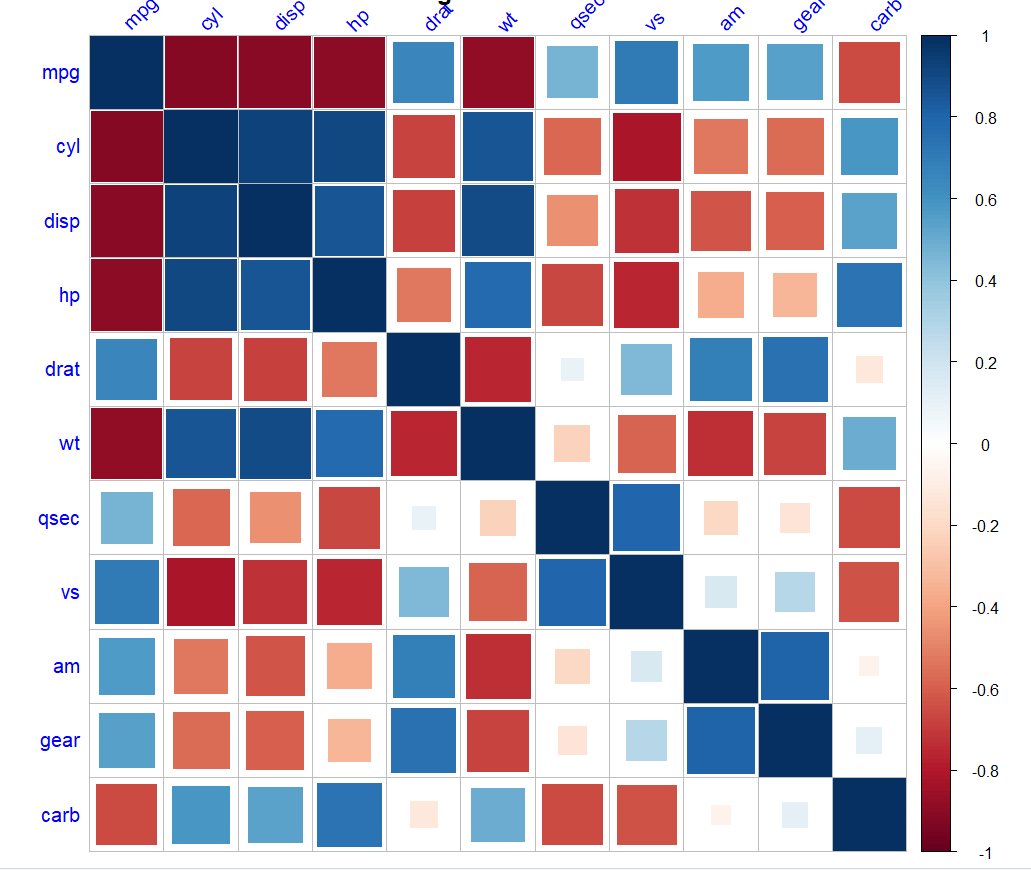
Correlogram using lares package in R
**Related Article: