Data Structures in R Programming (original) (raw)
Last Updated : 4 May, 2026
Data structures in R are used to store and organize data efficiently. While data types define the kind of value stored, data structures define how those values are arranged. Choosing the correct data structure is essential for performing analysis, transformations and computations effectively.
- Data structures organize data in different formats.
- Some structures store homogeneous data, others allow mixed data types.
- Understanding them is fundamental for data analysis in R.
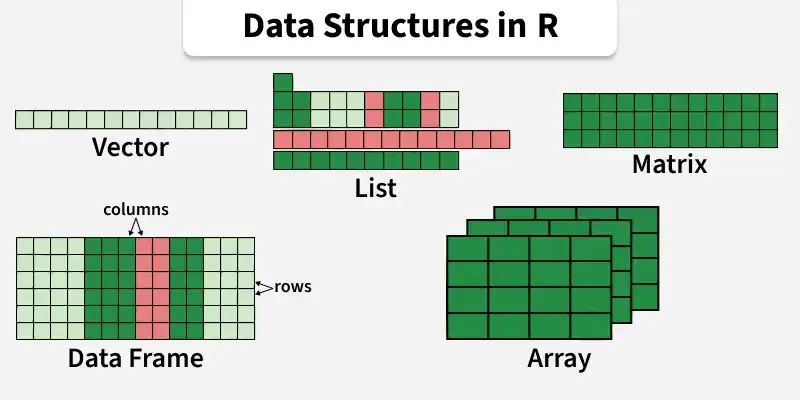
Data Structures in R
R data structures are generally classified based on:
- **Dimensionality: 1D, 2D or nD
- **Type Consistency: Homogeneous (same type) or Heterogeneous (different types)
Below are the most commonly used data structures in R.
1. Vectors
A vector is an ordered collection of basic data types of a given length. The only key thing here is all the elements of a vector must be of the identical data type e.g homogeneous data structures. Vectors are one-dimensional data structures.
R `
v <- c(1, 2, 3, 4, 5) v
`
2. Lists
A list is a generic object consisting of an ordered collection of objects. Lists are heterogeneous data structures. These are also one-dimensional data structures. A list can be a list of vectors, list of matrices, a list of characters and a list of functions and so on.
R `
my_list <- list( name = "R", age = 30, scores = c(90, 85, 88) )
my_list
`
Output
$name [1] "R"
$age [1] 30
$scores [1] 90 85 88
3. Matrix
A matrix is a rectangular arrangement of numbers in rows and columns. In a matrix, as we know rows are the ones that run horizontally and columns are the ones that run vertically. Matrices are two-dimensional, homogeneous data structures.
R `
m <- matrix(1:6, nrow = 2, ncol = 3) m
`
Output
[,1] [,2] [,3][1,] 1 3 5 [2,] 2 4 6
4. Array
Array is the R data objects which store the data in more than two dimensions. Arrays are n-dimensional data structures. For example, if we create an array of dimensions (2, 3, 3) then it creates 3 rectangular matrices each with 2 rows and 3 columns. They are homogeneous data structures.
Python `
A = array(
c(1, 2, 3, 4, 5, 6, 7, 8),
dim = c(2, 3, 3)
)
print(A)
`
**Output:
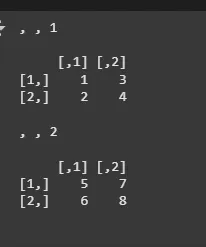
Arrays
5. Data Frames
Data frames are generic data objects of R which are used to store the tabular data. Data frames are the foremost popular data objects in R programming because we are comfortable in seeing the data within the tabular form. They are two-dimensional, heterogeneous data structures. These are lists of vectors of equal lengths.
Data frames have the following constraints placed upon them:
- A data-frame must have column names and row names are optional in a data frame, if not specified, R assigns default numeric row indices.
- Each column must have the identical number of items.
- Each item in a single column must be of the same data type.
- Different columns may have different data types.
To create a data frame we use the data.frame() function.
R `
df <- data.frame( name = c("A", "B", "C"), age = c(23, 25, 30), score = c(85, 90, 88) )
df
`
Output
name age score 1 A 23 85 2 B 25 90 3 C 30 88
6. Factors
Factors are the data objects which are used to categorize the data and store it as levels. They are useful for storing categorical data. Factors store categorical data as integer codes internally, with corresponding labels (levels).. They are useful to categorize unique values in columns like (“TRUE” or “FALSE”) or (“MALE” or “FEMALE”), etc.. They are useful in data analysis for statistical modeling.
R `
f <- factor(c("Male", "Female", "Male")) f
`
Output
[1] Male Female Male
Levels: Female Male
7. Tibbles
Tibbles are an enhanced version of data frames in R, part of the tidyverse. They offer improved printing, stricter column types, consistent subsetting behavior and allow variables to be referred to as objects. Tibbles provide a modern, user-friendly approach to tabular data in R.
install.packages("tibble")
R `
library(tibble)
my_data <- tibble( name = c("Sandeep", "Amit", "Aman"), age = c(25, 30, 35), city = c("Pune", "Jaipur", "Delhi") )
my_data
`
**Output:
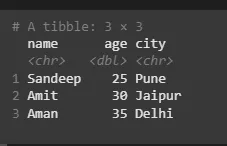
Tibble