How to Use is.na in R? (original) (raw)
Last Updated : 23 Jul, 2025
In this article we will discuss how to use is.na in R programming language.
is.na is used to check NA values present in the given data and return TRUE if the value is NA, otherwise FALSE
Syntax:
is.na(data)
where, data is a vector/dataframe
is.na() can be used with other methods to add more meaning to the requirement. To count the total NA values present in the data we have to use the sum() function
Syntax:
sum(is.na(data))
To get the positions where NA values are there, by using which() function
Syntax:
which(is.na(data))
Use of is.na in vector
A vector is a data structure that can store elements of multiple data types.
Example: R program to get and count NA values in a vector
R `
create a vector
data = c(1, 2, 3, NA, 45, 34, NA, NA, 23)
display
print(data)
get NA values
print(is.na(data))
count NA values
print(sum(is.na(data)))
get the NA index positions
print(which(is.na(data)))
`
Output:
[1] 1 2 3 NA 45 34 NA NA 23
[1] FALSE FALSE FALSE TRUE FALSE FALSE TRUE TRUE FALSE
[1] 3
[1] 4 7 8
Use of is.na in dataframe
A dataframe is a data structure that can stores elements of multiple data type in rows and columns
Example: R program to count NA and get NA values in a dataframe
R `
create a dataframe with 3 columns
data=data.frame(column1=c(1,2,NA,34), column2=c(NA,34,56,NA), column3=c(NA,NA,32,56))
display
print(data)
get NA values
print(is.na(data))
count NA values
print(sum(is.na(data)))
get the NA index positions
print(which(is.na(data)))
`
Output:
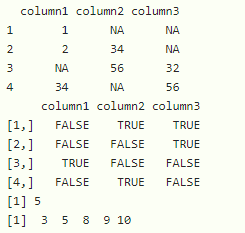
We can use sapply() function to get total NA values in the dataframe.
Syntax:
sapply(dataframe, function(variable) sum(is.na(variable)))
where
- dataframe is the input dataframe
- function is to get sum of NA in each column
Example: Use of is.na on a dataframe
R `
create a dataframe with 3 columns
data=data.frame(column1=c(1,2,NA,34), column2=c(NA,34,56,NA), column3=c(NA,NA,32,56))
display
print(data)
get count of NA in each column
print(sapply(data, function(x) sum(is.na(x))))
`
Output:
