Implement Machine Learning With Caret In R (original) (raw)
Last Updated : 23 Jul, 2025
Machine Learning (ML) is a method where computers learn patterns from data and make predictions or decisions without being explicitly programmed. It’s widely used in real-world applications like spam filtering, medical diagnosis, stock prediction and image recognition.
**Example: A hospital uses machine learning to predict if a patient has diabetes by analyzing their age, blood sugar levels, BMI and other medical information. This helps doctors make quicker and more accurate diagnoses.
What is Caret in R?
Caret stands for Classification And Regression Training. It is an R package that helps us build ML models. With Caret, we can:
- Clean and prepare data
- Split data into training and test sets
- Train different ML models
- Test model accuracy
Caret supports many algorithms like decision trees, SVM and LDA. We can use the same simple train() function for all.
Implementing Machine Learning with Caret in R
We will now implement a LDA model in R programming language using the caret library
1. Installing required packages
We install the necessary libraries used for data handling, visualization and modeling.
- **install.packages(): Installs external packages from CRAN so we can use their functions.
- **ggplot2: Used to create data visualizations like bar plots, histograms and boxplots.
- **ggpubr: Enhances ggplot2 by making it easier to create clean, publication-ready plots.
- **reshape: Helps reshape and organize data, especially useful for converting data into long format with melt().
- **caret: Main package for building machine learning models, including training, testing and evaluation.
- **kernlab: Provides backend support for models like SVM that are used by caret. R `
install.packages("ggplot2") install.packages("ggpubr") install.packages("reshape") install.packages("caret") install.packages("kernlab")
`
2. Loading installed libraries
We load all required libraries into our current R session.
- **library(): Activates packages like ggplot2, caret, etc., for use in the script. R `
library(ggplot2) library(ggpubr) library(reshape) library(caret) library(kernlab)
`
3. Importing and Viewing the Dataset
We import the built-in iris dataset and check the top rows to understand its structure.
- **data(): Loads the iris dataset into memory.
- **head(): Displays the first few rows of the dataset. R `
data("iris") head(iris)
`
**Output:
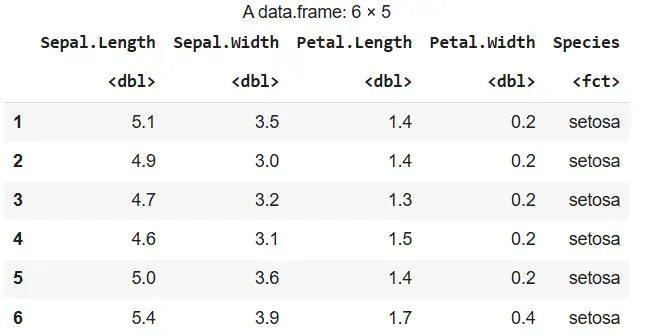
Output
4. Viewing the Last Few Rows
We view the bottom rows of the dataset to complete our inspection.
- **tail(): Displays the last few rows. R `
tail(iris)
`
**Output:
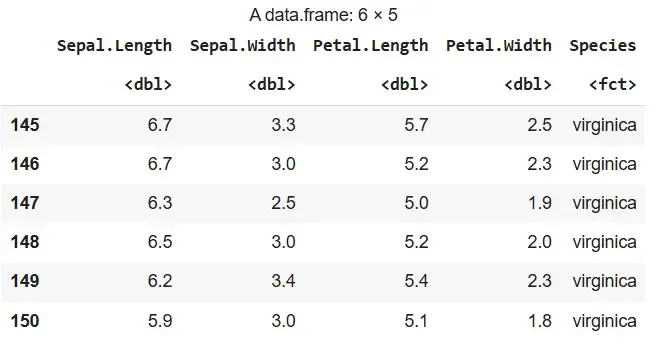
Output
5. Generating Summary Statistics
We summarize the dataset to understand distributions and detect anomalies.
- **summary(): Provides a statistical summary of each column. R `
summary(iris)
`
**Output:
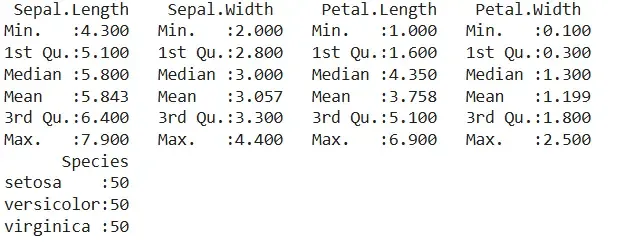
Output
6. Detecting Outliers with Boxplots
We identify potential outliers among numeric variables.
- **subset(): Selects only numeric columns.
- **melt(): Reshapes data for plotting.
- **ggplot() + geom_boxplot(): Creates boxplots for each variable. R `
df <- subset(iris, select = c(Sepal.Length, Sepal.Width, Petal.Length, Petal.Width)) ggplot(data = melt(df), aes(x = variable, y = value)) + geom_boxplot(aes(fill = variable))
`
**Output:
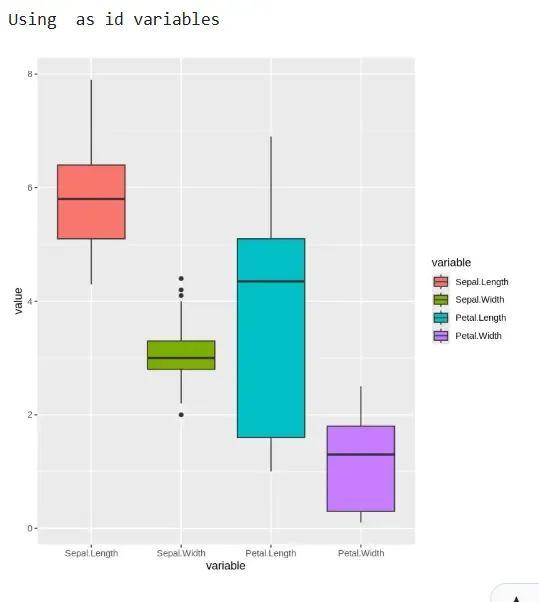
Output
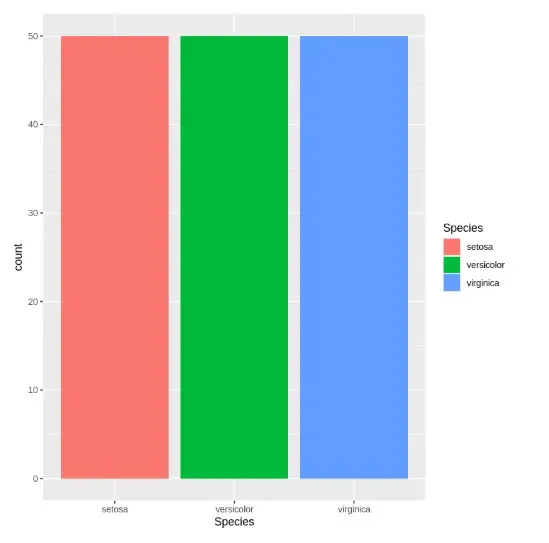
7. Plotting Categorical Variable Distribution
We visualize how different categories are distributed.
- **ggplot() + geom_bar(): Creates bar plots for the Species column. R `
ggplot(data = iris, aes(x = Species, fill = Species)) + geom_bar()
`
**Output:
Output
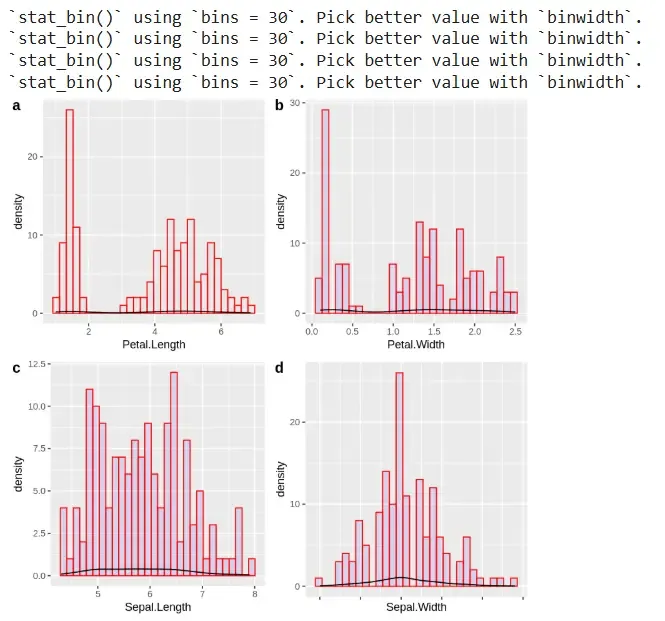
8. Visualizing Histograms of Numeric Variables
We visualize the distribution of numeric variables using histograms and density.
- **ggplot() + geom_histogram() + geom_density(): Plots histograms overlaid with density curves.
- **ggarrange(): Arranges multiple plots. R `
a <- ggplot(data = iris, aes(x = Petal.Length)) + geom_histogram(color = "red", fill = "blue", alpha = 0.01) + geom_density() b <- ggplot(data = iris, aes(x = Petal.Width)) + geom_histogram(color = "red", fill = "blue", alpha = 0.1) + geom_density() c <- ggplot(data = iris, aes(x = Sepal.Length)) + geom_histogram(color = "red", fill = "blue", alpha = 0.1) + geom_density() d <- ggplot(data = iris, aes(x = Sepal.Width)) + geom_histogram(color = "red", fill = "blue", alpha = 0.1) + geom_density() ggarrange(a, b, c, d + rremove("x.text"), labels = c("a", "b", "c", "d"), ncol = 2, nrow = 2)
`
**Output:
Output
9. Splitting the Dataset
We split the dataset into training and testing sets.
- **createDataPartition(): Creates training and testing partitions. R `
limits <- createDataPartition(iris$Species, p = 0.80, list = FALSE) testiris <- iris[-limits, ] trainiris <- iris[limits, ]
`
10. Identifying and Removing Outliers
We clean the training data by removing outliers based on IQR.
- **quantile(): Calculates 25th and 75th percentiles.
- **IQR(): Computes interquartile range.
- **subset(): Filters rows within bounds. R `
Q <- quantile(trainiris$Sepal.Width, probs = c(.25, .75), na.rm = FALSE) iqr <- IQR(trainiris$Sepal.Width) up <- Q[2] + 1.5 * iqr low <- Q[1] - 1.5 * iqr normal <- subset(trainiris, trainiris$Sepal.Width > low & trainiris$Sepal.Width < up)
`
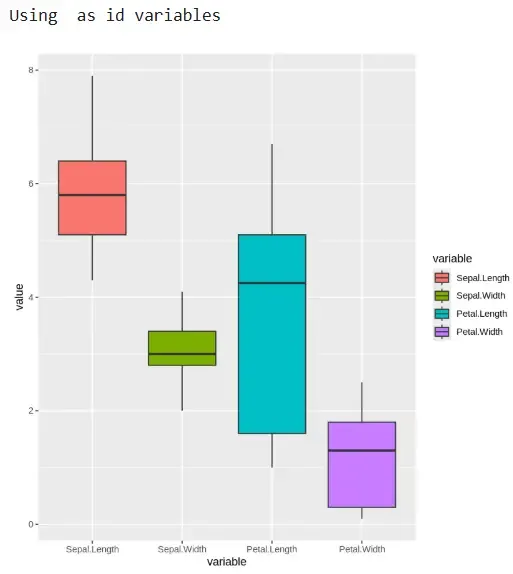
11. Rechecking Data After Outlier Removal
We visualize the cleaned data to confirm removal of outliers.
- **subset(): Selects numeric columns again.
- **melt(): Reshapes cleaned data.
- **ggplot() + geom_boxplot(): Plots boxplots post-cleaning. R `
boxes <- subset(normal, select = c(Sepal.Length, Sepal.Width, Petal.Length, Petal.Width)) ggplot(data = melt(boxes), aes(x = variable, y = value)) + geom_boxplot(aes(fill = variable))
`
**Output:
Output
12. Setting Up Cross-Validation Parameters
We configure model evaluation using 10-fold cross-validation.
- **trainControl(): Sets validation strategy.
- **metric: Defines accuracy as evaluation metric. R `
crossfold <- trainControl(method = "cv", number = 10, savePredictions = TRUE) metric <- "Accuracy"
`
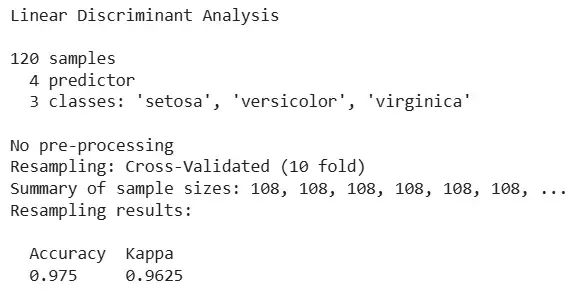
13. Training the LDA Model
We train the LDA model using the training set.
- **train(): Fits LDA using defined metric and cross-validation. R `
set.seed(42) fit.lda <- train(Species ~ ., data = trainiris, method = "lda", metric = metric, trControl = crossfold)
`
**Output:
Output
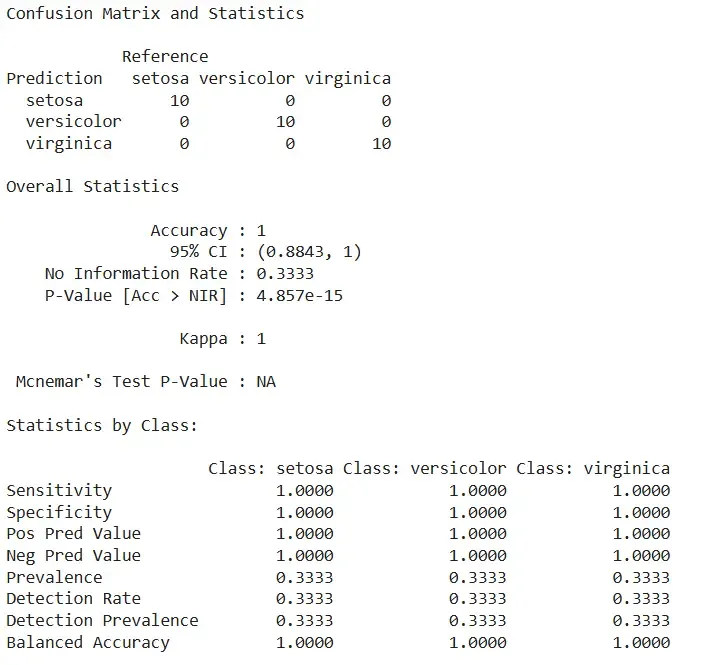
14. Making Predictions and Evaluating Accuracy
We evaluate the LDA model’s performance on test data.
- **predict(): Generates predictions on test data.
- **confusionMatrix(): Compares predicted vs actual values. R `
predictions <- predict(fit.lda, testiris) confusionMatrix(predictions, testiris$Species)
`
**Output:
Output
The model achieved perfect classification with 100% accuracy, correctly predicting all species in the test set without any errors.