CRUD Operations in ReactJS (original) (raw)
Last Updated : 26 Feb, 2026
CRUD (Create, Read, Update, Delete) operations are essential for managing application data. In ReactJS, these operations are handled using component state, forms, and local storage for persistence.
- Create new records using form inputs and store them in the component state
- Read and display stored data dynamically in the UI
- Update existing records through editable fields and state changes
- Delete records by removing them from the state and updating the UI
Here’s how you can perform Create, Read, Update, and Delete operations:
1. Create Operation: Adding Data
To add new data in React, you would typically use a form where users can input information. When the form is submitted, the new data is added to the component's state, and React will automatically re-render the UI.
JavaScript `
const handleSubmit = (e) => { e.preventDefault(); setPosts([...posts, newPost]); setNewPost(''); };
`
2. Read Operation: Displaying Data
React automatically re-renders the UI whenever the state changes. For example, using the .map() method, you can loop over an array and display the posts dynamically.
JavaScript `
-
{posts.map((post, index) => (
- {post} ))}
`
3. Update Operation: Editing Data
Updating data in React means modifying an item in the state and re-rendering the UI to reflect the changes. You can use a prompt or a form to allow users to edit an existing post.
JavaScript `
const handleEdit = (index) => { const updatedPosts = [...posts]; updatedPosts[index] = prompt('Edit your post', posts[index]); setPosts(updatedPosts); };
`
4. Delete Operation: Removing Data
The Delete operation removes an item from the state array. To achieve this, you can use the filter() method to create a new array without the item that needs to be deleted, and then update the state.
JavaScript `
const handleDelete = (index) => { const updatedPosts = posts.filter((_, i) => i !== index); setPosts(updatedPosts); };
`
Approach to Performing CRUD Operations in ReactJS
After understanding the basic CRUD operations in React, let’s break down how we can implement them in a React app. Here’s a simple approach to build the app:
- **Store Initial Data in array.js: Begin by creating an array.js file to store initial data that will be used throughout the app.
- **Create the Home Component: The Home component will display a list of data. It will include options for editing and deleting each item.
- **Create the Create Component: The Create component will contain a form to add new data to the list.
- **Create the Edit Component: The Edit component will allow users to update existing data using a form.
- **Manage Local State with useState: We will use the useState hook to manage local state in each component, enabling us to dynamically update the UI.
- **Persist Data Using localStorage: Use JavaScript’s localStorage API to store data persistently, allowing the data to remain even after the page is refreshed.
- **Set Up Routing with react-router-dom: Use react-router-dom to add routing, allowing easy navigation between the components (Home, Create, Edit).
- **Style with React-Bootstrap: Style the components using React-Bootstrap UI components and Bootstrap classes to make the app visually appealing.
Performing CRUD operations is fundamental for managing data in your applications. The ReactJS Course offers step-by-step instructions on how to create, read, update, and delete data using React, ensuring you have a solid grasp of essential functionality.
Implementation
CRUD operations (Create, Read, Update, Delete) are essential for managing data in ReactJS applications. In this implementation, we will use the useState hook for state management and localStorage for persistent data storage.
Step 1: Create a React App
To create a new React App, enter the following code into the terminal and hit enter.
npx create-react-app crud_app
Step 2: Navigate to the Project Folder
Move into the React project folder.
cd crud_app
Step 3: Install Required Dependencies
Install other dependencies using this command.
npm i react-bootstrap bootstrap@5.1.3 react-router-dom
Project Structure:
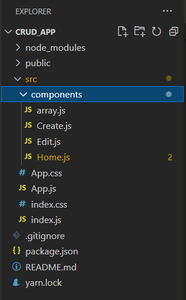
Updated dependencies in "package.json" file will look like:
"dependencies": { "@testing-library/jest-dom": "^5.17.0", "@testing-library/react": "^13.4.0", "@testing-library/user-event": "^13.5.0", "bootstrap": "^5.1.3", "react": "^18.2.0", "react-bootstrap": "^2.9.0", "react-dom": "^18.2.0", "react-router-dom": "^6.16.0", "react-scripts": "5.0.1", "web-vitals": "^2.1.4" }
**Example: This example show CRUD operations on a locally stored data file named array.js using React JS.
CSS `
/* App.css */ .App { text-align: center; } .geeks { color: green; }
JavaScript
// Filename - App.js
import React from "react"; import { BrowserRouter as Router, Route, Routes, } from "react-router-dom"; import "./App.css"; import Create from "./components/Create"; import Edit from "./components/Edit"; import Home from "./components/Home";
function App() { return (
GeeksforGeeks
CRUD App
<Route path="/" element={} /> <Route path="/create" element={} /> <Route path="/edit" element={} />export default App;
JavaScript
// Filename - components/array.js
// Javascript object named array // with 3 key-values const array = [ { id: "1", Name: "Shivansh", Age: "23", }, { id: "2", Name: "Simran", Age: "22", }, { id: "3", Name: "Aakash", Age: "23", }, ];
export default array;
JavaScript
// Filename - components/Create.js
import React, { useState } from "react"; import { Button, Form } from "react-bootstrap"; import "bootstrap/dist/css/bootstrap.min.css"; import array from "./array"; import { v4 as uuid } from "uuid"; import { Link, useNavigate } from "react-router-dom";
function Create() { // Making usestate for setting and // fetching a value in jsx const [name, setname] = useState(""); const [age, setage] = useState("");
// Using useNavigation for redirecting to pages
let history = useNavigate();

// Function for creating a post/entry
const handelSubmit = (e) => {
    e.preventDefault(); // Prevent reload

    const ids = uuid(); // Creating unique id
    let uni = ids.slice(0, 8); // Slicing unique id

    // Fetching a value from usestate and
    // pushing to javascript object
    let a = name,
        b = age;
    if (name == "" || age == "") {
        alert("invalid input");
        return;
    }
    array.push({ id: uni, Name: a, Age: b });

    // Redirecting to home page after creation done
    history("/");
};

return (
    <div>
        <Form
            className="d-grid gap-2"
            style={{ margin: "5rem" }}
        >
            {/* Fetching a value from input textfirld
                in a setname using usestate*/}
            <Form.Group
                className="mb-3"
                controlId="formBasicName"
            >
                <Form.Control
                    onChange={(e) =>
                        setname(e.target.value)
                    }
                    type="text"
                    placeholder="Enter Name"
                    required
                />
            </Form.Group>

            {/* Fetching a value from input textfirld in
                a setage using usestate*/}
            <Form.Group
                className="mb-3"
                controlId="formBasicAge"
            >
                <Form.Control
                    onChange={(e) =>
                        setage(e.target.value)
                    }
                    type="number"
                    placeholder="Age"
                    required
                />
            </Form.Group>

            {/* handing a onclick event in button for
                firing a function */}
            <Button
                onClick={(e) => handelSubmit(e)}
                variant="primary"
                type="submit"
            >
                Submit
            </Button>

            {/* Redirecting back to home page */}
            <Link className="d-grid gap-2" to="/">
                <Button variant="info" size="lg">
                    Home
                </Button>
            </Link>
        </Form>
    </div>
);
}
export default Create;
` JavaScript ``
// Filename - components/Home.js
import React from "react"; import { Button, Table } from "react-bootstrap"; import "bootstrap/dist/css/bootstrap.min.css"; import array from "./array"; import { Link, useNavigate } from "react-router-dom";
function Home() { let history = useNavigate();
// Function to set the ID, Name, and Age in local storage
function setID(id, name, age) {
    localStorage.setItem("id", id);
    localStorage.setItem("Name", name);
    localStorage.setItem("Age", age);
}

// Function to delete an entry
function deleted(id) {
    let index = array
        .map(function (e) {
            return e.id;
        })
        .indexOf(id);

    // Deleting the entry with the specified index
    array.splice(index, 1);

    // Redirecting to the same page to re-render
    history("/");
}

return (
    <div style={{ margin: "2rem" }}>
        <h1 className="text-center mb-4">User Management</h1>
        <Table striped bordered hover responsive className="shadow-sm">
            <thead className="thead-dark">
                <tr>
                    <th>Name</th>
                    <th>Age</th>
                    <th>Actions</th>
                </tr>
            </thead>
            <tbody>
                {array.map((item, index) => {
                    return (
                        <tr key={index}>
                            <td>{item.Name}</td>
                            <td>{item.Age}</td>
                            <td>
                                <Link to={`/edit`}>
                                    <Button
                                        onClick={() => setID(item.id, item.Name, item.Age)}
                                        variant="info"
                                        className="me-2"
                                    >
                                        Update
                                    </Button>
                                </Link>
                                <Button
                                    onClick={() => deleted(item.id)}
                                    variant="danger"
                                >
                                    Delete
                                </Button>
                            </td>
                        </tr>
                    );
                })}
            </tbody>
        </Table>
        <div className="d-grid gap-2 mt-4">
            <Link to="/create">
                <Button variant="success" size="lg">
                    Create New User
                </Button>
            </Link>
        </div>
    </div>
);
}
export default Home;
`` JavaScript `
// Filename - Edit.js import React, { useEffect, useState } from "react"; import { Button, Form } from "react-bootstrap"; import "bootstrap/dist/css/bootstrap.min.css"; import array from "./array"; import { Link } from "react-router-dom"; import { useNavigate } from "react-router-dom";
function Edit() { // Here usestate has been used in order // to set and get values from the jsx const [name, setname] = useState(""); const [age, setage] = useState(""); const [id, setid] = useState("");
// Used for navigation with logic in javascript
let history = useNavigate();

// Getting an index of an entry with an id
let index = array
    .map(function (e) {
        return e.id;
    })
    .indexOf(id);

// Function for handling the edit and
// pushing changes of editing/updating
const handelSubmit = (e) => {
    // Preventing from reload
    e.preventDefault();
    if (name == "" || age == "") {
        alert("invalid input");
        return;
    }

    // Getting an index of an array
    let a = array[index];

    // Putting the value from the input
    // textfield and replacing it from
    // existing for updation
    a.Name = name;
    a.Age = age;


    // Redirecting to main page
    history("/");
};

// Useeffect take care that page will
// be rendered only once
useEffect(() => {
    setname(localStorage.getItem("Name"));
    setage(localStorage.getItem("Age"));
    setid(localStorage.getItem("id"));
}, []);

return (
    <div>
        <Form
            className="d-grid gap-2"
            style={{ margin: "5rem" }}
        >
            {/* setting a name from the
                input textfiled */}
            <Form.Group
                className="mb-3"
                controlId="formBasicEmail"
            >
                <Form.Control
                    value={name}
                    onChange={(e) =>
                        setname(e.target.value)
                    }
                    type="text"
                    placeholder="Enter Name"
                />
            </Form.Group>

            {/* setting a age from the input textfiled */}
            <Form.Group
                className="mb-3"
                controlId="formBasicPassword"
            >
                <Form.Control
                    value={age}
                    onChange={(e) =>
                        setage(e.target.value)
                    }
                    type="number"
                    placeholder="Age"
                />
            </Form.Group>

            {/* Hadinling an onclick event
                running an edit logic */}
            <Button
                onClick={(e) => handelSubmit(e)}
                variant="primary"
                type="submit"
                size="lg"
            >
                Update
            </Button>

            {/* Redirecting to main page after editing */}
            <Link className="d-grid gap-2" to="/">
                <Button variant="warning" size="lg">
                    Home
                </Button>
            </Link>
        </Form>
    </div>
);
}
export default Edit;
`
**Output
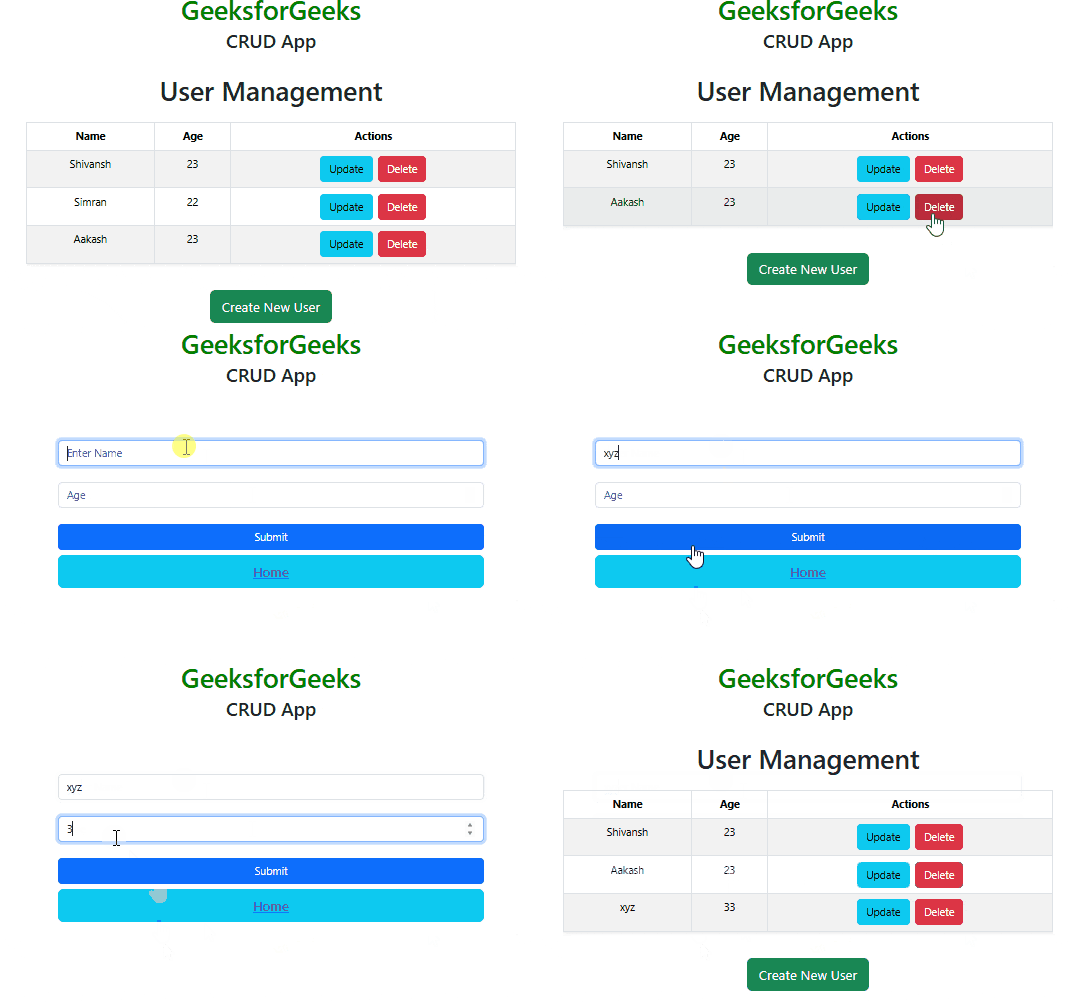
CRUD App
This CRUD operations in React JS are performed on Local Storage, for learning CRUD operation with ReactJS and NodeJS please refer to How to build a basic CRUD app with Node.js and ReactJS?