Regression Testing Software Engineering (original) (raw)
Last Updated : 28 May, 2026
Regression Testing is a type of software testing performed to ensure that recent code changes do not negatively affect existing functionality. It helps maintain system stability after updates, bug fixes, or enhancements.
- Re-executes previously passed test cases
- Ensures new changes do not break existing features
- Detects unintended side effects early
- Improves software reliability and stability
Architecture of Regression Testing
Regression Testing follows a structured flow to ensure that new changes do not break existing functionality.
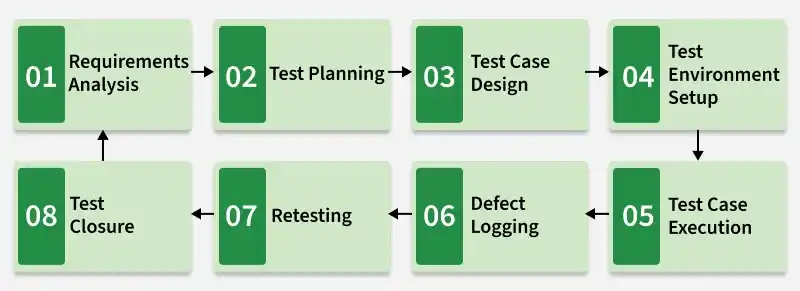
Architecture of Regression Testing
- **Requirement Change Layer : Identifies new updates, bug fixes, or enhancements in the application.
- **Impact Analysis Layer : Analyzes which modules or functionalities are affected by the changes.
- Test Suite Repository : Stores all existing test cases (manual + automated) used for regression testing.
- **Test Case Selection & Prioritization : Selects relevant test cases and prioritizes them based on risk and critical features.
- **Test Execution Layer : Executes selected test cases (manually or using automation tools).
- **Defect Management System : Logs, tracks, and manages defects found during testing.
- **Automation Framework (Optional) : Helps in faster execution of repetitive regression test cases.
- **Reporting & Feedback Layer : Generates reports and provides feedback on system stability after testing.
Workflow of Regression Testing
Regression testing follows a structured approach to ensure that recent changes do not negatively impact existing functionality and system stability.
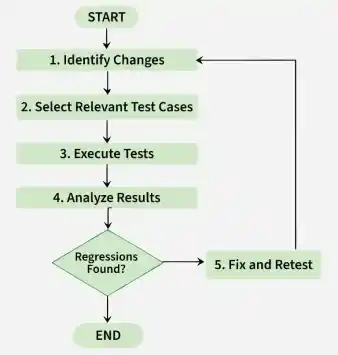
Workflow of Regression Testing
- **Identify Changes : Analyze recent code updates to determine modified components and assess their potential impact on the system.
- **Select Relevant Test Cases : Choose existing test cases that cover affected areas and add new ones if required to ensure complete coverage.
- **Execute Tests : Run the selected test cases either manually or using automation tools to validate functionality.
- **Analyze Results : Evaluate test outcomes to identify failures, regressions, or unexpected behavior.
- **Fix and Retest : Resolve identified defects and re-execute the tests to ensure issues are fixed and no new problems are introduced.
Techniques for Selecting Test Cases for Regression Testing
Selecting appropriate test cases is important to make regression testing efficient and time-effective. Instead of executing the entire test suite every time, teams apply different techniques based on project requirements.
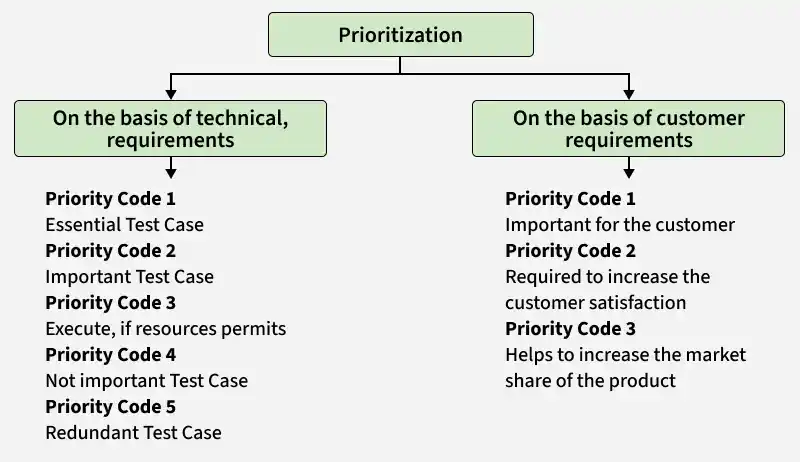
Selection of Test cases for Regression Testing
- **Retest All : All existing test cases are executed after changes are made. This provides maximum coverage but can be time-consuming for large applications.
- **Impact-Based Selection : Only test cases that cover the modified code and affected areas are executed. This approach is efficient and commonly used in real-world projects.
- **Priority-Based Selection : Test cases are selected based on business importance, risk level, and defect history. Critical functionalities are tested first.
- **Hybrid Approach : A combination of impact-based and priority-based techniques is used to balance coverage and execution time.
Regression Testing Example
**Scenario: E-Commerce Website Core Functionality
In an e-commerce application, when a new feature (e.g., discount coupon or payment update) is added, regression testing is performed to ensure existing features still work correctly.
**Tested Functionalities
- **Login Functionality: Verify users can log in with valid credentials
- **Add to Cart Functionality: Ensure products can be added to the cart without issues
- **Logout Functionality: Confirm users can securely log out of the system
**Basetest.java
Java `
package Test;
import org.openqa.selenium.WebDriver; import org.openqa.selenium.chrome.ChromeDriver; import org.testng.annotations.AfterMethod; import org.testng.annotations.BeforeMethod;
public class BaseTestMain {
protected WebDriver driver;
protected String Url = "https://ecommerce.artoftesting.com/";

// Set up the ChromeDriver
@BeforeMethod
public void setup() {
    // Set the path to your chromedriver executable
    System.setProperty("webdriver.chrome.driver", "C:\\Users\\path of the chromedriver\\drivers\\chromedriver.exe");


    // Initialize the ChromeDriver
    driver = new ChromeDriver();
}

// Close the browser after each test
@AfterMethod
public void teardown() {
    if (driver != null) {
        driver.quit();
    }
}
}
`
**1. Test Login Functionality:
Verify that the user can still log in successfully after updates.
- **Steps 1 : Open the login page.
- **Steps 2 : Input valid username and password.
- **Steps 3 : Submit the login form.
- **Steps 4 : Verify the user is redirected to the correct URL (i.e., logged in successfully).
- **Steps 5 : Verify that the user session has been created (this can be done optionally by checking cookies, or session IDs).
**LoginPageTest.java
Java `
package ArtOfTesting;
import org.openqa.selenium.By; import org.openqa.selenium.WebDriver; import org.testng.Assert; import org.testng.annotations.Test; import Test.BaseTestMain;
public class LoginPageTest extends BaseTestMain {
@Test
public void TestLogin() {
    // Step 1: Navigate to the login page
    driver.get(Url);

    // Step 2: Enter valid username and password
    driver.findElement(By.name("uname")).clear();
    driver.findElement(By.name("uname")).sendKeys("auth_user");

    driver.findElement(By.name("pass")).clear();
    driver.findElement(By.name("pass")).sendKeys("auth_password");

    // Step 3: Click on the Login button
    driver.findElement(By.className("Login_btn__pALc8")).click();

    // Step 4: Verify successful login by checking the URL
    Assert.assertEquals(driver.getCurrentUrl(), "https://ecommerce.artoftesting.com/");

    System.out.println("Login Successful");
}
}
`
**2. Test Add to Cart Functionality:
Ensure that users can successfully add products to the cart and the cart updates accordingly.
- **Steps 1 : Log in (reuse the login test).
- **Steps 2 : Select a product to add to the cart.
- **Steps 3 : Click the "Add to Cart" button.
- **Steps 4 : Verify that the cart is updated with the added item.
- **Steps 5 : Optionally, check if the correct number of items is displayed in the cart.
**AddToCartTest.java
Java `
package ArtOfTesting;
import org.openqa.selenium.By; import org.openqa.selenium.WebElement; import org.openqa.selenium.interactions.Actions; import org.testng.Assert; import org.testng.annotations.Test; import Test.BaseTestMain;
public class AddToCartTest extends BaseTestMain {
@Test
public void TestAddToCart() {
    // Step 1: Log in (reuse the login test)
    driver.get(Url);
    driver.findElement(By.className("Login_btn__pALc8")).click(); // Log in

    // Step 2: Navigate to the product
    driver.findElement(By.xpath("/html/body/div/div/div[3]/div/div/select")).click();
    WebElement filterOption = driver.findElement(By.className("Header_select__8rhX+"));
    Actions action = new Actions(driver);
    action.sendKeys(filterOption, "Down").perform();
    action.sendKeys("ENTER").perform();

    // Step 3: Select a product and add to cart
    WebElement bookAddition = driver.findElement(By.cssSelector("#root > div > div.Products_body__ifIXG > div > div:nth-child(1) > div.Products_quantity__54gJ2 > svg:nth-child(3) > path"));
    action.doubleClick(bookAddition).perform();
    driver.findElement(By.cssSelector("#root > div > div.Products_body__ifIXG > div > div:nth-child(1) > div.Products_priceSection__j7qrQ > button")).click();

    // Step 4: Check if the cart is updated (URL check)
    driver.findElement(By.className("Header_cart__Jnfkn")).click();
    String cartURL = "https://ecommerce.artoftesting.com/cart";
    String currentURL = driver.getCurrentUrl();
    Assert.assertEquals(currentURL, cartURL);

    System.out.println("Item successfully added to the cart.");
}
}
`
**3. Test Logout Functionality:
Ensure that users can log out successfully and are redirected to the login page.
- **Steps 1 : Log in (reuse the login test).
- **Steps 2 : Click the logout button.
- **Steps 3 : Verify that the user is logged out and redirected to the login page.
**LogoutTest.java
Java `
package ArtOfTesting;
import org.openqa.selenium.By; import org.openqa.selenium.WebElement; import org.openqa.selenium.interactions.Actions; import org.testng.Assert; import org.testng.annotations.Test; import Test.BaseTestMain;
public class LogoutTest extends BaseTestMain {
@Test
public void TestLogout() {
    // Step 1: Log in (reuse the login test)
    driver.get(Url);
    driver.findElement(By.name("uname")).clear();
    driver.findElement(By.name("uname")).sendKeys("auth_user");

    driver.findElement(By.name("pass")).clear();
    driver.findElement(By.name("pass")).sendKeys("auth_password");

    driver.findElement(By.className("Login_btn__pALc8")).click();

    // Step 2: Log out by clicking the logout button
    WebElement logoutButton = driver.findElement(By.xpath("/html/body/div/div/div[1]/div/div[2]/button/div/span"));
    Actions actions = new Actions(driver);
    actions.doubleClick(logoutButton).perform();

    // Step 3: Verify user is logged out and redirected to login page
    Assert.assertEquals(driver.getCurrentUrl(), "https://ecommerce.artoftesting.com/login");

    System.out.println("Logout Successful");
}
}
`
**Running the Regression Tests:
Once the individual tests for login, add to cart, and logout are written, you can combine them into a regression test suite.
**RegressionTestSuite.java
XML `
package TestSuite;
import ArtOfTesting.LoginPageTest; import ArtOfTesting.AddToCartTest; import ArtOfTesting.LogoutTest; import org.testng.annotations.Test; import org.testng.TestNG;
public class RegressionTestSuite {
@Test
public void runRegressionTests() {
    TestNG testng = new TestNG();
    testng.setTestClasses(new Class[] { LoginPageTest.class, AddToCartTest.class, LogoutTest.class });
    testng.run();
}
}
`
Regression testing aims to ensure that the core features continue to work after any new changes or updates in the system. Here’s how this applies to your code:
- **Login Functionality: Ensures that the login feature works as expected after any backend or UI changes.
- **Add to Cart: Verifies that the user can still add items to the cart and that the cart behaves correctly.
- **Logout: Confirms that users can still log out successfully and are redirected properly.
**Output:
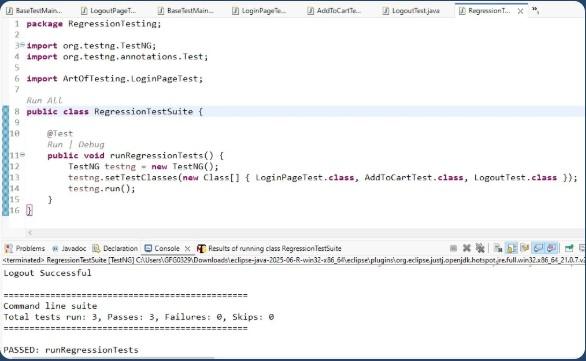
Output of Regression Test Case
Regression testing is highly suitable for automation because it reuses existing test cases with predefined expected results. Automating regression tests saves time, improves accuracy, and supports continuous integration and frequent releases.
- **Selenium: Open-source tool widely used for automating web applications across multiple browsers and programming languages.
- **Ranorex Studio: Supports web, desktop, and mobile application testing with both codeless and scripted options.
- **testRigor : AI-powered tool that allows test creation using natural language with minimal coding.
- **Sahi Pro: User-friendly tool for cross-browser testing and CI integration.
- **Testlio: Cloud-based platform offering on-demand testing services.
Purpose of Regression Testing
Regression testing should be performed whenever changes are made to the software that could impact existing functionality. Even small updates can unintentionally affect other parts of the system.
- **New Feature Implementation: When new functionality is added and integrated with existing modules.
- **Bug Fixes: After defects are resolved to ensure the fix does not create new issues.
- **Code Refactoring or Optimization: When internal code structure is improved without changing functionality.
- **System or Environment Changes: When updates are made to configuration, database, servers, or third-party integrations.