API Response Structure in Postman (original) (raw)
Last Updated : 23 Jul, 2025
Postman, a widely-used API testing tool, is essential for developers to interact with APIs efficiently. Understanding the API response structure in Postman is key to successful testing and debugging. From status codes to response body options, Postman provides a user-friendly interface for analyzing and interpreting API responses.
API Response Structure in Postman
Let's talk about the way the API response is visualized in Postman. Firstly, we have status codes, time section, and size are present.

Response structure example
1. Status Code
In the above response structure example, you can see on the right that "200 OK" means the status code.
- The status information is available to us, in our case it is "200".
- Postman also gives us detailed information about what "200" means in general, so this will be helpful in case you encounter a status code that you are not aware of. Along with that we also get a string description of the status code. Here "200" means "ok".
2. Time
The "524ms" represents time section.
- This is time taken by the server to respond to the request sent by the postman. If we click on that, we can see detailed breakdown of the time taken for different events right from the socket initialization to the downloading of the response and the total time taken this analysis can be helpful in primary performance testing of any API.
3. Size
The next time, size is present ("1.89 KB" in the image).
- It shows the size of request and response and the breakdown of size of each component of request and response. This can be helpful in preliminary analysis of the request and response.
4. Body
- The body section is nothing where our actual response is displayed.
- We can see different options available to view the body.
- That are Pretty, Raw, Preview, and Visualize.
You can see in the below image we have Pretty, Raw, and Preview sections.

Body section
Pretty:
- It displays information in a visually appealing way. Different colors for keys (e.g., ID) and values enhance readability.
- It is primarily used for JSON data, where the response is formatted with colored syntax.
- It allows collapsing of individual items or the entire response for easier interaction.
- It allows collapsing of individual items or the entire response for easier interaction.
- It provides a user-friendly view, making it easy to understand the structure of the data.
As you can see in the below pic, the key colors(id, category, ..) are different and the values colors(coffee, true, ..) are different.

Overview of preview section
Raw:
- It displays data in its raw format, without any formatting or color.
- It shows raw JSON, making it challenging to read due to lack of visual structure.
- It is necessary for understanding the true, unformatted representation of the data.
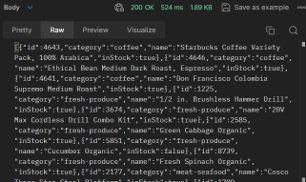
Overview of raw section
Preview:
- Postman attempts to preview data in a user-friendly manner, such as images or other formats it can handle.
- It is primarily beneficial for data types other than JSON (e.g., HTML).
- It attempts to display non-JSON data with different colors for enhanced readability.
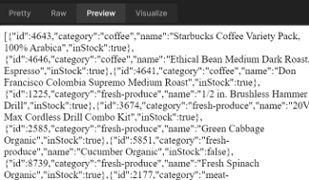
Overview of preview section
Visualize:
Visualize section is helpful when we have add some test scripts and also add some graphics to visualize our test. Since, we do not have any test scripts right now for this request, this section is empty.

Visualize section
5. Cookies
Cookies are the small files that are sent from the web server to clients (example: Browser). They store necessary information.
**Example: One of the cookies use case shopping website, when we add items to the cart, if you close the browser logged in or logged out. It is the cookie files that stores that particular information( i.e. the items are still added to the cart). This is all possible because cookie files that are being sent from server to client are save in your computer and once you access this browser again on that particular website you can able to fetch the items you have added previously.
- Postman allows you to manage the cookies for the domain. You can: Add, edit and delete the cookie.
- In header, set cookie has been returned in response from the server to basically set this particular cookie.
So, cookie headeris basically used to send cookie from the client and Set-Cookie is the key, that is used to set the cookie that are returned by the server and then this cookie gets saved in the cookies section of the postman.
If we have any cookies those will be visible here.
.png)
Cookies Section example
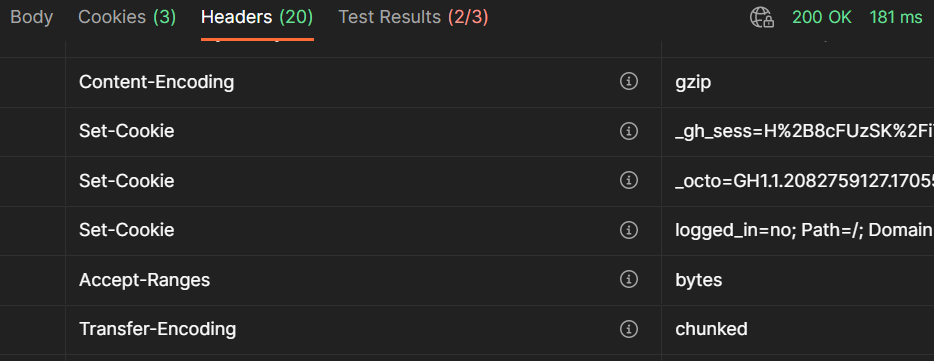
Header section when cookies are present
6. Response Headers
The example response header is mentioned below:
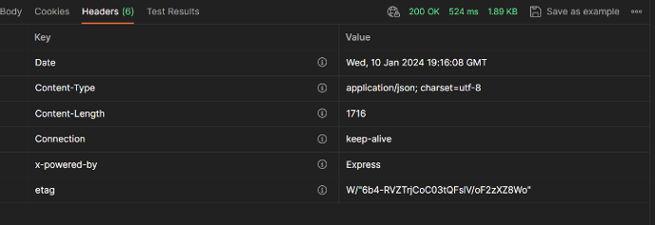
Response header example
- The response headers are displayed in tabular format.
- The "i" symbol in circle that is next to header provides extra information about that header to understand what that particular header means.
- In the above headers example, you can see content-type, which here indicates resource media type and its value is application JSON.
7. Test Results
It is an important feature of postman that allows us to write test scripts that will run on the response that we received from the server. Tests in Postman are Javascript code that is executed after receiving response.
Example of writing a basic test:
- Starts with **pm.test
- First parameter: name of the test
- Second parameter: A function that contains assertions like **pm response status
.png)
Test Results Section example
In the above example, the executed example tests are shown.
Conclusion
The Postman API response structure provides a comprehensive view of the interaction between a client and a server. From status codes and response times to various ways of visualizing the response body, it offers essential tools for developers and testers. This structured approach simplifies the debugging process and enhances the overall efficiency of API testing and development workflows.