Usability Testing Software Engineering (original) (raw)
Last Updated : 15 Jun, 2026
Usability testing is a software testing technique used to evaluate how easily end users can use a software application. It focuses on observing real users while they perform tasks to identify usability issues and improve user experience. It ensures that the system is simple, efficient, and user-friendly.
- It checks how easily users can interact with a software system.
- It is performed by real users to find usability problems.
- It helps improve the overall user experience and satisfaction.
Types of Usability Testing
There are some common types of usability testing explained:
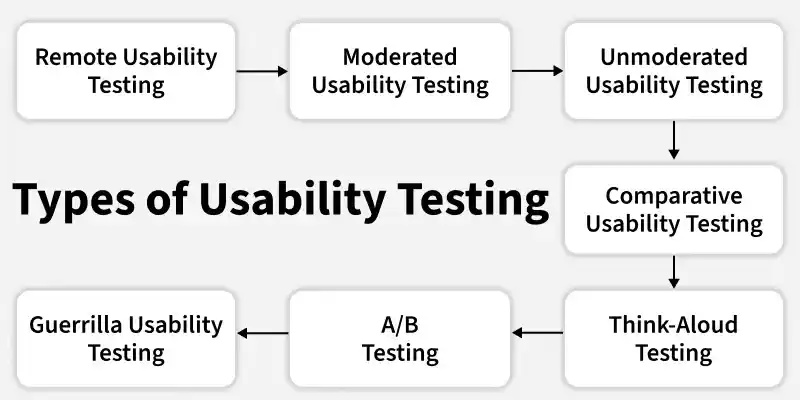
- **Remote Usability Testing: Participants use a product or website from their own location while researchers collect feedback remotely using online tools, recordings, or analytics.
- **Moderated Usability Testing: A researcher directly guides participants through tasks and observes their behavior in real time, either in-person or through online sessions.
- **Unmoderated Usability Testing: Participants complete assigned tasks independently without any moderator, while their interactions are recorded using testing tools or screen recordings.
- **Comparative Usability Testing: Two or more versions of a product or interface are tested to compare usability and determine which design performs better based on user interaction.
- **Think-Aloud Testing: Participants speak out their thoughts while performing tasks, helping researchers understand their thinking process and decision-making.
- **A/B Testing: Users are shown different versions of a design, and their behavior is analyzed to compare performance using metrics such as clicks, engagement, or conversions.
- **Guerrilla Usability Testing: A quick and informal method where testers approach random users in public places and ask them to perform short tasks. It is used to get fast, low-cost feedback on basic usability issues.
Workflow of Usability Testing
The workflow of usability testing describes the step-by-step process followed to evaluate how easily users can use a product or system.
- **Plan the Test: Define what to test, choose the testing method (moderated, remote, etc.), set timeline, assign roles, and define success criteria clearly.
- **Recruit Participants: Select users who match the target audience; generally 5–8 participants are enough to identify most usability issues.
- **Design Tasks & Scenarios: Create realistic, goal-based tasks based on user activities without giving hints or leading instructions.
- **Set Up the Environment: Prepare devices, prototypes, tools, and recording systems, and conduct a pilot test to ensure everything works properly.
- **Conduct the Test: Participants perform tasks while the moderator observes, records behavior, and collects feedback during the session.
- **Analyze Findings: Review collected data to identify usability problems, patterns, and task difficulties, and prioritize issues by severity.
- **Report Results: Summarize findings in a report with key issues, evidence, and clear recommendations for improvement.
- **Iterate & Improve: Fix identified usability issues and improve the design; retest if necessary to validate changes.
Techniques of Usability Testing
Several usability testing techniques are used to improve software efficiency. The most commonly used methods are described below.
- **Think-Aloud Technique: Users perform tasks while speaking their thoughts aloud, helping understand their decision-making and problems faced.
- **Moderated Usability Testing: A moderator guides the user through tasks, observes behavior, and asks follow-up questions in real time.
- **Unmoderated Usability Testing: Users complete tasks independently without a moderator, while their actions are recorded for later analysis.
- **Remote Usability Testing: Users test the product from their own location, and researchers collect data using online tools and recordings.
- **A/B Testing: Two versions of a design are shown to different users to compare performance based on metrics like clicks and conversions.
- **Eye Tracking Technique: Tracks where users look on the screen to understand attention patterns and interface effectiveness.
- **Heuristic Evaluation: Experts review the interface based on usability principles to identify usability problems.
- **Hotjar: A behavior analytics tool that provides heatmaps, session recordings, and user feedback to understand how users interact with a website.
- **Crazy Egg: A tool that offers heatmaps, scroll maps, and A/B testing features to analyze user behavior and improve website usability.
- **Lookback: A user research platform that allows live and recorded usability testing sessions with real-time user interaction tracking.
- **UserTesting: A popular platform where real users test websites or apps and provide video feedback and usability insights.
- **Optimal Workshop: A suite of tools used for card sorting, tree testing, and usability analysis to improve information architecture.
- **Google Analytics: A web analytics tool that tracks user behavior, traffic sources, and engagement metrics to support usability evaluation.
Importance of Usability Testing
- **Ensures better user experience: Helps make the product easy to use, intuitive, and user-friendly for end users.
- **Identifies usability problems early: Detects issues like confusing navigation, unclear design, or errors before product release.
- **Aligns with user needs: Ensures the system matches real user expectations, goals, and usage behavior.
- **Improves product quality: Enhances overall design, efficiency, and effectiveness of the application.
- **Supports data-driven decisions: Provides real user feedback and insights to improve design and functionality.
- **Reduces development risk: Minimizes chances of product failure by fixing usability issues early in development.
- **Increases user satisfaction and retention: A smooth and easy-to-use system leads to higher engagement and long-term users.
- **Gives competitive advantage: A well-tested product offers better usability compared to competitors in the market.
Advantages of Usability Testing
- **User-centric design: Involves real users to ensure the product meets their needs and expectations.
- **Identifies user pain points: Reveals areas where users face difficulties, confusion, or errors while using the system.
- **Improves user interface: Helps optimize layout, navigation, and interaction design for better usability.
- **Enhances user satisfaction: Leads to higher engagement, trust, and better user retention.
- **Reduces development costs: Detects usability issues early, minimizing costly rework and redesign efforts.
- **Improves product efficiency: Helps users complete tasks faster and more effectively.
- **Increases product success: A user-friendly product is more likely to succeed in the market.
Limitations of Usability Testing
- **High Cost: Usability testing can be expensive because it requires real users, testing tools, lab setup, and expert facilitators.
- **Time Consuming: Planning, recruiting participants, conducting tests, and analyzing results takes a significant amount of time.
- **Small Sample Size: Usability tests usually involve a limited number of users, which may not represent the entire user population.
- **Requires Skilled Moderators: Effective testing depends on experienced testers who can properly guide sessions and interpret results.
- **User Bias: Participants may change their natural behavior when they know they are being observed.
- **Limited Scope: It focuses mainly on user experience issues and may not detect all technical or functional problems in the system.
Factors Affecting Cost of Usability Testing
- **Number of Participants: More participants increase recruitment, compensation, and testing costs.
- **Type of Testing Method: Moderated, remote, or lab-based testing affects cost depending on resources and setup required.
- **Testing Location: Lab testing is more expensive, while remote testing reduces infrastructure and travel costs.
- **Test Complexity: Complex tasks and advanced scenarios require more time, tools, and effort, increasing cost.
- **Duration of Testing: Longer test sessions and multiple rounds of testing increase overall cost.
- **Tools and Technology Used: Specialized tools for recording, eye tracking, or analytics add to expenses.
- **Analyst Effort: Time spent in analyzing data, reporting findings, and preparing recommendations affects cost.
- **Iterations Required: Multiple cycles of testing and redesign increase total project cost.