SQL Joins (Inner, Left, Right and Full Join) (original) (raw)
Last Updated : 12 Jun, 2026
SQL Joins are used to combine data from two or more tables based on a related column. They help in:
- Retrieving connected data stored across multiple tables.
- Matching records using common columns.
- Improving data analysis by combining related information.
- Creating meaningful result sets from separate tables.
Types of SQL Joins
SQL joins are categorized into different types based on how rows from two tables are matched and combined.
1. INNER JOIN
INNER JOIN is used to retrieve rows where matching values exist in both tables. It helps in:
- Combining records based on a related column.
- Returning only matching rows from both tables.
- Excluding non-matching data from the result set.
- Ensuring accurate data relationships between tables.
**Syntax:
SELECT table1.column1,table1.column2,table2.column1,.... FROM table1 INNER JOIN table2 ON table1.matching_column = table2.matching_column;
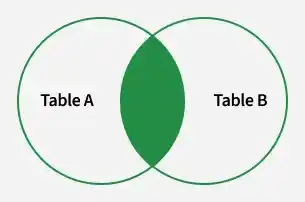
Inner join
**Note: We can also write JOIN instead of INNER JOIN. JOIN is same as INNER JOIN.
**Example of INNER JOIN:
Consider the two tables, Student and StudentCourse, which share a common column ROLL_NO. Using SQL JOINS, we can combine data from these tables based on their relationship, allowing us to retrieve meaningful information like student details along with their enrolled courses.
**Student Table:

**StudentCourse Table:

The following example demonstrates the working of the INNER JOIN clause. This query displays the names and ages of students enrolled in different courses.
**Query:
SELECT StudentCourse.COURSE_ID, Student.NAME, Student.AGE FROM Student INNER JOIN StudentCourse ON Student.ROLL_NO = StudentCourse.ROLL_NO;
**Output:

2. LEFT JOIN
LEFT JOIN is used to retrieve all rows from the left table and matching rows from the right table. It helps in:
- Returning all records from the left table.
- Showing matching data from the right table.
- Displaying NULL values where no match exists in the right table.
- Performing outer joins, also known as LEFT OUTER JOIN.
**Syntax:
SELECT table1.column1,table1.column2,table2.column1,.... FROM table1 LEFT JOIN table2 ON table1.matching_column = table2.matching_column;
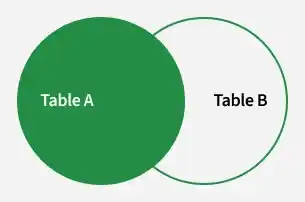
Left Join
**Note: We can also use LEFT OUTER JOIN instead of LEFT JOIN, both are the same.
**Example: In this example, the LEFT JOIN retrieves all rows from the Student table and the matching rows from the StudentCourse table based on the ROLL_NO column.
**Query:
SELECT Student.NAME,StudentCourse.COURSE_ID FROM Student LEFT JOIN StudentCourse ON StudentCourse.ROLL_NO = Student.ROLL_NO;
**Output:

3. RIGHT JOIN
RIGHT JOIN is used to retrieve all rows from the right table and the matching rows from the left table. It helps in:
- Returning all records from the right-side table.
- Showing matching data from the left-side table.
- Displaying NULL values where no match exists in the left table.
- Performing outer joins, also known as RIGHT OUTER JOIN.
**Syntax:
SELECT table1.column1,table1.column2,table2.column1,.... FROM table1 RIGHT JOIN table2 ON table1.matching_column = table2.matching_column;
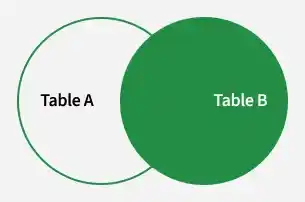
Right Join
**Note: We can also use RIGHT OUTER JOIN instead of RIGHT JOIN, both are the same
**Example: In this example, the RIGHT JOIN retrieves all rows from the StudentCourse table and the matching rows from the Student table based on the ROLL_NO column.
**Query:
SELECT Student.NAME,StudentCourse.COURSE_ID FROM Student RIGHT JOIN StudentCourse ON StudentCourse.ROLL_NO = Student.ROLL_NO;
**Output:

4. FULL JOIN
FULL JOIN is used to combine the results of both LEFT JOIN and RIGHT JOIN. It helps in:
- Returning all rows from both tables.
- Showing matching records from each table.
- Displaying NULL values where no match exists in either table.
- Providing complete data from both sides of the join.
**Syntax:
SELECT table1.column1,table1.column2,table2.column1,.... FROM table1 FULL JOIN table2 ON table1.matching_column = table2.matching_column;
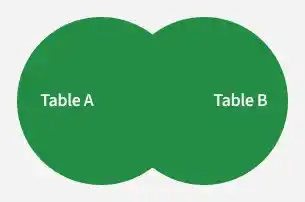
Full Join
**Example: This example uses a FULL JOIN to return all rows from both tables. Matching records appear together, while non-matching records still show up with NULL values for the missing fields.
**Query:
SELECT Student.NAME,StudentCourse.COURSE_ID FROM Student FULL JOIN StudentCourse ON StudentCourse.ROLL_NO = Student.ROLL_NO;
**Output :

**Note: MySQL does not supportFULL OUTER JOIN directly.It cab be simulated using UNION of LEFT JOIN and RIGHT JOIN.
5. Natural Join
A Natural Join is a type of INNER JOIN that automatically joins two tables based on columns with the same name and data type. It returns only the rows where the values in the common columns match.
- It joins tables using common columns with the same name.
- It returns only rows where values in those columns match.
- The common column appears only once in the result.
**Example:
**Employee Table

**Department Table

**Example: Find all Employees and their respective departments.
SELECT Emp_name, Dept_name FROM Employee NATURAL JOIN Department;
**Output:
