SQL Logical Operators (original) (raw)
Last Updated : 16 Jun, 2026
SQL Logical Operators are used to test conditions in queries, returning results as TRUE, FALSE or UNKNOWN. They help in combining, negating and comparing conditions, enabling precise data retrieval and filtering.
- Control query execution flow.
- Support complex filtering and comparison.
- Return boolean results for decision-making.
**Example: First, we will create a demo SQL database and table, on which we will use the Logical Operators command.
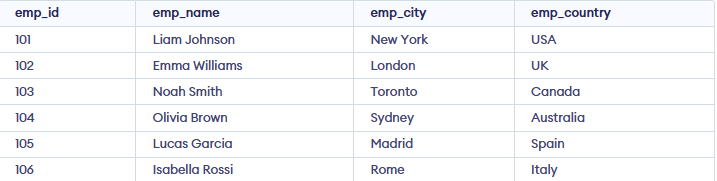
Below is the comprehensive list of SQL Logical Operators along with their meanings, detailed explanations and practical examples:
AND Operator
The AND operator combines multiple conditions in an SQL query and returns only the records that satisfy all the specified conditions.
**Example: Retrieve the records of employees from the employees table who are located in 'London' and belong to 'UK', ensuring that both conditions are met.
**Query:
SELECT *
FROM employee
WHERE emp_city = 'London' AND emp_country = 'UK';
**Output:

IN Operator
The IN operator checks whether a value matches any value in a specified list, providing a concise alternative to multiple OR conditions.
**Example: Retrieve the records of employees from the employee table who are located in either 'London' or 'Rome'
**Query:
SELECT *
FROM employee
WHERE emp_city IN ('London', 'Rome');
**Output:

NOT Operator
The NOT operator is used to reverse the result of a condition, returning TRUE when the condition is FALSE. It is typically used to exclude records that match a specific condition, making it useful for filtering out unwanted data.
**Example: Retrieve the records of employees from the employee table whose city names do not start with the letter 'S'.
**Query:
SELECT *
FROM employee
WHERE emp_city NOT LIKE 'S%';
**Output:

OR Operator
The OR operator combines multiple conditions in a SQL query and returns TRUE if at least one of the conditions is satisfied. It is ideal for situations where you want to retrieve records that meet any of several possible conditions.
**Example: Retrieve the records of employees from the employee table who are either from 'USA' or have 'UK' as their country.
**Query
SELECT *
FROM employee
WHERE emp_country = 'UK' OR emp_country = 'USA';
**Output

LIKE Operator
The LIKE operator in SQL is used in the WHERE clause to search for a specified pattern in a column, using % to match any number of characters and _ to match a single character.
**Example: Retrieve the records of employees from the employee table whose city names start with the letter 'M'.
**Query:
SELECT *
FROM employee
WHERE emp_city LIKE 'M%';
**Output:

BETWEEN Operator
The BETWEEN operator in SQL checks whether a value lies within a specified range, including both the lower and upper limits.
**Example: Retrieve the records of employees from the employee table whose emp_id values fall within the range of 102 to 105 (inclusive).
**Query:
SELECT *
FROM employee
WHERE emp_id BETWEEN 102 AND 105;
**Output:

ALL Operator
The ALL operator in SQL compares a value with all values returned by a subquery and returns TRUE only if the condition is satisfied for every value.
**Example: Retrieve the records of employees whose emp_id is equal to all emp_id values in the employees table where the emp_city is 'London'.
**Query:
SELECT *
FROM employee
WHERE emp_id > ALL (
SELECT emp_id
FROM employee
WHERE emp_city = 'London'
);
**Output:

ANY Operator
The ANY operator compares a value with the results of a subquery and returns TRUE if the condition is satisfied by at least one value.
**Example: Retrieve the records of employees whose emp_id matches any of the emp_id values in the employees table where the emp_city is 'Rome'.
**Query:
SELECT *
FROM employee
WHERE emp_id = ANY (
SELECT emp_id
FROM employee
WHERE emp_city = 'Rome'
);
**Output:

EXISTS Operator
The EXISTS operator checks whether a subquery returns any rows and returns TRUE if at least one matching row exists.
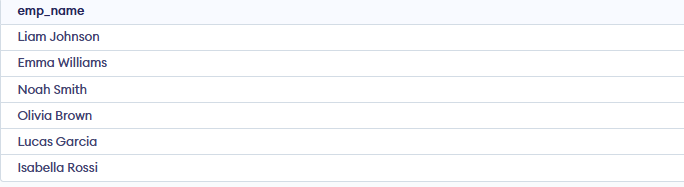
**Example: Retrieve the names of employees from the employee table if there are any employees in the employee table who are located in 'London'.
**Query
SELECT emp_name
FROM employee
WHERE EXISTS (
SELECT emp_id
FROM employee
WHERE emp_city = 'London'
);
**Output:
SOME Operator
The SOME operator compares a value with the results of a subquery and returns TRUE if the condition is satisfied for at least one value returned by the subquery.
**Example: Retrieve the records of employees from the employee table where the emp_id is less than any of the emp_id from employees located in 'London'.
**Query:
SELECT *
FROM employee
WHERE emp_id < SOME (
SELECT emp_id
FROM employee
WHERE emp_city = 'London'
);
**Output:
