SQL Operators (original) (raw)
Last Updated : 11 Jun, 2026
SQL operators are symbols or keywords used to perform operations on data in SQL queries.
- Perform operations like calculations, comparisons, and logical checks.
- Enable filtering, calculating, and updating data in databases.
- Essential for query optimization and accurate data management.
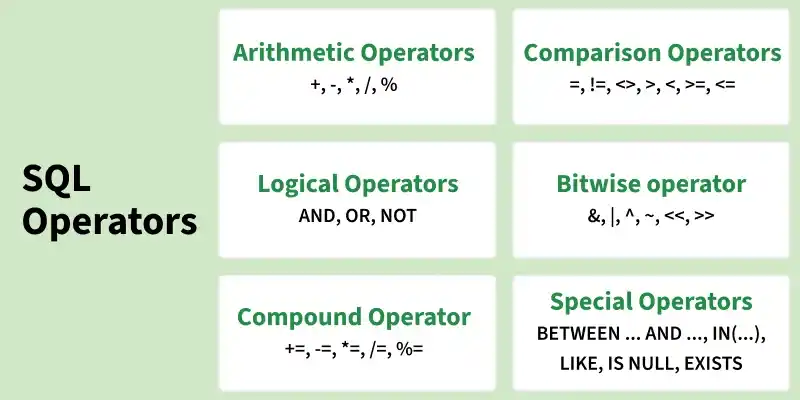
SQL Operators
1. Arithmetic Operators
Arithmetic operators in SQL are used to perform mathematical operations on numeric data types in SQL queries. Some common arithmetic operators:
Example:
-- Creating a sample table
CREATE TABLE Employees (
EmpID INT,
EmpName VARCHAR(50),
Salary INT,
Bonus INT
);
-- Inserting sample data
INSERT INTO Employees (EmpID, EmpName, Salary, Bonus)
VALUES
(1, 'Amit', 40000, 5000),
(2, 'Neha', 50000, 7000),
(3, 'Ravi', 30000, 3000);
-- Using Arithmetic Operators
SELECT
EmpName,
Salary,
Bonus,
Salary + Bonus AS Total_Income, -- Addition
Salary - Bonus AS After_Bonus_Deduction, -- Subtraction
Salary * 0.10 AS Ten_Percent_Salary, -- Multiplication
Salary / 12 AS Monthly_Salary, -- Division
Salary % 10000 AS Salary_Remainder -- Modulus
FROM Employees;
**Output:
| EmpName | Salary | Bonus | Total_Income | After_Bonus_Deduction | Ten_Percent_Salary | Monthly_Salary | Salary_Remainder |
|---|---|---|---|---|---|---|---|
| Amit | 40000 | 5000 | 45000 | 35000 | 4000 | 3333.33 | 0 |
| Neha | 50000 | 7000 | 57000 | 43000 | 5000 | 4166.67 | 0 |
| Ravi | 30000 | 3000 | 33000 | 27000 | 3000 | 2500 | 0 |
**2. Comparison Operators
Comparison Operators in SQL are used to compare one expression's value to other expressions. SQL supports different types of comparison operator, which are described below:
Example:
-- Create sample table
CREATE TABLE Students (
ID INT,
Name VARCHAR(50),
Marks INT
);
-- Insert data
INSERT INTO Students VALUES
(1, 'Amit', 85),
(2, 'Neha', 70),
(3, 'Ravi', 55);
-- Using comparison operators
SELECT *
FROM Students
WHERE Marks >= 70; -- Students who scored 70 or more
**Output:
| ID | Name | Marks |
|---|---|---|
| 1 | Amit | 85 |
| 2 | Neha | 70 |
3. Logical Operators
Logical Operators in SQL are used to combine or manipulate conditions in SQL queries to retrieve or manipulate data based on specified criteria.
Example:
-- Create sample table
CREATE TABLE Students (
ID INT,
Name VARCHAR(50),
Marks INT,
Age INT
);
-- Insert data
INSERT INTO Students VALUES
(1, 'Amit', 85, 18),
(2, 'Neha', 70, 19),
(3, 'Ravi', 55, 17);
-- Using logical operators
SELECT *
FROM Students
WHERE Marks >= 70 AND Age >= 18; -- Both conditions must be true
**Output:
| ID | Name | Marks | Age |
|---|---|---|---|
| 1 | Amit | 85 | 18 |
| 2 | Neha | 70 | 19 |
4. Bitwise Operators
Bitwise operators in SQL are used to perform bitwise operations on binary values in SQL queries, manipulating individual bits to perform logical operations at the bit level.
**Example:
-- Create sample table
CREATE TABLE Users (
UserID INT,
UserName VARCHAR(50),
Permissions INT -- Stores permission flags as a number
);
-- Insert sample data
-- Permission flags: Read=1, Write=2, Execute=4
INSERT INTO Users (UserID, UserName, Permissions) VALUES
(1, 'Amit', 1), -- Read only
(2, 'Neha', 3), -- Read + Write
(3, 'Ravi', 7); -- Read + Write + Execute
-- Example 1: Check if user has Write permission (Bitwise AND)
SELECT *
FROM Users
WHERE Permissions & 2 = 2; -- 2 = Write permission
-- Example 2: Add Execute permission (Bitwise OR)
UPDATE Users
SET Permissions = Permissions | 4
WHERE UserName = 'Neha'; -- Now Neha has Execute permission
-- Example 3: Remove Read permission (Bitwise AND + NOT)
UPDATE Users
SET Permissions = Permissions & ~1
WHERE UserName = 'Ravi'; -- Remove Read permission from Ravi
-- Example 4: Toggle Write permission (Bitwise XOR)
UPDATE Users
SET Permissions = Permissions ^ 2
WHERE UserName = 'Amit'; -- Toggle Write permission
-- Example 5: Show final Permissions for all users
SELECT * FROM Users;
**Output:
| UserName | Initial Permissions | Operation(s) Applied | Final Permissions | Binary | Meaning |
|---|---|---|---|---|---|
| Amit | 1 | Toggle Write (^2) | 3 | 011 | Read + Write |
| Neha | 3 | Add Execute (OR 4) | 7 | 111 | Read + Write + Execute |
| Ravi | 7 | Remove Read (&~1) | 6 | 110 | Write + Execute |
5. Compound Operators
Compound operators combine an operation with assignment. These operators modify the value of a column and store the result in the same column in a single step.
**Example:
-- Create sample table
CREATE TABLE Employees (
EmpID INT,
EmpName VARCHAR(50),
Salary INT
);
-- Insert data
INSERT INTO Employees VALUES
(1, 'Amit', 40000),
(2, 'Neha', 50000),
(3, 'Ravi', 30000);
-- Increase salary by 5000
UPDATE Employees
SET Salary = Salary + 5000;
-- Reduce salary by 2000
UPDATE Employees
SET Salary = Salary - 2000
WHERE EmpName = 'Ravi';
-- Double salary
UPDATE Employees
SET Salary = Salary * 2
WHERE EmpName = 'Neha';
-- Divide salary
UPDATE Employees
SET Salary = Salary / 2
WHERE EmpName = 'Amit';
-- Modulus example
UPDATE Employees
SET Salary = Salary % 10000;
**Output:
| EmpID | EmpName | Salary |
|---|---|---|
| 1 | Amit | 5000 |
| 2 | Neha | 0 |
| 3 | Ravi | 3000 |
6. Special Operators
SQL also provides several special operators that serve specific functions such as filtering data based on a range, checking for existence, and comparing sets of values.
Example:
-- Create sample table
CREATE TABLE Students (
ID INT,
Name VARCHAR(50),
Marks INT
);
-- Insert sample data
INSERT INTO Students VALUES
(1, 'Amit', 85),
(2, 'Neha', 70),
(3, 'Ravi', 55),
(4, 'Kiran', NULL);
-- Example 1: BETWEEN operator
SELECT * FROM Students
WHERE Marks BETWEEN 60 AND 90;
-- Example 2: IN operator
SELECT * FROM Students
WHERE Name IN ('Amit', 'Ravi');
-- Example 3: LIKE operator
SELECT * FROM Students
WHERE Name LIKE 'N%'; -- Names starting with N
-- Example 4: IS NULL operator
SELECT * FROM Students
WHERE Marks IS NULL;
-- Example 5: EXISTS operator
SELECT * FROM Students s
WHERE EXISTS (
SELECT * FROM Students
WHERE Marks > 80
);
**Output:
| Operator | Result |
|---|---|
| BETWEEN 60 AND 90 | Amit, Neha |
| IN ('Amit', 'Ravi') | Amit, Ravi |
| LIKE 'N%' | Neha |
| IS NULL | Kiran |
| EXISTS (Marks > 80) | All rows (since Amit has Marks > 80) |