SQL RENAME TABLE (original) (raw)
Last Updated : 23 Jul, 2025
Renaming a table is a common and useful operation for **database administrators and **developers. It is especially useful when we need to **correct a naming mistake, organize our **database schema, or **update the table name to reflect new business requirements.
In this article, we will provide a detailed guide on how to use the **SQL RENAME TABLE statement, its **syntax, various examples across **different databases, and the best practices to follow for successful renaming operations.
What is SQL RENAME TABLE?
In SQL, the RENAME TABLE statement is used to change the name of an existing table. This operation is typically performed when a table's name no longer reflects the data it contains, or to make the table name more **descriptive or **organized. Renaming a table does **not affect the data or structure of the table; it only updates the table's identifier in thedatabase schema.
The existing data, **columns, **constraints, **indexes, and other attributes of the table remain the same. The table's references in **queries, **views, or stored procedures must be updated manually after renaming the table.
The syntax for renaming a table varies slightly depending on the database system we are using. Below is the general syntax for the **RENAME TABLE statement.
**Syntax
RENAME TABLE old_table_name TO new_table_name;
**Key terms
- **old_table_name: The current name of the table that you want to rename.
- **new_table_name: The new name you want to assign to the table.
Examples of SQL RENAME TABLE in Different Database Systems
Different database systems implement table renaming in slightly different ways. Below are examples of how to use the RENAME TABLE statement across popular SQL databases such as **MySQL, **SQL Server, **PostgreSQL, and **Oracle.
Example 1: Renaming a Table in MySQL
Let’s say we have a table **Customers**containing customer details. Below is the SQL statement to rename the Customers table to Clients. The structure, data, and other properties of the table remain unchanged, but all references to the Customers table should now be updated to Clients.
**Query:
RENAME TABLE Customers TO Clients;
**Verification
To verify that the table name has been successfully changed, we can run the following query:
SELECT * FROM Clients;
**Output
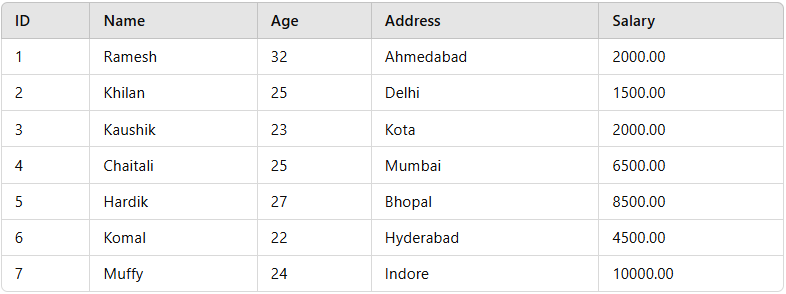
Clients Table
Example 2: Renaming a Table in SQL Server
In SQL Server,renaming a table requires using the **sp_rename stored procedure, as SQL Server does not support a direct **RENAME TABLE statement. Instead, we use the **sp_rename**stored procedure to rename the table. Let’s assume we have a table called **Employees and we wantto rename it to **Workers.
**Syntax
EXEC sp_rename 'old_table_name', 'new_table_name';
**Query:
EXEC sp_rename 'Employees', 'Workers';
**Verification
This will display all records from the newly renamed **Workers table.
SELECT * FROM Workers;
**Output
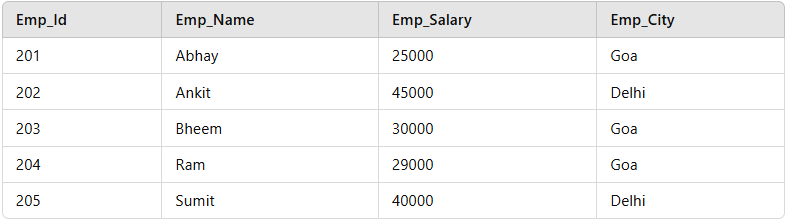
Workers Table
Example 3: Renaming a Table in PostgreSQL
In **PostgreSQL, we can rename a table using the ALTER TABLE statement, which is more flexible than RENAME TABLE. Here's how to rename a table called **Products to **Product_Inventory.
**Syntax
ALTER TABLE old_table_name RENAME TO new_table_name;
**Query:
ALTER TABLE Products RENAME TO Product_Inventory;
**Verification
This query renames the table and retains the data and structure within it.
SELECT * FROM Product_Inventory;
**Output
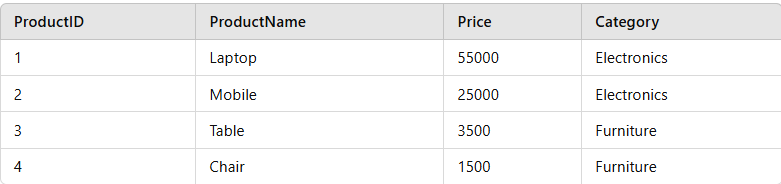
Product_Inventory
Best Practices for Renaming Tables
Renaming a table is a straightforward operation, but it’s important to follow some best practices to ensure smooth database management:
1. **Ensure No Active Transactions
Renaming a table while transactions are active can cause **data inconsistency or **loss. If a transaction is being executed on the table being renamed, there could be errors or data being modified incorrectly. It's important to ensure that no operations, such as **INSERT, UPDATE, or **DELETE, are happening on the table at the time of renaming.
2. **Update References
After renaming the table, any foreign key references, **views, **queries, or **stored procedures that referenced the old table name must be updated to reflect the new name. If these references are not updated, queries may fail, or the application may experience issues when trying to interact with the **renamed table. It's essential to go through the **database schema and update every reference to ensure the system works smoothly after the table rename.
3. **Perform Renaming During Off-Peak Hours
Renaming a table **might lock it for a brief period, so it is best to perform this operation during off-peak hours when the system is under less load. This minimizes the impact of the **temporary lock and allows for smoother operation of the database, especially for **large databases or busy systems.
4. **Test Changes
After renaming a table, it is crucial to test the **renamed table to ensure it functions as expected with the **application and other **database objects. This includes checking if queries that depend on the table are still working correctly and confirming that any updated foreign key references, views, or procedures are functioning as intended.
Limitations and Considerations
**1. Dependent Objects
When renaming a table, it's crucial to review any dependent objects such as **foreign keys, **views, **stored procedures, and triggers. After renaming the table, these objects must be updated to reference the new table name. Failing to do so can cause errors in our database operations, as the old table name will no longer exist in the schema.
**2. Database Locking
Renaming a table may briefly lock the table, which could affect **concurrent operations. During this time, other users may not be able to access or modify the table. To **minimize disruptions, it’s best to perform this operation during periods of low database activity or **off-peak hours. Understanding this lock duration and planning accordingly can help ensure smooth operations without affecting other tasks.
**3. Permission Issues
Renaming a table typically requires **administrative privileges, so it’s important to ensure that the user performing the **rename operation has sufficient rights. If you do not have the required permissions, we might **encounter errors, and the table rename operation will fail. Always check our user account permissions before attempting to rename tables to avoid **unnecessary interruptions.
Conclusion
Renaming a table in SQL is a powerful operation that helps keep our **database schema organized and easy to understand. Whether using the **RENAME TABLE or **ALTER TABLE statements, the process is simple, but it requires careful consideration of **potential dependencies and **permissions. By following best practices and using the appropriate syntax for our database system (MySQL, SQL Server, PostgreSQL, Oracle, etc.), we can rename tables with minimal disruption to our application and users.