SQL Subquery (original) (raw)
Last Updated : 11 Jun, 2026
A subquery in SQL is a query nested inside another SQL query. It allows complex filtering, aggregation and data manipulation by using the result of one query inside another. They are an essential tool when we need to perform operations like:
- Filter rows based on results from another query.
- Apply aggregate functions like SUM, COUNT, or AVG dynamically.
- Update data using values from other tables.
- Delete rows based on conditions returned by another query.
**Example: First, we create a demo SQL database and tables, on which we use the SQL Subqueries.

Output
**Query:
SELECT * FROM Students
WHERE Score > ( SELECT AVG(Score) FROM Students );
**Output:

Output
- The subquery calculates the average score of all students.
- The main query returns only the students whose score is higher than that average.
**Syntax:
SELECT column_name
FROM table_name
WHERE column_name operator
(SELECT column_name
FROM table_name
WHERE condition);
**Note: Subqueries do not have a single fixed syntax, as they can be used in different clauses like SELECT, WHERE, FROM and HAVING
SQL Clauses for Subqueries
Clauses that can be used with subqueries are:
- Filters rows in the outer query based on the results returned by the WHERE clause.
- Treats the subquery as a temporary (derived) table that can be queried like a normal table using the FROM clause.
- Filters grouped or aggregated results using values produced by the HAVING clause.
Types of Subqueries
Consider the following two tables for examples:
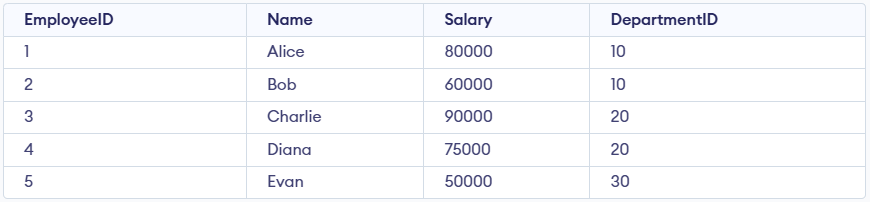
Employees Table

Departments Table
1. Single-Row Subquery
A single-row subquery is a subquery that returns only one value.
- Returns exactly one row as the result.
- Commonly used with comparison operators such as =, >, <
**Example:
SELECT * FROM Employees
WHERE Salary = (SELECT MAX(Salary) FROM Employees);
**Output:

Output
- Finds the highest salary in the Employees table.
- Returns the employee(s) whose salary matches that maximum value.
2. Multi-Row Subquery
A multi-row subquery is a subquery that returns more than one value.
- Returns multiple rows as the result.
- Requires operators that can handle multiple values, such as IN, ANY or ALL
**Example:
SELECT * FROM Employees
WHERE DepartmentID IN (SELECT DepartmentID FROM Departments WHERE Location = 'New York');
**Output:

Output
- Identifies all departments located in New York.
- Returns the employees who belong to any of those departments.
A correlated subquery is a subquery that depends on the outer query for its values.
- A dependent subquery: it references columns from the outer query.
- Executed once for each row of the outer query, making it slower for large datasets.
**Example:
SELECT e.Name, e.Salary
FROM Employees e
WHERE e.Salary > (SELECT AVG(Salary)
FROM Employees
WHERE DepartmentID = e.DepartmentID);
**Output:

Output
- Calculates the average salary within each employee's department.
- Returns employees whose salary is higher than their department’s average.
Examples of Using SQL Subqueries
These examples showcase how subqueries can be used for various operations like selecting, updating, deleting or inserting data, providing insights into their syntax and functionality. Through these examples, we will understand flexibility and importance of subqueries in simplifying complex database tasks.
Consider the following two tables:
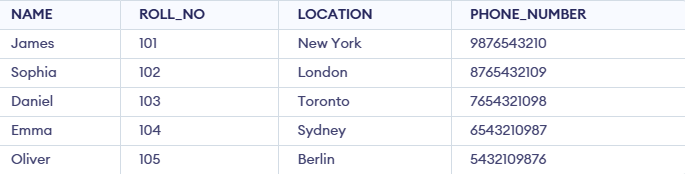
Student_Info

Student_Section
**Example 1: Fetching Data Using Subquery in WHERE Clause
This example demonstrates how to use a subquery inside the WHERE clause. The inner query retrieves roll numbers of students who belong to section 'A' and the outer query fetches their corresponding details (name, location and phone number) from the Student table.
**Query:
SELECT NAME, LOCATION, PHONE_NUMBER
FROM Student_Info
WHERE ROLL_NO IN (
SELECT ROLL_NO
FROM Student_Section
WHERE SECTION = 'A'
);
**Output:

Output
- The subquery retrieves the roll numbers of students who belong to section 'A'.
- The outer query then fetches details from the Student_Info table.
- Thus, only Sophia and Emma are returned, since they are in section A.
**Example 2: Using Subquery with DELETE
In this example, we use a subquery with DELETE to remove certain rows from the Student table. Instead of hardcoding roll numbers, the subquery finds them based on conditions.
**Query:
DELETE FROM Student_Info
WHERE ROLL_NO IN (
SELECT ROLL_NO FROM (
SELECT ROLL_NO FROM Student_Info WHERE ROLL_NO <= 101 OR ROLL_NO = 201
) AS temp
);
**Output:
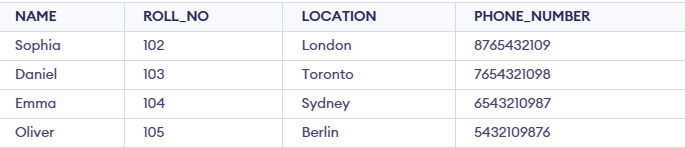
Output
- The subquery selects roll numbers 101 and 201.
- The outer query deletes students having those roll numbers.
**Example 3: Using Subquery with UPDATE
Subqueries can also be used with UPDATE. In this example, we update student names to "Geeks" if their location matches the result of a subquery.
**Query:
UPDATE Student_Info
SET NAME = 'Geeks'
WHERE LOCATION IN (
SELECT LOCATION
FROM Student_Info
WHERE LOCATION IN ('London', 'Berlin')
);
**Output:
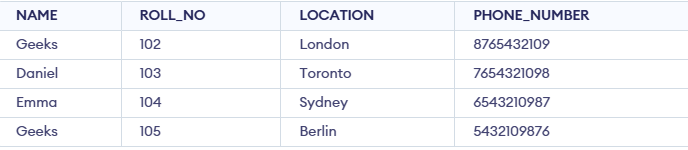
Output
- The subquery selects locations 'London' and 'Berlin'.
- The outer query updates the NAME field for students whose location matches those values.
**Example 4: Simple Subquery in the FROM Clause
This example demonstrates using a subquery inside the FROM clause, where the subquery acts as a temporary (derived) table.
**Query:
SELECT NAME, PHONE_NUMBER
FROM (
SELECT NAME, PHONE_NUMBER, LOCATION
FROM Student_Info
WHERE LOCATION LIKE 'T%'
) AS subquery_table;
**Output:

Output
- The subquery fetches students whose location starts with "T" (Toronto) from the Student_Info table.
- The outer query then selects only NAME and PHONE_NUMBER from this derived table.
**Example 5: Subquery with JOIN
We can also use subqueries along with JOIN to connect data across tables.
**Query:
SELECT s.NAME, s.LOCATION, ns.SECTION
FROM Student_Info s
INNER JOIN (
SELECT ROLL_NO, SECTION
FROM Student_Section
WHERE SECTION = 'A'
) ns
ON s.ROLL_NO = ns.ROLL_NO;
**Output:

Output
- The subquery extracts roll numbers of students in section A.
- Joining this with the Student_Info table on ROLL_NO returns Emma and Sophia along with their locations and section.