SQL TRANSACTIONS (original) (raw)
Last Updated : 2 May, 2026
An SQL transaction groups one or more SQL operations (e.g., INSERT, UPDATE, DELETE) into a single unit of work to ensure reliable data processing. It guarantees that all operations are completed successfully or none are applied, preserving data integrity.
- Ensures consistency by committing all changes together.
- Rolls back changes if any operation fails.
ACID Properties of SQL Transactions
The reliability of SQL transactions is ensured by the ACID properties:
- **Atomicity: A transaction is either fully completed or fully rolled back. If any part fails, the entire transaction fails.
- **Consistency: A transaction moves the database from one valid state to another while following all rules and constraint.
- **Isolation: Transactions run independently of each other, even when executed at the same time.
- **Durability: Once a transaction is committed, its changes remain permanent, even after a system failure
SQL Transaction Control Commands
Transaction Control Commands are used to manage transactions and control when changes are saved or undone.
1. BEGIN TRANSACTION Command
Starts a new transaction. All SQL commands after this are treated as part of the same transaction until COMMIT or ROLLBACK is used.
**Syntax:
BEGIN TRANSACTION transaction_name ;
Example of SQL Transaction with a Bank Transfer Scenario
Let’s look at an example of a bank transfer between two accounts. This example demonstrates the usage of multiple queries in a single transaction.
BEGIN TRANSACTION;
-- Deduct $150 from Account A
UPDATE Accounts
SET Balance = Balance - 150
WHERE AccountID = 'A';
-- Add $150 to Account B
UPDATE Accounts
SET Balance = Balance + 150
WHERE AccountID = 'B';
-- Commit the transaction if both operations succeed
COMMIT;
- Both UPDATE queries are executed as part of a single transaction.
- If all updates succeed, COMMIT permanently saves the changes.
- If any update fails, ROLLBACK cancels all changes to maintain consistency.
ROLLBACK;
**2. COMMIT Command
The COMMIT command is used to save all changes made during the current transaction to the database. Once a transaction is committed, the changes are permanent.
**Syntax:
COMMIT;
**Example: The Student table contains basic details like ID, Name and Age and will be used to demonstrate transaction commands such as SAVEPOINT, ROLLBACK and RELEASE.
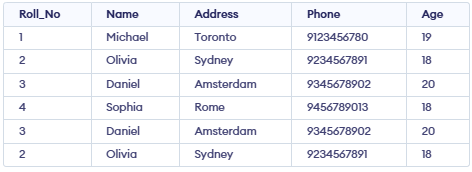
Following is an example which would delete those records from the table which have age = 20 and then COMMIT the changes in the database.
**Query:
DELETE FROM Student WHERE AGE = 20;
COMMIT;
**Output:
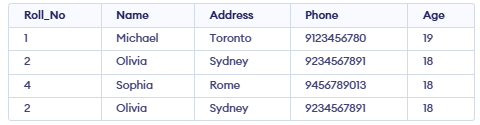
- Rows with AGE = 20 are deleted.
- The deletion is now permanent and cannot be undone.
3. ROLLBACK Command
The ROLLBACK command undoes all changes in the current transaction, useful if something goes wrong or you want to cancel the changes. The database will revert to the state it was in before the BEGIN TRANSACTION was executed.
**Syntax:
ROLLBACK;
**Query:
DELETE FROM Student WHERE AGE = 20;
ROLLBACK;
**Output:
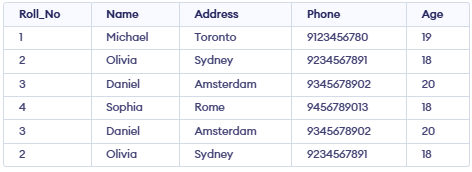
- Rows with AGE = 20 are deleted temporarily.
ROLLBACKrestores the table to its original state before the delete.
4. SAVEPOINT Command
A SAVEPOINT is like a marker inside a transaction. It lets you go back to a specific point without canceling the whole transaction.
**Syntax:
SAVEPOINT SAVEPOINT_NAME;
Query:
SAVEPOINT SP1;
DELETE FROM Student WHERE AGE = 20;
SAVEPOINT SP2;
**Output:
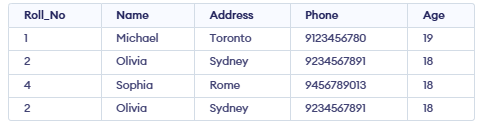
- Create SP1 before deleting.
- Delete students with age 20.
- Create SP2 after deleting.
5. ROLLBACK TO SAVEPOINT
The ROLLBACK TO SAVEPOINT command allows us to roll back the transaction to a specific savepoint, effectively undoing changes made after that point.
**Syntax:
ROLLBACK TO SAVEPOINT SAVEPOINT_NAME;
**Query:
ROLLBACK TO SP1;
**Output:
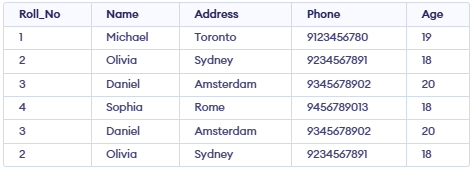
- Undo the delete, so students with age 20 come back.
- Table goes back to how it was at SP1.
6. RELEASE SAVEPOINT Command
RELEASE SAVEPOINT removes a savepoint so you can’t rollback to it. It helps manage transactions and their changes. It is used to initiate a database transaction and used to specify characteristics of the transaction that follows.
**Syntax:
RELEASE SAVEPOINT SAVEPOINT_NAME;
**Query:
RELEASE SAVEPOINT SP2; -- Release the second savepoint.
**Output:
Savepoint released
- Now SP1 is gone.
- You cannot do ROLLBACK TO SP1 anymore.
- Table does not change, it stays as it was after the last rollback.
**For Example: In banking system transactions ensure money transfers are safe by making sure either all steps succeed or all fail, keeping data consistent.
Types of SQL Transactions
There are different types of transactions based on their nature and the specific operations they perform:
- **Read Transactions: Used to only read the data, typically with SELECT queries.
- **Write Transactions: These involve modifying the data in the database with INSERT, UPDATE or DELETE operations.
- **Distributed Transactions: These transactions span multiple databases and ensure consistency across them.
- **Implicit Transactions: Automatically started by SQL Server for certain operations.
- **Explicit Transactions: Manually controlled transactions where the user begins and ends the transaction using BEGIN TRANSACTION, COMMIT and ROLLBACK.
Optimization
Following best practices helps improve transaction performance and reduces the risk of conflicts.
- Monitor locks to avoid conflicts and deadlocks.
- Keep transactions small to improve performance.
- Use batching for handling large data operations efficiently.