Cursor in SQL (original) (raw)
Last Updated : 11 Apr, 2026
A cursor in SQL is a database object used to process data one row at a time, useful when row-by-row handling is needed instead of bulk processing. It temporarily stores data for operations like SELECT, UPDATE or DELETE.
- Useful for applying custom logic, conditional operations or step-by-step updates.
- Common in PL/SQL or T-SQL for tasks like loops, conditional logic or complex procedures.
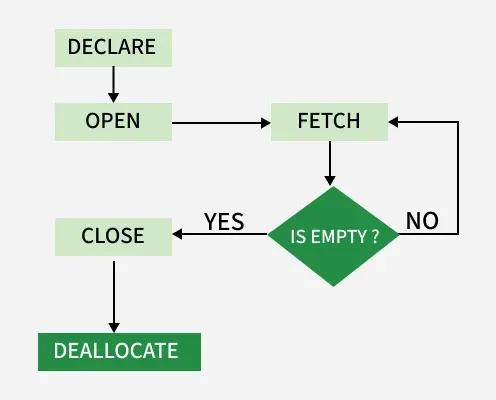
Cursor
Use of Cursor
Cursors should be used carefully as they are helpful in scenarios like:
- Performing conditional logic row-by-row.
- Looping through data to calculate or transform fields
- Iterating over result sets for conditional updates or transformations.
- Handling hierarchical or recursive data structures.
- Performing clean-up tasks that can not be done with a single SQL Query.
Types of Cursors in SQL
SQL offers two main types of cursors, each suited for different scenarios and depending on how much control we want:
1. Implicit Cursors
In PL/SQL, when we perform INSERT, UPDATE or DELETE operations, an implicit cursor is automatically created. This cursor holds the data to be inserted or identifies the rows to be updated or deleted. We can refer to this cursor as the SQL cursor in our code. It is fully managed entirely by the SQL engine without explicit declaration.
**Useful Attributes:
- ****%FOUND**: True if the SQL operation affects at least one row.
- ****%NOTFOUND**: True if no rows are affected.
- ****%ROWCOUNT**: Returns the number of rows affected.
- ****%ISOPEN**: Checks if the cursor is open.
Example****:** UsingImplicitCursorforBulk Updates
This program updates a table by increasing the salary of each employee by 1500. After the update, the SQL%ROWCOUNT attribute is used to find out how many rows were affected by the operation.
**Query:
DECLARE
total_rows number;
BEGIN
UPDATE Emp
SET Salary = Salary + 1500;
total_rows := SQL%ROWCOUNT;
dbms_output.put_line(total_rows || ' rows updated.');
END;
**Output
5 Emp selected
PL/SQL procedure successfully completed.
**Explanation:
- %BULK_ROWCOUNT and %BULK_EXCEPTIONS are used with the FORALL statement.
- The FORALL statement is used to perform multiple DML operations efficiently.
- %BULK_ROWCOUNT returns the number of rows affected by each DML operation.
- %BULK_EXCEPTIONS returns information about exceptions that occur during bulk operations.
2. Explicit Cursors
These are user-defined cursors created explicitly by users for custom operations. They provide complete control over every part of their lifecycle: declaration, opening, fetching, closing and deallocating.It is used for fetching data row-by-row with complete control over the cursor lifecycle.
**Explicit cursors are useful when:
- We need to loop through results manually
- Each row needs to be handled with custom logic
- We need access to row attributes during processing
Example: Using an Explicit Cursor
Here is a complete example of declaring, opening, fetching, closing and deallocating a cursor. This workflow demonstrates how to use explicit cursors for row-by-row operations, including resource management and result retrieval.
**Query:
DECLARE emp_cursor CURSOR FOR SELECT Name, Salary FROM Employees;
BEGIN
OPEN emp_cursor;
FETCH NEXT FROM emp_cursor INTO @Name, @Salary;
WHILE @@FETCH_STATUS = 0
BEGIN
PRINT 'Name: ' + @Name + ', Salary: ' + CAST(@Salary AS VARCHAR);
FETCH NEXT FROM emp_cursor INTO @Name, @Salary;
END;
CLOSE emp_cursor;
DEALLOCATE emp_cursor;
END;
**Output:
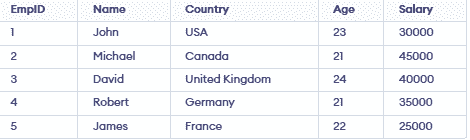
Cursor Syntax Breakdown in SQL
SQL Cursors allow you to process query results one row at a time. Below is a step-by-step explanation of how to create and use explicit cursors with simplified explanations and examples.
1. Declare a Cursor
The first step in creating an explicit cursor is to declare it. This defines the cursor and associates it with a SQL query that determines the result set.
**Syntax:
DECLARE cursor_name CURSOR FOR SELECT * FROM table_name
**Example:
DECLARE s1 CURSOR FOR SELECT * FROM studDetails
**Explanation: The DECLARE statement creates a cursor named s1, which is linked to the query SELECT * FROM studDetails. This cursor will allow row-by-row processing of the studDetails table.
**2. Open Cursor Connection
After declaring the cursor, it needs to be opened. The OPEN statement executes the query associated with the cursor and prepares it for fetching rows. The OPEN s1 command initializes the cursor s1 and establishes a connection to its result set.
**Syntax:
OPEN cursor_connection
**Example:
OPEN s1
**Explanation: The cursor executes the associated query and makes the result set available for row-by-row processing.
3. Fetch Data from the Cursor
To retrieve data from the cursor, use the FETCH statement. SQL provides six methods to access data:
| Mode | Description |
|---|---|
| FIRST | Fetches the first row in the result set |
| LAST | Fetches the last row |
| NEXT | Fetches the next row (default behavior) |
| PRIOR | Fetches the previous row |
| ABSOLUTE n | Fetches the nth row |
| RELATIVE n | Fetches a row relative to current position |
**Syntax:
FETCH NEXT/FIRST/LAST/PRIOR/ABSOLUTE n/RELATIVE n FROM cursor_name
**Example:
FETCH FIRST FROM s1
FETCH LAST FROM s1
FETCH NEXT FROM s1
FETCH PRIOR FROM s1
FETCH ABSOLUTE 7 FROM s1
FETCH RELATIVE -2 FROM s1
4. Close Cursor Connection
After completing the required operations, the cursor should be closed to release the lock on the result set and free up resources.
**Syntax:
CLOSE cursor_name
**Example:
CLOSE s1
**Explanation:
The CLOSE statement closes the cursor s1, terminating its connection to the result set. This ensures that the cursor is no longer available for fetching data.
5. Deallocate Cursor Memory
The final step is to deallocate the cursor to free up server memory. The DEALLOCATE statement removes the cursor definition and its associated resources from the memory. The DEALLOCATE statement completely removes the cursor s1 from memory, ensuring efficient resource usage.
**Syntax:
DEALLOCATE cursor_name
**Example:
DEALLOCATE s1
**Explanation: This permanently removes the cursor definition from memory, keeping your server efficient.
How To Create an Implicit Cursor
An implicit cursor is automatically created by SQL when we execute a SQL statement. These cursors are managed behind the scenes by the SQL engine and do not require explicit declaration or management. To create an implicit cursor in PL/SQL, we simply need to execute a SQL statement.
**Query:
BEGIN
FOR emp_rec IN SELECT * FROM emp LOOP
DBMS_OUTPUT.PUT_LINE('Employee name: ' || emp_rec.ename);
END LOOP;
END;
**Explanation: This loop implicitly creates a cursor to iterate through each row in the emp table and prints out employee names.
SQL Cursor Exceptions
When using SQL cursors, there is always a possibility of encountering unexpected errors during execution. These errors can occur due to improper usage or conflicting operations. Below are some common exceptions you might face while working with cursors:
1. Duplicate Value Error
- This error occurs when the cursor attempts to insert a record or row that already exists in the database, causing a conflict due to duplicate values.
- **Solution: Use proper error handling mechanisms such as TRY-CATCH blocks or check for existing records before inserting data.
2. Invalid Cursor State
- This error is triggered when the cursor is in an invalid state, such as attempting to fetch data from a cursor that is not open or already closed.
- **Solution: Ensure the cursor is properly opened before fetching data and closed only after completing all operations.
3. Lock Timeout
- This happens when the cursor tries to obtain a lock on a row or table, but the lock is already held by another transaction for an extended time.
- **Solution: Use appropriate isolation levels, manage transactions efficiently and minimize locking duration to prevent timeouts.
Comparison of Implicit and Explicit Cursors
| Implicit Cursors | Explicit Cursors |
|---|---|
| Automatically created by the SQL engine | Manually created by the user |
| No declaration required | Requires declaration before use |
| Managed automatically by SQL | Controlled using open, fetch and close |
| Used for simple DML operations | Used for complex row-by-row processing |
| Provide less control | Provide more control and flexibility |
| Faster and more efficient | Slower due to manual handling |
Advantages of Using Cursors
- **Row-by-row processing: Useful for detailed operations
- **Iterative handling: Can loop through data multiple times
- **Handles complex relationships: Works with hierarchical/complex data
- **Conditional operations: Supports condition-based updates, deletes, inserts
- **Flexible for complex cases: Useful when set-based queries fail
Limitations of Cursors
- **Slow performance: Processes one row at a time
- **High resource usage: Consumes memory and locks data
- **Complex syntax: Requires multiple steps (declare, open, fetch, close)
- **Not suitable for large data: Performance degrades with big datasets