Design BookMyShow A System Design Interview Question (original) (raw)
Last Updated : 31 Mar, 2026
Designing BookMyShow is a popular system design interview question that tests your ability to build scalable, high-performance systems. It involves creating a platform where users can search for movies, select seats, and book tickets while handling high traffic and real-time updates. This article will guide you through key aspects, to demonstrate how such a system can be efficiently designed.
1. System Requirements
This section defines what the system must do to meet user needs and expectations.
1. Functional Requirements
This describes the features and capabilities the portal must provide to users.
- City Selection: The portal should provide a list of cities where theatres are available, allowing users to select their preferred location.
- Movie Listings: Based on the selected city, the portal should display all movies currently running in that city.
- Cinema and Show Selection: For a selected movie, the portal should list cinemas running the movie, along with available showtimes.
- Ticket Booking: Users should be able to select a show at a specific theatre and proceed to book tickets seamlessly.
- Ticket Notifications: After booking, the system should send a copy of the tickets to the user via SMS or email for confirmation and record.
- Seating Arrangement Display: The portal should visually display the seating arrangement of the selected cinema hall.
- Seat Selection: Users should have the ability to choose multiple seats from the seating arrangement as per their preference.
- Ticket Serving Order: The system should ensure tickets are allocated on a First In, First Out (FIFO) basis to handle multiple concurrent bookings fairly and accurately.
2. Non-Functional Requirements
This outlines the quality attributes and performance expectations of the system.
- High Concurrency: A large number of concurrent users must be supported by the system in order to guarantee that several reservations for the same seat are processed effectively and without errors.
- Security and ACID Compliance: Since purchasing tickets entails money transactions, the system needs to be safe to guard against fraud and illegal access. In order to preserve data consistency throughout transactions, it should also guarantee ACID compliance.
- Responsiveness: The portal should have a responsive design to provide a seamless experience across devices such as mobiles, tablets, and desktops.
- Real-Time User Engagement: The system should offer movie recommendations based on user preferences and deliver real-time notifications about new movie releases, offers, or other relevant updates.
2. Theatres Integration in BookMyShow
When you visit any third-party application/movie tickets aggregator using the mobile app or website, you see the available and occupied seats for a movie show in that theatre. Now the question is how these third-party aggregators talk to the theatres, get the available seat information, and display it to the users. Definitely, the app needs to work with the theatre's server to get the seat allocation and give it to the users. There are mainly two strategies to allocate seats to these aggregators:
- **Reserved Seats for Aggregators: A specific number of seats will be dedicated to every aggregator and then these seats will be offered to the users. In this strategy, some seats are already reserved for these aggregators, so there is no need to keep updating the seat information from all the theatres.
- **Dynamic Seat Updates: In the second strategy, the app can work along with the theatre and other aggregators to keep updating the seat availability information. Then the ticket will be offered to the users.
3. Checking Available Seats
There are mainly two ways to get this information...
- The aggregators can connect to the theatre's DB directly and get the information from the database table. Then this information can be cached and displayed to the user.
- Use the theatre's server API to get the available seat information and book the tickets.
Handling Concurrent Seat Bookings
This explains how theatres handle temporary locks to prevent double bookings.
- When a user selects a seat, the theatre server temporarily locks it for a fixed duration (e.g., 5–10 minutes).
- During this time, other users cannot book the same seat.
- If the user does not complete the booking within the timeout, the seat is automatically released.
- This ensures fair first-come-first-served access to seats for all users.
- The mechanism prevents conflicts and maintains real-time seat availability accuracy.
4. High-Level Design
BookMyShow is built on microservice architecture. The key Components of the system include:
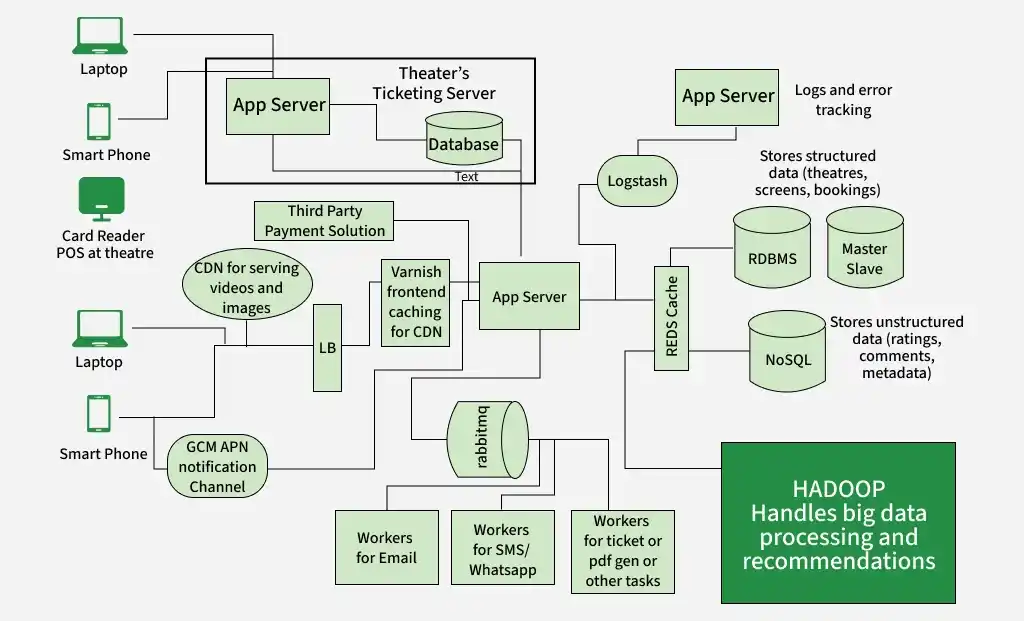
HLD
1. Load Balancer
A load balancer is used to distribute the load on the server and to keep the system highly concurrent when we are scaling the app server horizontally. The load balancer can use multiple techniques to balance the load.
2. Frontend Caching and CDN
We do frontend caching using Varnish to reduce the load from the backend infrastructure. We can also use CDN Cloudflare to cache the pages, API, video, images, and other content.
3. App Servers
There will be multiple app servers and BookMyShow uses Java, Spring Boot, Swagger, and Hibernate for the app servers. We can also go with Python-based or NodeJS servers (Depending on requirements). We also need to scale these app servers horizontally to take the heavy load and handle a lot of requests in parallel.
4. Elastic Search
Elastic search is used to support the search APIs on Bookmyshow (to search movies or shows). Elastic search is distributed and it has RESTful search APIs available in the system. It can be also used as an analytics engine that works as an App-level search engine to answer all the search queries from the front end.
5. Caching
To save the information related to the movies, seat ordering, theatres, etc, we need to use caching. We can use Memcache or Redis for caching to save all this information in Bookmyshow. Redis is open-source and it can be also used for the locking mechanism to block the tickets temporarily for a user. It means when a user is trying to book the ticket Redis will block the tickets with a specific TTL.
6. Async Workers
The main task of the Async worker is to execute the tasks such as generating the pdf or png of the images for booked tickets and sending the notification to the users. For push notifications, SMS notifications, or emails we need to call third-party APIs. These are network IO and it adds a lot of latency. Also, these time-consuming tasks can not be executed synchronously.
- To solve this problem, as soon as the app server confirms the booking of the tickets, it will send the message to the message queue, a free worker will pick up the task, execute it asynchronously and provide the SMS notification, other notifications, or email to the users.
- RabbitMQ or Kafka can be used for Message Queueing Systems and Python celery can be used for workers.
- For browser notifications or phone Notifications use GCM/ APN.
7. Business Intelligence and ML
For data analysis of business information, we need to have a Hadoop platform. All the logs, user activity, and information can be dumped into Hadoop, and on top of it, we can run PIG/Hive queries to extract information like user behavior or user graph.
- ML is used to understand the user's behavior and to generate movie recommendations etc.
- For real-time analysis, we can use Spark streaming.
8. Log Management
ELK (ElasticSearch, Logstash, Kibana) stack is used for the logging system. All the logs are pushed into the Logstash. Logstash collects data from all the servers via Files/Syslog/socket/AMQP etc and based on a different set of filters it redirects the logs to Queue/File/Hipchat/Whatsapp/JIRA etc.
5. Database Design
We need to use both RDBMS and NoSQL databases for different purposes. Let's analyze what we need in our system and which database is suitable for what kind of data:
**1. RDBMS
We use RDBMS (Relational Database Management System) to handle structured data that requires relationships and transactions, such as:
- Countries, Cities, Theatres in each city, Multiple Screens in theatres, and Rows and Seats in each screen. The database should support ACID transactions, ensuring consistency across transactions.
- A master-slave architecture is used for scaling—read queries are handled by slaves, while the master handles writes.
**2. NoSQL
We also have a huge amount of data like movie information, actors, crew, comments, and reviews. RDBMS can not handle this much amount of data so we need to use the NoSQL database which can be distributed.
- Cassandra can be a good choice to handle this ton of information. We can save multiple copies of data in multiple nodes deployed in multiple regions.
- This ensures the high availability and durability of data (if a node goes down, we will have data available in other nodes).
6. Low-Level Design
This section dives into the internal components and data flow of the system for implementation.
Step-By-Step Working
- **Step 1: The customer visits the portal and filters the location. Then the theatres and movies released in that theatres will be suggested to the user. Data will be provided from DB and ELK recommendation engines.
- **Step 2: Users select the movie and check the different timing for the movies in all the nearby theatres.
- **Step 3: Users select a particular date and time for a movie in his/her own choice of theatre. The available seat information will be fetched from the database and it will be displayed to the user.
- **Step 4: Once the user selects the available seat, BMS locks the seat temporarily for the next 10 minutes. BMS interacts with the theatre DB and blocks the seat for the user. The ticket will be booked temporarily for the current user and for all the other users using different aggregators or apps the seat will be unavailable for the next 10 minutes. If the user is failed to book the ticket within that timeframe the seat will be released for the other aggregators.
- **Step 5: If the user continues with the booking he/she will check the invoice with the payment option and after the payment via the payment gateway, the app server will be notified about the successful payment.
- **Step 6: After successful payment, a unique ID will be generated by the theatre and it will be provided to the app server.
- **Step 7: Using that unique ID a ticket will be generated with a QR code and a copy of the ticket will be shown to the user. Also, a message to the queue will be added to send the invoice copy of the ticket to the user via SMS notification or email. The ticket will have all the details such as the movie, address of the theatre, timing, theatre number, etc.
- **Step 8: At movie time, when the customer visits the theatre the QR code will be scanned and the customer will be allowed to enter the theatre if the ID will be matched on both customer's ticket and the theatre's ticket.
APIs Needed
This section lists the key APIs required for communication between the platform, theatres, and users.
**1. GetListOfCities():
Retrieves a list of cities where events or movies are available.
- **Request: None
- **Response: List of Cities with their IDs and Names
**2. GetListOfEventsByCity(CityId):
Returns events or movies running in a specified city.
- **Request:
CityId - **Response: List of Movies and Events in the specified city, including EventID, Movie Name, Genre, Duration, etc.
**3. GetLocationsByCity(CityId):
Fetches all locations (cinemas or venues) in the given city.
- **Request:
CityId - **Response: List of Locations (cinemas) in the specified city, with Location ID, Name, Address.
**4. GetLocationsByEventandCity(cityid, eventid):
Retrieves the locations hosting a specific event in a given city.
- **Request:
CityId, EventId - **Response: List of Locations with
LocationId,LocationName,Address, andAvailableSeats
**5. GetEventsByLocationandCity(CityId, LocationId):
Lists events available at a specific location in a city.
- **Request:
CityId, LocationId - **Response: List of Events with
EventId,EventName, andShowtimes
**6. GetShowTiming(eventid, locationid):
Provides show timings for a specific event at a given location.
- **Request:
EventId, LocationId - **Response: List of ShowTimings with
ShowtimeId,StartTime, andEndTime
**7. GetAvailableSeats(eventid, locationid, showtimeid):
Returns the seating availability for a specific show.
- **Request:
EventId,LocationId,ShowtimeId - **Response: Seat Availability (number of seats left, seat rows, etc.)
**8. VarifyUserSelectedSeatsAvailable(eventid, locationid, showtimeid, seats):
Checks if the user-selected seats are still available.
- **Request:
EventId, LocationId, ShowtimeId, Seats[] - **Response:
Status("Available" or "Not Available"),AvailableSeats,Message
**9. BlockUserSelectedSeats():
Temporarily blocks the user-selected seats to prevent others from booking them.
- **Request:
SeatIds[],UserId - **Response: Confirmation of temporary seat block and timeout details.
**10. BookUserSelectedSeat():
Confirms the booking for the user-selected seats.
- **Request:
UserId,SeatIds[],PaymentDetails - **Response: Confirmation of seat booking, unique Ticket ID, and Payment Status.
**11. GetTimeoutForUserSelectedSeats():
Provides the timeout duration for holding user-selected seats before release.
- **Request:
SeatIds[] - **Response: Timeout duration for locked seats.
Technologies Used
This section outlines the tools, frameworks, and platforms used to build and maintain the system.
- **User Interface: ReactJS & BootStrapJS
- **Server language and Framework: Java, Spring Boot, Swagger, Hibernate
- **Security: Spring Security
- **Database: MySQL
- **Server: Tomcat
- **Caching: In memory cache Hazelcast.
- **Notifications: RabbitMQ. A Distributed message queue for push notifications.
- **Payment API: Popular ones are Paypal, Stripe, Square
- **Deployment: Docker & Ansible
- **Code repository: Git
- **Logging: Log4J
- **Log Management: ELK Stack
- **Load balancer: Nginx