MVC Architecture System Design (original) (raw)
Last Updated : 23 Jul, 2025
MVC(Model-View-Controller) Architecture is a fundamental design pattern in software development, separating an application into Model, View, and Controller components. This article explores its role in building robust, maintainable systems, emphasizing its benefits and implementation strategies.
Important Topics to Understand MVC Architecture
- What is MVC Architecture?
- Importance in System Design
- Key Components of MVC Architecture
- Benefits of MVC Architecture
- Implementation Strategies
- Some of the real life examples of MVC architecture
- Challenges of MVC Architecture
- Asynchronous Programming in MVC Architecture
- Popular MVC Frameworks
- Example Implementation of MVC Architecture
What is MVC Architecture?
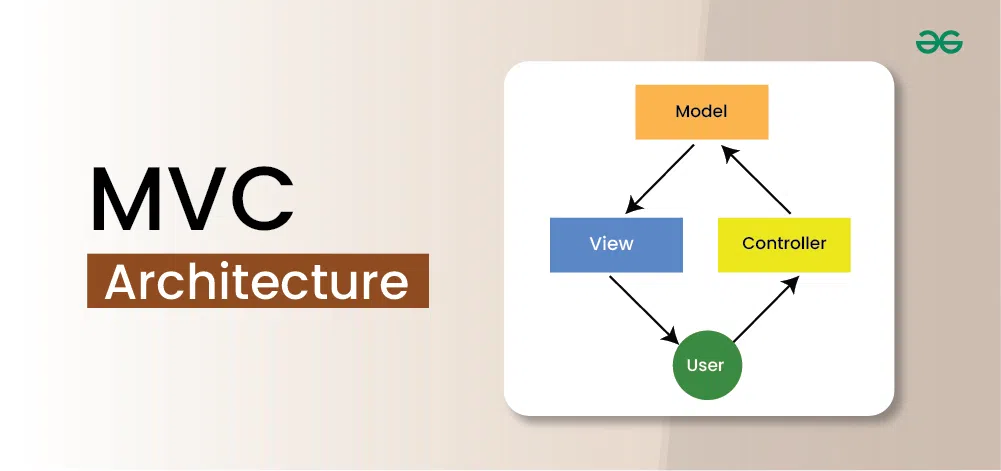
MVC (Model-View-Controller) architecture is a universal pattern of a structure in which an application is divided into three parts which are all dedicated to certain parts of the whole application. This pattern is normally used in software development to create organized and easy-to-maintain code. Here’s a deeper look at each component:

- **Model: It is worth stating that the Model stands as the data layer for the application. It is directly involved in managing the data as well as the control of the application’s logic and rules.
- **View: The View is in the presentation tier. It plays a role of presenting the information given by the Model to the user and transferring the user commands to the Controller. The View is used to display the data to the user in a readable and manageable way using the interface created by the Controller.
- **Controller: The Controller CE works in the middle between the Model and the View. It takes the input from the View, sometimes modifies it with the help of the Model, and sends it back to the View. the results back to the View.
Importance in System Design
The MVC architecture is significant in system design for the following reasons:
- **Separation of Concerns: MVC structures an application into three integrated elements and that really separates concern. Due to the clear division of responsibilities among each of the components, the functioning of the application becomes more logical and comprehensible.
- **Reusability: Due to the fact that Model, View, and Controller are all the distinct entities, components can be utilized in the various sections of the application or different projects. For example, a Model class that contains user data can be used many times in the views and the controllers.
- **Scalability****:** MVC amplifies the creation of applications that can be developed further. When the application advances, new functionalities of the application can be added without significant alterations to some parts of the application because they are elusive.
- **Testability: This separation of concerns make it easier for the testing of each part from the other as we as from other problems. One of the testing strategies is to have separate tests for Model, View, and Controller parts, in this way, one is sure that each part is functioning properly before combining them.
Key Components of MVC Architecture
Here are detailed explanations and examples for each of the key components of the MVC architecture:Here are detailed explanations and examples for each of the key components of the MVC architecture:
- **Model: The Model component brings together all the core details and business knowledge. Therefore, it is concerned with the management of data, states and rules of the application. For example, in a booking system the Model might deal with user data, booking details and with calculations of prices.
- **View: The View component is responsible for the presentation layer. It takes the data provided by the Model and presents it to the user in a readable format.
- **Controller: The Controller component handles user input and interactions. It processes the input, interacts with the Model, and updates the View accordingly.
Benefits of MVC Architecture
MVC architecture offers several advantages:
- **Enhanced Organization: MVC is useful in splitting the application into different parts thus improving on the way the codebase is structured. This also helps in easy identification of errors that exist in a program, implement changes to the existing program and even have better understanding of the overall structure of the created application.
- Parallel Development: It means that two or more developers can work on Model, View, and Controller form at the same time without attempting or interfering with the work of the other. This aspect of parallel development can go along way in enhancing the development process since they are being worked on simulatenously.
- **Code Reusability: Compared with other designs, elements of MVC can be reused from part of the application to another. For example, a Model representing user data can be reused in different views and controllers and modification of one will automatically affect them because they are derived from it.
- Improved Maintainability: It bellows from the fact that this methodology of separation of concerns makes it easier to maintain and update the application. Refinements to one part (for example, modifying the Model by altering the database schema) affect no other part at least at the conceptual level (for example, the View should not be impacted).
- **Testability: Compared with other architectures, MVC architecture is relatively easy to test because each component of the architecture can be tested separately. Writing unit tests can be done for the Model, View and Controller, thus assuring that each component is correct before the others.
Implementation Strategies
The proper application of the MVC architecture depends on the right planning and compliance with many standards. Here are some strategies to consider:
- **Code Separation: It recommend to split a working code into three folders named Model, View and Controller. This separation should seem in the directory structure of the project as well as variable and function names.
- **Framework Utilization: Utilize widely used MVC frameworks which are provided with the options for organizing the application by the MVC pattern. Digital libraries include Angular, React coupled with Redux, Django and Ruby on Rails. These frameworks have some tools and libraries inclusive of: MVC architecture is easy to implement by these frameworks.
- **Consistent Data Flow: Make sure that data pass through the components of the application in a continuous manner according to the MVC characteristics. The Controller should be receiving as well as processing user input and modifying the Model and the View in response to it. Do not directly communicate the Model with the View.
- **Modular Design: Design each component as a self-contained module with well-defined interfaces. This modular design makes it easier to test, maintain, and extend the application.
Some of the real life examples of MVC architecture
Several popular web frameworks implement the MVC architecture:
- **Django: A Python Web application framework that supports high level and promotes the strong, fast web application development and clear, and practical design. While Django also has the components of MVC but refers to it as MVT where T stands for Template, django is famous for its “batteries included” philosophy where it has many included features.
- **Ruby on Rails: Ruby web application framework implemented on the server side. Rails is built on MVC and is a software that aims at having a number of conventions at the core, so that one can begin creating web applications at a very basic level.
- **Angular: The libraries are created to build a single-page client application using HTML and a TypeScript language. Angular follows the MVC model by the use of components and dependency injection.
Challenges of MVC Architecture
Despite its benefits, MVC architecture can present some challenges:
- **Complexity: If one is working on a small application, then the MVC architecture can prove to be quite cumbersome. If the project is simple, then managing a different component may lead to excess expenditure on the overhead.
- **Learning Curve: The use of MVC entails a lot of learning by the developers in as much as it catalyses ease in development of applications. There is therefore a need for developers to thoroughly understand the functionality of each component to establish the relationship that binds them.
- **Overhead: It may also involve some additional costs because of the component necessitating its or her management and maintenance. The requirement gives rise to complexity when the Model, View and the Controller need to be synchronized which results to longer time when developing and debugging the software.
Asynchronous Programming in MVC Architecture
In an MVC architecture, asynchronous programming can be implemented as follows:In an MVC architecture, asynchronous programming can be implemented as follows:
- **Model: There are two primary kinds of communication with the database – synchronous and asynchronous; asynchronous methods should be used to interact with the database, namely to read data from it and write data into it. For example, in Node. Js, there is async/await or Promises to do with the Database query because it is Asynchronous.
- **Controller: Handle the requests and responses from and to the users in a non-synchronous manner. This helps to allow the server to handle other requests without being locked up, waiting for a response from the client.
- **View: Update the user interface without reloading the entire page. Techniques like AJAX or Fetch API can be used to fetch data asynchronously and update the View dynamically.
Popular MVC Frameworks
Several popular web frameworks implement the MVC architecture:
- **Django: A Python Web application framework that supports high level and promotes the strong, fast web application development and clear, and practical design. While Django also has the components of MVC but refers to it as MVT where T stands for Template, django is famous for its “batteries included” philosophy where it has many included features.
- **Ruby on Rails: Ruby web application framework implemented on the server side. Rails is built on MVC and is a software that aims at having a number of conventions at the core, so that one can begin creating web applications at a very basic level.
- **Angular: The libraries are created to build a single-page client application using HTML and a TypeScript language. Angular follows the MVC model by the use of components and dependency injection.
Example Implementation of MVC Architecture
Let’s consider a simple implementation of an MVC application for a booking system using Node.js with Express:
1. Model (models/booking.js)
JavaScript `
const mongoose = require('mongoose');
const bookingSchema = new mongoose.Schema({ user: String, hotel: String, date: Date, price: Number });
const Booking = mongoose.model('Booking', bookingSchema);
module.exports = Booking;
`
The Booking model defines the schema for a booking and interacts with the database to manage booking data.
2. View (views/bookings.ejs)
JavaScript `
BookingsBookings
-
<% bookings.forEach(function(booking) { %>
- <%= booking.user %> booked <%= booking.hotel %> on <%= booking.date %> for $<%= booking.price %> <% }); %>
`
The View displays a list of bookings using data passed from the Controller.
2. Controller (controllers/bookingController.js)
JavaScript `
const Booking = require('../models/booking');
exports.getBookings = async (req, res) => { try { const bookings = await Booking.find(); res.render('bookings', { bookings }); } catch (err) { res.status(500).send(err); } };
exports.createBooking = async (req, res) => { const { user, hotel, date, price } = req.body; const booking = new Booking({ user, hotel, date, price }); try { await booking.save(); res.redirect('/bookings'); } catch (err) { res.status(500).send(err); } };
`
The Controller retrieves booking data from the Model and passes it to the View, or it creates a new booking based on user input.
4. Routes (routes/bookings.js)
JavaScript `
const express = require('express'); const router = express.Router(); const bookingController = require('../controllers/bookingController');
router.get('/bookings', bookingController.getBookings); router.post('/bookings', bookingController.createBooking);
module.exports = router;
`
The bookings.js file defines the routes for the application, linking URLs to Controller actions.
5. Server Setup (app.js)
JavaScript `
const express = require('express'); const mongoose = require('mongoose'); const bookingRoutes = require('./routes/bookings'); const bodyParser = require('body-parser');
const app = express();
mongoose.connect('mongodb://localhost:27017/booking_system', { useNewUrlParser: true, useUnifiedTopology: true });
app.set('view engine', 'ejs'); app.use(bodyParser.urlencoded({ extended: true })); app.use(bookingRoutes);
app.listen(3000, () => { console.log('Server is running on port 3000'); });
`
The app.js file sets up the server, connects to the database, and uses the defined routes.
Explanation
- **Model: The Booking schema defines the structure of the booking data and interacts with the database.
- **View: The bookings.ejs file displays a list of bookings to the user.
- **Controller: The bookingController handles the logic for retrieving and creating bookings, interacting with the Model and updating the View.
- **Routes: The bookings.js file defines the routes that link URLs to specific Controller actions.
- **Server Setup: The app.js file sets up the Express server, connects to the MongoDB database, and uses the routes defined in bookings.js.