What is Auto Scaling? (original) (raw)
Last Updated : 23 Jul, 2025
A characteristic of cloud computing called auto-scaling automatically adjusts the number of servers in use in response to demand. This implies that your applications can save money during slower periods and function flawlessly at peak periods. In this post, we'll examine the benefits of auto-scaling, how it operates, and some best practices.

Table of Content
- What is Auto Scaling?
- Importance of Auto Scaling
- Key Components of Auto Scaling
- Types of Auto Scaling
- How Auto Scaling Works?
- Auto Scaling Strategies
- Auto Scaling in Cloud Environments
- Benefits of Auto Scaling
- Best Practices for Auto Scaling
- Challenges with Auto Scaling
- Real-world Use Cases of Auto Scaling
- Auto Scaling vs. Load Balancing
What is Auto Scaling?
A characteristic of cloud computing called auto scaling automatically modifies the quantity of processing resources in response to shifting workloads.
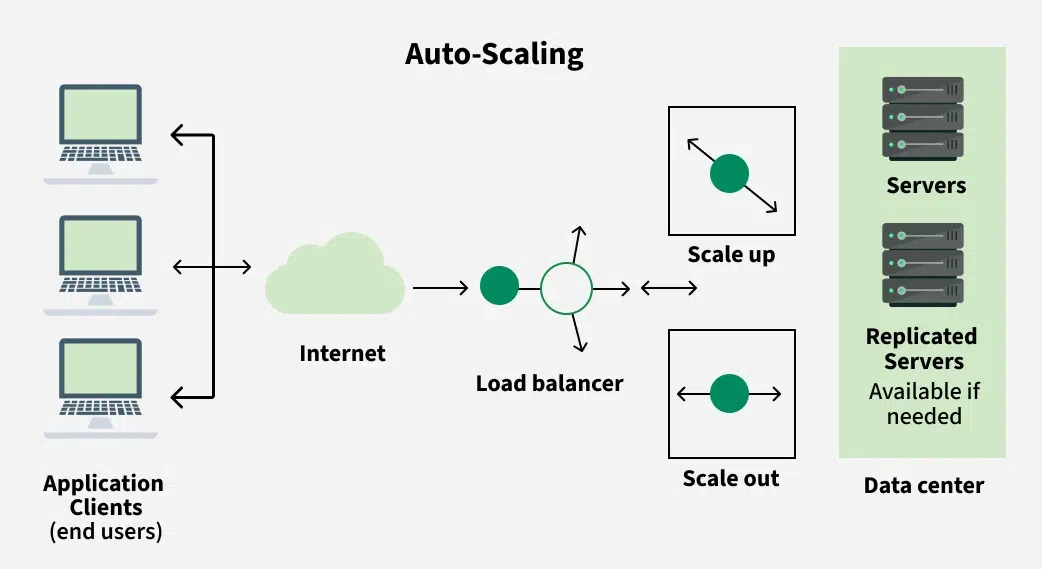
Auto Scaling
- By scaling resources up or down according to predetermined factors like CPU use, network traffic, or other indicators, it enables systems to effectively accommodate variations in demand.
- This ensures optimal performance, cost-effectiveness, and reliability without manual intervention, enabling organizations to adapt to varying workload demands in their cloud infrastructure seamlessly.
Importance of Auto Scaling
Auto Scaling is crucial for several reasons:
- **Optimized Performance: Without compromising speed, auto scaling makes sure your system can manage fluctuating workloads or traffic volumes.
- **Cost Efficiency: By dynamically scaling resources up when demand rises and down during times of low demand, it helps in cost optimization.
- Improved **Reliability: By distributing workloads among several instances or servers, auto scaling lowers the possibility of system outages or malfunctions.
- **Scalability****:** With auto scaling, you can easily manage unexpected increases in workload or abrupt spikes in traffic by allowing your system to grow or shrink elastically in response to demand.
Key Components of Auto Scaling
Key Components of Auto Scaling are:
- **Launch Configuration: This sets the guidelines for the instances that Auto Scaling will launch. It includes details like the Amazon Machine Image (AMI), instance type, key pair, security groups, and block device mapping.
- **Auto Scaling Groups (ASG): ASGs are groups of instances that Auto Scaling manages together. They specify the minimum, maximum, and desired number of instances, along with the scaling policies that dictate how to adjust the number of instances.
- **Scaling Policies: These rules determine when and how Auto Scaling should add or remove instances in an ASG based on certain metrics, such as CPU usage, network traffic, or custom metrics from CloudWatch.
- **Scaling Cooldowns: Cooldown periods help prevent sudden changes in the number of instances by imposing a waiting period between scaling actions. This stabilizes the system and minimizes unnecessary adjustments.
- **Health Checks: Auto Scaling conducts health checks on instances to make sure they are operating correctly. If an instance fails a health check, it is terminated and replaced with a functioning one.
- **CloudWatch Alarms: These alarms monitor system metrics and trigger scaling actions when certain thresholds are met. You can set alarms for various performance metrics to ensure a responsive system.
- **Lifecycle Hooks: These allow you to perform specific tasks before instances are launched or terminated during the scaling process. For instance, you can prepare instances before they go live or clean up before they are shut down.
Types of Auto Scaling
Below are the main types of auto scaling:
- **Manual Autoscaling
- Depending on observed changes in workload, this type manually modifies the number of instances. Although it provides control, it needs to be constantly watched over and may not work well when demand fluctuates quickly.
- **Dynamic Autoscaling
- In reaction to real-time indicators like CPU, RAM, or network traffic, dynamic autoscaling automatically modifies the number of instances. This makes it possible to react quickly to shifting workloads.
- **Predictive Autoscaling
- Using machine learning algorithms and historical data, predictive autoscaling predicts future demand and modifies resources in front of spikes. By being proactive, performance problems during peak hours are avoided.
- **Scheduled Autoscaling
- Based on established consumption patterns, scheduled autoscaling determines when to increase or decrease resources. For workloads that are predictable, like a web application that has increased traffic during business hours, it is helpful.
- **Target Tracking Autoscaling
- This technique modifies resources in order to maintain a particular target metric, such as maintaining a particular percentage of CPU usage. It keeps an eye on things and adjusts as needed to make sure performance goals are reached.
- **Resource-based Autoscaling
- Instead of scaling entire instances, this type concentrates on scaling particular resources (such as databases or load balancers). It guarantees that specific parts can meet demand without affecting the system as a whole.
How Auto Scaling Works?
Auto Scaling uses Amazon CloudWatch or other monitoring services to continuously track user-specified parameters, like CPU use, network traffic, or custom metrics. Auto Scaling adjusts the number of instances in an Auto Scaling group (ASG) by initiating scaling operations when the metrics exceed predetermined thresholds or conditions.
Below is the step-by-step overview of how Auto Scaling operates:
- **Step 1: Monitoring: Using CloudWatch or other monitoring services, Auto Scaling continuously keeps an eye on the designated metrics for every instance in the ASG.
- **Step 2: Evaluation: Based on the monitored metrics, Auto Scaling evaluates whether the current capacity meets the defined scaling policies.
- **Step 3: Decision Making: Auto Scaling decides whether to scale in or out based on the established policies and the state of the system if the evaluation shows that scaling is required.
- **Step 4: Scaling Action: Once a decision is made, Auto Scaling takes the necessary action to adjust the capacity of the ASG.
- **Step 4: Health Checks: Auto Scaling makes sure the freshly launched instances are healthy and prepared to handle traffic by performing health checks on them when scaling procedures are completed.
- **Step 5: Cooldown Period: Auto Scaling enforces a cooldown period following scaling actions, during which it waits before starting more scaling actions.
- **Step 6: Feedback Loop: As workload conditions change, Auto Scaling keeps an eye on the system and modifies the number of instances as necessary.
By automating the process of capacity management, Auto Scaling enables organizations to seamlessly adapt to changing workload demands, ensuring that the right amount of resources is available at any given time to support their applications or services.
Auto Scaling Strategies
There are several Auto Scaling strategies that organizations can implement to effectively manage their cloud infrastructure. Some common strategies include:
- **Simple Scaling: This strategy involves setting static thresholds for scaling actions based on predefined metrics such as CPU utilization or network traffic. For example, scaling out when CPU utilization exceeds 70% and scaling in when it drops below 30%.
- **Proportional Scaling: With this strategy, scaling actions are triggered based on proportional changes in workload or resource utilization. For instance, if CPU utilization doubles, the Auto Scaling group would double the number of instances.
- **Predictive Scaling: Predictive scaling uses machine learning algorithms to forecast future workload patterns and proactively adjust the capacity of the Auto Scaling group accordingly. This helps prevent performance degradation during anticipated spikes in demand.
- **Scheduled Scaling: Scheduled scaling allows organizations to define specific time-based schedules for scaling actions. For example, scaling out during peak hours of operation and scaling in during off-peak hours to optimize resource utilization and reduce costs.
- **Dynamic Scaling Policies: These policies dynamically adjust scaling thresholds based on factors such as time of day, day of the week, or other contextual information. For example, scaling thresholds may be higher during weekdays and lower on weekends.
- **Load-based Scaling: Load-based scaling involves scaling actions triggered by changes in application-specific metrics or external load balancer metrics. For example, scaling out when the number of requests per second exceeds a certain threshold.
Auto Scaling in Cloud Environments
Auto Scaling in cloud environments is a crucial feature that allows organizations to dynamically adjust their computational resources based on demand. Here's how Auto Scaling operates within cloud environments:
- Because cloud environments are inherently elastic, resources can be scaled up or down as needed. This is improved by auto scaling, which automates the procedure and guarantees that the appropriate number of resources are always available to manage workload variations.
- Auto Scaling automatically adds more instances or resources when demand rises. This allows applications to manage traffic spikes or increased workloads without needing manual adjustments, ensuring they run smoothly and remain available.
- Auto Scaling helps control expenses by modifying resources according to demand. By avoiding overprovisioning during times of low demand, it lowers wasteful spending while guaranteeing that sufficient resources are available during periods of high demand.
- Auto Scaling improves fault tolerance by spreading workloads across several instances or servers. If one instance fails, Auto Scaling quickly replaces it, helping maintain continuous operation and reducing downtime.
Benefits of Auto Scaling
Below are the benefits of Auto Scaling:
- By adjusting resources according to demand, auto scaling helps prevent overprovisioning and cut down on wasteful expenses during times of low traffic.
- Auto scaling guarantees that applications maintain optimal performance and responsiveness by automatically boosting resources during peak periods.
- By swiftly adding or replacing instances that fail, auto scaling helps ensure application availability and guarantees users have constant access to services.
- Without the need for manual intervention, it enables businesses to swiftly adjust to shifting workloads and successfully handle unforeseen increases or decreases in demand.
Best Practices for Auto Scaling
Implementing Auto Scaling effectively involves following certain best practices to ensure optimal performance, reliability, and cost efficiency. Here are some Auto Scaling best practices:
- **Set Up Monitoring: To keep an eye on important performance indicators like CPU, memory, and network traffic, use monitoring tools like Amazon CloudWatch.
- **Define Clear Scaling Policies: Create precise and well-defined scaling guidelines that complement the performance needs and corporate objectives of your application.
- **Start with Conservative Scaling: To prevent needlessly overprovisioning resources, start with cautious scaling practices.
- **Implement Multiple Availability Zones: Distribute instances over several availability zones to improve resilience and fault tolerance.
Challenges with Auto Scaling
Challenges of Auto Scaling are:
- **Cost Management: Although auto scaling can reduce expenses by automatically allocating resources according to demand, incorrect setup or erratic traffic patterns may result in unforeseen expenses.
- **Complexity of Configuration: It might be difficult to set up monitoring, define scaling policies, and configure Auto Scaling groups, particularly for large-scale applications with a variety of workloads.
- **Scaling Limitations: Certain resource or application types, such as stateful apps or older systems that are not built for dynamic scaling, may be difficult for auto scaling to scale.
- **Performance Impact: Application performance may be impacted by scaling events, such as starting new instances or ending old ones, particularly if improperly handled.
Real-world Use Cases of Auto Scaling
Auto Scaling is widely used across various industries and scenarios to efficiently manage cloud infrastructure and dynamically adjust resources based on changing workload demands. Here are some real-world use cases of Auto Scaling:
- **Web Applications:
- Web applications that encounter varying traffic patterns throughout the day are frequently subjected to auto scaling.
- By automatically adding or removing instances based on traffic volume, auto scaling ensures that the application can handle peak loads during busy times while lowering costs during calm times.
- **E-commerce Websites:
- Traffic to e-commerce websites frequently increases during sales, promotions, and the holidays.
- These websites can automatically scale resources to meet rising demand thanks to auto scaling, which guarantees that users won't see any outages or slowdowns.
- **Media Streaming Platforms:
- Demand for media streaming services fluctuates based on the time of day and the popularity of the material.
- These systems can instantly scale their streaming infrastructure up or down thanks to auto scaling, which guarantees users uninterrupted streaming and fluid playback.
Auto Scaling vs. Load Balancing
auto scaling focuses on adjusting the number of resources available, while load balancing manages how incoming traffic is distributed across those resources. Both are essential for maintaining performance and efficiency in cloud environments. Below are the differences between auto scaling and load balancing:
| Aspect | Auto Scaling | Load Balancing |
|---|---|---|
| Purpose | Automatically adjusts the number of instances based on demand. | Distributes incoming traffic across multiple servers to ensure no single server is overwhelmed. |
| Functionality | Increases or decreases resources as needed to handle workload fluctuations. | Routes requests to available servers, optimizing resource use and improving response times. |
| Scaling | Focuses on scaling resources up or down. | Maintains performance by balancing traffic among existing resources. |
| Response to Demand | Reacts to changes in workload or traffic patterns over time. | Handles requests in real-time as they come in, regardless of server capacity. |
| Configuration | Requires policies and metrics to determine scaling actions. | Uses algorithms (like round-robin or least connections) to manage traffic distribution. |
| Impact on Resources | Can create or terminate instances based on demand. | Does not create or destroy instances; it only manages traffic to existing resources. |
| Cost Management | Helps optimize costs by ensuring you’re only using the resources needed at any time. | Does not directly manage costs, but improves resource utilization by preventing overloads. |