How to Identify and Spot Phishing Emails with Examples (2025 Updated) (original) (raw)
Last Updated : 23 Jul, 2025
Phishing emails are one of the most common and misleading ways cybercriminals attempt to steal personal information, financial details, or credentials. These emails often appear legitimate, using techniques designed to trick the recipient into taking actions that compromise their privacy and security. In this in-depth guide, we will explore the various methods for **how to identify phishing emails, provide real-world examples, and offer actionable tips for both beginners and advanced users to **recognize phishing emails.
Whether you use the internet casually or are an experienced internet user, knowing how to **spot phishing emails can save you from significant financial losses and personal data theft.
How to Identify Phishing Emails with Examples
**What is a Phishing Email?
A **phishing email is a fraudulent email designed to trick you into revealing sensitive information, such as passwords, credit card numbers, or social security numbers. These emails often appear to come from legitimate organizations like banks, online retailers, or even colleagues within your company.
**Why Do Phishing Emails Work?
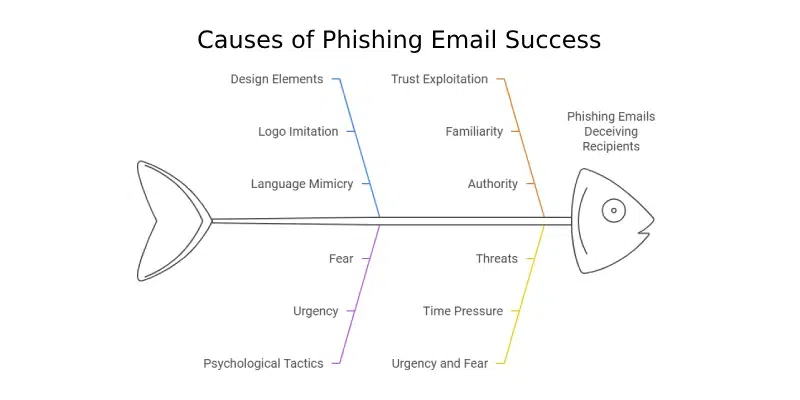
Phishing emails are effective because they exploit human psychology. Cybercriminals often use social engineering techniques, creating a sense of urgency, fear, or excitement. They mimic trustworthy sources (e.g., official logos, email addresses, language) to make the email look legitimate, causing the victim to act impulsively without considering the consequences.
Phishing Email
Techniques Used in Phishing Attacks
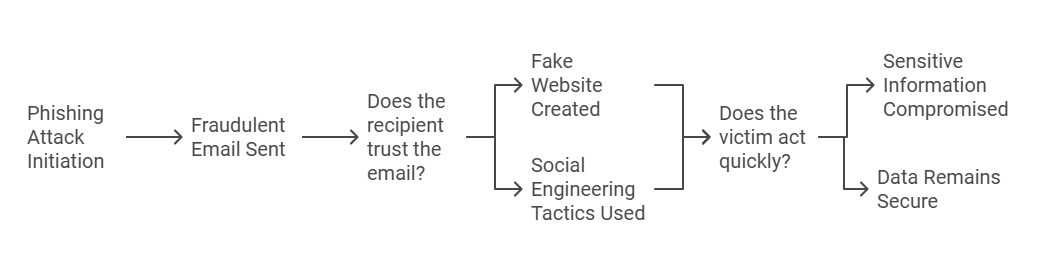
Phishing attacks can be executed using various techniques, including:
- **Email Spoofing: This involves forging the sender's address to make it appear as though the email is coming from a trusted source.
- **Social Engineering: Attackers often use social engineering tactics to manipulate victims into divulging personal information. This may involve impersonating a colleague or a trusted service provider.
- **Malware Delivery: Some phishing emails contain malicious attachments or links that, when clicked, download malware onto the victim's device.
Techniques Used in Phishing Attacks
**How to Recognize a Phishing Email: Key Indicators
Several common ways can easily help you **identify phishing emails. Here are the most important indicators to watch for:
1. **Check the Email Address
Phishers often hide their real email addresses to look like they’re from reputable sources. Pay attention to slight variations in the sender's email address.
- **Legitimate emails: From well-known domains like
@bank.comor@amazon.com. - **Phishing attempt: Look for unusual domain names like
@service-support.comor@amazonsupport.net. The domain name might be similar to a legitimate domain but with an extra character or misspelled.
**Example:
- **Phishing: support@amaz0n-security.com (Note the "0" instead of the letter "o").
- **Legitimate: support@amazon.com
2. **Suspicious or Generic Greeting
Phishing emails often use a generic greeting such as “Dear Customer” or “Dear User” because the attacker does not know your actual Name or Gender.
- **Legitimate emails: Most legitimate companies address you by your name (e.g., "Dear John Doe").
- **Phishing attempt: Generic greetings or misspellings in the salutation are red flags.
**Example:
- **Phishing: "Dear Customer, your account has been compromised."
- **Legitimate: "Dear John Doe, we’ve noticed unusual activity on your account."
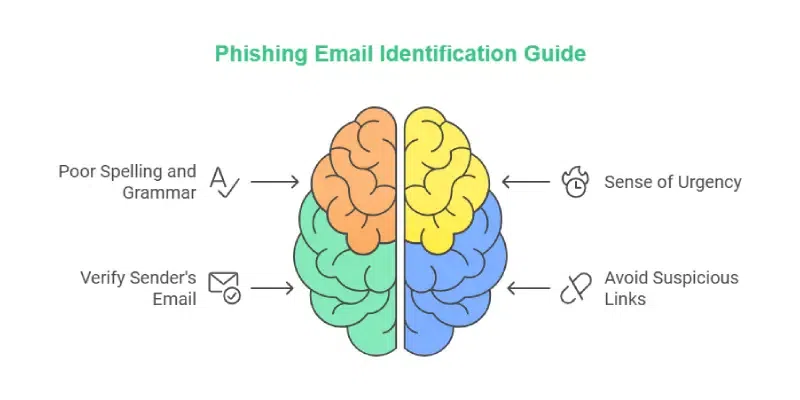
3. **Sense of Urgency or Threat
Phishing emails often create a sense of urgency or fear to prompt quick action. For example, they might threaten that your account will be locked unless you take action immediately, or you risk losing a reward.
- **Legitimate emails: Legitimate companies usually don’t pressure you to act right away.
- **Phishing attempt: Emails that demand immediate action to avoid penalties or losses are highly suspicious.
**Example:
- **Phishing: “Your account has been compromised. Click here immediately to avoid your account being locked.”
- **Legitimate: “We’ve detected some unusual activity. Please review your account when convenient.”
4. **Suspicious Links or Attachments
Phishing emails often include suspicious links or attachments designed to install malware on your device or steal your information. Hover over any link to check its destination URL.
- **Legitimate emails: Links in legitimate emails lead to official websites (e.g.,
https://www.amazon.com/). - **Phishing attempt: Hovering over a link might show a different URL than expected, such as
http://www.malicioussite.com.
**Example:
- **Phishing: A link that looks like
www.yourbank-secure.com, but actually redirects towww.maliciousbank.com.- **Legitimate: A direct link to the official website (e.g.,
www.yourbank.com).
5. **Grammar and Spelling Mistakes
Many phishing emails contain noticeable spelling or grammatical errors. These can often be overlooked, but paying attention to these small mistakes can help you **recognize a phishing email.
- **Legitimate emails: Professional emails from reputable companies are proofread and free of errors.
- **Phishing attempt: Phishing emails may have awkward phrasing, incorrect spelling, or missing punctuation.
**Example:
- **Phishing: “Your accunt is suspecious, click here to secure your profile.”
- **Legitimate: “Your account has been flagged for suspicious activity. Please review your account details.”
6. **Unsolicited Requests for Personal Information
Phishing emails often ask you to provide sensitive information, such as login credentials, credit card details, or personal information.
- **Legitimate emails: No reputable company will ask you to provide sensitive information via email.
- **Phishing attempt: Emails requesting you to confirm your login information, PIN, or Social Security number.
**Example:
- **Phishing: “We need to confirm your identity. Please provide your username and password to avoid account suspension.”
- **Legitimate: “We noticed suspicious activity on your account. Please review your recent transactions.”
7. **Too Good to Be True Offers
If an email promises you something that seems too good to be true (like a large sum of money or an unbelievable discount), it’s probably a phishing attempt. Phishers use attractive offers to lure you into clicking a malicious link.
- **Legitimate emails: Any legitimate offer will be reasonable and include a clear explanation.
- **Phishing attempt: Offers that sound unrealistic or too generous to be true are common in phishing emails.
**Example:
- **Phishing: “Congratulations! You’ve won $1,000,000. Click here to claim your prize.”
- **Legitimate: “We are offering a limited-time discount on your next purchase.”
**How to Spot a Phishing Email (Advanced Techniques)
For more advanced users, identifying phishing attempts may involve examining headers and using tools to detect malicious emails.
1. **Examine the Email Header
The email header provides information about the sender, path of the message, and more. By analyzing the header, you can check if the email has come from a legitimate source.
- **Check the Return-Path: This field tells you where the email came from. If the domain doesn’t match the sender, it’s likely a phishing attempt.
- **Authentication Results: Look for SPF (Sender Policy Framework) and DKIM (DomainKeys Identified Mail) results in the header. These help verify if the email came from a trusted source.
2. **Use Anti-Phishing Tools and Filters
Most email providers, including Gmail, Outlook, and Yahoo, have built-in spam filters that can help identify phishing attempts. Additionally, tools like **PhishTool or **Email Verification Services can assist in validating the sender and authenticity of the email.
3. **Verify Through Official Channels
If an email from a bank, service, or friend seems suspicious, always verify through official channels. For example, don’t click on the links in the email—go to the official website directly and log into your account to check for any updates.
How to Spot a Phishing Email
**Real-World Examples of Phishing Emails
Here are two examples of **phishing emails and how you can identify them:
**Example 1:
**Subject: “Action Required: Secure Your Account Now”
- **Suspicious email address: security@fakebank.com.
- **Suspicious links: Links in the email redirect to a website with a domain name
www.fakebankaccountverify.com. - **Urgency: The email creates a sense of urgency, claiming that your account will be locked unless you confirm your details immediately.
- **Call to action: Clicking on the link asks for your username, password, and social security number.
**Example 2:
**Subject: “You’ve Won a Free iPhone! Claim Your Prize Now!”
- **Suspicious email address: promotions@randomstuff.com.
- **Too good to be true: Offering an iPhone for free with no strings attached.
- **Suspicious links: Directs to an unfamiliar site requiring personal details like credit card numbers.
- **No contact info: No physical address, phone number, or customer service info in the email footer.
**Conclusion
Identifying phishing emails is crucial for your online security. By staying vigilant and examining the details of suspicious emails, you can significantly reduce the risk of falling victim to phishing scams. For beginners, focus on obvious signs such as misspelled domain names, poor grammar, and unsolicited requests for sensitive information. Advanced users can use tools like header analysis and email verification services to dig deeper.
By knowing **how to recognize a phishing email and **how to spot phishing emails, you can protect yourself from online fraud and identity theft. Always proceed with caution when dealing with suspicious emails, and when in doubt, verify the message through other channels.