Guidance for detecting, investigating, and defending against the Trivy supply chain compromise | Microsoft Security Blog (original) (raw)
On March 19, 2026, Trivy, Aqua Security’s widely used open-source vulnerability scanner, was reported to have been compromised in a sophisticated CI/CD-focused supply chain attack. Threat actors leveraged access from a prior incident that was not fully remediated to inject credential-stealing malware into official releases of Aqua Security’s widely adopted open-source vulnerability scanner, Trivy. The attack simultaneously compromised the core scanner binary, the trivy-action GitHub Action, and the setup-trivy GitHub Action, weaponizing trusted security tooling against the organizations relying on it.
The campaign, attributed to the threat actor identifying as TeamPCP, introduces several concerning techniques. This blog walks through the Trivy supply chain attack and explains how Microsoft Defender helps organizations detect, investigate, and respond to this incident.
This activity has since expanded to additional frameworks, including Checkmarx KICS and LiteLLM, with further details to be shared as the investigation continues.
Update (April 27): Microsoft Defender has observed the campaign expanding to the Bitwarden CLI npm package (v2026.4.0) and the checkmarx/kics Docker Hub repository. The observed techniques remain consistent with the earlier waves, with the same overarching objective: harvesting credentials and other sensitive data from developer and CI/CD environments, followed by exfiltration. Common network indicators observed across these compromises include 94[.]154[.]172[.]43 and audit[.]checkmarx[.]cx.
Update (March 25): Microsoft Defender for Cloud has since observed the campaign expanding to Checkmarx KICS (March 23) and LiteLLM (March 24). The core attack chain remained similar: broad credential harvesting with a focus on cloud credentials, including AWS IAM, GCP service account keys, and Azure environment variables, alongside Kubernetes secret enumeration and database credential searches, all exfiltrated to an attacker-controlled domain as an encrypted `tpcp.tar.gz` archive. Each wave used a new C2 domain themed to the compromised project: `checkmarx[.]zone` for the Checkmarx attack and `models.litellm[.]cloud` for LiteLLM. Refer to the updated mitigation table below for affected versions.
Analyzing the Trivy supply chain compromise
The activity on March 19 represents the execution phase of the campaign, where previously established access was used to weaponize trusted Trivy distribution channels:
- Poisoning GitHub Actions used in CI/CD pipelines: Using compromised credentials with tag write access, the attacker force-pushed 76 of 77 version tags in aquasecurity/trivy-action and all 7 tags in aquasecurity/setup-trivy, redirecting existing, trusted version references to malicious commits. This caused downstream workflows to execute attacker-controlled code without any visible change to release metadata.
- Publishing a malicious Trivy binary: In parallel, the attacker triggered release automation to publish an infected Trivy binary (v0.69.4) to official distribution channels, including GitHub Releases and container registries, exposing both CI/CD environments and developer machines to credential theft and persistence.
- Maintaining stealth and impact window: Both the compromised GitHub Actions and the malicious binary were designed to execute credential-harvesting logic in addition to the legitimate Trivy functionality, allowing workflows and scans to appear successful while secrets were exfiltrated.
- Attack containment by maintainers: Later that day, the Trivy team identified the compromise and removed malicious artifacts from distribution channels, ending the active propagation phase.
How Git’s design was abused in the attack
This attack exploited two aspects of how Git and GitHub operate by design: mutable tags and self-declared commit identity, turning expected platform behavior into an advantage for the attacker.
In Git, a tag is a label that maps to a specific commit in the repository’s history. By default, these references are not immutable – anyone with push access can reassign an existing tag to point to an entirely different commit. The attacker did exactly that, replacing the target commit behind 76 of 77 tags in trivy-action and all 7 in setup-trivy with commits containing malicious payloads. Every CI/CD pipeline that referenced these actions by tag name began running the attacker’s code on its next execution, with no visible change on GitHub to alert maintainers or consumers.
In addition, the threat actor spoofed the identity of the commit, similar to the persona impersonation tactics seen in the Shai-Hulud 2.0 campaign.
For GitHub specific guidance, learn more about strengthening your supply chain.
Exploitation details
Microsoft Defender for Cloud observed the full attack chain in compromised self-hosted GitHub Actions runners.
Upon execution, the entry point performed process discovery to locate runner processes (Runner.Worker, Runner.Listener), then inspected them to identify processes carrying secrets. A base64-encoded Python payload was then decoded and executed to handle the credential harvesting phase.
The Python stealer first fingerprinted the host (“hostname”, “whoami”, “uname -a”, “ip addr”) and dumped all environment variables (via “printenv”). It then conducted broad-spectrum credential harvesting that reveals the attacker’s interest in maximizing the value of each compromised runner:
- Cloud credentials: For each major cloud provider, the stealer combined environment variable extraction with deeper credential access attempts:
- AWS: Harvested environment variables (“
_grep AWS”_), then queried both the ECS task metadata endpoint (169.254.170.2) and the EC2 instance metadata service (169.254.169.254) for IAM credentials. - GCP: Harvested environment variables (“
grep -igoogle”, “grep -igcloud”) and attempted to read the service account key file via_$GOOGLEAPPLICATIONCREDENTIALS_. - Azure: Harvested environment variables (“
grep -iazure”).
- AWS: Harvested environment variables (“
- Kubernetes secrets: Enumeration and exfiltration of mounted service-account files (under “_/run/secrets/kubernetes.io/serviceaccount/”_), and an attempt to dump all cluster secrets with Kubernetes CLI (“kubectl get secrets –all-namespaces -o json”).
- CI/CD and application secrets: Reading the runner’s internal environment files, recursive filesystem searches for API keys and tokens in “.env”, “.json”, “.yml”, and “.yaml” files, and harvesting of Slack and Discord webhook URLs.
- Infrastructure and access: Extraction of WireGuard VPN configurations (“wg showconf all”), SSH authentication logs (“/var/log/auth.log”, “/var/log/secure”), and database connection strings (MySQL, PostgreSQL, MongoDB, Redis, Vault).
- Cryptocurrency: Searches for Solana wallet variables and RPC authentication credentials (rpcuser, rpcpassword).
The stolen data was then encrypted using a hybrid AES-256-CBC + RSA scheme and bundled into a tpcp.tar.gz archive, then exfiltrated via HTTP POST to the typosquatted domain scan.aquasecurtiy[.]org.
After exfiltration, the malware cleaned up all temporary files and launched the legitimate Trivy scan. The workflow completed successfully with expected output, masking the compromise from pipeline operators.
Bitwarden CLI and Checkmarx/kics Docker compromise
How trusted developer tools became the attack surface
Recent supply chain compromises targeting developer tooling reveal a mature and repeating playbook: instead of deploying standalone malware, attackers are embedding credential-stealing logic directly into trusted software distribution paths.
Initial access: Hijacking package installation
In the Bitwarden incident, the attacker published a compromised @bitwarden/cli@2026.4.0 package to npm containing a malicious preinstall hook. Upon installation, this hook silently downloaded the Bun runtime and launched a heavily obfuscated ~10MB JavaScript payload — a single-line file using import.meta.require and a seeded Fisher-Yates shuffle cipher (__decodeScrambled, seed 0x3039) across 36 call sites to hide critical strings like C2 domains and shell commands. The related Checkmarx incident followed the same model: malicious artifacts were introduced through official channels, including poisoned KICS container images and developer tool releases that could silently fetch and execute a remote addon.
Execution: Multi-stage, hiding in plain sight
What makes this attack chain effective is that malicious execution is embedded within normal developer workflows. The payload does not behave like traditional malware — it runs in the same context as a legitimate npm install, a CI scan, or a browser extension update. The obfuscated JavaScript bundles ~8MB of legitimate AWS SDK, Google Cloud, Azure Identity, and Octokit libraries alongside the malicious collector and exfiltration classes. Because the tool still functions as expected (scans complete, installs succeed), operators see no disruption, and the theft of secrets goes unnoticed.
The malware also gates execution on CI/CD environment detection, checking 27+ platform-specific environment variables (GitHub Actions, GitLab CI, CircleCI, Jenkins, Buildkite, Travis, CodeBuild, and many more) before activating the full payload — ensuring it runs where secrets are richest.
Anti-analysis and evasion
The malware employs several techniques to resist detection and analysis:
- String obfuscation: All critical strings (C2 domains, API URLs, shell commands) are encrypted via a seeded Fisher-Yates cipher and decoded at runtime.
- Control-flow flattening: Hex lookup tables (_0x214e, _0x5747) obscure code structure.
- CIS-region exclusion: Exits if the system locale is Russian (ru), a hallmark of Eastern European threat actors.
- Self-daemonization: Spawns a detached copy of itself with __DAEMONIZED=1 to survive parent process termination.
- Single-instance locking: PID file in the system temp directory prevents duplicate execution.
- Active re-obfuscation: Analyzed variants share identical architecture and cipher seed but use different class names and lookup tables, indicating automated re-obfuscation to evade signature-based detection.
Objective: Broad credential harvesting
The post-execution goal across these incidents is systematic, broad credential collection — not narrow host compromise. Microsoft’s malware analysis of the Bitwarden payloads (Variant A and Variant B) confirmed 9–10 distinct collector modules, each targeting a different secret source:
| Target | Method |
|---|---|
| GitHub tokens (ghp_, gho_) | Regex scan of env vars and filesystem; validated against api.github.com/user; scope-checked for repo and workflow |
| NPM tokens (npm_) | Regex scan across 9–11 references; used to republish poisoned packages |
| AWS secrets | SDK calls to STS, Secrets Manager, and SSM Parameter Store; EC2 IMDS (169.254.169.254) for ambient credentials |
| GCP secrets | Secret Manager API with cloud-platform OAuth scope; project enumeration via Cloud Resource Manager |
| Azure secrets | Key Vault SDK (@azure/keyvault-secrets); DefaultAzureCredential for ambient identity; sovereign cloud support (China, US Gov) |
| Environment variables | Full process.env dump from CI runners |
| Shell history & config | execSync commands to harvest SSH keys, shell history, and AI tool config files |
The Checkmarx and broader TeamPCP campaign reporting describe the same pattern: harvesting AWS IAM credentials, GCP service account material, Kubernetes secrets, database credentials, and CI/CD pipeline secrets.
Exfiltration: Dual channels, encrypted and stealthy
The malware uses two parallel exfiltration channels:
- HTTPS POST to C2: Stolen data is encrypted (SHA-256 + base64), then sent to an attacker-controlled domain decoded at runtime via the scramble cipher. The C2 domain impersonates legitimate security vendors (e.g., Checkmarx-themed infrastructure).
- GitHub repository commits: Using stolen GitHub tokens, the malware commits base64-encoded JSON files to attacker-controlled repos via the Octokit createOrUpdateFileContents API, blending exfiltration traffic with normal GitHub activity.
- In the broader campaign, harvested data was also bundled into encrypted archives (e.g., tpcp.tar.gz) and exfiltrated to project-themed attacker-controlled domains.
Propagation: From stolen tokens to supply chain spread
The attack does not stop at collection. Stolen NPM tokens are used to download legitimate packages, inject a malicious preinstall hook, bump the patch version, and republish — turning each compromise into a new supply chain vector. Valid GitHub tokens were used to enumerate repositories, extract GitHub Actions secrets, and inject malicious workflows. This creates a self-reinforcing loop: each compromised developer workstation or CI/CD pipeline becomes a pivot point for further downstream compromise.
Reconnaissance activity linked to exfiltration infrastructure
The same infrastructure used for data exfiltration in this campaign was also observed conducting reconnaissance activity against Google Cloud Kubernetes (GKE) environments in late March 2026. The scanning activity used the LibRedTail-http user agent and issued Kubernetes API POST requests containing cgi-bin path-traversal payloads designed to reach /bin/sh (e.g., cgi-bin/../../../../../../../../../bin/sh and percent-encoded variants such as cgi-bin/.%2e/.%2e/…/bin/sh) — a pattern consistent with automated exploitation probes against misconfigured or vulnerable cluster endpoints.
The LibRedTail-http user agent has been previously reported as malicious scanner traffic probing cgi-bin and exploit-prone endpoints.
Visibility into cloud activity logs, for example through Microsoft Defender for Cloud Apps’ Google Cloud Platform connector, can help surface this type of scanning behavior and support early detection of reconnaissance targeting cloud environments. Guidance to set up the connector: Protect your Google Cloud Platform environment.
Detection and investigation
Microsoft Defender XDR customers can refer to the list of applicable detections below. Microsoft Defender XDR coordinates detection, prevention, investigation, and response across endpoints, identities, email, and apps to provide integrated protection against attacks like the threat discussed in this blog.
Customers with provisioned access can also use Microsoft Security Copilot in Microsoft Defender to investigate and respond to incidents, hunt for threats, and protect their organization with relevant threat intelligence.
| Tactic | Observed activity | Microsoft Defender coverage |
|---|---|---|
| Execution | In the Trivy campaign, the malicious entrypoint.sh runs automatically during the Action, injecting ~105 lines of stealer code before executing the legitimate Trivy logic. In the LiteLLM campaign, the malicious code (base64-decoded stealer) executes via Python. In 1.82.7 it runs at import litellm.proxy.proxy_server; In 1.82.8 the .pth file triggers automatically on every Python interpreter startup. | Microsoft Defender for Endpoint: – Trojan:Linux/EntryPointStealer.BZ – Trojan:Python/PthLlmStealer.BZ -Trojan:Python/PthLlmStealer.DB!MTB– Trojan:JS/ShaiWorm.DN!MTB – Trojan:JS/CheckKics.DB!MTB |
| Credential access | Access to the IMDS endpoint in cloud resources to steal cloud tokens | Microsoft Defender for Cloud: – Access to cloud metadata service detected Microsoft Defender for Endpoint: – Suspicious curl behavior |
| Credential access | Secret Reconnaissance on containers served as CI\CD runners | Microsoft Defender for Cloud: – Possible Secret Reconnaissance Detected Microsoft Defender for Endpoint: – Kubernetes Secrets Enumeration Indicative of Credential Access– Credential access attempt |
| Command and Control | DNS query to a domain name which is identified as suspicious by Microsoft Threat Intelligence – including the scan[.]aquasecurtiy[.]org domain (and others) | Microsoft Defender for Identity:– Suspicious DNS query from a device in the organizationMicrosoft Defender for Endpoint: – Suspicious connection blocked by network protection – Suspicious activity linked to an emerging threat actor has been detected – Connection to a custom network indicator |
| Exfiltration | Malicious exfiltration activity performed by infected Trivy version | Microsoft Defender for Cloud:– Malicious commands from TeamPCP supply chain attack detectedMicrosoft Defender for Endpoint: – Possible data exfiltration using curl |
Mitigation and protection guidance
The recent compromise affecting Trivy and related GitHub Actions highlights how attackers increasingly target CI/CD pipelines, trusted developer tooling and software supply chains. In this campaign, adversaries exploited insecure workflow configurations, abused trusted version tags and leveraged stolen credentials to distribute malicious artifacts and exfiltrate secrets.
Microsoft Defender recommends organizations to adopt the following preventative measures to reduce exposure to similar attacks.
Immediately update to safe versions: Ensure all workflows are running verified safe versions:
| Product | Component | Safe Version |
|---|---|---|
| Trivy | Trivy binary | v0.69.2 – v0.69.3 |
| trivy-action | v0.35.0 | |
| setup-trivy | v0.2.6 | |
| LiteLLM (Update) | litellm | v1.82.6 and below |
| Checkmarx (Update) | checkmarx.cx-dev-assist | 1.10.0 and above |
| checkmarx.ast-results | 2.56.0 and above | |
| ast-github-action | 2.3.33 | |
| kics-github-action | 2.1.20 | |
| Bitwarden | bitwarden/cli | 2026.4.1 2026.3.0 and below |
Harden CI/CD pipelines against supply chain attacks
Pin all third-party actions to immutable references:
- Pin GitHub Actions to commit SHA rather than version tags (e.g., @v1), as tags can be force-modified by attackers.
- Regularly audit workflows for tag-based references; replace them with verified SHAs.
Restrict action usage through policy controls:
- Use organization-level policies to allow only approved actions.
- Block unverified or newly introduced external actions by default.
- Publish using immutable release to prevent attackers from replacing the commit behind released versions.
- Review your CI/CD audit logs for unexpected updates to already released versions.
Enforce least privilege and strong identity controls
Minimize token and permission scope:
- Configure GITHUB_TOKEN and other credentials with minimum required permissions.
- Avoid granting write permissions unless strictly necessary.
Protect secrets and sensitive data in pipelines
Eliminate implicit secret exposure:
- Avoid injecting secrets into environment variables when not required.
- Store secrets in dedicated secret managers and retrieve them just-in-time.
Disable credential persistence on runners:
- Ensure credentials are not persisted to disk or reused across jobs.
- Use ephemeral runners or clean environments to prevent cross-job secret leakage.
Reduce lateral movement risk through Attack Path analysis
Organizations can reduce the risk of credential-driven lateral movement by leveraging attack path analysis in Microsoft Defender. This capability provides visibility into how identities, secrets, misconfigurations and resources are interconnected across the environment. By continuously analyzing these relationships, Defender identifies attack paths involving leaked or overprivileged secrets, including those used in CI/CD pipelines.
Security teams can use these insights to proactively remediate risk by removing excessive permissions, rotating credentials, and segmenting access, effectively limiting how far an attacker could move if a pipeline or token is compromised.
Assess blast radius using Advanced Hunting
The Exposure Management graph provides a unified representation of organizational assets and their relationships, including identities, endpoints, cloud resources and secrets. This graph is also exposed to customers through Advanced Hunting in Microsoft Defender, enabling programmatic exploration of these connections.
Using Advanced Hunting, security teams can query this graph to assess the potential blast radius of any given node, such as a leaked CI/CD secret or compromised identity. By understanding which assets are reachable through existing permissions and trust relationships, organizations can prioritize remediation of the most critical exposure paths.
Additional examples and query patterns are available here as well as in the following Advanced Hunting Queries section below.
If your organization believes it has been impacted by this supply chain compromise, Microsoft Incident Response is available to provide immediate investigation, containment, and recovery support. Contact Microsoft Incident Response
Microsoft Defender for Cloud: Possibly compromised packages
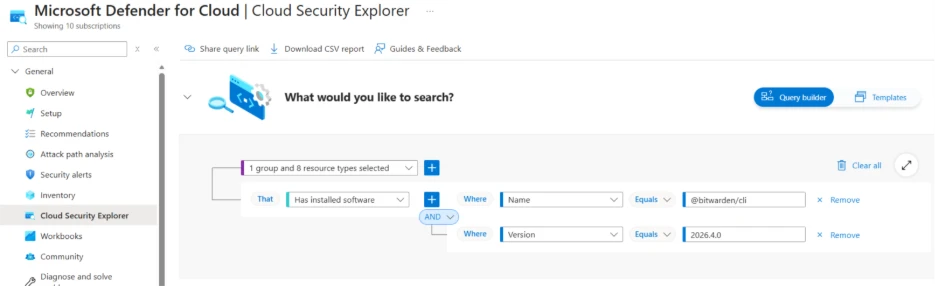
Microsoft Defender for Cloud customers can use cloud security explorer to surface possibly compromised software packages. The following screenshot represents a query that searches for container images and code repositories with the @bitwarden/cli node package.
Advanced hunting queries
CloudProcessEvents query to identify malicious commands originating from the recent TeamPCP supply-chain attacks.
CloudProcessEvents
| where ProcessCommandLine has_any ('scan.aquasecurtiy.org','45.148.10.212','plug-tab-protective-relay.trycloudflare.com','tdtqy-oyaaa-aaaae-af2dq-cai.raw.icp0.io','checkmarx.zone','models.litellm.cloud','/tmp/runner_collected_','tpcp.tar.gz','94.154.172.43','audit.checkmarx.cx','node bw_setup.js','/bun bw1.js') or (ParentProcessName == 'entrypoint.sh' and ProcessCommandLine has 'grep -qiE (env|ssh)')
Kubernetes secrets enumeration
DeviceProcessEvents | where FileName == "bash" | where InitiatingProcessFileName != "claude" | where InitiatingProcessParentFileName != "claude" | where ProcessCommandLine !contains "claude" | where ProcessCommandLine has_all ("kubectl get secrets ", " --all-namespaces ", " -o json ", " || true")
Credential enumeration
let GCP_Enumeration = pack_array('$GOOGLE_APPLICATION_CREDENTIALS', 'cat', '2>/dev/null', '||'); let AWS_Enumeration = pack_array('AWS_CONTAINER_CREDENTIALS_RELATIVE_URI', 'curl -s', '2>/dev/null'); let Kubernetes_Enumeration = pack_array('kubectl get secrets --all-namespaces', '2>/dev/null'); DeviceProcessEvents | where FileName in ('dash', 'bash', 'sh') | where InitiatingProcessFileName contains "python" | where ProcessCommandLine has_all (GCP_Enumeration) or ProcessCommandLine has_all (AWS_Enumeration) or ProcessCommandLine has_all (Kubernetes_Enumeration) | where ProcessCommandLine !has_cs 'ADC'
let GCP_Enum = pack_array('gcloud config config-helper');
let GitHub_Enum = pack_array('gh auth token');
let Azure_Enum = pack_array('az account get-access-token', 'azd auth token', 'Get-AzAccessToken' );
DeviceProcessEvents
| where InitiatingProcessParentFileName == 'bun'
| where ProcessCommandLine has_any (GCP_Enum, GitHub_Enum, Azure_Enum)
| where InitiatingProcessCommandLine has_all ('checkmarx', '.js')
Exfiltration via curl from a Trivy process
DeviceProcessEvents | where FileName == "curl" | where InitiatingProcessCommandLine contains "trivy-action" | where ProcessCommandLine contains " POST " | where ProcessCommandLine contains " --data-binary"
Typosquatted C2 Domain in Command Line
CloudProcessEvents
| where ProcessCommandLine has_any (
// Typosquatted C2 domain
"scan.aquasecurtiy.org", "aquasecurtiy.org",
// C2 IP
"45.148.10.212”)
| project Timestamp, KubernetesPodName, KubernetesNamespace, AzureResourceId, ContainerName, ContainerId, ContainerImageName, ProcessName, ProcessCommandLine, ParentProcessName, FileName
OpenSSL-based encryption operations
CloudProcessEvents | where ProcessName == "openssl" and ProcessCommandLine has_any ( "enc -aes-256-cbc", "enc -aes-256",) and and ProcessCommandLine has "-pass file:" | project Timestamp, KubernetesPodName, KubernetesNamespace, AzureResourceId, ContainerName, ContainerId, ContainerImageName, ProcessName, ProcessCommandLine, ParentProcessName, FileName
DeviceProcessEvents
| where ProcessCommandLine has_all ('/dev/null', '--data-binary', '-X POST', 'scan.aquasecurtiy.org ')
or ProcessCommandLine has_any ('pgrep -f Runner.Listener', 'pgrep -f Runner.Worker')
or ProcessCommandLine has_any ('tmp/runner_collected_', 'tpcp.tar.gz') and ProcessCommandLine has_any ('curl', 'tar', 'rm', 'openssl enc') and ProcessCommandLine !has 'find'
or InitiatingProcessCommandLine contains '/entrypoint.sh’ and ProcessCommandLine has ‘grep -qiE (env|ssh)’
| join kind=leftouter (DeviceNetworkEvents | where RemoteIP == '45.148.10.122') on DeviceId
| project Timestamp, FileName, ProcessCommandLine, InitiatingProcessCommandLine, InitiatingProcessFolderPath, RemoteIP
Compromised installations of Trivy
DeviceTvmSoftwareInventory | where SoftwareName has "trivy" | where SoftwareVersion has_any ("0.69.4", "0.69.5", "0.69.6")
Scanning activity from known reconnaissance tooling observed in CloudAppEvents table when Google Cloud is set up though Microsoft Defender for Cloud Apps
CloudAppEvents | where UserAgent == "libredtail-http" | where ActionType == "io.k8.post" | where RawActivityData has_any( "cgi-bin/../../../../../../../../../bin/sh", "cgi-bin/.%2e/.%2e/.%2e/.%2e/.%2e/.%2e/.%2e/.%2e/.%2e/.%2e/bin/sh" )
Detect network IP and domain indicators of compromise using ASIM Description: The following query checks IP addresses and domain IOCs across data sources supported by ASIM network session parser //IP list and domain list- _Im_NetworkSession let lookback = 30d; let ioc_ip_addr = dynamic(["94.154.172.43", "45.148.10.212"]); let ioc_domains = dynamic(["http://audit.checkmarx.cx", "http://tdtqy-oyaaa-aaaae-af2dq-cai.raw.icp0.io", "http://models.litellm.cloud", "http://plug-tab-protective-relay.trycloudflare.com", "https://scan.aquasecurtiy.org"]); _Im_NetworkSession(starttime=todatetime(ago(lookback)), endtime=now()) | where DstIpAddr in (ioc_ip_addr) or DstDomain has_any (ioc_domains) | summarize imNWS_mintime=min(TimeGenerated), imNWS_maxtime=max(TimeGenerated), EventCount=count() by SrcIpAddr, DstIpAddr, DstDomain, Dvc, EventProduct, EventVendor
Detect domain and URL indicators of compromise using ASIM Description: The following query checks domain and URL IOCs across data sources supported by ASIM web session parser // Domain list - _Im_WebSession let ioc_domains = dynamic(["http://audit.checkmarx.cx", "http://tdtqy-oyaaa-aaaae-af2dq-cai.raw.icp0.io", "http://models.litellm.cloud", "http://plug-tab-protective-relay.trycloudflare.com", "https://scan.aquasecurtiy.org"]); _Im_WebSession (url_has_any = ioc_domains)
References
Malicious Checkmarx Artifacts Found in Official KICS Docker Repository and Code Extensions (Socket.dev)
Bitwarden CLI Hijacked on npm: Bun-Staged Credential Stealer Targets Developers, GitHub Actions, and AI Tools (Step Security)
Update: Ongoing Investigation and Additional Activity (Aqua)
This research is provided by Microsoft Defender Security Research with contributions from Yossi Weizman, Mathieu Letourneau, Bhakta Pradhan, Hazel Kim, Sagar Patil, Shai Yannai, Gourav Khandelwal, Ofir Mastor, Chinmay Soni, Arlette Umuhire Sangwa, and Ram Pliskin
Learn more
Review our documentation to learn more about our real-time protection capabilities and see how to enable them within your organization.
Learn more about Protect your agents in real-time during runtime (Preview) – Microsoft Defender for Cloud Apps
Explore how to build and customize agents with Copilot Studio Agent Builder
Microsoft 365 Copilot AI security documentation
How Microsoft discovers and mitigates evolving attacks against AI guardrails
Learn more about securing Copilot Studio agents with Microsoft Defender