CONVERT - Data Type Conversion (original) (raw)
Scilab 5.3.3
- Scilab help
- Xcos
- palettes
- Integer palette
- Integer_pal
- BITCLEAR
- BITSET
- CONVERT
- DFLIPFLOP
- DLATCH
- EXTRACTBITS
- INTMUL
- JKFLIPFLOP
- LOGIC
- SHIFT
- SRFLIPFLOP
Please note that the recommended version of Scilab is 2026.0.1. This page might be outdated.
See the recommended documentation of this function
Scilab help >> Xcos > palettes > Integer palette > CONVERT
Block Screenshot

Contents
Description
This block converts an input signal of real double or integer data type to an integer or real double data type. This block is particularly useful to connect a block which accepts or produces only integer data type with another block which produces or accepts only double data type.
It can be also use to get the least significant half of the input by a downgrade conversion like int16 to int8. For this use case and if you do not want a type conversion, you can also use the EXTRACTBITS block with the Bits to extract parameter set toLower half.
For an upgrade conversion of a signed integer to another signed integer, the sign bit is propagated.
When the output is an integer and when overflow occurs the block gives three different forms of results :
- A normal non saturated result. By example, if type is int8 and the result is 128, the block output value will be -128.
- A saturated result. For the previous example the block output value will be 127
- An error message warning the user about the overflow.
The user can select one of these three forms by setting theDo on Overflow field to 0,1 or 2.
Data types
The block supports the following types :
- Input : Scilab's integer and real double data types (Input Type parameter).
- Output : Scilab's integer and real double data types (Output Type parameter).
Dialog box
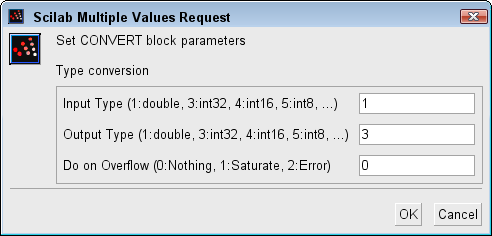
- Input Type (1: double, 3:int32, 4:int16, 5:int8, ...)
It indicates the input data type that it can be a double or an integer: Between 1 and 8.
Properties : Type 'vec' of size 1. - Output Type (1: double, 3:int32, 4:int16, 5:int8, ...)
It indicates the output data type that can be a double or an integer: Between 1 and 8.
Properties : Type 'vec' of size 1. - Do on Overflow (0:Nothing, 1:Saturate, 2:Error)
Between 0 and 2. When there are an overflowing, if parameter is equal to :- 0 : the result is non saturated.
- 1 : the result is saturated.
- 2 : the simulation displays en error message.
Properties : Type 'vec' of size 1.
Default properties
- always active: no
- direct-feedthrough: yes
- zero-crossing: no
- mode: no
- regular inputs:
- port 1 : size [-1,-2] / type 1 - regular outputs:
- port 1 : size [-1,-2] / type 3 - number/sizes of activation inputs: 0
- number/sizes of activation outputs: 0
- continuous-time state: no
- discrete-time state: no
- object discrete-time state: no
- name of computational function: convert
Computational function
- SCI/modules/scicos_blocks/src/c/convert.c
Authors
Fady NASSIF - INRIA