CRUD using SQLAlchemy Core (original) (raw)
- Home
- SQLAlchemy Tutorial
- CRUD using SQLAlchemy Core
Last updated on July 27, 2020
SQL Expression Language #
SQL Expression Language is a backend neutral way to writing SQL statement using Python.
Inserting Records #
There are several ways to insert records into the database. The most basic way is to use the insert() method of the Table instance and pass values of the columns as keyword arguments to the values() method.
| ins = customers.insert().values( first_name = 'John', last_name = 'Green', username = 'johngreen', email = 'johngreen@mail.com', address = '164 Hidden Valley Road', town = 'Norfolk' ) |
|---|
To view the SQL this code would generate type the following:
Expected Output:
| 'INSERT INTO customers (first_name, last_name, username, email, created_on, updated_on) VALUES (:first_name, :last_name, :username, :email, :created_on, :updated_on)' |
|---|
Notice that the VALUES clause contains the bind parameters (i.e a parameter of the form :name) instead of the values passed to the values() method.
When the query is run against the database the dialect will replace the bind parameters with the actual values. The dialect will also escape the values to mitigate the risk of SQL injection.
We can view the values that will replace the bind parameters by compiling the insert statement.
Expected Output:
| {'address': '164 Hidden Valley Road', 'created_on': None, 'email': 'johngreen@mail.com', 'first_name': 'John', 'last_name': 'Green', 'town': 'Norfolk', 'updated_on': None, 'username': 'johngreen'} |
|---|
We have created the insert statement but we haven't sent it to the database. To do that, call the execute() method of the Connection object.
| conn = engine.connect() conn r = conn.execute(ins) r |
|---|
Expected Output:
| <sqlalchemy.engine.base.Connection object at 0x7fa82a7d53c8> <sqlalchemy.engine.result.ResultProxy object at 0x7fa828096da0> |
|---|
The above code inserts the following record in the customers table.
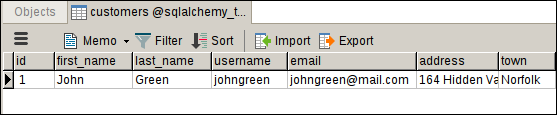
The execute() method returns an object of type ResultProxy. The ResultProxy provides several attributes, one of them is called inserted_primary_key which returns the primary key of the records just inserted.
| r.inserted_primary_key type(r.inserted_primary_key) |
|---|
Expected Output:
Another way to create insert statement is to use the standalone insert() function from the sqlalchemy package.
| 1 2 3 4 5 6 7 8 9 10 11 12 13 | from sqlalchemy import insert ins = insert(customers).values( first_name = 'Katherine', last_name = 'Wilson', username = 'katwilson', email = 'katwilson@gmail.com', address = '4685 West Side Avenue', town = 'Peterbrugh' ) r = conn.execute(ins) r.inserted_primary_key |
|---|
Expected Output:
Multiple Inserts #
Instead of passing values to the values() method as keyword arguments, we can also pass them to the execute() method.
| ins = insert(customers) r = conn.execute(ins, first_name = "Tim", last_name = "Snyder", username = "timsnyder", email = "timsnyder@mail.com", address = '1611 Sundown Lane', town = 'Langdale' ) r.inserted_primary_key |
|---|
Expected Output:
The execute() method is quite flexible because it allows us to insert multiple rows by passing a list of dictionaries each representing a row to be inserted.
| 1 2 3 4 5 6 7 8 9 10 11 12 13 14 15 16 17 18 19 20 21 22 23 24 25 26 27 28 29 30 31 32 33 34 35 36 | r = conn.execute(ins, [ { "first_name": "John", "last_name": "Lara", "username": "johnlara", "email":"johnlara@mail.com", "address": "3073 Derek Drive", "town": "Norfolk" }, { "first_name": "Sarah", "last_name": "Tomlin", "username": "sarahtomlin", "email":"sarahtomlin@mail.com", "address": "3572 Poplar Avenue", "town": "Norfolk" }, { "first_name": "Pablo", "last_name": "Gibson", "username": "pablogibson", "email":"pablogibson@mail.com", "address": "3494 Murry Street", "town": "Peterbrugh" }, { "first_name": "Pablo", "last_name": "Lewis", "username": "pablolewis", "email":"pablolewis@mail.com", "address": "3282 Jerry Toth Drive", "town": "Peterbrugh" }, ]) r.rowcount |
|---|
Expected Output:
Before moving on to the next section, let's add some records to the items, orders and order_lines table.
| 1 2 3 4 5 6 7 8 9 10 11 12 13 14 15 16 17 18 19 20 21 22 23 24 25 26 27 28 29 30 31 32 33 34 35 36 37 38 39 40 41 42 43 44 45 46 47 48 49 50 51 52 53 54 55 56 57 58 59 60 61 62 63 64 65 66 67 68 69 70 71 72 73 74 75 76 77 78 79 80 81 82 83 84 85 86 87 88 89 90 91 92 93 94 | items_list = [ { "name":"Chair", "cost_price": 9.21, "selling_price": 10.81, "quantity": 5 }, { "name":"Pen", "cost_price": 3.45, "selling_price": 4.51, "quantity": 3 }, { "name":"Headphone", "cost_price": 15.52, "selling_price": 16.81, "quantity": 50 }, { "name":"Travel Bag", "cost_price": 20.1, "selling_price": 24.21, "quantity": 50 }, { "name":"Keyboard", "cost_price": 20.12, "selling_price": 22.11, "quantity": 50 }, { "name":"Monitor", "cost_price": 200.14, "selling_price": 212.89, "quantity": 50 }, { "name":"Watch", "cost_price": 100.58, "selling_price": 104.41, "quantity": 50 }, { "name":"Water Bottle", "cost_price": 20.89, "selling_price": 25.00, "quantity": 50 }, ] order_list = [ { "customer_id": 1 }, { "customer_id": 1 } ] order_line_list = [ { "order_id": 1, "item_id": 1, "quantity": 5 }, { "order_id": 1, "item_id": 2, "quantity": 2 }, { "order_id": 1, "item_id": 3, "quantity": 1 }, { "order_id": 2, "item_id": 1, "quantity": 5 }, { "order_id": 2, "item_id": 2, "quantity": 5 }, ] r = conn.execute(insert(items), items_list) r.rowcount r = conn.execute(insert(orders), order_list) r.rowcount r = conn.execute(insert(order_lines), order_line_list) r.rowcount |
|---|
Expected Output:
Selecting Records #
To select records we use select() method of the Table object.
| s = customers.select() str(s) |
|---|
Expected Output:
'SELECT customers.id, customers.first_name, customers.last_name, customers.username, customers.email, customers.address, customers.town, customers.created_on, customers.updated_on \nFROM customers'
As you can see, this query is not qualified in any way, as a result, it will return all the rows from the customers table.
Another way to create SELECT query is to use the standalone select() function. It accepts a list of tables or columns from where to retrieve data.
| from sqlalchemy import select s = select([customers]) str(s) |
|---|
Expected Output:
'SELECT customers.id, customers.first_name, customers.last_name, customers.username, customers.email, customers.address, customers.town, customers.created_on, customers.updated_on \nFROM customers'
As usual, to send the query to the database we use the execute() method:
| r = conn.execute(s) r.fetchall() |
|---|
Expected Output:
| [(1, 'John', 'Green', 'johngreen', 'johngreen@mail.com', '164 Hidden Valley Road', 'Norfolk', datetime.datetime(2018, 7, 8, 19, 6, 13, 844404), datetime.datetime(2018, 7, 8, 19, 6, 13, 844444)), (2, 'Katherine', 'Wilson', 'katwilson', 'katwilson@gmail.com', '4685 West Side Avenue', 'Peterbrugh', datetime.datetime(2018, 7, 8, 20, 37, 57, 407023), datetime.datetime(2018, 7, 8, 20, 37, 57, 407053)), (17, 'Tim', 'Snyder', 'timsnyder', 'timsnyder@mail.com', '1611 Sundown Lane', 'Langdale', datetime.datetime(2018, 7, 8, 22, 19, 55, 721864), datetime.datetime(2018, 7, 8, 22, 19, 55, 721895)), (18, 'John', 'Lara', 'johnlara', 'johnlara@mail.com', '3073 Derek Drive', 'Norfolk', datetime.datetime(2018, 7, 8, 22, 20, 11, 559344), datetime.datetime(2018, 7, 8, 22, 20, 11, 559380)), (19, 'Sarah', 'Tomlin', 'sarahtomlin', 'sarahtomlin@mail.com', '3572 Poplar Avenue', 'Norfolk', datetime.datetime(2018, 7, 8, 22, 20, 11, 559397), datetime.datetime(2018, 7, 8, 22, 20, 11, 559411)), (20, 'Pablo', 'Gibson', 'pablogibson', 'pablogibson@mail.com', '3494 Murry Street', 'Peterbrugh', datetime.datetime(2018, 7, 8, 22, 20, 11, 559424), datetime.datetime(2018, 7, 8, 22, 20, 11, 559437)), (21, 'Pablo', 'Lewis', 'pablolewis', 'pablolewis@mail.com', '3282 Jerry Toth Drive', 'Peterbrugh', datetime.datetime(2018, 7, 8, 22, 20, 11, 559450), datetime.datetime(2018, 7, 8, 22, 20, 11, 559464))] |
|---|
The fetchall() method of the ResultProxy object returns all the records matched by the query. Once the result set is exhausted, subsequent calls to fetchall() will return an empty list.
Expected Output:
The fetchall() method loads all the results into the memory at once. Thus, it is not very efficient on a large reset set. Alternatively, you can use for loop to iterate over the result set one at a time.
| rs = conn.execute(s) for row in rs: print(row) |
|---|
Expected Output:
| (1, 'John', 'Green', 'johngreen', 'johngreen@mail.com', '164 Hidden Valley Road', 'Norfolk', datetime.datetime(2018, 7, 8, 19, 6, 13, 844404), datetime.datetime(2018, 7, 8, 19, 6, 13, 844444)) (2, 'Katherine', 'Wilson', 'katwilson', 'katwilson@gmail.com', '4685 West Side Avenue', 'Peterbrugh', datetime.datetime(2018, 7, 8, 20, 37, 57, 407023), datetime.datetime(2018, 7, 8, 20, 37, 57, 407053)) (17, 'Tim', 'Snyder', 'timsnyder', 'timsnyder@mail.com', '1611 Sundown Lane', 'Langdale', datetime.datetime(2018, 7, 8, 22, 19, 55, 721864), datetime.datetime(2018, 7, 8, 22, 19, 55, 721895)) (18, 'John', 'Lara', 'johnlara', 'johnlara@mail.com', '3073 Derek Drive', 'Norfolk', datetime.datetime(2018, 7, 8, 22, 20, 11, 559344), datetime.datetime(2018, 7, 8, 22, 20, 11, 559380)) (19, 'Sarah', 'Tomlin', 'sarahtomlin', 'sarahtomlin@mail.com', '3572 Poplar Avenue', 'Norfolk', datetime.datetime(2018, 7, 8, 22, 20, 11, 559397), datetime.datetime(2018, 7, 8, 22, 20, 11, 559411)) (20, 'Pablo', 'Gibson', 'pablogibson', 'pablogibson@mail.com', '3494 Murry Street', 'Peterbrugh', datetime.datetime(2018, 7, 8, 22, 20, 11, 559424), datetime.datetime(2018, 7, 8, 22, 20, 11, 559437)) (21, 'Pablo', 'Lewis', 'pablolewis', 'pablolewis@mail.com', '3282 Jerry Toth Drive', 'Peterbrugh', datetime.datetime(2018, 7, 8, 22, 20, 11, 559450), datetime.datetime(2018, 7, 8, 22, 20, 11, 559464)) |
|---|
Here is a list of some common methods and attributes of the ResultProxy object.
| Method/Attribute | Description |
|---|---|
| fetchone() | fetch the next row from the result set. If the result set has been exhausted, subsequent calls to fetchone() returns None. |
| fetchmany(size=None) | fetch the specified number of rows from the result set. If the result set has been exhausted, subsequent calls to fetchmany() returns None. |
| fetchall() | fetch all the rows from the result set. If the result set has been exhausted, subsequent calls to fetchall() returns None. |
| first() | fetch the first row from the result set and close the connection. This means that after calling the first() method we can't access any other rows in the result set, until we send the query to the database again (using the execute() method). |
| rowcount | returns the number of rows in the result set. |
| keys() | returns a list of columns from where data is retrieved. |
| scalar() | fetch the first column from the first row and close the connection. If the result set is empty it returns None. |
The following shell sessions demonstrates methods and attributes we just discussed in action.
fetchone() #
| r = conn.execute(s) r.fetchone() r.fetchone() |
|---|
Expected Output:
| (1, 'John', 'Green', 'johngreen', 'johngreen@mail.com', '164 Hidden Valley Road', 'Norfolk', datetime.datetime(2018, 7, 8, 19, 6, 13, 844404), datetime.datetime(2018, 7, 8, 19, 6, 13, 844444)) (2, 'Katherine', 'Wilson', 'katwilson', 'katwilson@gmail.com', '4685 West Side Avenue', 'Peterbrugh', datetime.datetime(2018, 7, 8, 20, 37, 57, 407023), datetime.datetime(2018, 7, 8, 20, 37, 57, 407053)) |
|---|
fetchmany() #
| r = conn.execute(s) r.fetchmany(3) r.fetchmany(5) |
|---|
Expected Output:
| [(1, 'John', 'Green', 'johngreen', 'johngreen@mail.com', '164 Hidden Valley Road', 'Norfolk', datetime.datetime(2018, 7, 8, 19, 6, 13, 844404), datetime.datetime(2018, 7, 8, 19, 6, 13, 844444)), (2, 'Katherine', 'Wilson', 'katwilson', 'katwilson@gmail.com', '4685 West Side Avenue', 'Peterbrugh', datetime.datetime(2018, 7, 8, 20, 37, 57, 407023), datetime.datetime(2018, 7, 8, 20, 37, 57, 407053)), (17, 'Tim', 'Snyder', 'timsnyder', 'timsnyder@mail.com', '1611 Sundown Lane', 'Langdale', datetime.datetime(2018, 7, 8, 22, 19, 55, 721864), datetime.datetime(2018, 7, 8, 22, 19, 55, 721895))] [(18, 'John', 'Lara', 'johnlara', 'johnlara@mail.com', '3073 Derek Drive', 'Norfolk', datetime.datetime(2018, 7, 8, 22, 20, 11, 559344), datetime.datetime(2018, 7, 8, 22, 20, 11, 559380)), (19, 'Sarah', 'Tomlin', 'sarahtomlin', 'sarahtomlin@mail.com', '3572 Poplar Avenue', 'Norfolk', datetime.datetime(2018, 7, 8, 22, 20, 11, 559397), datetime.datetime(2018, 7, 8, 22, 20, 11, 559411)), (20, 'Pablo', 'Gibson', 'pablogibson', 'pablogibson@mail.com', '3494 Murry Street', 'Peterbrugh', datetime.datetime(2018, 7, 8, 22, 20, 11, 559424), datetime.datetime(2018, 7, 8, 22, 20, 11, 559437)), (21, 'Pablo', 'Lewis', 'pablolewis', 'pablolewis@mail.com', '3282 Jerry Toth Drive', 'Peterbrugh', datetime.datetime(2018, 7, 8, 22, 20, 11, 559450), datetime.datetime(2018, 7, 8, 22, 20, 11, 559464))] |
|---|
first() #
| r = conn.execute(s) r.first() r.first() # this will result in an error |
|---|
Expected Output:
| (4, 'Jon', 'Green', 'jongreen', 'jongreen@gmail.com', datetime.datetime(2018, 6, 22, 10, 3), datetime.datetime(2018, 6, 22, 10, 3)) ... ResourceClosedError: This result object is closed. |
|---|
rowcount #
| r = conn.execute(s) r.rowcount |
|---|
Expected Ouput:
keys() #
Expected Ouput:
| ['id', 'first_name', 'last_name', 'username', 'email', 'address', 'town', 'created_on', 'updated_on'] >>> |
|---|
scalar() #
Expected Ouput:
It is important to note that rows returns by methods fetchxxx() and first() are not tuples or dictionaries, instead, it is an object of type RowProxy, which allows us to access data in the row using column name, index position or Column instance. For example:
| r = conn.execute(s) row = r.fetchone() row type(row) row['id'], row['first_name'] # access column data via column name row[0], row[1] # access column data via column index position row[customers.c.id], row[customers.c.first_name] # access column data via Column object row.id, row.first_name # access column data via attribute |
|---|
Expected Ouput:
| (1, 'John', 'Green', 'johngreen', 'johngreen@mail.com', '164 Hidden Valley Road', 'Norfolk', datetime.datetime(2018, 7, 8, 19, 6, 13, 844404), datetime.datetime(2018, 7, 8, 19, 6, 13, 844444)) sqlalchemy.engine.result.RowProxy (1, 'John') (1, 'John') (1, 'John') (1, 'John') |
|---|
To access data from multiple tables simply pass comma separated list of Table instances to the select() function.
select([tableOne, tableTwo])
This code would return the Cartesian product of rows present in both the tables. We will learn how to create an SQL JOIN later in this chapter.
Filtering Records #
To filter records we use where() method. It accept a condition and adds a WHERE clause to the SELECT statement.
| s = select([items]).where( items.c.cost_price > 20 ) str(s) r = conn.execute(s) r.fetchall() |
|---|
This query will return all the items whose cost price is greater than 20.
Expected Ouput:
| 'SELECT items.id, items.name, items.cost_price, items.selling_price, items.quantity \nFROM items \nWHERE items.cost_price > :cost_price_1' [(4, 'Travel Bag', Decimal('20.10'), Decimal('24.21'), 50), (5, 'Keyboard', Decimal('20.12'), Decimal('22.11'), 50), (6, 'Monitor', Decimal('200.14'), Decimal('212.89'), 50), (7, 'Watch', Decimal('100.58'), Decimal('104.41'), 50), (8, 'Water Bottle', Decimal('20.89'), Decimal('25.00'), 50)] |
|---|
We can specify additional conditions by simple chaining the where() method.
| s = select([items]).\ where(items.c.cost_price + items.c.selling_price > 50).\ where(items.c.quantity > 10) print(s) |
|---|
Expected Ouput:
| SELECT items.id, items.name, items.cost_price, items.selling_price, items.quantity FROM items WHERE items.cost_price + items.selling_price > :param_1 AND items.quantity > :quantity_1 |
|---|
As you can see, when we chain the where() method the conditions are ANDed together.
So how do we specify OR or NOT conditions to our SELECT statement?
It turns out that instead of chaining where() method there are two other ways to combine conditions:
- Bitwise Operators.
- Conjunctions.
Let's start with the first one.
Bitwise Operators #
Bitwise Operators &, | and ~ allow us to connect conditions with SQL AND, OR and NOT operators respectively.
The preceding query can be coded using bitwise operators as follows:
| s = select([items]).\ where( (items.c.cost_price + items.c.selling_price > 50) & (items.c.quantity > 10) ) |
|---|
Notice that the conditions are wrapped using parentheses, this is because the precedence of bitwise operators is greater than that of + and > operators.
Here are some more examples:
Example: 1
| s = select([items]).\ where( (items.c.cost_price > 200 ) | (items.c.quantity < 5) ) print(s) conn.execute(s).fetchall() |
|---|
Expected Ouput:
| SELECT items.id, items.name, items.cost_price, items.selling_price, items.quantity FROM items WHERE items.cost_price > :cost_price_1 OR items.quantity < :quantity_1 [(2, 'Pen', Decimal('3.45'), Decimal('4.51'), 3), (6, 'Monitor', Decimal('200.14'), Decimal('212.89'), 50)] |
|---|
Example: 2
| s = select([items]).\ where( ~(items.c.quantity == 50) ) print(s) conn.execute(s).fetchall() |
|---|
Expected Ouput:
| SELECT items.id, items.name, items.cost_price, items.selling_price, items.quantity FROM items WHERE items.quantity != :quantity_1 [(1, 'Chair', Decimal('9.21'), Decimal('10.81'), 5), (2, 'Pen', Decimal('3.45'), Decimal('4.51'), 3)] |
|---|
Example: 3
| s = select([items]).\ where( ~(items.c.quantity == 50) & (items.c.cost_price < 20) ) print(s) conn.execute(s).fetchall() |
|---|
Expected Ouput:
| SELECT items.id, items.name, items.cost_price, items.selling_price, items.quantity FROM items WHERE items.quantity != :quantity_1 AND items.cost_price < :cost_price_1 [(1, 'Chair', Decimal('9.21'), Decimal('10.81'), 5), (2, 'Pen', Decimal('3.45'), Decimal('4.51'), 3)] |
|---|
Conjunctions #
Another way to connect conditions is to use conjunction functions i.e and_(), or_() and not_(). This is the preferred way of defining conditions in SQLAlchemy.
Here are some examples:
Example 1:
| s = select([items]).\ where( and_( items.c.quantity >= 50, items.c.cost_price < 100, ) ) print(s) conn.execute(s).fetchall() |
|---|
Expected Ouput:
| SELECT items.id, items.name, items.cost_price, items.selling_price, items.quantity FROM items WHERE items.quantity >= :quantity_1 AND items.cost_price < :cost_price_1 [(3, 'Headphone', Decimal('15.52'), Decimal('16.81'), 50), (4, 'Travel Bag', Decimal('20.10'), Decimal('24.21'), 50), (5, 'Keyboard', Decimal('20.12'), Decimal('22.11'), 50), (8, 'Water Bottle', Decimal('20.89'), Decimal('25.00'), 50)] |
|---|
Example 2:
| s = select([items]).\ where( or_( items.c.quantity >= 50, items.c.cost_price < 100, ) ) print(s) conn.execute(s).fetchall() |
|---|
Expected Ouput:
| 1 2 3 4 5 6 7 8 9 10 11 12 | SELECT items.id, items.name, items.cost_price, items.selling_price, items.quantity FROM items WHERE items.quantity >= :quantity_1 OR items.cost_price < :cost_price_1 [(1, 'Chair', Decimal('9.21'), Decimal('10.81'), 5), (2, 'Pen', Decimal('3.45'), Decimal('4.51'), 3), (3, 'Headphone', Decimal('15.52'), Decimal('16.81'), 50), (4, 'Travel Bag', Decimal('20.10'), Decimal('24.21'), 50), (5, 'Keyboard', Decimal('20.12'), Decimal('22.11'), 50), (6, 'Monitor', Decimal('200.14'), Decimal('212.89'), 50), (7, 'Watch', Decimal('100.58'), Decimal('104.41'), 50), (8, 'Water Bottle', Decimal('20.89'), Decimal('25.00'), 50)] |
|---|
Example 3:
| 1 2 3 4 5 6 7 8 9 10 11 12 | s = select([items]).\ where( and_( items.c.quantity >= 50, items.c.cost_price < 100, not_( items.c.name == 'Headphone' ), ) ) print(s) conn.execute(s).fetchall() |
|---|
Expected Ouput:
| SELECT items.id, items.name, items.cost_price, items.selling_price, items.quantity FROM items WHERE items.quantity >= :quantity_1 AND items.cost_price < :cost_price_1 AND items.name != :name_1 [(4, 'Travel Bag', Decimal('20.10'), Decimal('24.21'), 50), (5, 'Keyboard', Decimal('20.12'), Decimal('22.11'), 50), (8, 'Water Bottle', Decimal('20.89'), Decimal('25.00'), 50)] |
|---|
Other Common Comparison Operators #
The following listing demonstrates how to use some other comparison operators while defining conditions in SQLAlchemy.
IS NULL #
| s = select([orders]).where( orders.c.date_shipped == None ) print(s) conn.execute(s).fetchall() |
|---|
Expected Ouput:
| SELECT orders.id, orders.customer_id, orders.date_placed, orders.date_shipped FROM orders WHERE orders.date_shipped IS NULL [(1, 1, datetime.datetime(2018, 7, 8, 22, 36, 20, 175526), None), (2, 1, datetime.datetime(2018, 7, 8, 22, 36, 20, 175549), None)] |
|---|
IS NOT NULL #
| s = select([orders]).where( orders.c.date_shipped != None ) print(s) conn.execute(s).fetchall() |
|---|
Expected Output:
| SELECT orders.id, orders.customer_id, orders.date_placed, orders.date_shipped FROM orders WHERE orders.date_shipped IS NOT NULL [] |
|---|
IN #
| s = select([customers]).where( customers.c.first_name.in_(["Sarah", "John"]) ) print(s) conn.execute(s).fetchall() |
|---|
Expected Ouput:
| SELECT customers.id, customers.first_name, customers.last_name, customers.username, customers.email, customers.address, customers.town, customers.created_on, customers.updated_on FROM customers WHERE customers.first_name IN (:first_name_1, :first_name_2) [(1, 'John', 'Green', 'johngreen', 'johngreen@mail.com', '164 Hidden Valley Road', 'Norfolk', datetime.datetime(2018, 7, 8, 19, 6, 13, 844404), datetime.datetime(2018, 7, 8, 19, 6, 13, 844444)), (18, 'John', 'Lara', 'johnlara', 'johnlara@mail.com', '3073 Derek Drive', 'Norfolk', datetime.datetime(2018, 7, 8, 22, 20, 11, 559344), datetime.datetime(2018, 7, 8, 22, 20, 11, 559380)), (19, 'Sarah', 'Tomlin', 'sarahtomlin', 'sarahtomlin@mail.com', '3572 Poplar Avenue', 'Norfolk', datetime.datetime(2018, 7, 8, 22, 20, 11, 559397), datetime.datetime(2018, 7, 8, 22, 20, 11, 559411)) |
|---|
NOT IN #
| s = select([customers]).where( customers.c.first_name.notin_(["Sarah", "John"]) ) print(s) conn.execute(s).fetchall() |
|---|
Expected Ouput:
| SELECT customers.id, customers.first_name, customers.last_name, customers.username, customers.email, customers.address, customers.town, customers.created_on, customers.updated_on FROM customers WHERE customers.first_name NOT IN (:first_name_1, :first_name_2) [(2, 'Katherine', 'Wilson', 'katwilson', 'katwilson@gmail.com', '4685 West Side Avenue', 'Peterbrugh', datetime.datetime(2018, 7, 8, 20, 37, 57, 407023), datetime.datetime(2018, 7, 8, 20, 37, 57, 407053)), (17, 'Tim', 'Snyder', 'timsnyder', 'timsnyder@mail.com', '1611 Sundown Lane', 'Langdale', datetime.datetime(2018, 7, 8, 22, 19, 55, 721864), datetime.datetime(2018, 7, 8, 22, 19, 55, 721895)), (20, 'Pablo', 'Gibson', 'pablogibson', 'pablogibson@mail.com', '3494 Murry Street', 'Peterbrugh', datetime.datetime(2018, 7, 8, 22, 20, 11, 559424), datetime.datetime(2018, 7, 8, 22, 20, 11, 559437)), |
|---|
BETWEEN #
| s = select([items]).where( items.c.cost_price.between(10, 20) ) print(s) conn.execute(s).fetchall() |
|---|
Expected Ouput:
| SELECT items.id, items.name, items.cost_price, items.selling_price, items.quantity FROM items WHERE items.cost_price BETWEEN :cost_price_1 AND :cost_price_2 [(3, 'Headphone', Decimal('15.52'), Decimal('16.81'), 50)] |
|---|
NOT BETWEEN #
| s = select([items]).where( not_(items.c.cost_price.between(10, 20)) ) print(s) conn.execute(s).fetchall() |
|---|
Expected Ouput:
| SELECT items.id, items.name, items.cost_price, items.selling_price, items.quantity FROM items WHERE items.cost_price NOT BETWEEN :cost_price_1 AND :cost_price_2 [(1, 'Chair', Decimal('9.21'), Decimal('10.81'), 5), (2, 'Pen', Decimal('3.45'), Decimal('4.51'), 3), (4, 'Travel Bag', Decimal('20.10'), Decimal('24.21'), 50), (5, 'Keyboard', Decimal('20.12'), Decimal('22.11'), 50), (6, 'Monitor', Decimal('200.14'), Decimal('212.89'), 50), (7, 'Watch', Decimal('100.58'), Decimal('104.41'), 50), (8, 'Water Bottle', Decimal('20.89'), Decimal('25.00'), 50)] |
|---|
LIKE #
| s = select([items]).where( items.c.name.like("Wa%") ) print(s) conn.execute(s).fetchall() |
|---|
Expected Ouput:
| SELECT items.id, items.name, items.cost_price, items.selling_price, items.quantity FROM items WHERE items.name LIKE :name_1 [(7, 'Watch', Decimal('100.58'), Decimal('104.41'), 50), (8, 'Water Bottle', Decimal('20.89'), Decimal('25.00'), 50)] |
|---|
The like() method performs a case-sensitive match. For case-insensitive match use ilike().
| s = select([items]).where( items.c.name.ilike("wa%") ) print(s) conn.execute(s).fetchall() |
|---|
Expected Ouput:
| SELECT items.id, items.name, items.cost_price, items.selling_price, items.quantity FROM items WHERE lower(items.name) LIKE lower(:name_1) [(7, 'Watch', Decimal('100.58'), Decimal('104.41'), 50), (8, 'Water Bottle', Decimal('20.89'), Decimal('25.00'), 50)] |
|---|
NOT LIKE #
| s = select([items]).where( not_(items.c.name.like("wa%")) ) print(s) conn.execute(s).fetchall() |
|---|
Expected Ouput:
| 1 2 3 4 5 6 7 8 9 10 11 12 | SELECT items.id, items.name, items.cost_price, items.selling_price, items.quantity FROM items WHERE items.name NOT LIKE :name_1 [(1, 'Chair', Decimal('9.21'), Decimal('10.81'), 5), (2, 'Pen', Decimal('3.45'), Decimal('4.51'), 3), (3, 'Headphone', Decimal('15.52'), Decimal('16.81'), 50), (4, 'Travel Bag', Decimal('20.10'), Decimal('24.21'), 50), (5, 'Keyboard', Decimal('20.12'), Decimal('22.11'), 50), (6, 'Monitor', Decimal('200.14'), Decimal('212.89'), 50), (7, 'Watch', Decimal('100.58'), Decimal('104.41'), 50), (8, 'Water Bottle', Decimal('20.89'), Decimal('25.00'), 50)] |
|---|
Ordering Result #
The order_by() method adds ORDER BY clause to the SELECT statement. It accepts one or more columns to sort by. For each column listed in the order_by() clause, you can specify whether the rows are sorted in ascending order (using asc()) or descending order (using desc()). If neither specified rows are sorted in ascending order. For example:
| s = select([items]).where( items.c.quantity > 10 ).order_by(items.c.cost_price) print(s) conn.execute(s).fetchall() |
|---|
Expected Ouput:
| SELECT items.id, items.name, items.cost_price, items.selling_price, items.quantity FROM items WHERE items.quantity > :quantity_1 ORDER BY items.cost_price [(3, 'Headphone', Decimal('15.52'), Decimal('16.81'), 50), (4, 'Travel Bag', Decimal('20.10'), Decimal('24.21'), 50), (5, 'Keyboard', Decimal('20.12'), Decimal('22.11'), 50), (8, 'Water Bottle', Decimal('20.89'), Decimal('25.00'), 50), (7, 'Watch', Decimal('100.58'), Decimal('104.41'), 50), (6, 'Monitor', Decimal('200.14'), Decimal('212.89'), 50)] |
|---|
This query returns the rows sorted by cost_price in ascending order. It is equivalent to:
| from sqlalchemy import asc s = select([items]).where( items.c.quantity > 10 ).order_by(asc(items.c.cost_price)) print(s) rs = conn.execute(s) rs.fetchall() |
|---|
To sort the result in descending order use desc() function. For example:
| from sqlalchemy import desc s = select([items]).where( items.c.quantity > 10 ).order_by(desc(items.c.cost_price)) print(s) conn.execute(s).fetchall() |
|---|
Expected Ouput:
| SELECT items.id, items.name, items.cost_price, items.selling_price, items.quantity FROM items WHERE items.quantity > :quantity_1 ORDER BY items.cost_price DESC [(6, 'Monitor', Decimal('200.14'), Decimal('212.89'), 50), (7, 'Watch', Decimal('100.58'), Decimal('104.41'), 50), (8, 'Water Bottle', Decimal('20.89'), Decimal('25.00'), 50), (5, 'Keyboard', Decimal('20.12'), Decimal('22.11'), 50), (4, 'Travel Bag', Decimal('20.10'), Decimal('24.21'), 50), (3, 'Headphone', Decimal('15.52'), Decimal('16.81'), 50)] |
|---|
Here is another example which sorts the rows according to two columns, first by quantity (in ascending order) and then by cost_price (in descending order).
| s = select([items]).order_by( items.c.quantity, desc(items.c.cost_price) ) print(s) conn.execute(s).fetchall() |
|---|
Expected Ouput:
| SELECT items.id, items.name, items.cost_price, items.selling_price, items.quantity FROM items ORDER BY items.quantity, items.cost_price DESC [(2, 'Pen', Decimal('3.45'), Decimal('4.51'), 3), (1, 'Chair', Decimal('9.21'), Decimal('10.81'), 5), (6, 'Monitor', Decimal('200.14'), Decimal('212.89'), 50), (7, 'Watch', Decimal('100.58'), Decimal('104.41'), 50), (8, 'Water Bottle', Decimal('20.89'), Decimal('25.00'), 50), (5, 'Keyboard', Decimal('20.12'), Decimal('22.11'), 50), (4, 'Travel Bag', Decimal('20.10'), Decimal('24.21'), 50), (3, 'Headphone', Decimal('15.52'), Decimal('16.81'), 50)] |
|---|
Limiting Results #
The limit() method adds the LIMIT clause to the SELECT statement. It accepts an integer which indicates the number of rows to return. For example:
| s = select([items]).order_by( items.c.quantity ).limit(2) print(s) conn.execute(s).fetchall() |
|---|
Expected Ouput:
| SELECT items.id, items.name, items.cost_price, items.selling_price, items.quantity FROM items ORDER BY items.quantity LIMIT :param_1 [(2, 'Pen', Decimal('3.45'), Decimal('4.51'), 3), (1, 'Chair', Decimal('9.21'), Decimal('10.81'), 5)] |
|---|
To specify an offset (i.e. the starting position) to the LIMIT clause use the offset() method.
| s = select([items]).order_by( items.c.quantity ).limit(2).offset(2) print(s) conn.execute(s).fetchall() |
|---|
Expected Ouput:
| SELECT items.id, items.name, items.cost_price, items.selling_price, items.quantity FROM items ORDER BY items.quantity LIMIT :param_1 OFFSET :param_2 [(4, 'Travel Bag', Decimal('20.10'), Decimal('24.21'), 50), (5, 'Keyboard', Decimal('20.12'), Decimal('22.11'), 50)] |
|---|
Limiting Columns #
The SELECT statements we have created so far has returned data from all the columns of the table. We can limit the number of fields returned by the query by passing the name of the fields as a list to the select() function. For example:
| s = select([items.c.name, items.c.quantity]).where( items.c.quantity == 50 ) print(s) rs = conn.execute(s) str(rs.keys()) rs.fetchall() |
|---|
Expected Ouput:
| 1 2 3 4 5 6 7 8 9 10 11 12 | SELECT items.name, items.quantity FROM items WHERE items.quantity = :quantity_1 ['name', 'quantity'] [('Headphone', 50), ('Travel Bag', 50), ('Keyboard', 50), ('Monitor', 50), ('Watch', 50), ('Water Bottle', 50)] |
|---|
This query returns the data only from the name and quantity columns from the items table.
Just as in SQL, we can perform simple calculations on the rows retrieved before sending them to the output. For example:
| 1 2 3 4 5 6 7 8 9 10 11 12 | s = select([ items.c.name, items.c.quantity, items.c.selling_price * 5 ]).where( items.c.quantity == 50 ) print(s) rs = conn.execute(s) rs.keys() rs.fetchall() |
|---|
Expected Ouput:
| 1 2 3 4 5 6 7 8 9 10 11 12 | SELECT items.name, items.quantity, items.selling_price * :selling_price_1 AS anon_1 FROM items WHERE items.quantity = :quantity_1 ['name', 'quantity', 'anon_1'] [('Headphone', 50, Decimal('84.05')), ('Travel Bag', 50, Decimal('121.05')), ('Keyboard', 50, Decimal('110.55')), ('Monitor', 50, Decimal('1064.45')), ('Watch', 50, Decimal('522.05')), ('Water Bottle', 50, Decimal('125.00'))] |
|---|
Notice that the items.c.selling_price * 5 is not an actual column, therefore, an anonymous name called anon_1 is generated to display the query result (line 5).
We can assign a label to a column or expression using the label() method, which works by adding an AS subclause to the SELECT statement.
| 1 2 3 4 5 6 7 8 9 10 11 12 | s = select([ items.c.name, items.c.quantity, (items.c.selling_price * 5).label('price') ]).where( items.c.quantity == 50 ) print(s) rs = conn.execute(s) rs.keys() rs.fetchall() |
|---|
Expected Ouput:
| 1 2 3 4 5 6 7 8 9 10 11 12 | SELECT items.name, items.quantity, items.selling_price * :selling_price_1 AS price FROM items WHERE items.quantity = :quantity_1 ['name', 'quantity', 'price'] [('Headphone', 50, Decimal('84.05')), ('Travel Bag', 50, Decimal('121.05')), ('Keyboard', 50, Decimal('110.55')), ('Monitor', 50, Decimal('1064.45')), ('Watch', 50, Decimal('522.05')), ('Water Bottle', 50, Decimal('125.00'))] |
|---|
Accessing Built-in Functions #
To access the built-in functions provided by the database we use func object. The following listing shows how to use date/time, mathematical and string functions found in PostgreSQL database.
| 1 2 3 4 5 6 7 8 9 10 11 12 13 14 15 16 17 18 19 20 21 22 23 24 25 26 27 28 29 30 31 32 33 | from sqlalchemy.sql import func c = [ ## date/time functions ## func.timeofday(), func.localtime(), func.current_timestamp(), func.date_part("month", func.now()), func.now(), ## mathematical functions ## func.pow(4,2), func.sqrt(441), func.pi(), func.floor(func.pi()), func.ceil(func.pi()), ## string functions ## func.lower("ABC"), func.upper("abc"), func.length("abc"), func.trim(" ab c "), func.chr(65), ] s = select(c) rs = conn.execute(s) rs.keys() rs.fetchall() |
|---|
Expected Ouput:
| 1 2 3 4 5 6 7 8 9 10 11 12 13 14 15 16 17 | ['timeofday_1', 'localtime_1', 'current_timestamp_1', 'date_part_1', 'now_1', 'pow_1', 'sqrt_1', 'pi_1', 'floor_1', 'ceil_1', 'lower_1', 'upper_1', 'length_1', 'trim_1', 'chr_1'] [('Mon Jul 09 00:03:29.638802 2018 IST', datetime.time(23, 6, 54, 773833), datetime.datetime(2018, 7, 8, 23, 6, 54, 773833, tzinfo=psycopg2.tz.FixedOffsetTimezone(offset=330, name=None)), 7.0, datetime.datetime(2018, 7, 8, 23, 6, 54, 773833, tzinfo=psycopg2.tz.FixedOffsetTimezone(offset=330, name=None)), 16.0, 21.0, 3.14159265358979, 3.0, 4.0, 'abc', 'ABC', 3, 'ab c', 'A')] |
|---|
You also have access to aggregate functions via the func object.
| 1 2 3 4 5 6 7 8 9 10 11 12 13 14 15 16 | from sqlalchemy.sql import func c = [ func.sum(items.c.quantity), func.avg(items.c.quantity), func.max(items.c.quantity), func.min(items.c.quantity), func.count(customers.c.id), ] s = select(c) print(s) rs = conn.execute(s) rs.keys() rs.fetchall() |
|---|
Expected Ouput:
| SELECT sum(items.quantity) AS sum_1, avg(items.quantity) AS avg_1, max(items.quantity) AS max_1, min(items.quantity) AS min_1, count(customers.id) AS count_1 FROM items, customers ['sum_1', 'avg_1', 'max_1', 'min_1', 'count_1'] [(1848, Decimal('38.5000000000000000'), 50, 3, 48)] |
|---|
Grouping Results #
Grouping results is done via GROUP BY clause. It is commonly used in conjunction with the aggregate functions. We add GROUP BY clause to the select statement using group_by() method. It accepts one or more columns and groups the rows according to the values in the column. For example:
| from sqlalchemy.sql import func c = [ func.count("*").label('count'), customers.c.town ] s = select(c).group_by(customers.c.town) print(s) conn.execute(s).fetchall() |
|---|
Expected Ouput:
| SELECT count(:count_1) AS count, customers.town FROM customers GROUP BY customers.town [(1, 'Langdale'), (2, 'Peterbrugh'), (3, 'Norfolk')] |
|---|
This query returns the number of customers lives in each town.
To filter out the results based on the values returned by aggregate functions we use having() method which adds the HAVING clause to the SELECT statement. Just like the where() clause, it accepts a condition.
| 1 2 3 4 5 6 7 8 9 10 11 12 13 | from sqlalchemy.sql import func c = [ func.count("*").label('count'), customers.c.town ] s = select(c).group_by(customers.c.town).having(func.count("*") > 2) print(s) rs = conn.execute(s) rs.keys() rs.fetchall() |
|---|
Expected Ouput:
| SELECT count(:count_1) AS count, customers.town FROM customers GROUP BY customers.town HAVING count(:count_2) > :count_3 ['count', 'town'] [(3, 'Norfolk')] |
|---|
Joins #
The Table instance provides the following two methods to create joins:
join()- creates inner joinouterjoin()- creates outer join (LEFT OUTER JOINto be specific)
The inner join returns only the rows which matches the join condition, whereas the outer join returns the rows which matches the join condition as well as some additional rows.
Both methods accept a Table instance, figures out the join condition based on the foreign key relationship and returns a JOIN construct.
| >>> >>> print(customers.join(orders)) customers JOIN orders ON customers.id = orders.customer_id >>> >>> |
|---|
If the methods can't figure out the join condition correctly or you want to specify an alternate condition, you can do so by passing the join condition manually as a second argument.
| >>> >>> print(customers.join(items, ... customers.c.address.like(customers.c.first_name + '%') ... ) ... ) customers JOIN items ON customers.address LIKE customers.first_name || :first_name_1 >>> >>> | | -------------------------------------------------------------------------------------------------------------------------------------------------------------------------------------------------------------------------------------------- |
When we specify tables or list of columns in the select() function, SQLAlchemy automatically places those tables in the FROM clause. However, when we use join, we know exactly the tables we want in the FROM clause, so we use the select_from() method. However, if we want we can use select_from() in queries not involving joins too. For example:
| s = select([ customers.c.id, customers.c.first_name ]).select_from( customers ) print(s) rs = conn.execute(s) rs.keys() rs.fetchall() |
|---|
Expected Ouput:
| SELECT customers.id, customers.first_name FROM customers ['id', 'first_name'] [(1, 'John'), (2, 'Katherine'), (17, 'Tim'), (18, 'John'), (19, 'Sarah'), (20, 'Pablo')] |
|---|
Let's use this knowledge to find all the orders placed by customer name John Green.
| 1 2 3 4 5 6 7 8 9 10 11 12 13 14 15 16 | s = select([ orders.c.id, orders.c.date_placed ]).select_from( orders.join(customers) ).where( and_( customers.c.first_name == "John", customers.c.last_name == "Green", ) ) print(s) rs = conn.execute(s) rs.keys() rs.fetchall() |
|---|
Expected Ouput:
| SELECT orders.id, orders.date_placed FROM orders JOIN customers ON customers.id = orders.customer_id WHERE customers.first_name = :first_name_1 AND customers.last_name = :last_name_1 ['id', 'date_placed'] [(1, datetime.datetime(2018, 7, 8, 22, 36, 20, 175526)), (2, datetime.datetime(2018, 7, 8, 22, 36, 20, 175549))] |
|---|
The preceding query only returns the order id and date_placed. Wouldn't it be better to know the items and quantity of items in each order?
To get the items and quantity of items in each order we have to create a total of 3 joins, spanning all the way to the items table.
| 1 2 3 4 5 6 7 8 9 10 11 12 13 14 15 16 17 18 19 | s = select([ orders.c.id.label('order_id'), orders.c.date_placed, order_lines.c.quantity, items.c.name, ]).select_from( orders.join(customers).join(order_lines).join(items) ).where( and_( customers.c.first_name == "John", customers.c.last_name == "Green", ) ) print(s) rs = conn.execute(s) rs.keys() rs.fetchall() |
|---|
Expected Ouput:
| 1 2 3 4 5 6 7 8 9 10 11 12 13 14 15 16 17 18 19 20 21 | SELECT orders.id AS order_id, orders.date_placed, order_lines.quantity, items.name FROM orders JOIN customers ON customers.id = orders.customer_id JOIN order_lines ON orders.id = order_lines.order_id JOIN items ON items.id = order_lines.item_id WHERE customers.first_name = : first_name_1 AND customers.last_name = : last_name_1 ['order_id', 'date_placed', 'quantity', 'name'] [(1, datetime.datetime(2018, 7, 8, 22, 36, 20, 175526), 5, 'Chair'), (1, datetime.datetime(2018, 7, 8, 22, 36, 20, 175526), 2, 'Pen'), (1, datetime.datetime(2018, 7, 8, 22, 36, 20, 175526), 1, 'Headphone'), (2, datetime.datetime(2018, 7, 8, 22, 36, 20, 175549), 5, 'Chair'), (2, datetime.datetime(2018, 7, 8, 22, 36, 20, 175549), 5, 'Pen')] |
|---|
Finally, here is an example of how to define an outer join.
| s = select([ customers.c.first_name, orders.c.id, ]).select_from( customers.outerjoin(orders) ) print(s) rs = conn.execute(s) rs.keys() rs.fetchall() |
|---|
Expected Ouput:
| 1 2 3 4 5 6 7 8 9 10 11 12 13 14 15 16 | SELECT customers.first_name, orders.id FROM customers LEFT OUTER JOIN orders ON customers.id = orders.customer_id ['first_name', 'id'] [('John', 1), ('John', 2), ('Pablo', None), ('Tim', None), ('John', None), ('Katherine', None), ('Sarah', None)] |
|---|
The Table instance we pass to the outerjoin() method is placed on the right side of the outer join. As a result, the above query will return all the rows from customers table (the left table), and only the rows that meets the join condition are returned from the orders table (the right table).
If you want all the rows from the order table but only the rows that meets the join condition from the orders table, call outerjoin() as follows:
| s = select([ customers.c.first_name, orders.c.id, ]).select_from( orders.outerjoin(customers) ) print(s) rs = conn.execute(s) rs.keys() rs.fetchall() |
|---|
Expected Ouput:
| SELECT customers.first_name, orders.id FROM orders LEFT OUTER JOIN customers ON customers.id = orders.customer_id ['first_name', 'id'] [('John', 1), ('John', 2)] |
|---|
You can also create a FULL OUTER JOIN by passing full=True to outerjoin() method. For example:
| s = select([ customers.c.first_name, orders.c.id, ]).select_from( orders.outerjoin(customers, full=True) ) print(s) rs = conn.execute(s) rs.keys() rs.fetchall() |
|---|
Expected Ouput:
| 1 2 3 4 5 6 7 8 9 10 11 12 13 14 15 16 | SELECT customers.first_name, orders.id FROM orders FULL OUTER JOIN customers ON customers.id = orders.customer_id ['first_name', 'id'] [('John', 1), ('John', 2), ('Pablo', None), ('Tim', None), ('John', None), ('Katherine', None), ('Sarah', None)] |
|---|
Updating Records #
Updating records is achieved using the update() function. For example, the following query updates the selling_price and quantity of Water Bottle to 30 and 60, respectively.
| 1 2 3 4 5 6 7 8 9 10 11 12 | from sqlalchemy import update s = update(items).where( items.c.name == 'Water Bottle' ).values( selling_price = 30, quantity = 60, ) print(s) rs = conn.execute(s) rs.rowcount # count of rows updated |
|---|
Expected Ouput:
| UPDATE items SET selling_price =: selling_price, quantity =: quantity WHERE items. NAME = : name_1 1 |
|---|
Deleting Records #
To delete records we use the delete() function.
| from sqlalchemy import delete s = delete(customers).where( customers.c.username.like('pablo%') ) print(s) rs = conn.execute(s) rs.rowcount |
|---|
Expected Ouput:
| DELETE FROM customers WHERE customers.username LIKE : username_1 1 |
|---|
This query will delete all the customers whose username starts with pablo.
Dealing with Duplicates #
To deal with the duplicate rows in the result set we use the DISTINCT option. We can add DISTINCT option to the SELECT statement using the distinct() method. For example:
| 1 2 3 4 5 6 7 8 9 10 11 12 13 14 | # without DISTINCT s = select([customers.c.town]).where(customers.c.id < 10) print(s) rs = conn.execute(s) rs.fetchall() # with DISTINCT s = select([customers.c.town]).where(customers.c.id < 10).distinct() print(s) rs = conn.execute(s) rs.fetchall() |
|---|
Expected Ouput:
| SELECT customers.town FROM customers WHERE customers.id < :id_1 [('Norfolk',), ('Peterbrugh',), ('Langdale',), ('Norfolk',), ('Norfolk',)] SELECT DISTINCT customers.town FROM customers WHERE customers.id < :id_1 [('Peterbrugh',), ('Langdale',), ('Norfolk',)] |
|---|
Here is another example which uses distinct() option with the count() aggregate function and counts the distinct number of towns in the customers table.
| s = select([ func.count(distinct(customers.c.town)), func.count(customers.c.town) ]) print(s) rs = conn.execute(s) rs.keys() rs.fetchall() |
|---|
Expected Ouput:
| SELECT COUNT (DISTINCT customers.town) AS count_1, COUNT (customers.town) AS count_2 FROM customers ['count_1', 'count_2'] [(3, 5)] |
|---|
Casting #
Casting (converting) data from one type to another is a common operation and is done via cast() function from the sqlalchemy package.
| 1 2 3 4 5 6 7 8 9 10 11 12 13 | from sqlalchemy import cast, Date s = select([ cast(func.pi(), Integer), cast(func.pi(), Numeric(10,2)), cast("2010-12-01", DateTime), cast("2010-12-01", Date), ]) print(s) rs = conn.execute(s) rs.keys() rs.fetchall() |
|---|
Expected Ouput:
| SELECT CAST (pi() AS INTEGER) AS anon_1, CAST (pi() AS NUMERIC(10, 2)) AS anon_2, CAST (:param_1 AS DATETIME) AS anon_3, CAST (:param_2 AS DATE) AS anon_4 ['anon_1', 'anon_2', 'anon_3', 'anon_4'] [(3, Decimal('3.14'), datetime.datetime(2010, 12, 1, 0, 0), datetime.date(2010, 12, 1))] |
|---|
Unions #
The SQL's UNION operator allows us to combine result set of multiple SELECT statements. To add UNION operator to our SELECT statement we use union() function.
| u = union( select([items.c.id, items.c.name]).where(items.c.name.like("Wa%")), select([items.c.id, items.c.name]).where(items.c.name.like("%e%")), ).order_by(desc("id")) print(items.c.name) print(u) rs = conn.execute(u) print(rs.keys()) rs.fetchall() |
|---|
Expected Ouput:
| 1 2 3 4 5 6 7 8 9 10 11 12 13 14 | SELECT items.id, items.name FROM items WHERE items.name LIKE :name_1 UNION SELECT items.id, items.name FROM items WHERE items.name LIKE :name_2 ORDER BY id DESC ['id', 'name'] [(8, 'Water Bottle'), (7, 'Watch'), (5, 'Keyboard'), (4, 'Travel Bag'), (3, 'Headphone'), (2, 'Pen')] |
|---|
By default, union() removes all the duplicate rows from the result set. If you want to keep the duplicates use union_all().
| 1 2 3 4 5 6 7 8 9 10 11 12 | from sqlalchemy import union_all s = union_all( select([items.c.id, items.c.name]).where(items.c.name.like("Wa%")), select([items.c.id, items.c.name]).where(items.c.name.like("%e%")), ).order_by(desc("id")) print(s) rs = conn.execute(s) rs.keys() rs.fetchall() |
|---|
Expected Ouput:
| 1 2 3 4 5 6 7 8 9 10 11 12 13 14 15 | SELECT items.id, items.name FROM items WHERE items.name LIKE :name_1 UNION ALL SELECT items.id, items.name FROM items WHERE items.name LIKE :name_2 ORDER BY id DESC ['id', 'name'] [(8, 'Water Bottle'), (8, 'Water Bottle'), (7, 'Watch'), (5, 'Keyboard'), (4, 'Travel Bag'), (3, 'Headphone'), (2, 'Pen')] |
|---|
Creating Subqueries #
We can also access data from multiple tables using subqueries.
The following query returns the id and name of the items ordered by John Green in his first order:
| 1 2 3 4 5 6 7 8 9 10 11 12 13 14 15 16 | s = select([items.c.id, items.c.name]).where( items.c.id.in_( select([order_lines.c.item_id]).select_from(customers.join(orders).join(order_lines)).where( and_( customers.c.first_name == 'John', customers.c.last_name == 'Green', orders.c.id == 1 ) ) ) ) print(s) rs = conn.execute(s) rs.keys() rs.fetchall() |
|---|
Expected Ouput:
| 1 2 3 4 5 6 7 8 9 10 11 12 13 14 15 16 17 18 19 20 21 22 | SELECT items.ID, items. NAME FROM items WHERE items.ID IN ( SELECT order_lines.item_id FROM customers JOIN orders ON customers.ID = orders.customer_id JOIN order_lines ON orders.ID = order_lines.order_id WHERE customers.first_name = : first_name_1 AND customers.last_name = : last_name_1 AND orders.ID = : id_1 ) ['id', 'name'] [(3, 'Headphone'), (1, 'Chair'), (2, 'Pen')] |
|---|
This query can also be written using JOINs as follows:
| s = select([items.c.id, items.c.name]).select_from(customers.join(orders).join(order_lines).join(items)).where( and_( customers.c.first_name == 'John', customers.c.last_name == 'Green', orders.c.id == 1 ) ) rs = conn.execute(s) rs.keys() rs.fetchall() |
|---|
Expected Ouput:
| ['id', 'name'] [(1, 'Chair'), (2, 'Pen'), (3, 'Headphone')] |
|---|
Raw Queries #
SQLAlchemy also gives you the flexibility to execute raw SQL using the text() function. For example, the following SELECT statement returns all the orders, along with the items ordered by John Green.
| 1 2 3 4 5 6 7 8 9 10 11 12 13 14 15 16 17 18 | from sqlalchemy.sql import text s = text( """ SELECT orders.id as "Order ID", orders.date_placed, items.id, items.name FROM customers INNER JOIN orders ON customers.id = orders.customer_id INNER JOIN order_lines ON order_lines.order_id = orders.id INNER JOIN items ON items.id= order_lines.item_id where customers.first_name = :first_name and customers.last_name = :last_name """ ) print(s) rs = conn.execute(s, first_name="John", last_name='Green') rs.fetchall() |
|---|
Expected Ouput:
| 1 2 3 4 5 6 7 8 9 10 11 12 13 14 15 | SELECT orders.id as "Order ID", orders.date_placed, items.id, items.name FROM customers INNER JOIN orders ON customers.id = orders.customer_id INNER JOIN order_lines ON order_lines.order_id = orders.id INNER JOIN items ON items.id= order_lines.item_id where customers.first_name = :first_name and customers.last_name = :last_name [(1, datetime.datetime(2018, 7, 8, 22, 36, 20, 175526), 1, 'Chair'), (1, datetime.datetime(2018, 7, 8, 22, 36, 20, 175526), 2, 'Pen'), (1, datetime.datetime(2018, 7, 8, 22, 36, 20, 175526), 3, 'Headphone'), (2, datetime.datetime(2018, 7, 8, 22, 36, 20, 175549), 1, 'Chair'), (2, datetime.datetime(2018, 7, 8, 22, 36, 20, 175549), 2, 'Pen')] |
|---|
Notice that the SELECT statement contains two bind parameters: first_name and last_name. The values to these parameters is passed via the execute() method.
The text() function can also be embedded inside a select() construct. For example:
| s = select([items]).where( text("items.name like 'Wa%'") ).order_by(text("items.id desc")) print(s) rs = conn.execute(s) rs.fetchall() |
|---|
Expected Ouput:
| SELECT items.id, items.name, items.cost_price, items.selling_price, items.quantity FROM items WHERE items.name like 'Wa%' ORDER BY items.id desc [(8, 'Water Bottle', Decimal('20.89'), Decimal('30.00'), 60), (7, 'Watch', Decimal('100.58'), Decimal('104.41'), 50)] |
|---|
Another way to execute raw SQL is to pass it directly to the execute() method. For example:
| rs = conn.execute("select * from orders;") rs.fetchall() |
|---|
Expected Ouput:
| [(1, 1, datetime.datetime(2018, 7, 8, 22, 36, 20, 175526), None), (2, 1, datetime.datetime(2018, 7, 8, 22, 36, 20, 175549), None)] |
|---|
Transactions #
A transaction is a way to execute a set of SQL statements such that either all of the statements are executed successfully or nothing at all. If any of the statement involved in the transaction fails then the database is returned to the state it was in before the transaction was initiated.
We currently have two orders in the database. To fulfill an order we need to perform following two actions:
- Subtract the quantity of ordered items from the
itemstable - Update the
date_shippedcolumn to contain the datetime value.
Both of these action must be performed as a unit to ensure that the data in the tables are correct.
The Connection object provides a begin() method, which starts the transaction and returns an object of type Transaction. The Transaction object in turn provides rollback() and commit() method, to rollback and commit the transaction, respectively.
In the following listing we define dispatch_order() method which accepts order_id as argument, and performs the above mentioned actions using transaction.
| 1 2 3 4 5 6 7 8 9 10 11 12 13 14 15 16 17 18 19 20 21 22 23 24 25 26 27 28 29 30 31 32 33 34 35 36 37 38 | from sqlalchemy.exc import IntegrityError def dispatch_order(order_id): # check whether order_id is valid or not r = conn.execute(select([func.count("*")]).where(orders.c.id == order_id)) if not r.scalar(): raise ValueError("Invalid order id: {}".format(order_id)) # fetch items in the order s = select([order_lines.c.item_id, order_lines.c.quantity]).where( order_lines.c.order_id == order_id ) rs = conn.execute(s) ordered_items_list = rs.fetchall() # start transaction t = conn.begin() try: for i in ordered_items_list: u = update(items).where( items.c.id == i.item_id ).values(quantity = items.c.quantity - i.quantity) rs = conn.execute(u) u = update(orders).where(orders.c.id == order_id).values(date_shipped=datetime.now()) rs = conn.execute(u) t.commit() print("Transaction completed.") except IntegrityError as e: print(e) t.rollback() print("Transaction failed.") |
|---|
Our first order is for 5 chairs, 2 pens and 1 headphone. Calling dispatch_order() function with order id of 1, will return the following output:
Expected Output:
At this point, items and order_lines tables should look like this:
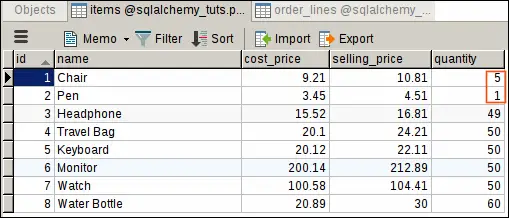
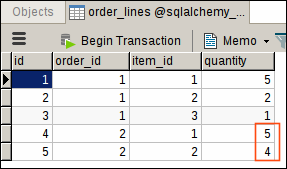
Our next order is for 5 chairs and 4 pens, but we now only have 5 chairs and 1 pen in the stock!
Let's try running dispatch_order() for second order and see what happens.
Expected Ouput:
| (psycopg2.IntegrityError) new row for relation "items" violates check constraint "quantity_check" DETAIL: Failing row contains (1, Chair, 9.21, 10.81, -4). [SQL: 'UPDATE items SET quantity=(items.quantity - %(quantity_1)s) WHERE items.id = %(id_1)s'] [parameters: {'quantity_1': 5, 'id_1': 1}] (Background on this error at: http://sqlalche.me/e/gkpj) Transaction failed. |
|---|
As expected, our shipment failed because we don't have enough pens in the stock and because we are using transaction our database is returned to the state it was in before the transaction was started.