Databases and the Doctrine ORM (Symfony Docs) (original) (raw)
Symfony provides all the tools you need to use databases in your applications thanks to Doctrine, the best set of PHP libraries to work with databases. These tools support relational databases like MySQL and PostgreSQL and also NoSQL databases like MongoDB.
Databases are a broad topic, so the documentation is divided in three articles:
- This article explains the recommended way to work with relational databasesin Symfony applications;
- Read this other article if you need low-level accessto perform raw SQL queries to relational databases (similar to PHP's PDO);
- Read DoctrineMongoDBBundle docs if you are working with MongoDB databases.
Installing Doctrine
First, install Doctrine support via the orm Symfony pack, as well as the MakerBundle, which will help generate some code:
Configuring the Database
The database connection information is stored as an environment variable calledDATABASE_URL. For development, you can find and customize this inside .env:
Warning
If the username, password, host or database name contain any character considered special in a URI (such as : / ? # [ ] @ ! $ & ' ( ) * + , ; =), you must encode them. See RFC 3986 for the full list of reserved characters. You can use the urlencode function to encode them or the urlencode environment variable processor. In this case you need to remove the resolve: prefix in config/packages/doctrine.yamlto avoid errors: url: '%env(DATABASE_URL)%'
Now that your connection parameters are setup, Doctrine can create the db_namedatabase for you:
There are more options in config/packages/doctrine.yaml that you can configure, including your server_version (e.g. 8.0.37 if you're using MySQL 8.0.37), which may affect how Doctrine functions.
Tip
There are many other Doctrine commands. Run php bin/console list doctrineto see a full list.
Creating an Entity Class
Suppose you're building an application where products need to be displayed. Without even thinking about Doctrine or databases, you already know that you need a Product object to represent those products.
You can use the make:entity command to create this class and any fields you need. The command will ask you some questions - answer them like done below:
Whoa! You now have a new src/Entity/Product.php file:
Tip
Starting in MakerBundle: v1.57.0 - You can pass either --with-uuid or--with-ulid to make:entity. Leveraging Symfony's Uid Component, this generates an entity with the id type as Uuidor Ulid instead of int.
Note
Starting in v1.44.0 - MakerBundle: only supports entities using PHP attributes.
Note
Confused why the price is an integer? Don't worry: this is just an example. But, storing prices as integers (e.g. 100 = $1 USD) can avoid rounding issues.
Warning
There is a limit of 767 bytes for the index key prefix when using InnoDB tables in MySQL 5.6 and earlier versions. String columns with 255 character length and utf8mb4 encoding surpass that limit. This means that any column of type string and unique=true must set its maximum length to 190. Otherwise, you'll see this error:"[PDOException] SQLSTATE[42000]: Syntax error or access violation: 1071 Specified key was too long; max key length is 767 bytes".
This class is called an "entity". And soon, you'll be able to save and query Product objects to a product table in your database. Each property in the Productentity can be mapped to a column in that table. This is usually done with attributes: the #[ORM\Column(...)] comments that you see above each property:
The make:entity command is a tool to make life easier. But this is your code: add/remove fields, add/remove methods or update configuration.
Doctrine supports a wide variety of field types, each with their own options. Check out the list of Doctrine mapping types in the Doctrine documentation. If you want to use XML instead of attributes, add type: xml anddir: '%kernel.project_dir%/config/doctrine' to the entity mappings in yourconfig/packages/doctrine.yaml file.
Warning
Be careful not to use reserved SQL keywords as your table or column names (e.g. GROUP or USER). See Doctrine's Reserved SQL keywords documentationfor details on how to escape these. Or, change the table name with#[ORM\Table(name: 'groups')] above the class or configure the column name with the name: 'group_name' option.
Migrations: Creating the Database Tables/Schema
The Product class is fully-configured and ready to save to a product table. If you just defined this class, your database doesn't actually have the producttable yet. To add it, you can leverage the DoctrineMigrationsBundle, which is already installed:
Tip
Starting in MakerBundle: v1.56.0 - Passing --formatted to make:migrationgenerates a nice and tidy migration file.
If everything worked, you should see something like this:
If you open this file, it contains the SQL needed to update your database! To run that SQL, execute your migrations:
This command executes all migration files that have not already been run against your database. You should run this command on production when you deploy to keep your production database up-to-date.
Migrations & Adding more Fields
But what if you need to add a new field property to Product, like adescription? You can edit the class to add the new property. But, you can also use make:entity again:
This adds the new description property and getDescription() and setDescription()methods:
The new property is mapped, but it doesn't exist yet in the product table. No problem! Generate a new migration:
This time, the SQL in the generated file will look like this:
The migration system is smart. It compares all of your entities with the current state of the database and generates the SQL needed to synchronize them! Like before, execute your migrations:
Warning
If you are using an SQLite database, you'll see the following error:PDOException: SQLSTATE[HY000]: General error: 1 Cannot add a NOT NULL column with default value NULL. Add a nullable=true option to thedescription property to fix the problem.
This will only execute the one new migration file, because DoctrineMigrationsBundle knows that the first migration was already executed earlier. Behind the scenes, it manages a migration_versions table to track this.
Each time you make a change to your schema, run these two commands to generate the migration and then execute it. Be sure to commit the migration files and execute them when you deploy.
Tip
If you prefer to add new properties manually, the make:entity command can generate the getter & setter methods for you:
If you make some changes and want to regenerate all getter/setter methods, also pass --overwrite.
Persisting Objects to the Database
It's time to save a Product object to the database! Let's create a new controller to experiment:
Inside the controller, you can create a new Product object, set data on it, and save it:
Try it out!
Congratulations! You just created your first row in the product table. To prove it, you can query the database directly:
Take a look at the previous example in more detail:
- line 13 The
EntityManagerInterface $entityManagerargument tells Symfony to inject the Entity Manager service into the controller method. This object is responsible for saving objects to, and fetching objects from, the database. - lines 15-18 In this section, you instantiate and work with the
$productobject like any other normal PHP object. - line 21 The
persist($product)call tells Doctrine to "manage" the$productobject. This does not cause a query to be made to the database. - line 24 When the
flush()method is called, Doctrine looks through all of the objects that it's managing to see if they need to be persisted to the database. In this example, the$productobject's data doesn't exist in the database, so the entity manager executes anINSERTquery, creating a new row in theproducttable.
Whether you're creating or updating objects, the workflow is always the same: Doctrine is smart enough to know if it should INSERT or UPDATE your entity.
Validating Objects
The Symfony validator can reuse Doctrine metadata to perform some basic validation tasks. First, add or configure theauto_mapping option to define which entities should be introspected by Symfony to add automatic validation constraints.
Consider the following controller code:
Although the Product entity doesn't define any explicitvalidation configuration, if the auto_mapping option includes it in the list of entities to introspect, Symfony will infer some validation rules for it and will apply them.
For example, given that the name property can't be null in the database, aNotNull constraint is added automatically to the property (if it doesn't contain that constraint already).
The following table summarizes the mapping between Doctrine metadata and the corresponding validation constraints added automatically by Symfony:
Because the Form component as well as API Platform internally use the Validator component, all your forms and web APIs will also automatically benefit from these automatic validation constraints.
This automatic validation is a nice feature to improve your productivity, but it doesn't replace the validation configuration entirely. You still need to add some validation constraints to ensure that data provided by the user is correct.
Fetching Objects from the Database
Fetching an object back out of the database is even easier. Suppose you want to be able to go to /product/1 to see your new product:
Another possibility is to use the ProductRepository using Symfony's autowiring and injected by the dependency injection container:
Try it out!
When you query for a particular type of object, you always use what's known as its "repository". You can think of a repository as a PHP class whose only job is to help you fetch entities of a certain class.
Once you have a repository object, you have many helper methods:
You can also add custom methods for more complex queries! More on that later in the Databases and the Doctrine ORM section.
Tip
When rendering an HTML page, the web debug toolbar at the bottom of the page will display the number of queries and the time it took to execute them:
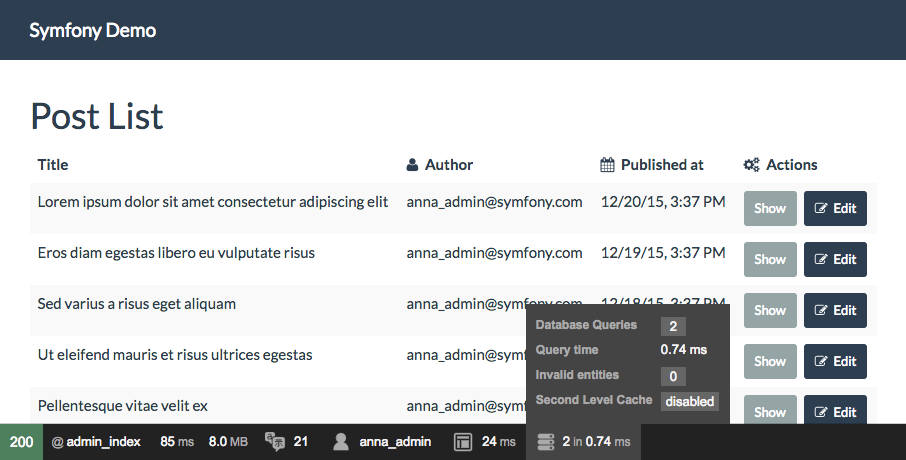
If the number of database queries is too high, the icon will turn yellow to indicate that something may not be correct. Click on the icon to open the Symfony Profiler and see the exact queries that were executed. If you don't see the web debug toolbar, install the profiler Symfony packby running this command: composer require --dev symfony/profiler-pack.
For more information, read the Symfony profiler documentation.
Automatically Fetching Objects (EntityValueResolver)
2.7.1
Autowiring of the EntityValueResolver was introduced in DoctrineBundle 2.7.1.
In many cases, you can use the EntityValueResolver to do the query for you automatically! You can simplify the controller to:
That's it! The attribute uses the {id} from the route to query for the Productby the id column. If it's not found, a 404 error is thrown.
You can change this behavior by making the controller argument optional. In that case, no 404 is thrown automatically and you're free to handle the missing entity yourself:
Tip
When enabled globally, it's possible to disable the behavior on a specific controller, by using the MapEntity set to disabled:
Fetch Automatically
If your route wildcards match properties on your entity, then the resolver will automatically fetch them:
Automatic fetching works in these situations:
- If
{id}is in your route, then this is used to fetch by primary key via thefind()method. - The resolver will attempt to do a
findOneBy()fetch by using_all_ of the wildcards in your route that are actually properties on your entity (non-properties are ignored).
The {slug:product} syntax maps the route parameter named slug to the controller argument named $product. It also hints the resolver to look up the corresponding Product object from the database using the slug.
You can also configure the mapping explicitly for any controller argument using the MapEntity attribute. You can even control the behavior of theEntityValueResolver by using the MapEntity options :
Fetch via an Expression
If automatic fetching doesn't work for your use case, you can write an expression using the ExpressionLanguage component:
In the expression, the repository variable will be your entity's Repository class and any route wildcards - like {product_id} are available as variables.
The repository method called in the expression can also return a list of entities. In that case, update the type of your controller argument:
This can also be used to help resolve multiple arguments:
In the example above, the $product argument is handled automatically, but $comment is configured with the attribute since they cannot both follow the default convention.
If you need to get other information from the request to query the database, you can also access the request in your expression thanks to the requestvariable. Let's say you want the first or the last comment of a product depending on a query parameter named sort:
Fetch via Interfaces
Suppose your Product class implements an interface called ProductInterface. If you want to decouple your controllers from the concrete entity implementation, you can reference the entity by its interface instead.
To enable this, first configure theresolve_target_entities option. Then, your controller can type-hint the interface, and the entity will be resolved automatically:
MapEntity Options
A number of options are available on the MapEntity attribute to control behavior:
id
If an id option is configured and matches a route parameter, then the resolver will find by the primary key:
mapping
Configures the properties and values to use with the findOneBy()method: the key is the route placeholder name and the value is the Doctrine property name:
stripNull
If true, then when findOneBy() is used, any values that arenull will not be used for the query.
objectManager
By default, the EntityValueResolver uses the _default_object manager, but you can configure this:
evictCache
If true, forces Doctrine to always fetch the entity from the database instead of cache.
disabled
If true, the EntityValueResolver will not try to replace the argument.
message
An optional custom message displayed when there's a NotFoundHttpException, but only in the development environment (you won't see this message in production):
Updating an Object
Once you've fetched an object from Doctrine, you interact with it the same as with any PHP model:
Using Doctrine to edit an existing product consists of three steps:
- fetching the object from Doctrine;
- modifying the object;
- calling
flush()on the entity manager.
You can call $entityManager->persist($product), but it isn't necessary: Doctrine is already "watching" your object for changes.
Deleting an Object
Deleting an object is very similar, but requires a call to the remove()method of the entity manager:
As you might expect, the remove() method notifies Doctrine that you'd like to remove the given object from the database. The DELETE query isn't actually executed until the flush() method is called.
Querying for Objects: The Repository
You've already seen how the repository object allows you to run basic queries without any work:
But what if you need a more complex query? When you generated your entity withmake:entity, the command also generated a ProductRepository class:
When you fetch your repository (i.e. ->getRepository(Product::class)), it is_actually_ an instance of this object! This is because of the repositoryClassconfig that was generated at the top of your Product entity class.
Suppose you want to query for all Product objects greater than a certain price. Add a new method for this to your repository:
The string passed to createQuery() might look like SQL, but it isDoctrine Query Language. This allows you to type queries using commonly known query language, but referencing PHP objects instead (i.e. in the FROMstatement).
Now, you can call this method on the repository:
See Service Container for how to inject the repository into any service.
Querying with the Query Builder
Doctrine also provides a Query Builder, an object-oriented way to write queries. It is recommended to use this when queries are built dynamically (i.e. based on PHP conditions):
Querying with SQL
In addition, you can query directly with SQL if you need to:
With SQL, you will get back raw data, not objects (unless you use the NativeQueryfunctionality).
Learn more
- How to Work with Doctrine Associations / Relations
- Doctrine Events
- How to Register custom DQL Functions
- How to Use Doctrine DBAL
- How to Work with Multiple Entity Managers and Connections
- Referencing Entities with Abstract Classes and Interfaces
- How to Test a Doctrine Repository
This work, including the code samples, is licensed under aCreative Commons BY-SA 3.0 license.