Gemini 3 개발자 가이드 (original) (raw)
시작하기
모델
핵심 기능
도구 및 에이전트
Live API
가이드
리소스
정책
Gemini 3는 최첨단 추론을 기반으로 구축된, 현재까지 가장 지능적인 모델 제품군입니다. 에이전트 워크플로, 자율 코딩, 복잡한 멀티모달 작업을 마스터하여 아이디어를 실현하도록 설계되었습니다. 이 가이드에서는 Gemini 3 모델 제품군의 주요 기능과 이를 최대한 활용하는 방법을 설명합니다.
Gemini 3 앱 모음을 살펴보고 모델이 고급 추론, 자율 코딩, 복잡한 멀티모달 작업을 어떻게 처리하는지 확인하세요.
다음과 같이 몇 줄의 코드로 시작할 수 있습니다.
Python
from google import genai

client = genai.Client()

response = client.models.generate_content(
    model="gemini-3-pro-preview",
    contents="Find the race condition in this multi-threaded C++ snippet: [code here]",
)

print(response.text)
자바스크립트
import { GoogleGenAI } from "@google/genai";

const ai = new GoogleGenAI({});

async function run() {
  const response = await ai.models.generateContent({
    model: "gemini-3-pro-preview",
    contents="Find the race condition in this multi-threaded C++ snippet: [code here]",
  });

  console.log(response.text);
}

run();
REST
curl "https://generativelanguage.googleapis.com/v1beta/models/gemini-3-pro-preview:generateContent" \
  -H "x-goog-api-key: $GEMINI_API_KEY" \
  -H 'Content-Type: application/json' \
  -X POST \
  -d '{
    "contents": [{
      "parts": [{"text": "Find the race condition in this multi-threaded C++ snippet: [code here]"}]
    }]
  }'
Gemini 3 소개
Gemini 3 Pro는 새로운 시리즈의 첫 번째 모델입니다. gemini-3-pro-preview는 다양한 모달리티에 걸쳐 광범위한 세계 지식과 고급 추론이 필요한 복잡한 작업에 가장 적합합니다.
| 모델 ID | 컨텍스트 윈도우 (내 / 외부) | 지식 단절 | 가격 (입력 / 출력)* |
|---|---|---|---|
| gemini-3-pro-preview | 1백만 / 64,000 | 2025년 1월 | 2달러 / 12달러(토큰 200,000개 미만) 4달러 / 18달러(토큰 200,000개 초과) |
| gemini-3-pro-image-preview | 65,000 / 32,000 | 2025년 1월 | 2(텍스트입력)/2 (텍스트 입력) / 2(텍스트입력)/0.134 (이미지 출력)** |
* 별도로 명시되지 않는 한 가격은 100만 토큰당 가격입니다. ** 이미지 가격은 해상도에 따라 다릅니다. 자세한 내용은 가격 책정 페이지를 참고하세요.
자세한 비율 제한, 일괄 가격 책정, 추가 정보는 모델 페이지를 참고하세요.
Gemini 3의 새로운 API 기능
Gemini 3에는 개발자가 지연 시간, 비용, 멀티모달 충실도를 더 효과적으로 제어할 수 있도록 설계된 새로운 파라미터가 도입되었습니다.
사고 수준
Gemini 3 Pro는 기본적으로 동적 사고를 사용하여 프롬프트를 통해 추론합니다. 응답을 생성하기 전 모델의 내부 추론 프로세스의 최대 깊이를 제어하는 thinking_level 파라미터를 사용할 수 있습니다. Gemini 3는 이러한 수준을 엄격한 토큰 보장이 아닌 사고를 위한 상대적 허용치로 취급합니다.
thinking_level이 지정되지 않은 경우 Gemini 3 Pro는 기본적으로 high로 설정됩니다. 복잡한 추론이 필요하지 않은 경우 더 빠르고 지연 시간이 짧은 대답을 위해 모델의 사고 수준을 low로 제한할 수 있습니다.
low: 지연 시간과 비용을 최소화합니다. 간단한 안내 따르기, 채팅 또는 고처리량 애플리케이션에 적합medium: 현재 지원되지 않음high(기본값): 추론 깊이를 최대화합니다. 모델이 첫 번째 토큰에 도달하는 데 시간이 훨씬 더 오래 걸릴 수 있지만 출력은 더 신중하게 추론됩니다.
Python
from google import genai
from google.genai import types

client = genai.Client()

response = client.models.generate_content(
    model="gemini-3-pro-preview",
    contents="How does AI work?",
    config=types.GenerateContentConfig(
        thinking_config=types.ThinkingConfig(thinking_level="low")
    ),
)

print(response.text)
자바스크립트
import { GoogleGenAI } from "@google/genai";

const ai = new GoogleGenAI({});

const response = await ai.models.generateContent({
    model: "gemini-3-pro-preview",
    contents: "How does AI work?",
    config: {
      thinkingConfig: {
        thinkingLevel: "low",
      }
    },
  });

console.log(response.text);
REST
curl "https://generativelanguage.googleapis.com/v1beta/models/gemini-3-pro-preview:generateContent" \
  -H "x-goog-api-key: $GEMINI_API_KEY" \
  -H 'Content-Type: application/json' \
  -X POST \
  -d '{
    "contents": [{
      "parts": [{"text": "How does AI work?"}]
    }],
    "generationConfig": {
      "thinkingConfig": {
        "thinkingLevel": "low"
      }
    }
  }'
미디어 해상도
Gemini 3에서는 media_resolution 매개변수를 통해 멀티모달 시각 처리의 세부적인 제어를 도입합니다. 해상도가 높을수록 모델이 작은 텍스트를 읽거나 세부 요소를 식별하는 능력을 향상시키지만, 토큰 사용량과 지연 시간이 증가합니다. media_resolution 파라미터는 입력 이미지 또는 동영상 프레임당 할당되는 최대 토큰 수를 결정합니다.
이제 해상도를 각 미디어 파트별로 media_resolution_low, media_resolution_medium, media_resolution_high, media_resolution_ultra_high로 설정하거나 전역적으로 설정할 수 있습니다 (generation_config 사용, 울트라 하이는 전역적으로 설정할 수 없음). 지정하지 않으면 모델은 미디어 유형에 따라 최적의 기본값을 사용합니다.
권장 설정
| 미디어 유형 | 권장 설정 | 최대 토큰 수 | 사용 안내 |
|---|---|---|---|
| 이미지 | media_resolution_high | 1120 | 최대 품질을 보장하기 위해 대부분의 이미지 분석 작업에 권장됩니다. |
| media_resolution_medium | 560 | 문서 이해에 최적화되어 있으며 품질은 일반적으로 medium에서 포화됩니다. high로 늘려도 표준 문서의 OCR 결과가 개선되는 경우는 거의 없습니다. | |
| 동영상 (일반) | media_resolution_low (또는 media_resolution_medium) | 70 (프레임당) | 참고: 동영상의 경우 컨텍스트 사용을 최적화하기 위해 low 및 medium 설정이 동일하게 (70개 토큰) 처리됩니다. 대부분의 동작 인식 및 설명 작업에는 이 정도면 충분합니다. |
| 동영상 (텍스트가 많은 동영상) | media_resolution_high | 280 (프레임당) | 사용 사례에 밀도 높은 텍스트 (OCR) 또는 동영상 프레임 내의 작은 세부정보를 읽는 작업이 포함된 경우에만 필요합니다. |
Python
from google import genai
from google.genai import types
import base64

# The media_resolution parameter is currently only available in the v1alpha API version.
client = genai.Client(http_options={'api_version': 'v1alpha'})

response = client.models.generate_content(
    model="gemini-3-pro-preview",
    contents=[
        types.Content(
            parts=[
                types.Part(text="What is in this image?"),
                types.Part(
                    inline_data=types.Blob(
                        mime_type="image/jpeg",
                        data=base64.b64decode("..."),
                    ),
                    media_resolution={"level": "media_resolution_high"}
                )
            ]
        )
    ]
)

print(response.text)
자바스크립트
import { GoogleGenAI } from "@google/genai";

// The media_resolution parameter is currently only available in the v1alpha API version.
const ai = new GoogleGenAI({ apiVersion: "v1alpha" });

async function run() {
  const response = await ai.models.generateContent({
    model: "gemini-3-pro-preview",
    contents: [
      {
        parts: [
          { text: "What is in this image?" },
          {
            inlineData: {
              mimeType: "image/jpeg",
              data: "...",
            },
            mediaResolution: {
              level: "media_resolution_high"
            }
          }
        ]
      }
    ]
  });

  console.log(response.text);
}

run();
REST
curl "https://generativelanguage.googleapis.com/v1alpha/models/gemini-3-pro-preview:generateContent" \
  -H "x-goog-api-key: $GEMINI_API_KEY" \
  -H 'Content-Type: application/json' \
  -X POST \
  -d '{
    "contents": [{
      "parts": [
        { "text": "What is in this image?" },
        {
          "inlineData": {
            "mimeType": "image/jpeg",
            "data": "..."
          },
          "mediaResolution": {
            "level": "media_resolution_high"
          }
        }
      ]
    }]
  }'
온도
Gemini 3의 경우 temperature 파라미터를 기본값인 1.0으로 유지하는 것이 좋습니다.
이전 모델에서는 창의성과 결정론을 제어하기 위해 온도를 조정하는 것이 유용했지만 Gemini 3의 추론 기능은 기본 설정에 최적화되어 있습니다. 온도를 변경하면 (1.0 미만으로 설정) 특히 복잡한 수학 또는 추론 작업에서 루핑이나 성능 저하와 같은 예기치 않은 동작이 발생할 수 있습니다.
생각 서명
Gemini 3는 사고 서명을 사용하여 API 호출 전반에서 추론 컨텍스트를 유지합니다. 이러한 서명은 모델의 내부 사고 과정을 암호화한 표현입니다. 모델이 추론 기능을 유지하도록 하려면 요청에서 이러한 서명을 수신된 그대로 모델에 다시 반환해야 합니다.
- 함수 호출 (엄격): API는 '현재 턴'에 엄격한 검증을 적용합니다. 서명이 누락되면 400 오류가 발생합니다.
- 텍스트/채팅: 검증이 엄격하게 적용되지는 않지만 서명을 누락하면 모델의 추론 및 대답 품질이 저하됩니다.
- 이미지 생성/편집 (엄격): API는
thoughtSignature을 포함한 모든 모델 부분에 엄격한 검증을 적용합니다. 서명이 누락되면 400 오류가 발생합니다.
함수 호출 (엄격한 검증)
Gemini가 functionCall를 생성할 때 다음 턴에서 도구의 출력을 올바르게 처리하기 위해 thoughtSignature를 사용합니다. '현재 턴'에는 마지막 표준 사용자 text 메시지 이후에 발생한 모든 모델 (functionCall) 및 사용자 (functionResponse) 단계가 포함됩니다.
- 단일 함수 호출:
functionCall부분에 서명이 포함되어 있습니다. 반환해야 합니다. - 병렬 함수 호출: 목록의 첫 번째
functionCall부분에만 서명이 포함됩니다. 부품은 받은 순서대로 정확하게 반품해야 합니다. - 다단계 (순차적): 모델이 도구를 호출하고, 결과를 수신하고, (동일한 턴 내에서) 다른 도구를 호출하는 경우 두 함수 호출에 서명이 있습니다. 기록에 누적된 모든 서명을 반환해야 합니다.
텍스트 및 스트리밍
표준 채팅 또는 텍스트 생성의 경우 서명이 포함되지 않을 수 있습니다.
- 스트리밍 아님: 대답의 최종 콘텐츠 부분에
thoughtSignature가 포함될 수 있지만 항상 포함되는 것은 아닙니다. 반환된 기기가 있으면 최적의 성능을 유지하기 위해 다시 보내야 합니다. - 스트리밍: 서명이 생성되면 빈 텍스트 부분이 포함된 최종 청크에 도착할 수 있습니다. 텍스트 필드가 비어 있더라도 스트림 파서가 서명을 확인하도록 합니다.
이미지 생성 및 수정
gemini-3-pro-image-preview의 경우 생각 서명은 대화형 편집에 매우 중요합니다. 모델에 이미지 수정을 요청하면 이전 턴의 thoughtSignature를 사용하여 원본 이미지의 구성과 논리를 이해합니다.
- 수정: 서명은 대답의 생각 (
text또는inlineData) 이후의 첫 번째 부분과 모든 후속inlineData부분에 보장됩니다. 오류를 방지하려면 이러한 서명을 모두 반환해야 합니다.
코드 예시
다단계 함수 호출 (순차적)
사용자가 한 번에 두 가지 별도의 단계 (항공편 확인 -> 택시 예약)가 필요한 질문을 합니다.
1단계: 모델이 항공편 도구를 호출합니다.
모델이 서명 <Sig_A>를 반환합니다.
// Model Response (Turn 1, Step 1) { "role": "model", "parts": [ { "functionCall": { "name": "check_flight", "args": {...} }, "thoughtSignature": "" // SAVE THIS } ] }
2단계: 사용자가 항공편 결과를 전송함
모델의 사고 흐름을 유지하려면 <Sig_A>를 다시 전송해야 합니다.
// User Request (Turn 1, Step 2) [ { "role": "user", "parts": [{ "text": "Check flight AA100..." }] }, { "role": "model", "parts": [ { "functionCall": { "name": "check_flight", "args": {...} }, "thoughtSignature": "" // REQUIRED } ] }, { "role": "user", "parts": [{ "functionResponse": { "name": "check_flight", "response": {...} } }] } ]
3단계: 모델이 택시 도구를 호출함
모델이 <Sig_A>를 통해 항공편 지연을 기억하고 이제 택시를 예약하기로 결정합니다. 새 서명 <Sig_B>가 생성됩니다.
// Model Response (Turn 1, Step 3) { "role": "model", "parts": [ { "functionCall": { "name": "book_taxi", "args": {...} }, "thoughtSignature": "" // SAVE THIS } ] }
4단계: 사용자가 택시 결과를 보냄
턴을 완료하려면 <Sig_A> 및 <Sig_B> 전체 체인을 다시 보내야 합니다.
// User Request (Turn 1, Step 4) [ // ... previous history ... { "role": "model", "parts": [ { "functionCall": { "name": "check_flight", ... }, "thoughtSignature": "" } ] }, { "role": "user", "parts": [{ "functionResponse": {...} }] }, { "role": "model", "parts": [ { "functionCall": { "name": "book_taxi", ... }, "thoughtSignature": "" } ] }, { "role": "user", "parts": [{ "functionResponse": {...} }] } ]
병렬 함수 호출
사용자가 '파리와 런던의 날씨를 확인해 줘'라고 요청합니다. 모델이 하나의 대답에 두 개의 함수 호출을 반환합니다.
// User Request (Sending Parallel Results) [ { "role": "user", "parts": [ { "text": "Check the weather in Paris and London." } ] }, { "role": "model", "parts": [ // 1. First Function Call has the signature { "functionCall": { "name": "check_weather", "args": { "city": "Paris" } }, "thoughtSignature": "" }, // 2. Subsequent parallel calls DO NOT have signatures { "functionCall": { "name": "check_weather", "args": { "city": "London" } } } ] }, { "role": "user", "parts": [ // 3. Function Responses are grouped together in the next block { "functionResponse": { "name": "check_weather", "response": { "temp": "15C" } } }, { "functionResponse": { "name": "check_weather", "response": { "temp": "12C" } } } ] } ]
텍스트/컨텍스트 내 추론 (유효성 검사 없음)
사용자가 외부 도구 없이 컨텍스트 내 추론이 필요한 질문을 합니다. 엄격하게 검증되지는 않지만 서명을 포함하면 모델이 후속 질문에 대한 추론 체인을 유지하는 데 도움이 됩니다.
// User Request (Follow-up question) [ { "role": "user", "parts": [{ "text": "What are the risks of this investment?" }] }, { "role": "model", "parts": [ { "text": "I need to calculate the risk step-by-step. First, I'll look at volatility...", "thoughtSignature": "" // Recommended to include } ] }, { "role": "user", "parts": [{ "text": "Summarize that in one sentence." }] } ]
이미지 생성 및 편집
이미지 생성의 경우 서명이 엄격하게 검증됩니다. 첫 번째 부분 (텍스트 또는 이미지)과 이후의 모든 이미지 부분에 표시됩니다. 다음 턴에 모두 반환해야 합니다.
// Model Response (Turn 1) { "role": "model", "parts": [ // 1. First part ALWAYS has a signature (even if text) { "text": "I will generate a cyberpunk city...", "thoughtSignature": "" }, // 2. ALL InlineData (Image) parts ALWAYS have signatures { "inlineData": { ... }, "thoughtSignature": "" }, ] }
// User Request (Turn 2 - Requesting an Edit) { "contents": [ // History must include ALL signatures received { "role": "user", "parts": [{ "text": "Generate a cyberpunk city" }] }, { "role": "model", "parts": [ { "text": "...", "thoughtSignature": "" }, { "inlineData": "...", "thoughtSignature": "" }, ] }, // New User Prompt { "role": "user", "parts": [{ "text": "Make it daytime." }] } ] }
다른 모델에서 이전
다른 모델 (예: Gemini 2.5)을 사용하거나 Gemini 3에서 생성되지 않은 맞춤 함수 호출을 삽입하면 유효한 서명이 없습니다.
이러한 특정 시나리오에서 엄격한 유효성 검사를 우회하려면 필드를 다음 특정 더미 문자열로 채우세요. "thoughtSignature": "context_engineering_is_the_way_to_go"
도구를 사용한 구조화된 출력
Gemini 3를 사용하면 구조화된 출력을 Google 검색으로 그라운딩, URL 컨텍스트, 코드 실행과 같은 기본 제공 도구와 결합할 수 있습니다.
Python
from google import genai
from google.genai import types
from pydantic import BaseModel, Field
from typing import List

class MatchResult(BaseModel):
    winner: str = Field(description="The name of the winner.")
    final_match_score: str = Field(description="The final match score.")
    scorers: List[str] = Field(description="The name of the scorer.")

client = genai.Client()

response = client.models.generate_content(
    model="gemini-3-pro-preview",
    contents="Search for all details for the latest Euro.",
    config={
        "tools": [
            {"google_search": {}},
            {"url_context": {}}
        ],
        "response_mime_type": "application/json",
        "response_json_schema": MatchResult.model_json_schema(),
    },
)

result = MatchResult.model_validate_json(response.text)
print(result)
자바스크립트
import { GoogleGenAI } from "@google/genai";
import { z } from "zod";
import { zodToJsonSchema } from "zod-to-json-schema";

const ai = new GoogleGenAI({});

const matchSchema = z.object({
  winner: z.string().describe("The name of the winner."),
  final_match_score: z.string().describe("The final score."),
  scorers: z.array(z.string()).describe("The name of the scorer.")
});

async function run() {
  const response = await ai.models.generateContent({
    model: "gemini-3-pro-preview",
    contents: "Search for all details for the latest Euro.",
    config: {
      tools: [
        { googleSearch: {} },
        { urlContext: {} }
      ],
      responseMimeType: "application/json",
      responseJsonSchema: zodToJsonSchema(matchSchema),
    },
  });

  const match = matchSchema.parse(JSON.parse(response.text));
  console.log(match);
}

run();
REST
curl "https://generativelanguage.googleapis.com/v1beta/models/gemini-3-pro-preview:generateContent" \
  -H "x-goog-api-key: $GEMINI_API_KEY" \
  -H 'Content-Type: application/json' \
  -X POST \
  -d '{
    "contents": [{
      "parts": [{"text": "Search for all details for the latest Euro."}]
    }],
    "tools": [
      {"googleSearch": {}},
      {"urlContext": {}}
    ],
    "generationConfig": {
        "responseMimeType": "application/json",
        "responseJsonSchema": {
            "type": "object",
            "properties": {
                "winner": {"type": "string", "description": "The name of the winner."},
                "final_match_score": {"type": "string", "description": "The final score."},
                "scorers": {
                    "type": "array",
                    "items": {"type": "string"},
                    "description": "The name of the scorer."
                }
            },
            "required": ["winner", "final_match_score", "scorers"]
        }
    }
  }'
이미지 생성
Gemini 3 Pro Image를 사용하면 텍스트 프롬프트에서 이미지를 생성하고 편집할 수 있습니다. Gemini는 추론을 사용하여 프롬프트를 '생각'하고, 고화질 이미지를 생성하기 전에 Google 검색 그라운딩을 사용하여 날씨 예보나 주식 차트와 같은 실시간 데이터를 가져올 수 있습니다.
새로운 기능 및 개선된 기능:
- 4K 및 텍스트 렌더링: 최대 2K 및 4K 해상도로 선명하고 읽기 쉬운 텍스트와 다이어그램을 생성합니다.
- 그라운딩된 생성:
google_search도구를 사용하여 사실을 확인하고 실제 정보를 기반으로 이미지를 생성합니다. - 대화형 편집: 변경사항을 요청하기만 하면 멀티턴 이미지 편집이 가능합니다 (예: '배경을 일몰로 만들어 줘'와 같은 프롬프트를 입력합니다. 이 워크플로는 생각 서명을 사용하여 턴 간에 시각적 컨텍스트를 유지합니다.
종횡비, 편집 워크플로, 구성 옵션에 관한 자세한 내용은 이미지 생성 가이드를 참고하세요.
Python
from google import genai
from google.genai import types

client = genai.Client()

response = client.models.generate_content(
    model="gemini-3-pro-image-preview",
    contents="Generate an infographic of the current weather in Tokyo.",
    config=types.GenerateContentConfig(
        tools=[{"google_search": {}}],
        image_config=types.ImageConfig(
            aspect_ratio="16:9",
            image_size="4K"
        )
    )
)

image_parts = [part for part in response.parts if part.inline_data]

if image_parts:
    image = image_parts[0].as_image()
    image.save('weather_tokyo.png')
    image.show()
자바스크립트
import { GoogleGenAI } from "@google/genai";
import * as fs from "node:fs";

const ai = new GoogleGenAI({});

async function run() {
  const response = await ai.models.generateContent({
    model: "gemini-3-pro-image-preview",
    contents: "Generate a visualization of the current weather in Tokyo.",
    config: {
      tools: [{ googleSearch: {} }],
      imageConfig: {
        aspectRatio: "16:9",
        imageSize: "4K"
      }
    }
  });

  for (const part of response.candidates[0].content.parts) {
    if (part.inlineData) {
      const imageData = part.inlineData.data;
      const buffer = Buffer.from(imageData, "base64");
      fs.writeFileSync("weather_tokyo.png", buffer);
    }
  }
}

run();
REST
curl "https://generativelanguage.googleapis.com/v1beta/models/gemini-3-pro-image-preview:generateContent" \
  -H "x-goog-api-key: $GEMINI_API_KEY" \
  -H 'Content-Type: application/json' \
  -X POST \
  -d '{
    "contents": [{
      "parts": [{"text": "Generate a visualization of the current weather in Tokyo."}]
    }],
    "tools": [{"googleSearch": {}}],
    "generationConfig": {
        "imageConfig": {
          "aspectRatio": "16:9",
          "imageSize": "4K"
      }
    }
  }'
응답 예시
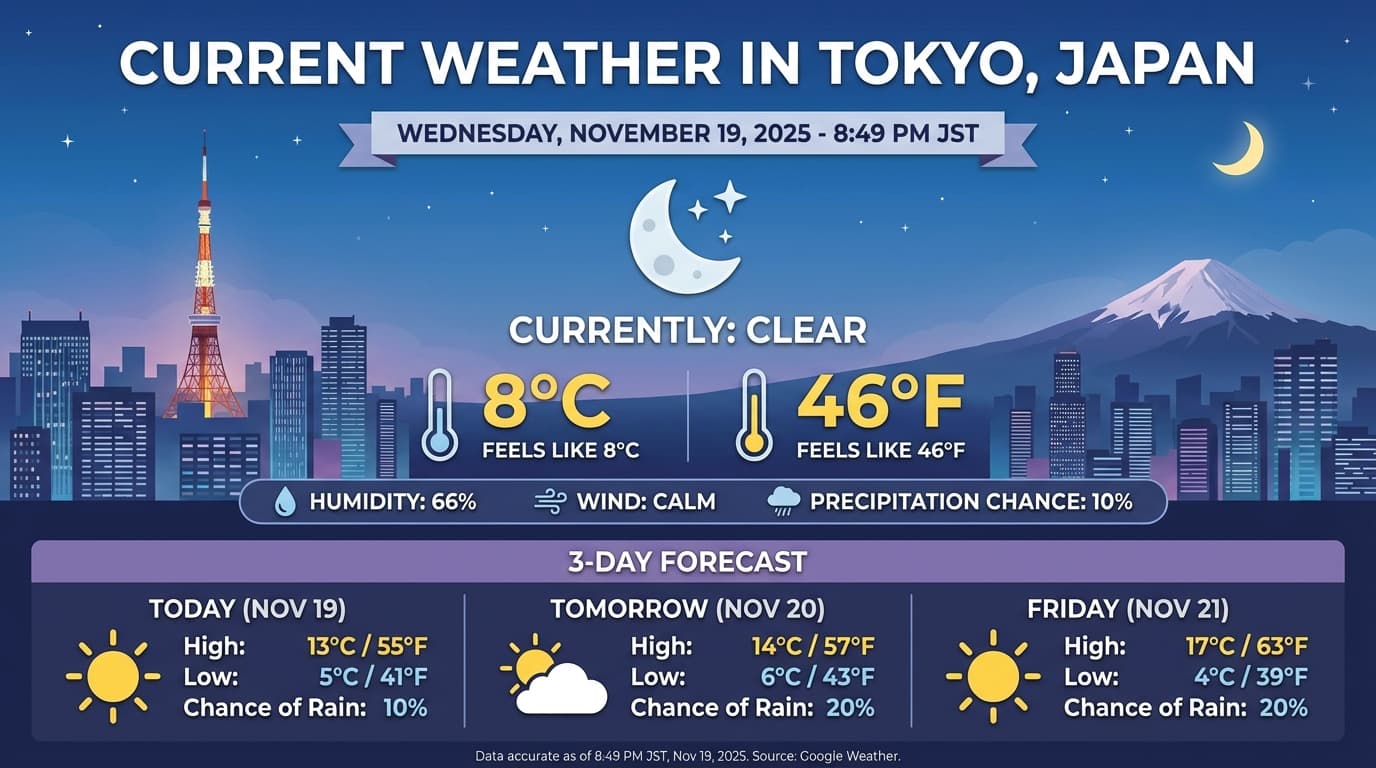
Gemini 2.5에서 마이그레이션
Gemini 3는 현재까지 가장 강력한 모델 제품군으로, Gemini 2.5 Pro에 비해 단계적으로 개선되었습니다. 마이그레이션할 때는 다음 사항을 고려하세요.
- 생각: 이전에 복잡한 프롬프트 엔지니어링 (예: 사고의 연쇄)을 사용하여 Gemini 2.5가 추론하도록 강제한 경우
thinking_level: "high"및 단순화된 프롬프트로 Gemini 3를 사용해 보세요. - 온도 설정: 기존 코드에서 온도를 명시적으로 설정하는 경우 (특히 결정적 출력을 위해 낮은 값으로 설정하는 경우) 이 매개변수를 삭제하고 Gemini 3 기본값인 1.0을 사용하여 복잡한 작업에서 발생할 수 있는 루핑 문제나 성능 저하를 방지하는 것이 좋습니다.
- PDF 및 문서 이해: PDF의 기본 OCR 해상도가 변경되었습니다. 밀도 높은 문서 파싱을 위해 특정 동작에 의존하고 있었다면, 정확도를 유지하기 위해 새로운
media_resolution_high설정을 테스트해 보세요. - 토큰 사용량: Gemini 3 Pro 기본값으로 이전하면 PDF의 토큰 사용량이 증가할 수 있지만 동영상의 토큰 사용량은 감소할 수 있습니다. 기본 해상도 상승으로 인해 요청이 컨텍스트 윈도우를 초과한다면 미디어 해상도를 명시적으로 낮추는 것이 좋습니다.
- 이미지 세분화: 이미지 세분화 기능 (객체의 픽셀 수준 마스크 반환)은 Gemini 3 Pro에서 지원되지 않습니다. 네이티브 이미지 세분화가 필요한 워크로드의 경우 사고를 사용 중지한 Gemini 2.5 Flash 또는 Gemini Robotics-ER 1.5를 계속 사용하는 것이 좋습니다.
OpenAI 호환성
OpenAI 호환성 레이어를 사용하는 사용자의 경우 표준 파라미터가 Gemini에 상응하는 파라미터에 자동으로 매핑됩니다.
reasoning_effort(OAI)는thinking_level(Gemini)에 매핑됩니다.reasoning_effort중간은thinking_level높음으로 매핑됩니다.
프롬프트 권장사항
Gemini 3는 추론 모델이므로 프롬프트 작성 방식에도 변화가 필요합니다.
- 정확한 지시: 입력 프롬프트는 간결하게 작성하세요. Gemini 3는 직접적이고 명확한 요청 사항에 가장 잘 응답합니다. 이전 모델에 사용된 장황하거나 지나치게 복잡한 프롬프트 엔지니어링 기법을 과도하게 분석할 수 있습니다.
- 출력 장황성: 기본적으로 Gemini 3는 장황하지 않으며 직접적이고 효율적인 답변을 제공하는 것을 선호합니다. 사용 사례에 더 대화적이거나 '수다스러운' 페르소나가 필요한 경우 프롬프트에서 모델을 명시적으로 안내해야 합니다 (예: '친절하고 수다스러운 어시스턴트처럼 설명해 줘').
- 컨텍스트 관리: 대규모 데이터 세트 (예: 전체 책, 코드베이스 또는 긴 동영상)로 작업할 때는 데이터 컨텍스트 뒤에 프롬프트 끝에 특정 요청 사항이나 질문을 배치하세요. '위의 정보를 바탕으로...'와 같은 문구로 질문을 시작하여 모델의 추론을 제공된 데이터에 고정합니다.
프롬프트 엔지니어링 가이드에서 프롬프트 설계 전략에 대해 자세히 알아보세요.
FAQ
- Gemini 3 Pro의 지식 단절 시점은 언제인가요? Gemini 3의 지식 단절 시점은 2025년 1월입니다. 최신 정보는 검색 그라운딩 도구를 사용하세요.
- 컨텍스트 윈도우 한도는 어떻게 되나요? Gemini 3 Pro는 최대 100만 토큰의 입력 컨텍스트 윈도우와 최대 64,000의 토큰 출력을 지원합니다.
- Gemini 3 Pro에 무료 등급이 있나요? Google AI Studio에서 모델을 무료로 사용해 볼 수 있지만 현재 Gemini API에서는
gemini-3-pro-preview에 사용할 수 있는 무료 등급이 없습니다. - 이전
thinking_budget코드가 계속 작동하나요? 예, 이전 버전과의 호환성을 위해thinking_budget가 계속 지원되지만 더 예측 가능한 성능을 위해thinking_level로 마이그레이션하는 것이 좋습니다. 동일한 요청에서 두 가지를 모두 사용하지 마세요. - Gemini 3에서 Batch API를 지원하나요? 예, Gemini 3는 Batch API를 지원합니다.
- 컨텍스트 캐싱이 지원되나요? 예, Gemini 3에서는 컨텍스트 캐싱이 지원됩니다. 캐싱을 시작하는 데 필요한 최소 토큰 수는 2,048개입니다.
- Gemini 3에서 지원되는 도구는 무엇인가요? Gemini 3는 Google 검색, 파일 검색, 코드 실행, URL 컨텍스트를 지원합니다. 또한 자체 맞춤 도구를 위한 표준 함수 호출도 지원합니다. 현재 Google 지도 기반 그라운딩 및 컴퓨터 사용은 지원되지 않습니다.
다음 단계
- Gemini 3 설명서 시작하기
- 사고 수준 및 사고 예산에서 사고 수준으로 이전하는 방법에 관한 전용 Cookbook 가이드를 확인하세요.
달리 명시되지 않는 한 이 페이지의 콘텐츠에는 Creative Commons Attribution 4.0 라이선스에 따라 라이선스가 부여되며, 코드 샘플에는 Apache 2.0 라이선스에 따라 라이선스가 부여됩니다. 자세한 내용은 Google Developers 사이트 정책을 참조하세요. 자바는 Oracle 및/또는 Oracle 계열사의 등록 상표입니다.
최종 업데이트: 2025-12-06(UTC)