Sane C++ Libraries: Async (original) (raw)
🟨 Async I/O (files, sockets, timers, processes, fs events, threads wake-up)
SaneCppAsync.h is a multi-platform / event-driven asynchronous I/O library.
Note
Check Async Streams for an higher level construct when streaming data
Dependencies
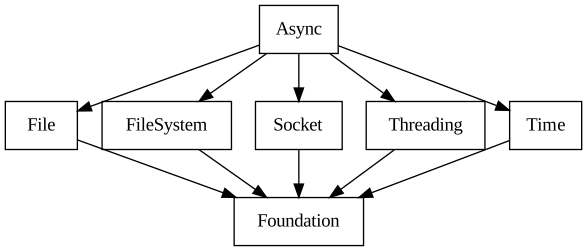
- Dependencies: File, FileSystem, Socket, Threading
- All dependencies: File, FileSystem, Foundation, Socket, Threading
Features
This is the list of supported async operations:
| Async Operation | Description |
|---|---|
| AsyncSocketConnect | Starts a socket connect operation, connecting to a remote endpoint. |
| AsyncSocketAccept | Starts a socket accept operation, obtaining a new socket from a listening socket. |
| AsyncSocketSend | Starts a socket send operation, sending bytes to a remote endpoint. |
| AsyncSocketReceive | Starts a socket receive operation, receiving bytes from a remote endpoint. |
| AsyncSocketSendTo | Starts an unconnected socket send to operation, sending bytes to a remote endpoint. |
| AsyncSocketReceiveFrom | Starts an unconnected socket receive from operation, receiving bytes from a remote endpoint. |
| AsyncFileRead | Starts a file read operation, reading bytes from a file (or pipe). |
| AsyncFileWrite | Starts a file write operation, writing bytes to a file (or pipe). |
| AsyncLoopTimeout | Starts a Timeout that is invoked only once after expiration (relative) time has passed. |
| AsyncLoopWakeUp | Starts a wake-up operation, allowing threads to execute callbacks on loop thread. |
| AsyncLoopWork | Executes work in a thread pool and then invokes a callback on the event loop thread. |
| AsyncProcessExit | Starts monitoring a process, notifying about its termination. |
| AsyncFilePoll | Starts an handle polling operation. |
| AsyncSequence | Execute AsyncRequests serially, by submitting the next one after the previous one is completed. |
| AsyncFileSystemOperation | Starts an asynchronous file system operation (open, close, read, write, sendFile, stat, lstat, fstat, etc.) Some operations need a file path and others need a file descriptor. |
Details
It exposes async programming model for common IO operations like reading / writing to / from a file or tcp socket.
Synchronous I/O operations could block the current thread of execution for an undefined amount of time, making it difficult to scale an application to a large number of concurrent operations, or to coexist with other even loop, like for example a GUI event loop. Such async programming model uses a common pattern, where the call fills an AsyncRequest with the required data. The AsyncRequest is added to an AsyncEventLoop that will queue the request to some low level OS IO queue. The event loop can then monitor all the requests in a single call to SC::AsyncEventLoop::run, SC::AsyncEventLoop::runOnce or SC::AsyncEventLoop::runNoWait. These three different run methods cover different integration use cases of the event loop inside of an applications.
The kernel Async API used on each operating systems are the following:
IOCPon Windowskqueueon macOSepollon Linuxio_uringon Linux (dynamically loadingliburing)
Note
If liburing is not available on the system, the library will transparently fallback to epoll.
If an async operation is not supported by the OS, the caller can provide a SC::ThreadPool to run it on a thread. See SC::AsyncFileRead / SC::AsyncFileWrite for an example.
Status
🟨 MVP
This is usable but needs some more testing and a few more features.
Videos
This is the list of videos that have been recorded showing some of the internal thoughts that have been going into this library:
- Ep.07 - SC::Async Linux epoll 1/2
- Ep.08 - SC::Async Linux epoll 2/2
- Ep.10 - A Tour of SC::Async
- Ep.11 - Linux Async I/O using io_uring (1 of 2)
- Ep.12 - Linux Async I/O using io_uring (2 of 2)
- Ep.14 - Async file read and writes using Thread Pool
- Ep.16 - Implement SC::AsyncLoopWork
- Ep.18 - BREAK SC::Async IO Event Loop
- Ep.20 - Pause Immediate Mode UI - Save CPU Time
- Ep.21 - Add Async IO to Immediate Mode GUI
Blog
Some relevant blog posts are:
- April 2024 Update
- May 2024 Update
- June 2024 Update
- July 2024 Update
- August 2024 Update
- December 2024 Update
- January 2025 Update
- April 2025 Update
- May 2025 Update
- June 2025 Update
- July 2025 Update
- August 2025 Update
- November 2025 Update
Description
An async operation is struct derived from AsyncRequest asking for some I/O to be done made to the OS.
Every async operation has an associated callback that is invoked when the request is fulfilled. If the start function returns a valid (non error) Return code, then the user callback will be called both in case of success and in case of any error.
If the function returns an invalid Return code or if the operation is manually cancelled with SC::AsyncRequest::stop, then the user callback will not be called.
Note
The memory address of all AsyncRequest derived objects must be stable until user callback is executed.
- If request is not re-activated (i.e.
result.reactivateRequest(true)is NOT called) then the async request can be freed as soon as the user callback is called (even inside the callback itself). - If request is re-activated (i.e.
result.reactivateRequest(true)is called) then the async cannot be freed as it's still in use.
Some implementation details: SC::AsyncRequest::state dictates the lifetime of the async request according to a state machine.
Regular Lifetime of an Async request (called just async in the paragraph below):
- An async that has been started, will be pushed in the submission queue with state == State::Setup.
- Inside stageSubmission a started async will be do the one time setup (with setupAsync)
- Inside stageSubmission a Setup or Submitting async will be activated (with activateAsync)
- If activateAsync is successful, the async becomes state == State::Active.
- When this happens, the async is either tracked by the kernel or in one of the linked lists like activeLoopWakeUps
- The Active async can become completed, when the kernel signals its completion (or readiness...):
- [default] -> Async is complete and it will be teardown and freed (state == State::Free)
- result.reactivateRequest(true) -> Async gets submitted again (state == State::Submitting) (3.)
Cancellation of an async: An async can be cancelled at any time:
- Async not yet submitted in State::Setup --> it just gets removed from the submission queue
- Async in submission queue but already setup --> it will receive a teardownAsync
- Async in Active state (so after setupAsync and activateAsync) --> will receive cancelAsync and teardownAsync
Any other case is considered an error (trying to cancel an async already being cancelled or being teardown).
AsyncEventLoop
Asynchronous I/O (files, sockets, timers, processes, fs events, threads wake-up) (see Async) AsyncEventLoop pushes all AsyncRequest derived classes to I/O queues in the OS.
See also
AsyncEventLoopMonitor can be used to integrate AsyncEventLoop with a GUI event loop
Basic lifetime for an event loop is:
AsyncEventLoop eventLoop;
SC_TRY(eventLoop.create());
SC_TRY(eventLoop.close());
Run modes
Event loop can be run in different ways to allow integrated it in multiple ways in applications.
| Run mode | Description |
|---|---|
| SC::AsyncEventLoop::run | Blocks until there are no more active queued requests, dispatching all completions. It's useful for applications where the eventLoop is the only (or the main) loop. One example could be a console based app doing socket IO or a web server. Waiting on kernel events blocks the current thread with 0% CPU utilization. See alsoAsyncEventLoop::blockingPoll to integrate the loop with a GUI event loop |
| SC::AsyncEventLoop::runOnce | Blocks until at least one request proceeds, ensuring forward progress, dispatching all completions. It's useful for application where it's needed to run some idle work after every IO event. Waiting on requests blocks the current thread with 0% CPU utilization. This function is a shortcut invoking async event loop building blocks: AsyncEventLoop::submitRequests AsyncEventLoop::blockingPoll AsyncEventLoop::dispatchCompletions See alsoAsyncEventLoop::blockingPoll for a description on how to integrate AsyncEventLoop with another event loop |
| SC::AsyncEventLoop::runNoWait | Process active requests if any, dispatching their completions, or returns immediately without blocking. It's useful for game-like applications where the event loop runs every frame and one would like to check and dispatch its I/O callbacks in-between frames. This call allows poll-checking I/O without blocking. See alsoAsyncEventLoop::blockingPoll to integrate the loop with a GUI event loop |
Alternatively user can explicitly use three methods to submit, poll and dispatch events. This is very useful to integrate the event loop into applications with other event loops (for example GUI applications).
| Run mode | Description |
|---|---|
| SC::AsyncEventLoop::submitRequests | Submits all queued async requests. An AsyncRequest becomes queued after user calls its specific AsyncRequest::start method. See alsoAsyncEventLoop::blockingPoll for a description on how to integrate AsyncEventLoop with another event loop |
| SC::AsyncEventLoop::blockingPoll | Blocks until at least one event happens, ensuring forward progress, without executing completions. It's one of the three building blocks of AsyncEventLoop::runOnce allowing co-operation of AsyncEventLoop within another event loop (for example a GUI event loop or another IO event loop). One possible example of such integration with a GUI event loop could: Call AsyncEventLoop::submitRequests on the GUI thread to queue some requests Call AsyncEventLoop::blockingPoll on a secondary thread, storying AsyncKernelEvents Wake up the GUI event loop from the secondary thread after AsyncEventLoop::blockingPoll returns Call AsyncEventLoop:dispatchCompletions on the GUI event loop to dispatch callbacks on GUI thread Repeat all steps Waiting on requests blocks the current thread with 0% CPU utilization. Parameters kernelEventsMandatory parameter to store kernel IO events WITHOUT running their completions. In that case user is expected to run completions passing it to AsyncEventLoop::dispatchCompletions. See alsoAsyncEventLoop::submitRequests sends async requests to kernel before calling blockingPoll AsyncEventLoop::dispatchCompletions invokes callbacks associated with kernel events after blockingPoll AsyncEventLoop::setListeners sets function called before and after entering kernel poll |
| SC::AsyncEventLoop::dispatchCompletions | Invokes completions for the AsyncKernelEvents collected by a call to AsyncEventLoop::blockingPoll. This is typically done when user wants to pool for events on a thread (calling AsyncEventLoop::blockingPoll) and dispatch the callbacks on another thread (calling AsyncEventLoop::dispatchCompletions). The typical example would be integrating AsyncEventLoop with a GUI event loop. See alsoAsyncEventLoop::blockingPoll for a description on how to integrate AsyncEventLoop with another event loop |
AsyncEventLoopMonitor
Monitors Async I/O events from a background thread using a blocking kernel function (no CPU usage on idle).
AsyncEventLoopMonitor makes it easy to integrate AsyncEventLoop within a GUI event loop or another I/O event loop. This pattern avoids constantly polling the kernel, using virtually 0% of CPU time when waiting for events.
| Functions | Description |
|---|---|
| SC::AsyncEventLoopMonitor::startMonitoring | Queue all async requests submissions and start monitoring loop events on a background thread. On the background thread AsyncEventLoop::blockingPoll will block (with 0% CPU usage) and return only when it will be informed by the kernel of some new events. Immediately after AsyncEventLoopMonitor::onNewEventsAvailable will be called (on the background thread). In the code handler associated with this event, the user/caller should inform its main thread to call AsyncEventLoopMonitor::stopMonitoringAndDispatchCompletions. |
| SC::AsyncEventLoopMonitor::stopMonitoringAndDispatchCompletions | Stops monitoring events on the background thread and dispatches callbacks for completed requests. This is typically called by the user of this class on the main thread or in general on the thread where the event loop that coordinates the application lives (GUI thread typically or another I/O Event Loop thread). NoteIn some cases this method will also immediately submit new requests that have been queued by callbacks. |
AsyncLoopTimeout
Starts a Timeout that is invoked only once after expiration (relative) time has passed.
Note
For a periodic timeout, call AsyncLoopTimeout::Result::reactivateRequest(true) in the completion callback
AsyncLoopTimeout timeout;
timeout.callback = [&](AsyncLoopTimeout::Result& res)
{
console.print("My timeout has been called!");
if (someCondition)
{
res.getAsync().relativeTimeout = Time::Milliseconds(100);
res.reactivateRequest(true);
}
};
SC_TRY(timeout.start(eventLoop, 200_ms));
AsyncLoopWakeUp
Starts a wake-up operation, allowing threads to execute callbacks on loop thread.
SC::AsyncLoopWakeUp::callback will be invoked on the thread running SC::AsyncEventLoop::run (or its variations) after SC::AsyncLoopWakeUp::wakeUp has been called.
Note
There is no guarantee that after calling AsyncLoopWakeUp::start the callback has actually finished execution. An optional SC::EventObject passed to SC::AsyncLoopWakeUp::start can be used for synchronization
AsyncLoopWakeUp wakeUp;
wakeUp.callback = [&](AsyncLoopWakeUp::Result& result)
{
console.print("My wakeUp has been called!");
result.reactivateRequest(true);
};
SC_TRY(wakeUp.start(eventLoop));
An EventObject can be wait-ed to synchronize further actions from the thread invoking the wake up request, ensuring that the callback has finished its execution.
AsyncLoopWakeUp wakeUpWaiting;
wakeUpWaiting.callback = [&](AsyncLoopWakeUp::Result& result)
{
console.print("My wakeUp has been called!");
result.reactivateRequest(true);
};
EventObject eventObject;
SC_TRY(wakeUpWaiting.start(eventLoop, eventObject));
eventObject.wait();
AsyncLoopWork
Executes work in a thread pool and then invokes a callback on the event loop thread.
AsyncLoopWork::work is invoked on one of the thread supplied by the ThreadPool passed during AsyncLoopWork::start. AsyncLoopWork::callback will be called as a completion, on the event loop thread AFTER work callback is finished.
static constexpr int NUM_THREADS = 4;
static constexpr int NUM_WORKS = NUM_THREADS * NUM_THREADS;
ThreadPool threadPool;
AsyncEventLoop eventLoop;
AsyncLoopWork works[NUM_WORKS];
int numAfterWorkCallbackCalls = 0;
Atomic numWorkCallbackCalls = 0;
for (int idx = 0; idx < NUM_WORKS; ++idx)
{
works[idx].work = [&]
{
Thread::Sleep(50);
numWorkCallbackCalls.fetch_add(1);
return Result(true);
};
works[idx].callback = [&](AsyncLoopWork::Result&)
{
numAfterWorkCallbackCalls++;
};
}
int numRequests = 0;
eventLoop.enumerateRequests([&](AsyncRequest&) { numRequests++; });
SC_TEST_EXPECT(numWorkCallbackCalls.load() == NUM_WORKS);
AsyncProcessExit
Starts monitoring a process, notifying about its termination.
Process library can be used to start a process and obtain the native process handle.
Process process;
SC_TRY(process.launch({"executable", "--parameter"}));
AsyncProcessExit processExit;
processExit.callback = [&](AsyncProcessExit::Result& res)
{
int exitStatus = -1;
if(res.get(exitStatus))
{
console.print("Process Exit status = {}", exitStatus);
}
};
SC_TRY(processExit.start(eventLoop, process.handle));
AsyncSocketAccept
Starts a socket accept operation, obtaining a new socket from a listening socket.
The callback is called with a new socket connected to the given listening endpoint will be returned.
Socket library can be used to create a Socket but the socket should be created with SC::SocketFlags::NonBlocking and associated to the event loop with SC::AsyncEventLoop::associateExternallyCreatedSocket.
Alternatively SC::AsyncEventLoop::createAsyncTCPSocket creates and associates the socket to the loop.
Note
To continue accepting new socket SC::AsyncResult::reactivateRequest must be called.
constexpr uint32_t numWaitingConnections = 2;
SocketDescriptor serverSocket;
SocketIPAddress nativeAddress;
SC_TRY(nativeAddress.fromAddressPort("127.0.0.1", tcpPort));
SC_TRY(eventLoop.createAsyncTCPSocket(nativeAddress.getAddressFamily(), serverSocket));
SocketServer server(serverSocket);
SC_TRY(server.bind(nativeAddress));
SC_TRY(server.listen(numWaitingConnections));
AsyncSocketAccept accept;
accept.callback = [&](AsyncSocketAccept::Result& res)
{
SocketDescriptor client;
if(res.moveTo(client))
{
console.printLine("New client connected!");
res.reactivateRequest(true);
}
};
SC_TRY(accept.start(eventLoop, serverSocket));
SC_TRY(accept.stop(eventLoop));
AsyncSocketConnect
Starts a socket connect operation, connecting to a remote endpoint.
Callback will be called when the given socket is connected to ipAddress.
Socket library can be used to create a Socket but the socket should be created with SC::SocketFlags::NonBlocking and associated to the event loop with SC::AsyncEventLoop::associateExternallyCreatedSocket.
Alternatively SC::AsyncEventLoop::createAsyncTCPSocket creates and associates the socket to the loop.
SocketIPAddress localHost;
SC_TRY(localHost.fromAddressPort("127.0.0.1", 5050));
AsyncSocketConnect connect;
SocketDescriptor client;
SC_TRY(eventLoop.createAsyncTCPSocket(localHost.getAddressFamily(), client));
connect.callback = [&](AsyncSocketConnect::Result& res)
{
if (res.isValid())
{
console.printLine("Client connected");
}
};
SC_TRY(connect.start(eventLoop, client, localHost));
AsyncSocketSend
Starts a socket send operation, sending bytes to a remote endpoint.
Callback will be called when the given socket is ready to send more data.
Socket library can be used to create a Socket but the socket should be created with SC::SocketFlags::NonBlocking and associated to the event loop with SC::AsyncEventLoop::associateExternallyCreatedSocket or though AsyncSocketAccept.
Alternatively SC::AsyncEventLoop::createAsyncTCPSocket creates and associates the socket to the loop.
const char sendBuffer[] = {123, 111};
Span sendData = {sendBuffer, sizeof(sendBuffer)};
AsyncSocketSend sendAsync;
sendAsync.callback = [&](AsyncSocketSend::Result& res)
{
if(res.isValid())
{
console.printLine("Ready to send more data");
}
};
SC_TRY(sendAsync.start(eventLoop, client, sendData));
AsyncSocketReceive
Starts a socket receive operation, receiving bytes from a remote endpoint.
Callback will be called when some data is read from socket.
Socket library can be used to create a Socket but the socket should be created with SC::SocketFlags::NonBlocking and associated to the event loop with SC::AsyncEventLoop::associateExternallyCreatedSocket or though AsyncSocketAccept.
Alternatively SC::AsyncEventLoop::createAsyncTCPSocket creates and associates the socket to the loop.
Additional notes:
- SC::AsyncSocketReceive::CompletionData::disconnected will be set to true when client disconnects
char receivedData[100] = {0};
AsyncSocketReceive receiveAsync;
receiveAsync.callback = [&](AsyncSocketReceive::Result& res)
{
Span readData;
if(res.get(readData))
{
if(res.completionData.disconnected)
{
console.print("Client disconnected");
}
else
{
console.print("{} bytes have been read", readData.sizeInBytes());
res.reactivateRequest(true);
}
}
else
{
}
};
SC_TRY(receiveAsync.start(eventLoop, client, {receivedData, sizeof(receivedData)}));
AsyncSocketSendTo
Starts an unconnected socket send to operation, sending bytes to a remote endpoint.
Callback will be called when the given socket is ready to send more data.
Typical use case is to send data to an unconnected UDP socket.
Socket library can be used to create a Socket but the socket should be created with SC::SocketFlags::NonBlocking and associated to the event loop with SC::AsyncEventLoop::associateExternallyCreatedSocket or though AsyncSocketAccept.
Alternatively SC::AsyncEventLoop::createAsyncUDPSocket creates and associates the socket to the loop.
SocketIPAddress destinationAddress;
SC_TRY(destinationAddress.fromAddressPort("127.0.0.1", 5051));
const char sendBuffer[] = {123, 111};
Span sendData = {sendBuffer, sizeof(sendBuffer)};
AsyncSocketSendTo sendAsync;
sendAsync.callback = [&](AsyncSocketSendTo::Result& res)
{
if(res.isValid())
{
console.printLine("Ready to send more data");
}
};
SC_TRY(sendAsync.start(eventLoop, client, destinationAddress, sendData));
AsyncSocketReceiveFrom
Starts an unconnected socket receive from operation, receiving bytes from a remote endpoint.
Callback will be called when some data is read from socket.
Typical use case is to receive data from an unconnected UDP socket.
Socket library can be used to create a Socket but the socket should be created with SC::SocketFlags::NonBlocking and associated to the event loop with SC::AsyncEventLoop::associateExternallyCreatedSocket or though AsyncSocketAccept.
Alternatively SC::AsyncEventLoop::createAsyncUDPSocket creates and associates the socket to the loop.
char receivedData[100] = {0};
AsyncSocketReceiveFrom receiveAsync;
receiveAsync.callback = [&](AsyncSocketReceive::Result& res)
{
Span readData;
if(res.get(readData))
{
if(res.completionData.disconnected)
{
console.print("Client disconnected");
}
else
{
console.print("{} bytes have been read", readData.sizeInBytes());
SocketIPAddress sourceAddress = res.getSourceAddress();
StringView formattedAddress;
(void)sourceAddress.toString(buffer, formattedAddress);
console.print("Source address: {}:{}", formattedAddress, sourceAddress.getPort());
res.reactivateRequest(true);
}
}
else
{
}
};
SC_TRY(receiveAsync.start(eventLoop, client, {receivedData, sizeof(receivedData)}));
AsyncFileRead
Starts a file read operation, reading bytes from a file (or pipe).
Callback will be called when the data read from the file (or pipe) is available.
Call AsyncRequest::executeOn to set a thread pool if this is a buffered file and not a pipe. This is important on APIs with blocking behaviour on buffered file I/O (all apis with the exception of io_uring).
File library can be used to open the file and obtain a file (or pipe) descriptor handle.
Note
Pipes or files opened using Posix O_DIRECT or Windows FILE_FLAG_WRITE_THROUGH & FILE_FLAG_NO_BUFFERING should instead avoid using the Task parameter for best performance.
When not using the Task remember to:
- Open the file descriptor for non-blocking IO (SC::File::OpenOptions::blocking ==
false) - Call SC::AsyncEventLoop::associateExternallyCreatedFileDescriptor on the file descriptor
Additional notes:
- When reactivating the AsyncRequest, remember to increment the offset (SC::AsyncFileRead::offset)
- SC::AsyncFileRead::CompletionData::endOfFile signals end of file reached
io_uringbackend will not use thread pool because that API allows proper async file read/writes
FileDescriptor fd;
FileOpen openMode;
openMode.blocking = true;
SC_TRY(fd.open("MyFile.txt", openMode));
AsyncFileRead asyncReadFile;
asyncReadFile.callback = [&](AsyncFileRead::Result& res)
{
Span readData;
if(res.get(readData))
{
if(res.completionData.endOfFile)
{
console.print("End of file reached");
}
else
{
console.print("Read {} bytes from file", readData.sizeInBytes());
res.getAsync().setOffset(res.getAsync().getOffset() + readData.sizeInBytes());
res.reactivateRequest(true);
}
}
else
{
}
};
char buffer[100] = {0};
asyncReadFile.buffer = {buffer, sizeof(buffer)};
AsyncTaskSequence asyncFileTask;
SC_TRY(asyncReadFile.executeOn(asyncFileTask, threadPool));
SC_TRY(asyncReadFile.start(eventLoop));
AsyncFileWrite
Starts a file write operation, writing bytes to a file (or pipe).
Callback will be called when the file is ready to receive more bytes to write.
Call AsyncRequest::executeOn to set a thread pool if this is a buffered file and not a pipe. This is important on APIs with blocking behaviour on buffered file I/O (all apis with the exception of io_uring).
File library can be used to open the file and obtain a blocking or non-blocking file descriptor handle.
Note
Pipes or files opened using Posix O_DIRECT or Windows FILE_FLAG_WRITE_THROUGH & FILE_FLAG_NO_BUFFERING should instead avoid using the Task parameter for best performance.
When not using the Task remember to:
- Open the file descriptor for non-blocking IO (SC::File::OpenOptions::blocking ==
false) - Call SC::AsyncEventLoop::associateExternallyCreatedFileDescriptor on the file descriptor
FileOpen openMode;
openMode.blocking = true;
FileDescriptor fd;
SC_TRY(fd.open("MyFile.txt", openMode));
AsyncFileWrite asyncWriteFile;
asyncWriteFile.callback = [&](AsyncFileWrite::Result& res)
{
size_t writtenBytes = 0;
if(res.get(writtenBytes))
{
console.print("{} bytes have been written", writtenBytes);
}
};
asyncWriteFile.buffer = StringView("test").toCharSpan();
AsyncTaskSequence asyncFileTask;
SC_TRY(asyncWriteFile.executeOn(asyncFileTask, threadPool));
SC_TRY(asyncWriteFile.start(eventLoop));
AsyncFileWrite asyncWriteFileLater;
asyncWriteFileLater.buffer = StringView("AFTER").toCharSpan();
SC_TRY(asyncWriteFileLater.executeOn(asyncFileTask, threadPool));
SC_TRY(asyncWriteFile.start(eventLoop));
AsyncFilePoll
Starts an handle polling operation.
Uses GetOverlappedResult (windows), kevent (macOS), epoll (Linux) and io_uring (Linux). Callback will be called when any of the three API signals readiness events on the given file descriptor. Check File System Watcher for an example usage of this notification.
AsyncSequence
Execute AsyncRequests serially, by submitting the next one after the previous one is completed.
Requests are being queued on a sequence using AsyncRequest::executeOn. AsyncTaskSequence can be used to force running asyncs on a thread (useful for buffered files)
FileOpen openMode;
openMode.blocking = true;
FileDescriptor fd;
SC_TRY(fd.open("MyFile.txt", openMode));
AsyncFileWrite asyncWriteFile;
asyncWriteFile.callback = [&](AsyncFileWrite::Result& res)
{
size_t writtenBytes = 0;
if(res.get(writtenBytes))
{
console.print("{} bytes have been written", writtenBytes);
}
};
asyncWriteFile.buffer = StringView("test").toCharSpan();
AsyncTaskSequence asyncFileTask;
SC_TRY(asyncWriteFile.executeOn(asyncFileTask, threadPool));
SC_TRY(asyncWriteFile.start(eventLoop));
AsyncFileWrite asyncWriteFileLater;
asyncWriteFileLater.buffer = StringView("AFTER").toCharSpan();
SC_TRY(asyncWriteFileLater.executeOn(asyncFileTask, threadPool));
SC_TRY(asyncWriteFile.start(eventLoop));
AsyncTaskSequence
An AsyncSequence using a SC::ThreadPool to execute one or more SC::AsyncRequest in a background thread.
Calling SC::AsyncRequest::executeOn on multiple requests with the same SC::AsyncTaskSequence queues them to be serially executed on the same thread.
AsyncFileSystemOperation
Starts an asynchronous file system operation (open, close, read, write, sendFile, stat, lstat, fstat, etc.) Some operations need a file path and others need a file descriptor.
Note
Operations will run on the thread pool set with AsyncFileSystemOperation::setThreadPool on all backends except when the event loop is using io_uring on Linux.
Warning
File paths must be encoded in the native encoding of the OS, that is UTF-8 on Posix and UTF-16 on Windows.
Example of async open operation:
static constexpr int NUM_THREADS = 1;
ThreadPool threadPool;
AsyncEventLoop eventLoop;
FileSystem fs;
SC_TEST_EXPECT(fs.init(report.applicationRootDirectory.view()));
SC_TEST_EXPECT(fs.writeString("FileSystemOperationOpen.txt", "FileSystemOperationOpen"));
AsyncFileSystemOperation asyncFileSystemOperation;
asyncFileSystemOperation.callback = [&](AsyncFileSystemOperation::Result& res)
{
SC_TEST_EXPECT(res.completionData.handle != FileDescriptor::Invalid);
FileDescriptor fd(res.completionData.handle);
String text;
SC_TEST_EXPECT(text.view() == "FileSystemOperationOpen");
};
SC_TEST_EXPECT(asyncFileSystemOperation.setThreadPool(threadPool));
String path = StringEncoding::Native;
SC_TEST_EXPECT(Path::join(path, {report.applicationRootDirectory.view(), "FileSystemOperationOpen.txt"}));
SC_TEST_EXPECT(asyncFileSystemOperation.open(eventLoop, path.view(), FileOpen::Read));
SC_TEST_EXPECT(fs.removeFile("FileSystemOperationOpen.txt"));
Example of async close operation:
static constexpr int NUM_THREADS = 1;
ThreadPool threadPool;
AsyncEventLoop eventLoop;
FileSystem fs;
SC_TEST_EXPECT(fs.init(report.applicationRootDirectory.view()));
SC_TEST_EXPECT(fs.writeString("FileSystemOperationClose.txt", "FileSystemOperationClose"));
AsyncFileSystemOperation asyncFileSystemOperation;
int callbackCalled = 0;
asyncFileSystemOperation.callback = [&](AsyncFileSystemOperation::Result& res)
{
callbackCalled++;
};
SC_TEST_EXPECT(asyncFileSystemOperation.setThreadPool(threadPool));
FileDescriptor fd;
String path = StringEncoding::Native;
SC_TEST_EXPECT(Path::join(path, {report.applicationRootDirectory.view(), "FileSystemOperationClose.txt"}));
FileDescriptor::Handle handle = FileDescriptor::Invalid;
SC_TEST_EXPECT(fd.get(handle, Result::Error("Invalid FD")));
fd.detach();
SC_TEST_EXPECT(asyncFileSystemOperation.close(eventLoop, handle));
SC_TEST_EXPECT(fs.removeFile("FileSystemOperationClose.txt"));
Example of async read operation:
static constexpr int NUM_THREADS = 1;
ThreadPool threadPool;
AsyncEventLoop eventLoop;
FileSystem fs;
SC_TEST_EXPECT(fs.init(report.applicationRootDirectory.view()));
SC_TEST_EXPECT(fs.writeString("FileSystemOperationRead.txt", "FileSystemOperationRead"));
FileDescriptor fd;
String path = StringEncoding::Native;
SC_TEST_EXPECT(Path::join(path, {report.applicationRootDirectory.view(), "FileSystemOperationRead.txt"}));
FileDescriptor::Handle handle = FileDescriptor::Invalid;
SC_TEST_EXPECT(fd.get(handle, Result::Error("Invalid FD")));
fd.detach();
AsyncFileSystemOperation asyncFileSystemOperation;
asyncFileSystemOperation.callback = [&](AsyncFileSystemOperation::Result& res)
{
SC_TEST_EXPECT(res.completionData.numBytes == 23);
};
SC_TEST_EXPECT(asyncFileSystemOperation.setThreadPool(threadPool));
char buffer[32] = {0};
SC_TEST_EXPECT(asyncFileSystemOperation.read(eventLoop, handle, Span(buffer, sizeof(buffer)), 0));
StringView readContent({buffer, 23}, true, StringEncoding::Ascii);
SC_TEST_EXPECT(readContent == StringView("FileSystemOperationRead"));
SC_TEST_EXPECT(fs.removeFile("FileSystemOperationRead.txt"));
Example of async write operation:
static constexpr int NUM_THREADS = 1;
ThreadPool threadPool;
AsyncEventLoop eventLoop;
FileDescriptor fd;
String path = StringEncoding::Native;
SC_TEST_EXPECT(Path::join(path, {report.applicationRootDirectory.view(), "FileSystemOperationWrite.txt"}));
FileDescriptor::Handle handle = FileDescriptor::Invalid;
SC_TEST_EXPECT(fd.get(handle, Result::Error("Invalid FD")));
fd.detach();
AsyncFileSystemOperation asyncFileSystemOperation;
asyncFileSystemOperation.callback = [&](AsyncFileSystemOperation::Result& res)
{
SC_TEST_EXPECT(res.completionData.numBytes == 24);
};
SC_TEST_EXPECT(asyncFileSystemOperation.setThreadPool(threadPool));
const char* writeData = "FileSystemOperationWrite";
SC_TEST_EXPECT(asyncFileSystemOperation.write(eventLoop, handle, Span(writeData, 24), 0));
FileDescriptor verifyFd;
SC_TEST_EXPECT(verifyFd.open(path.view(), FileOpen::Read));
String text;
SC_TEST_EXPECT(text.view() == "FileSystemOperationWrite");
SC_TEST_EXPECT(verifyFd.close());
FileSystem fs;
SC_TEST_EXPECT(fs.init(report.applicationRootDirectory.view()));
SC_TEST_EXPECT(fs.removeFile("FileSystemOperationWrite.txt"));
Example of async copy operation:
static constexpr int NUM_THREADS = 1;
ThreadPool threadPool;
AsyncEventLoop eventLoop;
FileSystem fs;
SC_TEST_EXPECT(fs.init(report.applicationRootDirectory.view()));
SC_TEST_EXPECT(fs.writeString("FileSystemOperationCopy.txt", "FileSystemOperationCopy"));
AsyncFileSystemOperation asyncFileSystemOperation;
asyncFileSystemOperation.callback = [&](AsyncFileSystemOperation::Result& res)
{
};
SC_TEST_EXPECT(asyncFileSystemOperation.setThreadPool(threadPool));
String sourcePath = StringEncoding::Native;
String destPath = StringEncoding::Native;
SC_TEST_EXPECT(Path::join(sourcePath, {report.applicationRootDirectory.view(), "FileSystemOperationCopy.txt"}));
SC_TEST_EXPECT(Path::join(destPath, {report.applicationRootDirectory.view(), "FileSystemOperationCopy2.txt"}));
SC_TEST_EXPECT(asyncFileSystemOperation.copyFile(eventLoop, sourcePath.view(), destPath.view()));
FileDescriptor verifyFd;
SC_TEST_EXPECT(verifyFd.open(destPath.view(), FileOpen::Read));
String text;
SC_TEST_EXPECT(text.view() == "FileSystemOperationCopy");
SC_TEST_EXPECT(verifyFd.close());
Example of async copy directory operation:
static constexpr int NUM_THREADS = 1;
ThreadPool threadPool;
AsyncEventLoop eventLoop;
FileSystem fs;
SC_TEST_EXPECT(fs.init(report.applicationRootDirectory.view()));
SC_TEST_EXPECT(fs.writeString("AsyncCopyDir/file1.txt", "data1"));
SC_TEST_EXPECT(fs.writeString("AsyncCopyDir/subdir/file2.txt", "data2"));
AsyncFileSystemOperation asyncFileSystemOperation;
asyncFileSystemOperation.callback = [&](AsyncFileSystemOperation::Result& res)
{
};
SC_TEST_EXPECT(asyncFileSystemOperation.setThreadPool(threadPool));
String sourcePath = StringEncoding::Native;
String destPath = StringEncoding::Native;
SC_TEST_EXPECT(Path::join(sourcePath, {report.applicationRootDirectory.view(), "AsyncCopyDir"}));
SC_TEST_EXPECT(Path::join(destPath, {report.applicationRootDirectory.view(), "AsyncCopyDirCopy"}));
SC_TEST_EXPECT(asyncFileSystemOperation.copyDirectory(eventLoop, sourcePath.view(), destPath.view()));
SC_TEST_EXPECT(fs.existsAndIsFile("AsyncCopyDirCopy/file1.txt"));
SC_TEST_EXPECT(fs.existsAndIsFile("AsyncCopyDirCopy/subdir/file2.txt"));
String text = StringEncoding::Ascii;
SC_TEST_EXPECT(fs.read("AsyncCopyDirCopy/file1.txt", text));
SC_TEST_EXPECT(fs.read("AsyncCopyDirCopy/subdir/file2.txt", text));
SC_TEST_EXPECT(fs.removeFile("AsyncCopyDir/subdir/file2.txt"));
SC_TEST_EXPECT(fs.removeEmptyDirectory("AsyncCopyDir/subdir"));
SC_TEST_EXPECT(fs.removeFile("AsyncCopyDirCopy/file1.txt"));
SC_TEST_EXPECT(fs.removeFile("AsyncCopyDirCopy/subdir/file2.txt"));
SC_TEST_EXPECT(fs.removeEmptyDirectory("AsyncCopyDirCopy/subdir"));
SC_TEST_EXPECT(fs.removeEmptyDirectory("AsyncCopyDirCopy"));
Example of async rename operation:
static constexpr int NUM_THREADS = 1;
ThreadPool threadPool;
AsyncEventLoop eventLoop;
FileSystem fs;
SC_TEST_EXPECT(fs.init(report.applicationRootDirectory.view()));
SC_TEST_EXPECT(fs.writeString("FileSystemOperationRename.txt", "FileSystemOperationRename"));
AsyncFileSystemOperation asyncFileSystemOperation;
asyncFileSystemOperation.callback = [&](AsyncFileSystemOperation::Result& res)
{
};
SC_TEST_EXPECT(asyncFileSystemOperation.setThreadPool(threadPool));
String sourcePath = StringEncoding::Native;
String destPath = StringEncoding::Native;
SC_TEST_EXPECT(Path::join(sourcePath, {report.applicationRootDirectory.view(), "FileSystemOperationRename.txt"}));
SC_TEST_EXPECT(Path::join(destPath, {report.applicationRootDirectory.view(), "FileSystemOperationRename2.txt"}));
SC_TEST_EXPECT(asyncFileSystemOperation.rename(eventLoop, sourcePath.view(), destPath.view()));
FileDescriptor verifyFd;
SC_TEST_EXPECT(verifyFd.open(destPath.view(), FileOpen::Read));
String text;
SC_TEST_EXPECT(text.view() == "FileSystemOperationRename");
SC_TEST_EXPECT(verifyFd.close());
Example of async remove empty directory operation:
static constexpr int NUM_THREADS = 1;
ThreadPool threadPool;
AsyncEventLoop eventLoop;
FileSystem fs;
SC_TEST_EXPECT(fs.init(report.applicationRootDirectory.view()));
String dirPath = StringEncoding::Native;
Path::join(dirPath, {report.applicationRootDirectory.view(), "FileSystemOperationRemoveEmptyDirectory"}));
AsyncFileSystemOperation asyncFileSystemOperation;
int numCallbacks = 0;
asyncFileSystemOperation.callback = [&](AsyncFileSystemOperation::Result& res)
{
numCallbacks++;
};
SC_TEST_EXPECT(asyncFileSystemOperation.setThreadPool(threadPool));
SC_TEST_EXPECT(asyncFileSystemOperation.removeEmptyDirectory(eventLoop, dirPath.view()));
SC_TEST_EXPECT(numCallbacks == 1);
SC_TEST_EXPECT(!fs.existsAndIsDirectory(dirPath.view()));
Example of async remove file operation:
static constexpr int NUM_THREADS = 1;
ThreadPool threadPool;
AsyncEventLoop eventLoop;
FileSystem fs;
SC_TEST_EXPECT(fs.init(report.applicationRootDirectory.view()));
String filePath = StringEncoding::Native;
SC_TEST_EXPECT(Path::join(filePath, {report.applicationRootDirectory.view(), "FileSystemOperationRemoveFile.txt"}));
SC_TEST_EXPECT(fs.writeString(filePath.view(), "FileSystemOperationRemoveFile"));
AsyncFileSystemOperation asyncFileSystemOperation;
asyncFileSystemOperation.callback = [&](AsyncFileSystemOperation::Result& res)
{
};
SC_TEST_EXPECT(asyncFileSystemOperation.setThreadPool(threadPool));
SC_TEST_EXPECT(asyncFileSystemOperation.removeFile(eventLoop, filePath.view()));
Implementation
Library abstracts async operations by exposing a completion based mechanism. This mechanism currently maps on kqueue on macOS and OVERLAPPED on Windows.
It currently tries to dynamically load io_uring on Linux doing an epoll backend fallback in case liburing is not available on the system. There is not need to link liburing because the library loads it dynamically and embeds the minimal set of static inline functions needed to interface with it.
The api works on file and socket descriptors, that can be obtained from the File and Socket libraries.
Memory allocation
The entire library is free of allocations, as it uses a double linked list inside SC::AsyncRequest.
Caller is responsible for keeping AsyncRequest-derived objects memory stable until async callback is called.
SC::ArenaMap from the Containers can be used to preallocate a bounded pool of Async objects.
Roadmap
🟩 Usable Features:
- More AsyncFileSystemOperations
- Async DNS Resolution
🟦 Complete Features:
- TTY with ANSI Escape Codes
- Signal handling
Statistics
| Type | Lines Of Code | Comments | Sum |
|---|---|---|---|
| Headers | 758 | 723 | 1481 |
| Sources | 5017 | 1190 | 6207 |
| Sum | 5775 | 1913 | 7688 |