Vision Language Models (VLMs) (original) (raw)
Last Updated : 17 Dec, 2025
Vision-Language Models (VLMs) are AI systems that combine computer vision and natural language processing to understand and generate language grounded in visual information. These models learn the relationship between images/videos and text, enabling them to interpret visuals and respond with meaningful language.
- VLMs map connections between visual features and textual descriptions.
- They integrate vision encoders and language models to perform multimodal tasks like image captioning, VQA and image generation from text.
- They are built using transformer-based architectures trained on large image–text datasets.
They are trained on large datasets which are pairs of images and their textual descriptions. VLMs learn to connect visual features with corresponding language, allowing them to "see" and "understand" the world in a way that combines both vision and language.
Types of Vision Language Models
VLMs can be divided into various categories, depending on how they handle the interaction between images and text:
**1. Vision-to-Text Models
Vision-to-text models focus on generating textual descriptions or answering questions based on visual inputs. Key examples include:
- I**mage Captioning: The model generates natural language descriptions of an image. It processes visual features to produce relevant text that describes the scene, objects and their relationships within the image. For example a model might look at a photo and produce a caption like "A dog running on the beach."
- **Visual Question Answering (VQA): These models take an image and a question about that image as input and provide a text-based answer. For example, if the image is of a dog and the question is "What color is the dog?" the model might respond with "Brown".
2. Text-to-Vision Models
Text-to-vision models generate images from text by converting natural language descriptions into visual outputs for creative and practical uses. Some key applications include:
- **Text-to-Image Generation: These models take a text description and generate an image based on it. For example, given the prompt "A sunset over the ocean" the model will generate an image of a sunset scene.
- **Text-Driven Image Manipulation: These models modify existing images based on text instruction such as changing the background to a sunset or adjusting colors.
3. Cross-Modal Retrieval Models
They are designed for tasks where one type of data like text or images is used to search for data in the other datatype. These models allow users to perform tasks such as:
- **Image Search Using Text: This allows users to search for images based on textual queries. For example, entering "a mountain view" into a search engine could retrieve images of mountains.
- **Text Search Using Images: These models take an image as input and retrieve relevant text such as descriptions or articles about the object in the image.
Vision Language Model Examples:
- **CLIP (Contrastive Language–Image Pretraining): A model by OpenAI that learns strong image-text associations using large-scale contrastive training.
- **ALIGN (A Large-scale ImaGe and Noisy-text embedding): Google’s contrastive model that aligns noisy text with images for robust cross-modal understanding.
- **ViLT(Vision-and-Language Transformer): A transformer based VLM that removes heavy CNN image encoders to achieve faster and simpler vision-language fusion.
Working of Vision Language Models
VLMs work by processing both visual and textual data together. Lets see how they work in detail:
1. Dual Modality Input
VLMs take two types of input i.e images and text. These inputs are processed separately by different networks:
- **Visual Input: Images are processed by a vision model like ResNet or Vision Transformers (ViTs) to extract meaningful features such as shapes, objects and textures.
- **Textual Input: Text is processed using language models like BERT or GPT which tokenize the words and convert them into meaningful representations.
2. Feature Extraction and Representation
Both visual and textual inputs are transformed into a unified space via a process known as feature extraction:
- **Visual Features: These are high-dimensional vectors that represent specific elements of the image like objects, backgrounds or textures.
- **Textual Features: These vectors represent the meanings of words or phrases in the context of the input text.
3. Cross-Modal Alignment
Cross-modal alignment maps visual and textual features into a shared space, enabling the model to link specific words with their corresponding image regions.
4. Fusion Layers
After the features are aligned, they are fused together for further processing. There are several ways to do this:
- **Late Fusion: Visual and textual features are processed separately and then combined.
- **Early Fusion: Features from both modalities are combined early on and processed together.
- **Cross-attention Fusion: Features from both modalities inform each other during processing.
5. Training Objectives
VLMs are typically trained on large-scale datasets that contain both images and text like Flickr30k dataset. Common training tasks include:
- **Image-Text Matching: The model learns to associate images with their corresponding text.
- **Masked Language and Image Modeling: The model predicts missing words or parts of an image based on the other modality.
- **Caption Generation: The model learns to generate a description for a given image.
Techniques Used in VLMs
Various advanced techniques are used in VLMs to achieve their core functionality:
- **Transformers: They encode text and images efficiently using self attention to capture long range dependencies in both modalities.
- **Cross Modal Attention: It links relevant parts of the image to corresponding words improving alignment between vision and language.
- **Pre training and Fine tuning: Models learn general multimodal patterns from large datasets and then adapt to specific tasks through targeted training.
- **Multimodal Fusion Techniques: They combine visual and textual features into a shared representation for performing joint vision–language tasks.
Implementing open source VLMs
Here in this code we loads a vision-language model that can look at a picture, understand your question and give a meaningful answer about the image.
Step 1: Import Required Libraries
- We need PyTorch for tensor operations and model inference.
- PIL is used to open and process images.
- Transformers library provides the pre-trained Qwen2-VL model and processor.
- qwen_vl_utils contains helper functions for processing images for the model. Python `
import torch from PIL import Image from transformers import Qwen2VLForConditionalGeneration, Qwen2VLProcessor from qwen_vl_utils import process_vision_info
`
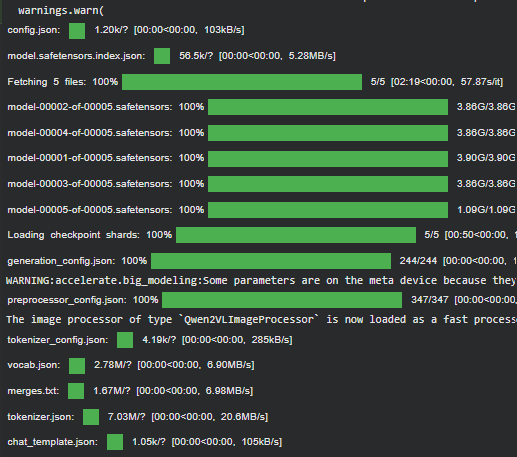
Step 2: Load Pre-trained Model and Processor
- Specify the model ID for the Qwen2-VL model.
- Load the pre-trained Qwen2-VL model with bfloat16 for efficient GPU memory usage.
- Load the processor which will handle text and image preprocessing. Python `
model_id = "Qwen/Qwen2-VL-7B-Instruct" device = "cuda" if torch.cuda.is_available() else "cpu"
model = Qwen2VLForConditionalGeneration.from_pretrained( model_id, device_map="auto", torch_dtype=torch.bfloat16, )
processor = Qwen2VLProcessor.from_pretrained(model_id)
`
**Output:
Output
Step 3 : Generate Function
- Loads an image and prepares it with the user query for processing by a Vision-Language Model (VLM).
- Uses the processor to format text, image, and chat structure into model-ready inputs.
- Generates a response from the model using both visual and textual information.
- Decodes the generated output into readable text and returns it as the final answer. Python `
def generate_answer(image_path, query, max_new_tokens=256): image = Image.open(image_path).convert("RGB") sample = { "messages": [ {"role": "system", "content": [{"type": "text", "text": "You are a Vision Language Model. Answer concisely."}]}, {"role": "user", "content": [{"type": "image", "image": image}, {"type": "text", "text": query}]} ] }
text_input = processor.apply_chat_template(sample['messages'][1:2], tokenize=False, add_generation_prompt=True)
image_inputs, _ = process_vision_info(sample['messages'])

model_inputs = processor(text=[text_input], images=image_inputs, return_tensors="pt").to(device)

generated_ids = model.generate(**model_inputs, max_new_tokens=max_new_tokens)

trimmed_generated_ids = [out_ids[len(in_ids):] for in_ids, out_ids in zip(model_inputs.input_ids, generated_ids)]

output_text = processor.batch_decode(trimmed_generated_ids, skip_special_tokens=True, clean_up_tokenization_spaces=False)

return output_text[0]
`
Step 4: Running the Function
- Provide the image path and the text prompt you want the VLM to answer.
- The function is executed, and the generated response is printed.
Used image is:

Input image
Python `
image_path = "/content/image.png"
query = "Describe this Image"
answer = generate_answer(image_path, query)
print("Generated Answer:", answer)
`
**Output:
Generated Answer: The image shows a young panda bear climbing a tree. The panda has a fluffy white body with black markings on its ears, eyes, and limbs.
You can download full code from here
Applications
VLMs have a wide range of applications:
- **Image Captioning: Automatically generating descriptive captions for images which is useful for accessibility for helping visually impaired individuals.
- **Visual Question Answering (VQA): It provides answers to questions about images. This can help in educational tools and customer support.
- **Image Search and Retrieval: It allows users to search for images using text queries, enhancing search engines and databases.
- **Content Creation: Assisting in generating multimedia content for marketing, social media or educational purposes.
- **Robotics: Helping robots to understand and interact with their environment using both visual and text-based instructions.
Challenges
Despite their various benefits, it has some challenges:
- **Data Bias: It can inherit biases from their training data, leading to unfair or skewed outputs.
- **Interpretability: Understanding how VLMs arrive at their decisions is challenging. The lack of transparency can limit trust in their outputs and hinder adoption.
- **Scalability: As it grow in complexity, the computational resources needed for training and inference increase significantly, making them costly and less accessible.
- **Generalization: It may struggle to generalize well across diverse or unseen data. This limits their performance in real-world applications where input can vary.