AWS S3 Backup (original) (raw)
Last Updated : 23 Jul, 2025
In the present advanced scene, where data is the backbone of organizations and people alike, ensuring its safety, accessibility, and flexibility is central, With the developing volumes of information being created and the rising risk of data loss because of different factors like hardware failure, human error, or cyberattacks, it is fundamental to have a powerful solution. Amazon Web Services (AWS) offers a strong and dependable solution for data backup and storage through Amazon Simple Storage Service (S3).
Amazon S3 is an object storage service intended to provide versatile, solid, and exceptionally accessible storage for an extensive variety of purposes, including backup, recording, and disaster recovery. Not at all like customary file storage systems. Which are restricted by equipment limits and geographic areas, AWS S3 offers practically limitless storage limits and worldwide accessibility.
In this far-reaching guide, we'll dive into the complexities of AWS S3 backup, covering everything from essential ideas to reasonable execution techniques, We'll define key terminologies like buckets, objects, and lifecycle strategies, and give a step-by-step walk-through of the backup process.
Primary Terminologies
- **Amazon S3: Amazon Simple Storage Service (S3) is a versatile, durable, and profoundly accessible object storage service presented by Amazon Web Services (AWS). It allows users to store and recover any measure of data from any place on the web, making it an ideal solution for an extensive variety of purposes, including backup, data lakes, and content distribution.
- **Bucket: With regards to Amazon S3, a bucket is a container for storing objects, consider it a high-level folder where you can coordinate and deal with your data, Bucket names should be globally unique across all of AWS.
- **Object: An object is the essential unit of data stored in Amazon S3. It comprises the real data, metadata (for example, record type, size, and creation date), and an extraordinary identifier known as a key. object can be of any record type, including reports, pictures, recordings, and application data.
- **Lifecycle Policies: Lifecycle Policies in Amazon S3 permit you to automate data on the executives' tasks in light of predefined rules, these tasks incorporate progressing objects between various capacity classes or deleting objects after a predefined period. Lifecycle policies assist in advancing capacity costs and ensure consistency with data maintenance policies.
- **Region: AWS partitions its global infrastructure into regions, which are discrete geographic areas. Every region comprises various Accessibility Zones (AZs) that are isolated from one another but interconnected through fast organizations. While making resources in AWS, for example, S3 buckets, you can pick the region where you maintain that they should be located.
- **Cross-Region Replication (CRR): Cross-Region Replication is an element in Amazon S3 that automatically replicates objects starting with one bucket then onto the next bucket in an alternate AWS region. This further develops data durability and accessibility by making repetitive copies of your data in topographically different areas.
- **Versioning: Versioning is an feature in Amazon S3 that permits you to keep various Versioning of an object in a similar bucket. Each time you overwrite or erase an item, another Versioning is made consequently. This versioning gives security against accidental deletion or overwrites and permits you to return to previous versions if necessary.
What is AWS S3 backup?
AWS S3 backup refers to the method involved with utilizing Amazon Simple Storage Service (S3) as a storage solution for backup data from different sources, like applications, databases, file systems, and servers, it includes safely putting away duplicates of data in S3 bucket, which are exceptionally durable and versatile storage containers given by AWS.
**AWS S3 backup offers a few benefits over conventional backup arrangements:
- **Security: S3 offers an extensive variety of safety elements to protect your backup data, including encryption very still and on the way, access control components, for example, can strategies and access control lists (ACLs), and incorporation with AWS Identity and Access Management (IAM) for fine-grained access control.
- **Scalability: AWS S3 gives virtually limitless storage capacity, permitting you to scale your backup infrastructure easily as your data develops, you can store any type of data in S3 without worrying over limit requirements or provisioning extra equipment.
- **Durability: S3 is intended for 99.999999999% (11 nines) durability, implying that your data is highly strong to hardware failures, errors, and disasters. AWS automatically recreates your data across different devices and offices inside the selected AWS Region, ensuring high accessibility and durability.
- **Cost-effectiveness: AWS S3 offers adaptable pricing options, including pay-as-you-go costs arise estimating with no upfront expenses or long haul responsibilities. You just pay for the capacity you use, with no base expenses or overage charges. Moreover, S3 offers capacity classes with fluctuating degrees of strength and accessibility, allowing you to upgrade costs in light of your backup necessities.
- **Accessibility: With AWS S3, you can get to your backup data from anyplace on the world over the web utilizing simple Application Programming interface (API) calls, SDKs, or the AWS Management console. This empowers consistent data access and recovery, no matter what your region or network infrastructure.
Step-By-Step Process for Backing Up S3 Data with AWS Backup
Step 1: Login to AWS Console
- First we need to login to AWS Management Console by using our credentials or either wise create new account if doesn't exist account.
Step 2: Create Bucket
- Now we need to create bucket or take existing bucket with uploaded object in that bucket because we need to backup file. Without any object we cannot backup.

S3 Bucket

S3 Object
- For created bucket or existing bucket enable versioning
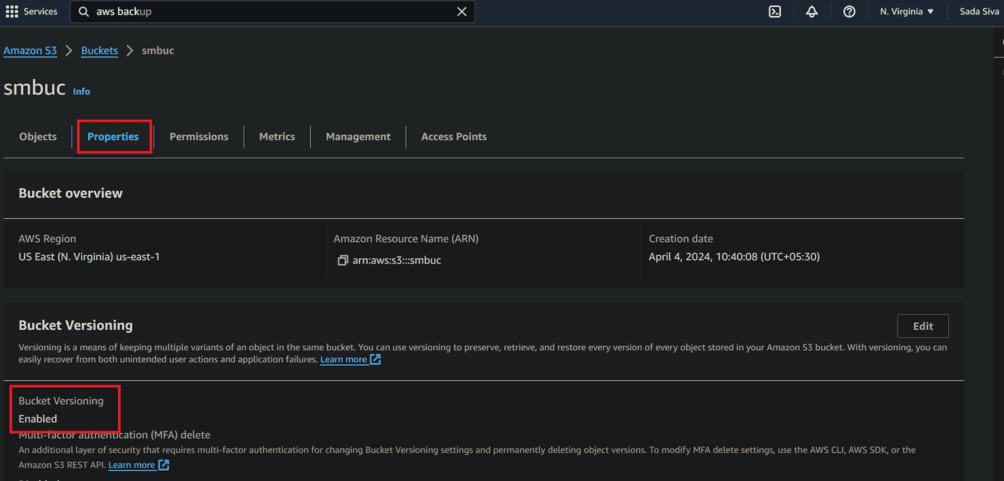
S3 Bucket Enabled
Step 3: Creating AWS Backup
- Now navigate to AWS Backup page. In AWS Dashboard Search AWS Backup
- Now click on Create Backup plan

- Now choose backup plan options

- In Templates select as your requirements, as shown in below and click on Create plan

Step 4: Assign resources
- **For created backup plan assign resources: Give Resource assignment name and provide IAM role Because AWS Backup will assume this IAM role when creating and managing recovery points on your behalf.

- Resource selection, Assign resources to this Backup plan using tags and resource IDs, In Define resource selection.
- They show a 2 types, they are:
- **Include all resource types: Protect all resource types that are enabled in your account.
- **Include specific resource types: Choose resources by type or specify individual resources by ID.
Here I am selecting Specify Resource Type, select created bucket and click on Assign resources.

- Here we see our back plan was successfully created

We can Create on-demand Backup also in AWS
**Step 1: Go to AWS Backup Dashboard and choose create on-demand backup.

**Step 2: In this select Resource type as S3 and choose bucket which was created previously and also we can set retention period.

**Step 3: Now in IAM role select default role or Choose an IAM Role and click on create on-demand backup.

**Step 4: Here we see output of the S3 bucket taken as the backup.
AWS Backup Features
- **Cross-Region and Cross-Account Backup: AWS backup supports cross-region and cross-account backup, empowering users to replicate backup across various AWS regions and AWS accounts, this ensure data overt repetitiveness and helps users with following data residency necessities.
- **Integration with AWS Services: AWS backup incorporates with an extensive variety of AWS services, including Amazon EBS (Elastic Block Store), Amazon RDS (Relational Database Service), Amazon DynamoDB, AWS Storage Gateway and so on. This allows users to back up data from different AWS resources consistently.
- **Centralized Backup Management: AWS backup gives an incorporated control center and Application Programming interface for managing backups across various AWS services and on-premises conditions, this allows users to streamline backup tasks and keep a brought together perspective on their backup environment.
- **Security and Consistence: AWS backup sticks to AWS security best practices and gives elements, for example, encryption, access control, and consistence answering to assist clients with safeguarding their data and meet administrative prerequisites.
- **Snapshot Management: AWS backup gives depiction the executives capabilities, allowing users to make, copy, and manage previews of their data effectively, users can without much of a restore data from snapshots and track snapshots use and costs.
Limitations of AWS Backup for S3
- **Limited Support for Object Lock: AWS Backup doesn't support backing up S3 objects protected with Item Lock, which is a component that prevents object deletion or change for a predefined maintenance period.
- **No Versioning Support: AWS Backup doesn't support backing up numerous forms of objects put away in S3 containers. It just backs up the current version of objects, which may not be reasonable for conditions requiring versioning support.
- **Limited Granularity: AWS Backup gives restricted granularity to support up S3 information, basically at the bucket level. Users can't define backup strategies at the item level or indicate individual items for backup inside a bucket.
- Additional Costs for Restore: While backup capacity costs are brought about for storing S3 backups, users may likewise cause extra expenses for restoring data from backup, contingent upon the restore technique and data transfer fees.
- **Limited Control over Backup Lifecycle: AWS backup gives restricted control over the lifecycle the management of S3 backups. For example, changing backups to lower cost classes or defining custom maintenance periods.
Conclusion
Amazon S3 backup gives a powerful and reliable solution for protecting your important data in the cloud. By utilizing the versatility, toughness, and accessibility of AWS S3, organizations and people can proficiently protect their data against loss, corruption, and unauthorized access. All through this guide, we have investigated the key terminologies, step by step cycles, and benefits of involving AWS S3 for backup purposes.
From making S3 buckets and designing lifecycle policies to carrying out cross-region replication and security best practices, AWS S3 offers an exhaustive set-up of features to meet the different requirements of backup and data protection work processes. Whether you're an independent company hoping to smooth out your backup system or a huge endeavor with rigid consistence prerequisites, AWS S3 gives the adaptability, versatility, and cost-viability you want to ensure the honesty and accessibility of your data.
As innovation proceeds to develop and data volumes develop dramatically, the significance of solid backup arrangements couldn't possibly be more significant. AWS S3 backup not just gives true serenity by offering highly durable and accessible storage yet in addition enables associations to automate backup work processes, advance capacity costs, and adjust to changing business prerequisites.