AWS Simple Storage Service (AWS S3) (original) (raw)
Last Updated : 11 Jun, 2026
Amazon S3 (Simple Storage Service) is AWS’s scalable object storage service used to store and retrieve data from anywhere on the internet. It stores data as objects inside buckets and supports virtually unlimited storage capacity with high durability, security, and availability. Amazon S3 also provides multiple storage classes to optimize cost based on data access patterns.
Core Architecture
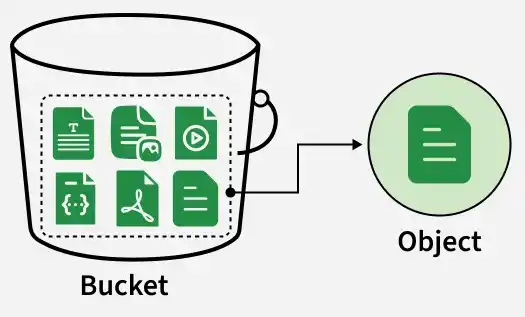
S3 utilizes a flat, non-hierarchical architecture that allows the service to scale virtually infinitely. The fundamental building blocks are logical containers and the data units stored within them:
1. Bucket
A container for objects with the following characteristics:
- **Global Namespace: Bucket names must be unique across all AWS accounts worldwide (like a DNS name).
- **Region Specific: You create a bucket in a specific region (e.g., us-east-1), and your data never leaves that region unless you explicitly move it.
2. Object
The fundamental entity stored in S3, consisting of:
- **Key: The name of the object (e.g., photos/vacation.jpg).
- **Value: The data itself (bytes).
- **Metadata: Name-value pairs describing the object (e.g., Content-Type: image/jpeg).
- **Size: Objects can range from 0 bytes up to 5 Terabytes.
S3 Storage Classes
S3 offers seven storage classes designed for different access patterns and costs. Each class has distinct pricing, retrieval times, and use cases:
| Storage Class | Access Frequency | Availability Zones | Monthly Cost (GB) | Use Case |
|---|---|---|---|---|
| S3 Standard | Frequent | ≥ 3 | $0.023 (first 50 TB) | General-purpose storage, static websites, cloud applications, frequently accessed data. |
| S3 Intelligent-Tiering | Unknown/Changing | ≥ 3 | Variable (based on tier placement + $0.0025/1000 objects monitoring fee) | Data with unpredictable access patterns. Automatically moves between tiers to save costs without retrieval fees. |
| S3 Standard-IA | Infrequent | ≥ 3 | $0.0125 | Long-lived data accessed less than once a month (e.g., backups, disaster recovery). Minimum 30-day storage. |
| S3 One Zone-IA | Infrequent | 1 | $0.01 | Non-critical, reproducible data (e.g., secondary backups). Cheaper but less durable. Minimum 30-day storage. |
| S3 Glacier Instant Retrieval | Rare (Quarterly) | ≥ 3 | $0.004 | Archives needing millisecond access (e.g., medical records, compliance data). Minimum 90-day storage. |
| S3 Glacier Flexible Retrieval | Rare (Yearly) | ≥ 3 | $0.0036 | Archives where retrieval time of minutes to 12 hours is acceptable. 10% cheaper than Instant. Minimum 90-day storage. |
| S3 Glacier Deep Archive | Very Rare | ≥ 3 | $0.00099 | Long-term retention (7-10 years) for compliance. Lowest cost. Retrieval in 12+ hours. Minimum 180-day storage. |
Use an Amazon S3 Bucket
You can use Amazon S3 buckets by following these simple steps:
Step 1: Create a Bucket
- Login to your AWS account, search for S3, and click on the S3 service. Click on "Create bucket" and configure all options as needed during setup.
Step 2: Upload Objects
- After configuring the AWS bucket, upload objects based on your requirements. Use the AWS Console or AWS CLI with the following command:
aws s3 cp <local-file-path> s3://<bucket-name>/Step 3: Control Permissions
- Control permissions for uploaded objects and determine who can access the bucket. You can make the bucket public or private (private is the default mode).
Step 4: Manage Lifecycle
- Manage S3 bucket lifecycle management through transitioning. Based on rules you define, S3 will transition objects to different storage classes according to the age of the object.
Step 5: Enable Monitoring
- Enable services to monitor and analyze S3. Enable S3 access logging to record who is requesting objects in your S3 buckets.
To know more how to configure about Amazon S3 refer to the Amazon S3 – Creating a S3 Bucket.
Upload and Manage Files on Amazon S3
- Create an Amazon S3 bucket to upload and manage files.
- Upload files using AWS SDKs, AWS CLI, or the Amazon S3 Management Console.
- Organize files into folders and apply access controls to secure data access.
- Use features like Versioning and Lifecycle policies to manage data efficiently and optimize storage costs.
To learn more, refer to this article - How to Store and Download Objects in Amazon S3?
Access Amazon S3 Bucket
You can work and access Amazon S3 buckets using any one of the following methods:
1. AWS Management Console
You can access AWS S3 buckets using the AWS Management Console, a web-based user interface. First, create an AWS account and login to the web console. From there, choose the S3 bucket option from Amazon S3 service (AWS Console >> Amazon S3 >> S3 Buckets).
2. AWS CLI Commands
First, install AWS CLI software in the terminal and configure your AWS account with your access key, secret key, and default region. Running aws --help shows S3 service usage. For example, to view buckets, run:
aws s3 ls3. Programming Scripts
You can configure Amazon S3 buckets using scripting languages like Python with libraries such as the boto3 library. This allows you to perform AWS S3 tasks programmatically.
To know more about refer this article - How to access Amazon S3 using python script
Key Features and Capabilities
1. Data Consistency
- S3 provides strong read-after-write consistency for all applications.
- If you write a new object or overwrite an existing one, any subsequent read request immediately receives the latest version (changed in late 2020 from eventual consistency).
2. S3 Versioning
- Versioning allows you to keep multiple variants of an object in the same bucket.
- **Protection: If you accidentally delete an object, S3 inserts a "delete marker" but keeps the previous version. You can restore it easily.
- **Rollback: You can retrieve previous versions of a file if an update overwrites it with bad data.
3. S3 Lifecycle Management
- Automate cost savings by defining rules to transition objects between storage classes.
- Example Rule: "Move objects to S3 Standard-IA after 30 days, then to Glacier Deep Archive after 365 days, then expire (delete) them after 7 years."
4. Security and Access Control
Amazon S3 provides multiple security mechanisms to control access to buckets and objects.
- **Bucket Policies: JSON-based policies attached directly to the bucket to manage bucket-level permissions and object access.
- **IAM Policies: IAM policies allow you to grant users, groups, and roles permission to perform operations on specific S3 buckets and objects.
- **Access Control Lists (ACLs): ACLs are legacy access control mechanisms. AWS recommends disabling ACLs and using Bucket Policies or IAM Policies instead.
- **Block Public Access: A centralized security feature that prevents accidental public exposure of S3 buckets and objects. Enabled by default for new buckets.
Bucket Policies are generally considered the preferred method for managing S3 bucket permissions.
5. Encryption
**Server-Side Encryption (SSE): S3 encrypts your data at rest.
- **SSE-S3: Keys managed by S3 (Default).
- **SSE-KMS: Keys managed by AWS KMS (Provides audit trail and rotation).
- **SSE-C: Keys managed by the customer.
**Client-Side Encryption: You encrypt data before uploading it to S3.
Advanced Features
- **S3 Cross-Region Replication (CRR): Automatically replicate objects to a bucket in a different AWS region for disaster recovery or lower latency compliance.
- **Pre-Signed URLs: A core security feature of Amazon S3 used to provide controlled, temporary access to objects without changing the bucket's public access settings. It generates a temporary URL that grants time-limited access to a private object.
- **Use Case: Allowing a user to download a premium video or upload a file directly to S3 without routing it through your web server.
- **S3 Object Lock (WORM): "Write Once, Read Many." Prevents an object from being deleted or overwritten for a fixed amount of time or indefinitely. Essential for legal holds.
- **S3 Select: Allows you to retrieve only a subset of data from an object using SQL expressions, drastically reducing data transfer costs for large CSV/JSON files.
Use Cases
Amazon S3 is widely used across cloud applications because of its scalability, durability, security, and cost-effective storage options.
- **Data Storage: Store and retrieve large volumes of structured and unstructured data efficiently in real time.
- **Backup and Recovery: Maintain durable backups and recover critical organizational data when needed.
- **Static Website Hosting: Host HTML, CSS, JavaScript, and other static web content directly from S3 with low latency and high availability.
- **Data Archiving: Use S3 Glacier storage classes for long-term archival and compliance data retention at lower costs.
- **Big Data Analytics: Store massive datasets and integrate with AWS services like Athena, Redshift, EMR, and SageMaker for analytics and machine learning workloads.
- **Application Hosting: Store user-generated content such as images, videos, and documents for mobile and web applications.