Google Compute Engine Autoscaler with Persistent Disks: Dynamic Scaling (original) (raw)
Last Updated : 23 Jul, 2025
In the ever-evolving landscape of cloud computing, efficient resource management and scalability are vital factors for corporations to succeed. Google Cloud Platform (GCP) gives a powerful solution in the form of the Google Compute Engine (GCE) Autoscaler, which allows users to dynamically alter the variety of virtual system times in response to various workloads. When combined with Persistent Disks, a reliable and scalable storage solution, the Google Compute Engine Autoscaler turns into stronger. In this text, we will delve into the capabilities of the GCE Autoscaler and discover how it may seamlessly combine with Persistent Disks for dynamic scaling.
What is Google Compute Engine Autoscaler?
The Google Compute Engine Autoscaler is a tool designed to automatically adjust the number of virtual machine instances in a managed instance group based on the observed load or a specified metric. This ensures that your application has the important resources to handle varying workloads efficiently. Autoscaling facilitates the optimization of useful resource usage, reduces prices, and improves the overall performance and reliability of your application.
Key Features of GCE Autoscaler
- **Automatic Scaling: GCE Autoscaler monitors the load on your instances and automatically adjusts the number of virtual machine times in the managed instance group.
- **Customizable Scaling Policies: Users can define scaling rules based totally on metrics like CPU usage, HTTP load balancing serving capacity, or custom metrics. This flexibility allows for fine-tuning the autoscaling conduct consistent with precise software necessities.
- **Cooldown Periods: To prevent useless scaling actions, GCE Autoscaler introduces cooldown durations at some point at which extra scaling actions are not on time. This facilitates stabilizing the environment and avoids fast, potentially disruptive adjustments.
- **Instance Template Integration: Autoscaler works seamlessly with instance templates, permitting you to specify the configuration of new instances brought throughout scaling operations.
What is Persistent Disks in Google Compute Engine?
Persistent Disks in GCE provide scalable and durable block storage that can be connected to virtual machine instances. These disks are designed to be highly available and reliable, making them suitable for storing critical data and applications. Persistent Disks support each well-known SSD storage option, imparting the power to fulfill numerous performance requirements.
Key features of Google Compute Engine
- **Scalable Storage: Persistent Disks provide adjustable storage sizes, allowing users to without problems scalestorage resources as per their requirements
- **High Durability: Data on Persistent Disks is replicated across more than one locations, ensuring high durability and availability, even in the event of hardware failures.
- **Snapshot and Cloning: Support for snapshots permits backup and cloning capabilities, streamlining data management and facilitating quick instance creation.
- **Integration with Live Migration: Persistent Disks seamlessly integrate with Live Migration, allowing virtual machine instance to be moved to different hardware without downtime, improving application availability.
How to setup Google Compute Engine Autoscaler with Persistent Disks for dynamic scaling
Step 1 - Set Up a Google Cloud Platform (GCP) Project
Create a new project or use an existing one in the Google Cloud Console.

Step 2 - Enable Compute Engine API
Navigate to the "**APIs & Services" section within the Cloud Console.
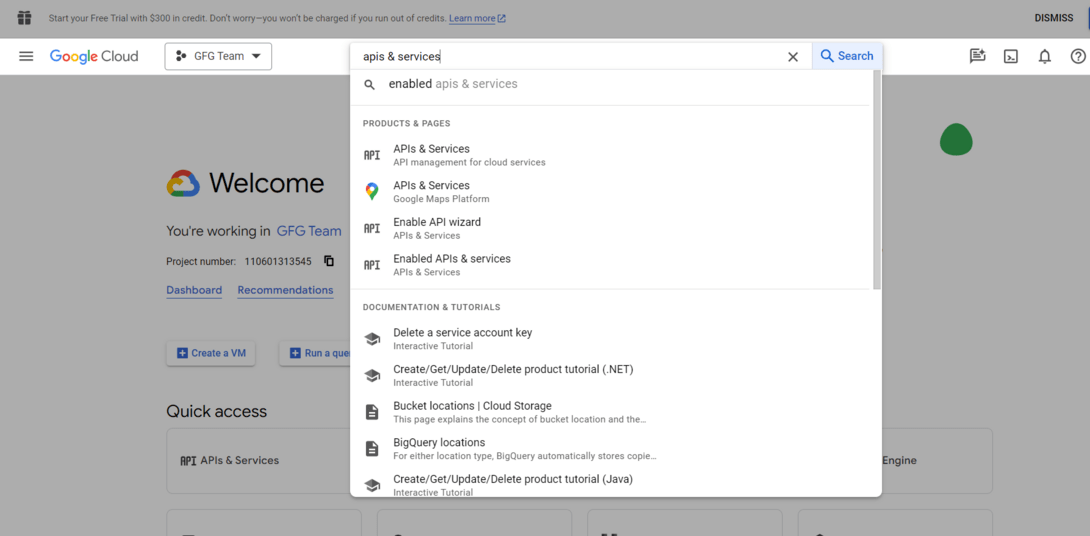
Navigate to the APIs & Services
Enable the "**Compute Engine API" for your project.

Enable Compute Engine API
Step 3 - Create an Instance Template
In the Compute Engine section of the Cloud Console, go to "**Instance templates."Click "**Create Instance Template" and configure the template together with your desired machine type, boot disk, and any additional settings.

Create instance template
Attach any Persistent Disks you want to included in the instance.
Step 4: Create a Managed Instance Group
In the Compute Engine section, go to "Instance Group."
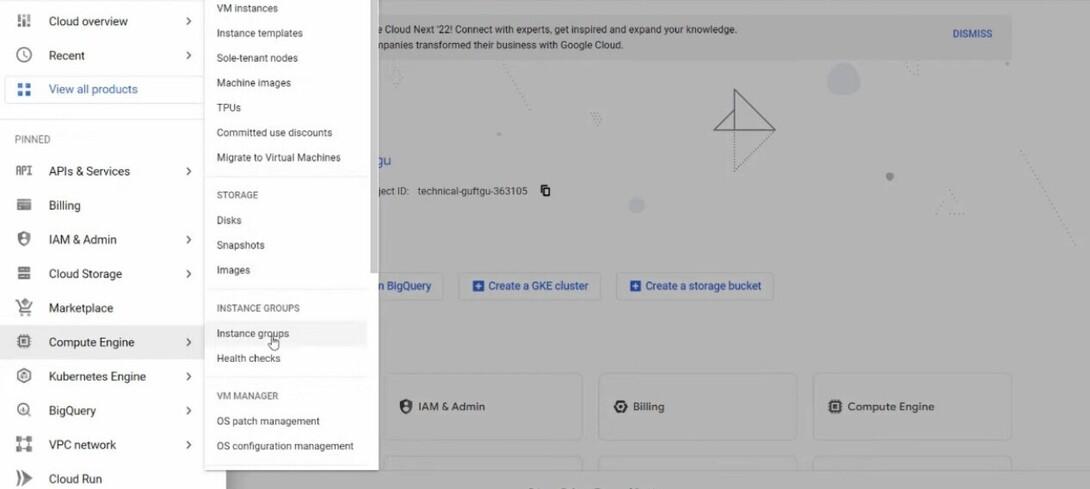
go to Instance Group
Click "**Create Instance Group" and select "**Managed Instance group."

Create Instance Group
Configure the group, specifying the instance template you created, the zone, and the target size of the group.
Step 5 - Configure Autoscaler
In the "**Instance Group" section, click at the name of the managed instance Group you created.Go to the "**Autoscaling" tab.
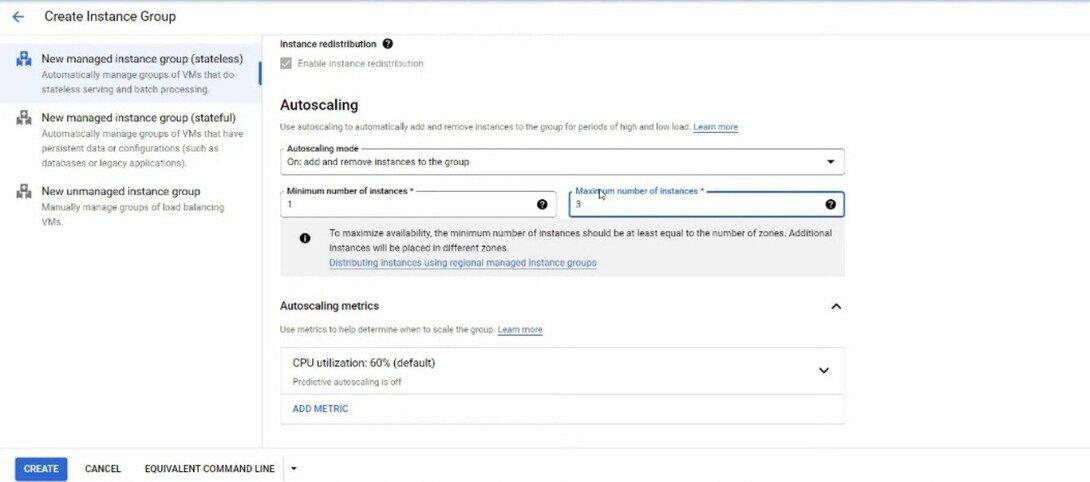
Go to the Autoscaling tab
Configure cool down periods to avoid rapid scaling.
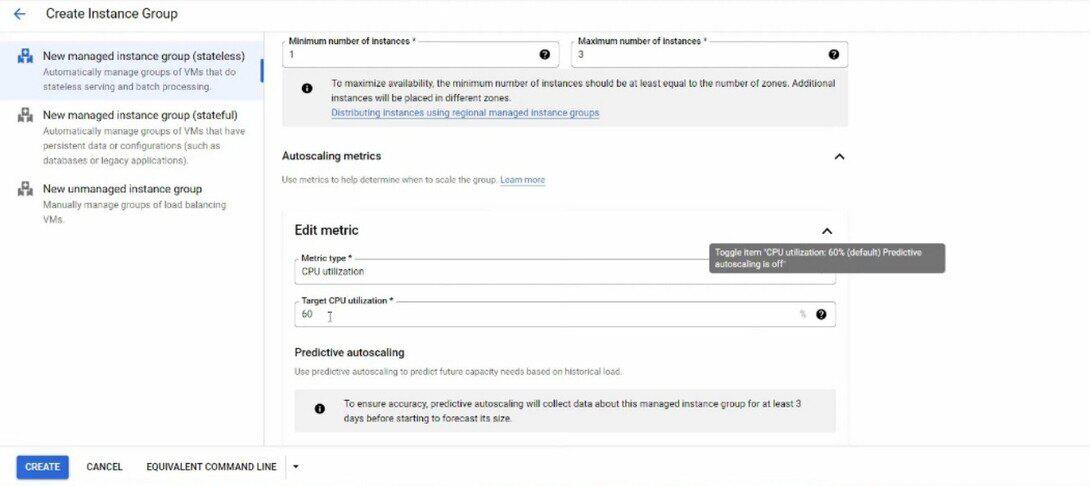
Configure cooldown periods
Step 6 - Health Checks and Metrics
Set up Health Checks for your instance to make sure that Autoscaler considers the health of instances while making scaling decision.
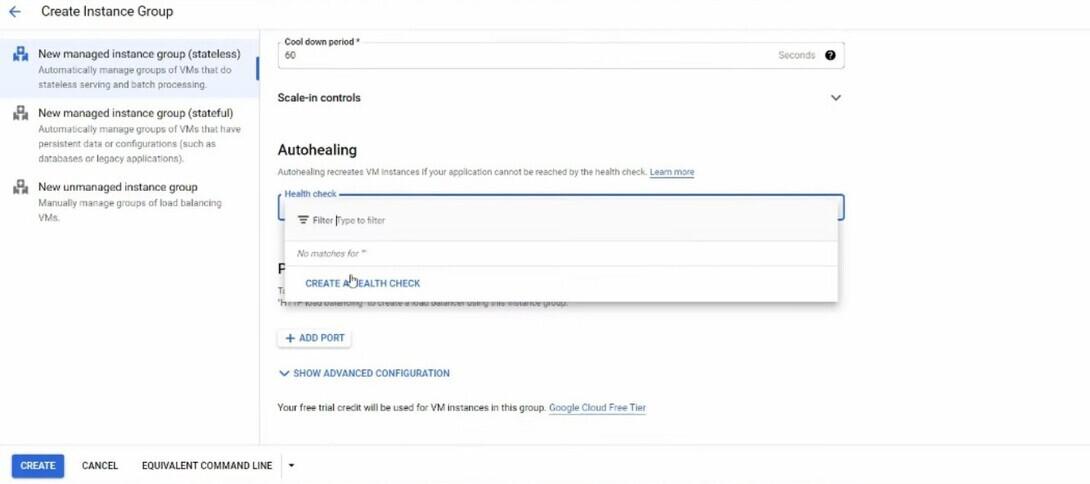
Create Health check
Define custom metrics if needed to montior application overall performance.
Step 7 - Monitor and Test
- Monitor the Autoscaler and Managed Instance Group within the Cloud Console.
- Test the autoscaling through simulating load to your instances to ensure they scale up and down as expected.
Benefits of Dynamic Scaling with GCE Autoscaler and Persistent Disks
- **Cost Optimization: GCE Autoscaler guarantees which you have the proper range of instances running to deal with your workload, stopping needless cost associated with over-provisioning.
- **Improved Application Performance: Dynamic scaling permits your application to adapt to varying workloads, making sure top of the line performance during peak usage durations.
- **Enhanced Reliability: Persistent Disks offer dependable and scalable storage solutions, contributing to the general resilience of your apllication.
- **Flexibility and Customization: The combination of GCE Autoscaler and Persistent Disks allows for fine-grained control and customization, ensuring that your scaling approach aligns with the unique necessities of your applications.
Conclusion
Google Compute Engine Autoscaler, while coupled with Persistent Disks, offers a strong solution for dynamic scaling in the cloud. By seamlessly integrating compute and storage scaling, this combination empowers businesses to optimize useful resource utilization, enhancing software overall performance, and improve normal reliability. As organizations continue to include cloud-local architectures, the GCE Autoscaler with Persistent Disks sticks out as a key enabler for constructing scalable and resilient application within the Google Cloud Platform.