Introduction to TELNET (original) (raw)
Last Updated : 15 Jul, 2025
**TELNET stands forTeletype Network. It is a **client/server application protocol that provides access to virtual terminals of remote systems on local area networks or the Internet. The local computer uses a telnet client program and the remote computers use a telnet server program. In this article, we will discuss every point about TELNET.
What is Telnet?
**TELNET is a type of protocol that enables one computer to connect to the local computer. It is used as a standard **TCP/IP protocol for virtual terminal service which is provided by **ISO. The computer which starts the connection is known as the local computer. The computer which is being connected to i.e. which accepts the connection known as the **remote computer. During telnet operation, whatever is being performed on the remote computer will be displayed by the local computer. Telnet operates on a client/server principle.
History of TELNET
The **Telnet protocol originated in the late 1960s, it was created to provide remote terminal access and control over mainframes and minicomputers. Initially, it was designed to be a simple and secure method of connecting to a remote system. This protocol allowed users to access remote computers using a terminal or command-line interface. Over time, Telnet’s use has diminished due to security concerns, and alternatives like **SSH are now preferred for secure remote management
Logging in TELNET
The logging process can be further categorized into two parts:
- Local Login
- Remote Login
**1. Local Login
Whenever a user logs into its local system, it is known as local login.

Local Login
**The Procedure of Local Login
- Keystrokes are accepted by the terminal driver when the user types at the terminal.
- Terminal Driver passes these characters to OS.
- Now, OS validates the combination of characters and opens the required application.
**2. Remote Login
Remote Login is a process in which users can log in to a remote site i.e. computer and use services that are available on the remote computer. With the help of remote login, a user is able to understand the result of transferring the result of processing from the remote computer to the local computer.

Remote Login in Logging
**The Procedure of Remote Login
- When the user types something on the local computer, the local operating system accepts the character.
- The local computer does not interpret the characters, it will send them to the TELNET client.
- TELNET client transforms these characters to a universal character set called Network Virtual Terminal (NVT) characters and it will pass them to the local TCP/IP protocol Stack.
- Commands or text which are in the form of NVT, travel through the Internet and it will arrive at the TCP/IP stack at the remote computer.
- Characters are then delivered to the operating system and later on passed to the TELNET server.
- Then TELNET server changes those characters to characters that can be understandable by a remote computer.
- The remote operating system receives characters from a pseudo-terminal driver, which is a piece of software that pretends that characters are coming from a terminal.
- The operating system then passes the character to the appropriate application program.
Network Virtual Terminal(NVT)
NVT (Network Virtual Terminal) is a virtual terminal in TELNET that has a fundamental structure that is shared by many different types of real terminals. NVT (Network Virtual Terminal) was created to make communication viable between different types of terminals with different operating systems.

Network Virtual Terminal(NVT) in Telnet
How TELNET Works?
- **Client-Server Interaction
- The **Telnet client initiates the connection by sending requests to the Telnet server.
- Once the connection is established, the client can send **commands to the server.
- The server processes these commands and responds accordingly.
- **Character Flow
- When the user types on the **local computer, the local operating system accepts the characters.
- The Telnet client transforms these characters into a universal character set called **Network Virtual Terminal (NVT) characters.
- These NVT characters travel through the Internet to the remote computer via the local TCP/IP protocol stack.
- The remote Telnet server converts these characters into a format understandable by the remote computer.
- The remote operating system receives the characters from a pseudo-terminal driver and passes them to the appropriate application program3.
- **Network Virtual Terminal (NVT)
- NVT is a virtual terminal in Telnet that provides a common structure shared by different types of real terminals.
- It ensures communication compatibility between various terminals with different operating systems.
**TELNET Commands
Commands of Telnet are identified by a prefix character, Interpret As Command (IAC) with code 255. IAC is followed by command and option codes. The basic format of the command is as shown in the following figure :
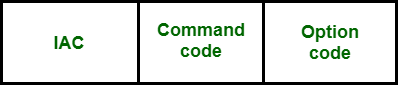
TELNET Command Format
Following are some of the important TELNET commands:
| Character | Decimal | Binary | Meaning |
|---|---|---|---|
| WILL | 251 | 11111011 | 1. Offering to enable. 2. Accepting a request to enable. |
| WON'T | 252 | 11111100 | 1. Rejecting a request to enable. 2. Offering to disable. 3. Accepting a request to disable. |
| DO | 253 | 11111101` | 1. Approving a request to enable. 2. Requesting to enable. |
| DON'T | 254 | 11111110 | 1. Disapproving a request to enable. 2. Approving an offer to disable. 3. Requesting to disable. |
Following are some common optionsused with the telnet:
| Code | Option | Meaning |
|---|---|---|
| 0 | Binary | It interprets as 8-bit binary transmission. |
| 1 | Echo | It will echo the data that is received on one side to the other side. |
| 3 | Suppress go ahead | It will suppress go ahead signal after data. |
| 5 | Status | It will request the status of TELNET. |
| 6 | Timing mark | It defines the timing marks. |
| 8 | Line width | It specifies the line width. |
| 9 | Page size | It specifies the number of lines on a page. |
| 24 | Terminal type | It set the terminal type. |
| 32 | Terminal speed | It set the terminal speed. |
| 34 | Line mode | It will change to the line mode. |
Uses of TELNET
- Remote Administration and Management
- Network Diagnostics
- Understanding Command-Line Interfaces
- Accessing Bulletin Board Systems (BBS)
- Automation and Scripting
Advantages of TELNET
- It provides remote access to someone's computer system.
- Telnet allows the user for more access with fewer problems in data transmission.
- Telnet saves a lot of time.
- The oldest system can be connected to a newer system with telnet having different operating systems.
Disadvantages of TELNET
- As it is somehow complex, it becomes difficult to beginners in understanding.
- Data is sent here in form of plain text, that's why it is not so secured.
- Some capabilities are disabled because of not proper interlinking of the remote and local devices.
**Modes of Operation
- **Default Mode: If no other modes are invoked then this mode is used. Echoing is performed in this mode by the client. In this mode, the user types a character and the client echoes the character on the screen but it does not send it until the whole line is completed.
- **Character Mode: Each character typed in this mode is sent by the client to the server. A server in this type of mode normally echoes characters back to be displayed on the client's screen.
- **Line Mode: Line editing like echoing, character erasing, etc. is done from the client side. The client will send the whole line to the server.
Conclusion
Telnet is a client/server application protocol that allows remote access to virtual terminals via local area networks or the internet. Telnet's use has decreased due to security concerns, with protocols such as SSH chosen for safe remote management. Telnet is still useful for remote administration, network diagnostics, instructional purposes, and interacting with legacy systems.