Computer Hardware (original) (raw)
Last Updated : 28 Apr, 2026
Physical parts of a system that can be seen and touched are known as computer hardware. These components work together to process input and produce output based on user instructions. In this article, we will explore different types of computer hardware, their functions, and how they interact to make a system work efficiently. The computer has mainly two major components:
- Hardware
- Software
This article focuses exclusively on computer hardware.
Input Devices
Used to interact with a computer, Input devices enable users to enter data and commands. These devices convert the entered information into a format that the computer can process. Mentioned below are few input devices:
- **Keyboard: Widely used input device with keys for typing and functions, now often available in wireless (Bluetooth) form.
- **Mouse: Pointing device used to control the cursor, with buttons for selection and a sensor to track movement.
- **Scanner: Scans documents, images, and other media, converting them into digital formats for editing or processing.
- **Trackball: A stationary pointing device with a ball that the user rotates to control the cursor, requiring less space than a traditional mouse.
- **Light Pen: A light-sensitive pen used to draw or select objects on a CRT screen by detecting raster patterns, offering a direct interaction with the display.
- **Microphone: Converts sound into electrical signals. It captures voice input for speech recognition and voice commands on the computer.
- **Optical Character Reader (OCR): Scans printed or handwritten text, converting it into digital data by detecting reflected light from the characters, similar to a scanner.
- **Bar Code Reader: Reads bar codes and converts them into digital data for processing. The bar code consists of light and dark lines that encode information.
Output Devices
Used to present processed data in a user-friendly form, output devices convert digital information into visual, audio, or physical results that users can easily understand. Let’s discuss some common output devices:
- **Monitor: Output device also called VDU(visual display unit)looks like a TV screen, displays the information from the computer like text, video, images, etc.
- **Printer: A printer is an output device that transfers data from the computer in a printed format by using text or images on paper. There are both colored and black & white printers.
- **Plotter: Plotter, similar to printer, is used to generate large drawings, architectural blueprints, etc. on paper and these are high-quality images and drawings and large.
- **Speakers: It is a very common output device and it gives sound as an output. The speaker is generally used to play music or anything having sound.
Storage Devices
Designed to store data and programs for long-term use, storage devices—also known as secondary storage devices—allow users to save, retrieve, and manage information even when the computer is turned off. Some of them are discussed below:
**1. CD (Compact disc): Circular storage medium made of plastic polycarbonate and a thin reflective layer, a CD has a storage capacity of about 600–700 MB. It typically measures 12 cm in diameter, with a 1.5 cm center hole and a thickness of around 1.2 mm. There are 3 types of CDs, which are:
- **CD-ROM (CD - Read Only Memory): Data on this CD cannot be erased or modified by users; it's written by the publisher and used for distributing music, software, and other commercial content.
- **CD-R (CD-Recordable): Data can be written only once on this disc, after which it can be read multiple times but cannot be erased or modified.
- **CD-RW(CD-Rewritable): Used to rewrite the content or erase previous content and again write new content many times.
**2. DVD (Digital Video/Versatile Disc): Similar to a CD but with enhanced features, a DVD offers much higher storage capacity and comes in single and dual-layer formats. A one-sided single-layer DVD stores about 4.7 GB, while a double-layer stores 8.5 GB; double-sided versions can hold up to 9.4 GB and 17 GB. There are also different types of DVDs, such as:
- **DVD-ROM: Data on this disc cannot be written or erased by users; it is mainly used for distributing applications, software, and large databases.
- **DVD-R / DVD+R: DVD-R (DVD minus R) and DVD+R (DVD plus R) are recordable discs that allow data to be written once and read many times, with minimal practical differences between the two formats.
- **DVD-RW / DVD+RW: Rewritable discs that can be erased and reused multiple times, typically up to around 1,000 rewrites.
- **DVD-RAM: DVD RAM is rewritable disc that functions similar to a hard disk, offering high data reliability and allowing up to 100,000 rewrites.
**3. Hard Disk: A non-volatile storage device used for long-term data storage, the hard disk stores digital information on the magnetic surface of rotating platters using read/write heads. It is typically 3.5 inches in desktops and 2.5 inches in laptops. A hard disk can be further classified into three types, which are:
- **Internal Hard Disk: Installed inside the system cabinet, it offers high-speed performance with fixed storage capacity, usually measured in GB or TB. It is mainly used to store operating systems, software, and large data files.
- **Internal Cartridges: Designed to overcome the difficulty of removing internal hard disks, these provide a removable storage option. They typically offer capacities ranging from 2 GB to 160 GB and act as an alternative to fixed internal storage.
- **Hard Disk Packs: Storage systems used by large organizations to handle large volumes of data, now replaced by modern storage technologies.
**4. SSD (Solid State Drive): A Modern fast storage device that uses flash memory instead of magnetic disks, offering higher speed and reliability than traditional hard drives.
**5. USB Drive: A Modern portable storage device used to store and transfer data between computers using a USB interface.
Hardware Components
Some important hardware devices known as the internal components are discussed below:
1. CPU (Central Processing Unit)
Also known as the brain of the computer. It consists of three units, generally known as the control unit, the Arithmetic Logical Unit (ALU), and the memory unit. Below is the block diagram of the CPU is given:
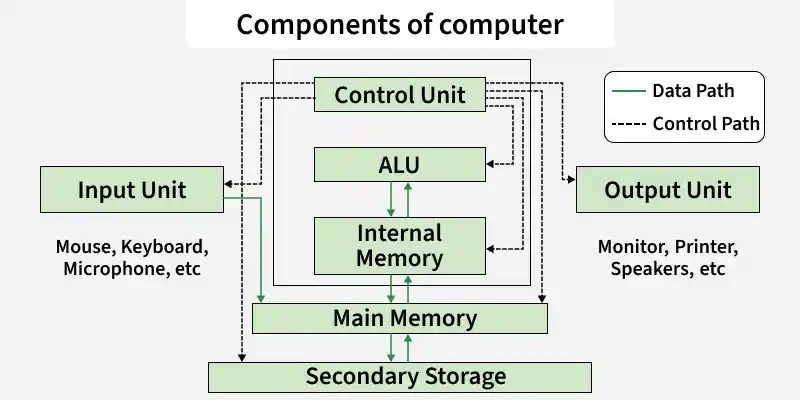
As shown in the diagram input is given to the CPU through input devices. This input goes to memory and the control unit gets instructions from memory. The control unit now decides what to do with the input or instructions and transfers it to ALU. Now, ALU performs various operations like addition, subtraction, multiplication, division, logical operations, etc. After that, the final result gets stored in memory and finally passed to output devices to give the output. So, this is how the CPU works.
2. Motherboard
It is the main circuit board inside a computer and contains most of the electronic components together. All the components of the computer are directly or indirectly connected to the motherboard. It includes RAM slots, controllers, system chipsets, etc.
3. RAM (Random Access Memory)
Also known as temporary or volatile memory. It holds the program and data, which are currently in process or processing. All the data is erased as soon as the computer is turned off or in case of a power failure. Data stored in this memory can be changed. There are two types of RAM:-
- **SRAM (Static RAM): SRAM consists of a flip-flop using a transistor or Mosfet (MOS). It is fast and has less access time. In this refreshing circuits are not required. But it is costly and requires more space. E.g. cache memory.
- **DRAM (Dynamic RAM): DRAM consists of capacitors and the data is stored in the form of capacitors. Capacitors charge when data is 1 and don't charge if data is 0. It requires refreshing circuits, as leakage of current in the capacitor can occur, so they need to be refreshed to the data. It is slower and has a higher access time. It is cheaper in comparison with SRAM. E.g. Main memory.
4. Video Graphics Array Port
Video input commonly used on computer monitors is called a video graphics array (VGA) port. Verifying that there isn't a loose connection, a damaged cable, or a broken display is one step in troubleshooting a VGA port. Compressed air can also be sprayed inside the VGA port by a computer expert to make sure it's dust-free.
5. Graphics Card (GPU)
A hardware component that renders images, videos, and graphics. It enhances visual performance, especially in gaming and design tasks.
6. Power Supply
All of a computer system's parts are powered by a power source. Typically, a power cord is used to connect a computer tower to an electrical outlet. By turning off the computer, unplugging and separating the power supply cord, or trying a different cord or socket, a technician can diagnose the power supply.
7. Cooling Fan
A computer's system to prevent overheating uses cooling fans. To aid customers who use their computers intensively, such as when streaming video or playing games, many computers contain more than one cooling fan. If a user detects their computer overheating, a computer expert might need to repair the cooling fan. The blades may be examined for any damage and cleared of any foreign objects. A technician's standard method of troubleshooting may involve replacing computer fans.
8. Hard Drive
On a computer system, files, programs, and other types of information are stored on hard drives, which are data storage devices. They utilize hard drives, which are magnetically coated discs used to store digital versions of information. A computer technician can suspect a corrupt hard disk when a hard drive dies.
Relationship Between Computer Hardware and Software
| Category | Hardware | Software |
|---|---|---|
| **Definition | Physical devices that perform tasks | Programs or applications that run on hardware |
| **Examples | CPU, RAM, Hard Drive, Monitor, Keyboard | Operating Systems, Applications, Utilities |
| **Purpose | Executes and stores data physically | Processes data and provides user interface |
| **Dependence | Independent of software, but relies on it to function | Requires hardware to operate |
| **Interaction | Direct interaction with the user or system | Indirect interaction, using hardware as a platform |
| **Examples of Interaction | Input/Output devices like keyboard, mouse | Word processors, video editors, web browsers |
| **Upgradability | Can be upgraded by adding/removing components | Can be updated via patches or newer versions |
| **Cost | Generally higher initial cost | Often lower initial cost |
| **Installation | Requires physical setup or installation | Installed via software package or online |