Preprocessing the Audio Dataset (original) (raw)
Last Updated : 14 Apr, 2026
Audio preprocessing is an essential step in preparing audio data for machine learning models.
- Improves audio quality by reducing noise and distortions
- Extracts meaningful features from raw audio signals
- Converts data into a format suitable for model input
- Enhances overall model performance and accuracy
Importance of Audio Preprocessing
Preprocessing helps improve model performance and ensures consistency across datasets.
- Reduces background noise and unwanted signals
- Standardizes formats, sample rates and resolutions
- Extracts important features like MFCCs and spectrograms
- Normalizes signal amplitude for consistency
- Handles variable-length audio using padding or trimming
- Improves training efficiency and model accuracy
Implementation
Step 1: Install Required Libraries
pip install gdown librosa
Step 2: Import Required Libraries
- **librosa: Load and process audio signals
- **scipy.signal****:** Apply filters (noise removal)
- **numpy:Handle numerical operations on audio arrays
- **os: Work with file paths
- **matplotlib: Visualize audio features
- **librosa.display: Plot spectrograms Python `
import librosa from scipy.signal import butter, filtfilt import numpy as np import os import matplotlib.pyplot as plt import librosa.display
`
Step 3: Load Dataset
- Audio datasets are often large and stored externally
- Extracting them ensures we can access individual audio files Python `
file_id = '1lNUGw8VMXvY2Yu6aITYlOCNaj8y-KbNB'
!gdown --id $file_id -O dataset.zip !unzip -q dataset.zip -d /content/
`
Step 4: Resampling
- Audio files may have different sample rates (e.g., 44.1kHz, 22kHz)
- Models usually require a fixed sample rate (e.g., 16kHz) Python `
sample_audio_path = '/content/barbie_vs_puppy/barbie/barbie_4.wav'
def resample_audio(audio_path, target_sr=16000): y, sr = librosa.load(audio_path, sr=target_sr) return y, sr
resampled_audio, sr = resample_audio(sample_audio_path) print(f"Sample rate after Resampling: {sr}")
`
**Output:

output
Step 5: Filtering
Removes high-frequency noise using a low-pass filter
Python `
def butter_lowpass_filter(data, cutoff_freq, sample_rate, order=4): nyquist = 0.5 * sample_rate normal_cutoff = cutoff_freq / nyquist b, a = butter(order, normal_cutoff, btype='low', analog=False) filtered_data = filtfilt(b, a, data) print(f"Filtered audio shape: {filtered_data.shape}") return filtered_data
filtered_audio = butter_lowpass_filter(resampled_audio, cutoff_freq=4000, sample_rate=sr)
`
Step 6: Convert to Model Input
- Audio clips are adjusted to a fixed length
- Ensures consistent input shape like (16000,) Python `
def convert_to_model_input(y, target_length): if len(y) < target_length: y = np.pad(y, (0, target_length - len(y))) else: y = y[:target_length] return y
model_input = convert_to_model_input(filtered_audio, target_length=16000) print(f"Model input shape: {model_input.shape}")
`
**Output:

Output
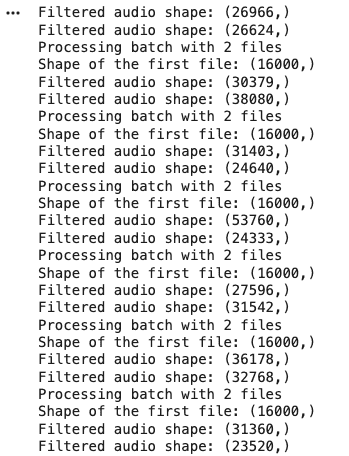
Step 7: Audio Data Streaming (Batch Processing)
- Processes audio files in batches instead of all at once
- Saves memory
- Works with large datasets
- Enables real-time and scalable systems Python `
def stream_audio_dataset(dataset_path, batch_size=32, target_length=16000, target_sr=None): audio_files = [os.path.join(root, file) for root, dirs, files in os.walk(dataset_path) for file in files] np.random.shuffle(audio_files)
for i in range(0, len(audio_files), batch_size):
    batch_paths = audio_files[i:i + batch_size]
    batch_data = []

    for file_path in batch_paths:
        y, sr = librosa.load(file_path, sr=target_sr)

        if target_sr is not None and sr != target_sr:
            y = librosa.resample(y, sr, target_sr)
            sr = target_sr

        filtered_audio = butter_lowpass_filter(y, cutoff_freq=4000, sample_rate=sr)
        model_input = convert_to_model_input(filtered_audio, target_length=target_length)
        batch_data.append(model_input)

    yield np.array(batch_data)
dataset_path = '/content/barbie_vs_puppy/barbie'
for batch_data in stream_audio_dataset(dataset_path, batch_size=2, target_sr=16000): print(f"Processing batch with {len(batch_data)} files") print(f"Shape of the first file: {batch_data[0].shape}")
`
**Output:
Output
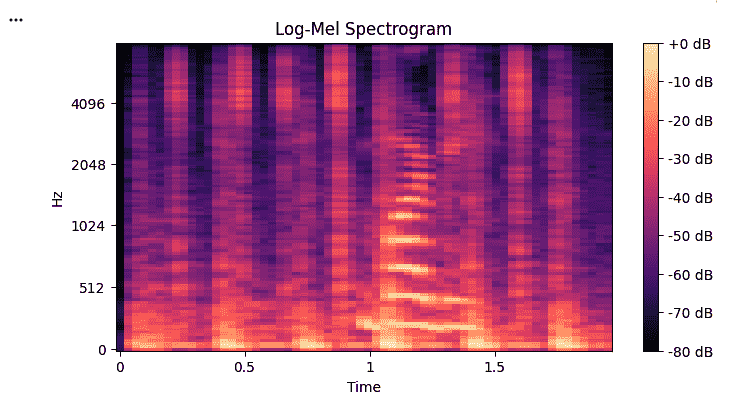
Step 8: Log-Mel Spectrogram
- Converts audio into a visual representation (frequency vs time)
- Raw audio is hard for models to understand so Spectrograms capture Frequency patterns,Temporal changes Python `
def compute_logmel_spectrogram(y, sr, n_mels=128, hop_length=512): mel_spectrogram = librosa.feature.melspectrogram(y=y, sr=sr, n_mels=n_mels, hop_length=hop_length) logmel_spectrogram = librosa.power_to_db(mel_spectrogram, ref=np.max) return logmel_spectrogram
audio_file_path = '/content/barbie_vs_puppy/barbie/barbie_4.wav' target_sr = 16000
y, sr = librosa.load(audio_file_path, sr=target_sr) logmel_spectrogram = compute_logmel_spectrogram(y, sr=sr)
plt.figure(figsize=(8, 4)) librosa.display.specshow(logmel_spectrogram, sr=sr, hop_length=512, x_axis='time', y_axis='mel') plt.colorbar(format='%+2.0f dB') plt.title('Log-Mel Spectrogram') plt.show()
`
**Output:
Log-Mel Spectogram
Download full code from here
Applications
- **Speech Recognition: Improves accuracy in systems like voice assistants and transcription tools
- **Audio Classification: Used to classify sounds such as music genres, environmental sounds or speaker identity
- **Music Analysis: Helps in tasks like beat detection, genre classification and recommendation systems
- **Healthcare: Assists in analyzing speech patterns for detecting disorders or medical conditions
- **Security and Surveillance: Enables sound-based event detection like alarms, gunshots or anomalies
- **Voice Biometrics: Supports speaker verification and authentication systems