Keys in Relational Model (original) (raw)
Last Updated : 24 Apr, 2026
Keys are fundamental elements of the relational database model that ensure uniqueness, data integrity, and efficient data access.
- They uniquely identify each row in a table.
- They prevent data duplication and maintain consistency.
- They create relationships between different tables.
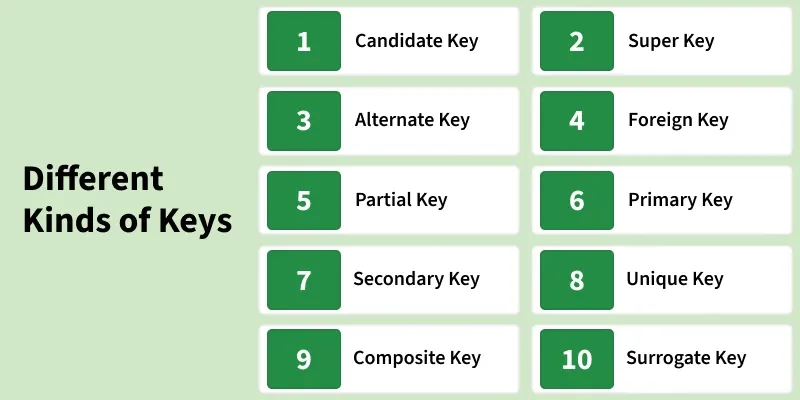
Keys in DBMS
Importance of Keys in DBMS
- **Uniqueness: Keys ensure that each record in a table is unique and can be identified distinctly.
- **Data Integrity: Keys prevent data duplication and maintain the consistency of the data.
- **Efficient Data Retrieval: Keys help in creating relationships between tables, allowing faster queries and better data organization.
- Without keys, managing large databases would become difficult, and data retrieval would be slow and error-prone.
Types of Database Keys
1. Candidate Key
The minimal set of attributes that can uniquely identify a tuple is known as a candidate key. For Example, STUD_NO in STUDENT relation.
- A candidate key is a minimal super key with no redundant attributes.
- It must contain unique values, ensuring that no two rows have the same value in the candidate key’s columns.
- Every table must have at least a single candidate key.
- A table can have multiple candidate keys but only one primary key.
Example: For the STUDENT table below, STUD_NO can be a candidate key, as it uniquely identifies each record.
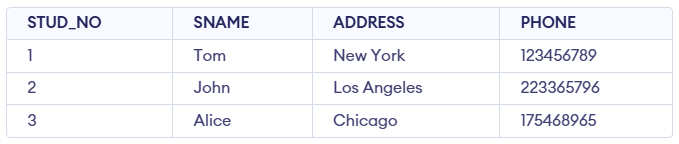
STUDENT Table
**Table: STUDENT_COURSE

STUDENT_COURSE Table
A composite candidate key example: {STUD_NO, COURSE_NO} can be a candidate key for a STUDENT_COURSE table.
2. Super Key
The set of one or more attributes (columns) that can uniquely identify a tuple (record) is known as Super Key. It may include extra attributes that aren't important for uniqueness but still uniquely identify the row. For Example, STUD_NO, (STUD_NO, STUD_NAME), etc.
- A super key can contain extra attributes that aren’t necessary for uniqueness.
- For example, if the "STUD_NO" column can uniquely identify a student, adding "SNAME" to it will still form a valid super key, though it's unnecessary.
**Example: Consider the STUDENT table
STUDENT Table
A super key could be a combination of STUD_NO and PHONE, as this combination uniquely identifies a student.

Relation between Primary Key, Candidate Key, and Super Key
3. Alternate Key
An alternate key is any candidate key in a table that is not chosen as the primary key. In other words, all the keys that are not selected as the primary key are considered alternate keys.
- An alternate key is also referred to as a secondary key because it can uniquely identify records in a table, just like the primary key.
- An alternate key can consist of one or more columns (fields) that can uniquely identify a record, but it is not the primary key
**Example: In the STUDENT table, both STUD_NO and PHONE are candidate keys. If STUD_NO is chosen as the primary key, then PHONE would be considered an alternate key.
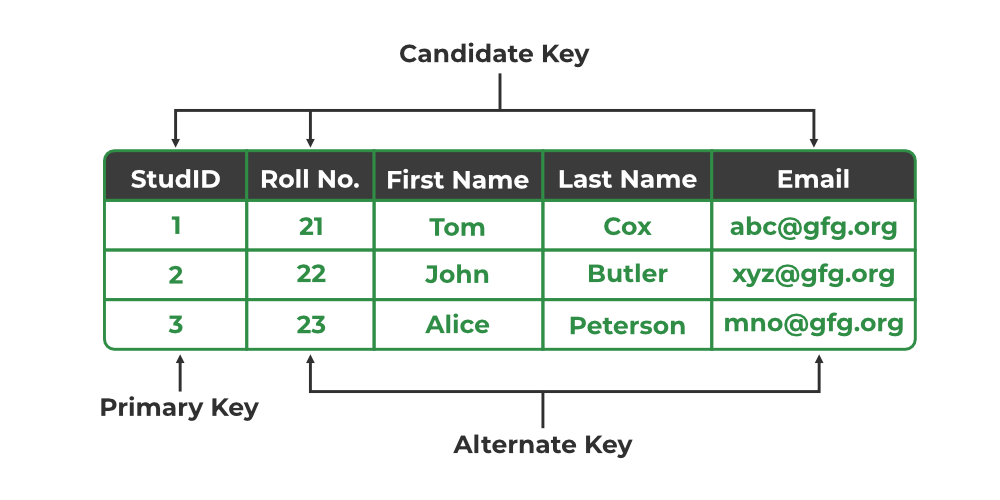
Primary Key, Candidate Key, and Alternate Key
4. Foreign Key
A foreign key is an attribute in one table that refers to the primary key in another table. The table that contains the foreign key is called the referencing table and the table that is referenced is called the referenced table.
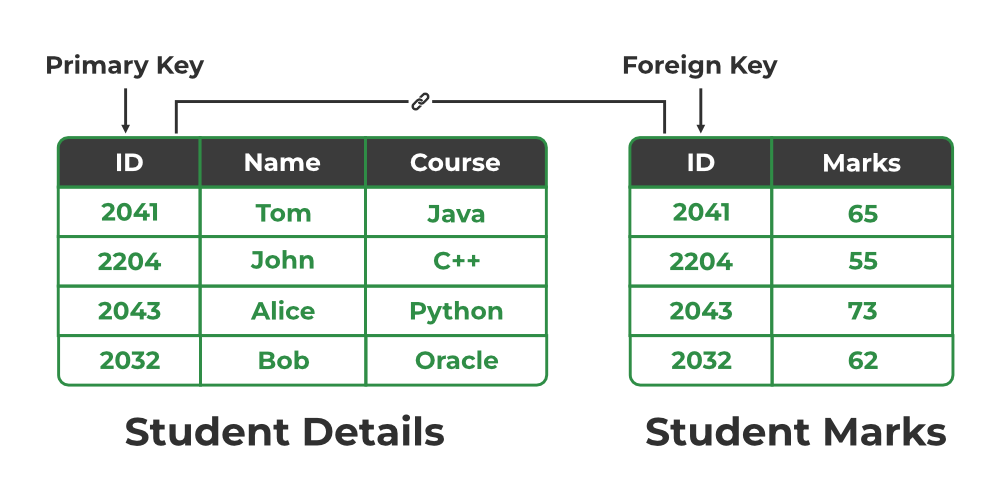
Relation between Primary Key and Foreign Key
- A foreign key in one table points to the primary key in another table, establishing a relationship between them.
- It helps connect two or more tables, enabling you to create relationships between them. This is important for maintaining data integrity and preventing data redundancy.
- They act as a cross-reference between the tables.
Example: Consider the STUDENT_COURSE table
STUDENT_COURSE Table
- STUD_NO in the STUDENT_COURSE table is a foreign key that refers to the STUD_NO primary key of the STUDENT table.
- Unlike a primary key, a foreign key can contain duplicate values and may be NULL. For example, STUD_NO appears multiple times in STUDENT_COURSE because a student can enroll in more than one course.
- However, STUD_NO in the STUDENT table is a primary key, so it must always be unique and non-NULL.
5. Partial Key
A partial key is chosen from a weak entity to help identify records, but it cannot uniquely identify a record by itself.
- Helps distinguish records in a weak entity when combined with data from a related strong entity.
- It cannot be NULL, as it is needed to identify records with other data.
- It can be a single column or a combination of columns.
- Ensures consistency when paired with data from a strong entity.
Example: In a STUDENT_COURSE table, the combination of STUD_NO and COURSE_CODE can be a partial key.

6. Primary Key
A primary key is chosen from the set of candidate keys to uniquely identify each record in a table. For example, in the STUDENT table, both STUD_NO and STUD_PHONE can be candidate keys, but STUD_NO is selected as the primary key.
- It cannot be NULL, as each record must have a valid identifier.
- It may be single-column or composite (made of multiple columns).
- Databases often organize data using the primary key to allow faster access and searching.
**Example: The STUDENT table has the structure Student(STUD_NO, SNAME, ADDRESS, PHONE), where STUD_NO is the primary key.
7. Secondary Key
A Secondary Key is an attribute or a combination of attributes used to search or query records in a table, but it doesn’t guarantee uniqueness.
- It helps in retrieving data quickly, often by creating indexes.
- It doesn’t uniquely identify each record; multiple records can have the same value.
- For example, STUD_NAME in a STUDENT table can be used to find students by name, even though many students may share the same name.
- It’s mainly for improving search efficiency, not for maintaining data uniqueness.
Here's an example of how the STUDENT table might look with STUD_NAME as a secondary key:
| STUD_NO | STUD_NAME | STUD_AGE | STUD_ADDRESS |
|---|---|---|---|
| 101 | John | 21 | 123 Oak St |
| 102 | Emily | 22 | 456 Pine St |
| 103 | John | 23 | 789 Maple St |
| 104 | Michael | 20 | 321 Birch St |
| 105 | Emily | 22 | 654 Cedar St |
8. Unique Key
A Unique Key is a database constraint that ensures that all values in a specific column or a combination of columns are unique across all the rows in a table. It guarantees that no two rows in the table can have the same value in the columns defined as part of the unique key.
- Prevents duplicate values in the specified column(s).
- It allows NULL values, but only one NULL per column.
- It can be applied to a single column or multiple columns.
- Helps maintain the integrity and accuracy of the data in the table.
**Example: In the STUDENT_COURSE table, the combination of STUD_EMAIL and STUD_NAME can form a Unique Key to ensure that each student’s email and name pair is unique across the table.
| STUD_NO | STUD_EMAIL | STUD_NAME |
|---|---|---|
| 101 | john@example.com | John |
| 102 | emily@example.com | Emily |
| 103 | michael@example.com | Michael |
| 104 | sara@example.com | Sara |
| 105 | david@example.com | David |
9. Composite Key
Sometimes, a single column is not enough to uniquely identify all records in a table, so a combination of multiple attributes is used. An optimal set of such attributes is chosen to ensure that every row is uniquely identifiable.
It acts as a primary key if there is no primary key in a table
- Two or more attributes are used together to make a composite key .
- Different combinations of attributes may give different accuracy in terms of identifying the rows uniquely.
**Example: In the STUDENT_COURSE table, {STUD_NO, COURSE_NO} can form a composite key to uniquely identify each record.

10. Surrogate Keys
A surrogate key is an artificial attribute created to uniquely identify each record in a table when no suitable natural key is available.
- It is usually generated automatically by the system (like auto-increment numbers).
- It acts as a primary key when natural or composite keys are not practical or efficient.
- A single system-generated attribute is used to make a surrogate key.
- It does not have any real-world meaning and is used only for identification purposes.
**Example: STUDENT_ID is used as a surrogate key to uniquely identify each record in the STUDENT_COURSE table, without relying on natural attributes like name or email.
