PyTorch Tutorial (original) (raw)
Last Updated : 2 Mar, 2026
PyTorch is an open-source deep learning framework designed to simplify the process of building neural networks and machine learning models. With its dynamic computation graph, it allows developers to modify the network’s behaviour in real-time.
Installation
To start using PyTorch, you first need to install it. You can install it via pip:
pip install torch torchvision
For GPU support (if you have a CUDA-enabled GPU), install the appropriate version:
pip install torch torchvision torchaudio cudatoolkit=11.3
Tensors
A tensor is a multi-dimensional array that is the fundamental data structure used in PyTorch. We can create tensors for performing above in several ways:
Python `
import torch
tensor_1d = torch.tensor([1, 2, 3]) print("1D Tensor (Vector):") print(tensor_1d) print()
tensor_2d = torch.tensor([[1, 2], [3, 4]]) print("2D Tensor (Matrix):") print(tensor_2d) print()
random_tensor = torch.rand(2, 3) print("Random Tensor (2x3):") print(random_tensor) print()
zeros_tensor = torch.zeros(2, 3) print("Zeros Tensor (2x3):") print(zeros_tensor) print()
ones_tensor = torch.ones(2, 3) print("Ones Tensor (2x3):") print(ones_tensor)
`
**Output:
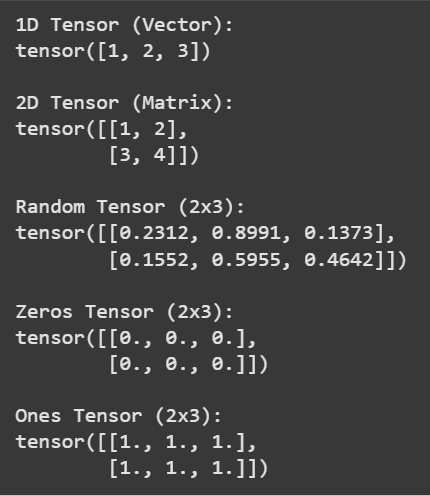
Tensors in PyTorch
Tensor Operations
PyTorch operations are essential for manipulating data efficiently, especially when preparing data for machine learning tasks.
- **Indexing****:** Indexing lets you retrieve specific elements or smaller sections from a larger tensor.
- **Slicing****:** Slicing allows you to take out a portion of the tensor by specifying a range of rows or columns.
- **Reshaping****:** Reshaping changes the shape or dimensions of a tensor without changing its actual data. This means you can reorganize the tensor into a different size while keeping all the original values intact.
Let's understand these operations with help of simple implementation:
Python `
import torch
tensor = torch.tensor([[1, 2], [3, 4], [5, 6]])
element = tensor[1, 0]
print(f"Indexed Element (Row 1, Column 0): {element}")
slice_tensor = tensor[:2, :]
print(f"Sliced Tensor (First two rows): \n{slice_tensor}")
reshaped_tensor = tensor.view(2, 3) print(f"Reshaped Tensor (2x3): \n{reshaped_tensor}")
`
**Output:
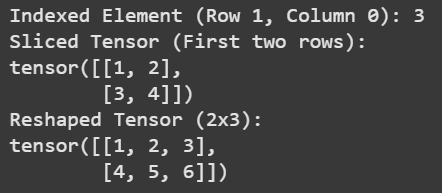
Tensor Operations
Common Tensor Functions
PyTorch offers a variety of common tensor functions that simplify complex operations.
- **Broadcasting allows for automatic expansion of dimensions to facilitate arithmetic operations on tensors of different shapes.
- **Matrix multiplication enables efficient computations essential for neural network operations. Python `
import torch
tensor_a = torch.tensor([[1, 2, 3], [4, 5, 6]])
tensor_b = torch.tensor([[10, 20, 30]])
broadcasted_result = tensor_a + tensor_b print(f"Broadcasted Addition Result: \n{broadcasted_result}")
matrix_multiplication_result = torch.matmul(tensor_a, tensor_a.T) print(f"Matrix Multiplication Result (tensor_a * tensor_a^T): \n{matrix_multiplication_result}")
`
**Output:
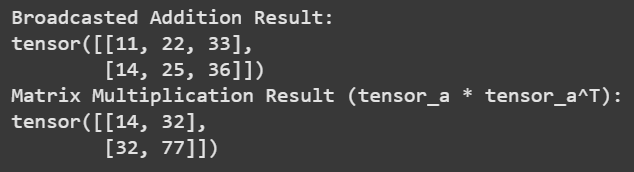
Broadcasting and Matrix Multiplication
GPU Acceleration
PyTorch facilitates GPU acceleration, enabling much faster computations which is especially important in deep learning due to the extensive matrix operations involved. By transferring tensors to the GPU, you can significantly reduce training times and improve performance.
Python `
import torch
device = torch.device('cuda' if torch.cuda.is_available() else 'cpu') print(f'Using device: {device}')
tensor_size = (10000, 10000)
a = torch.randn(tensor_size, device=device)
b = torch.randn(tensor_size, device=device)
c = a + b
print("Result shape (moved to CPU for printing):", c.cpu().shape)
print("Current GPU memory usage:") print(f"Allocated: {torch.cuda.memory_allocated(device) / (1024 ** 2):.2f} MB") print(f"Cached: {torch.cuda.memory_reserved(device) / (1024 ** 2):.2f} MB")
`
**Output:

GPU Acceleration
**Building and Training Neural Networks
In this section, we'll implement a neural network using PyTorch, following these steps:
**Step 1: Define the Neural Network Class
In this step, we’ll define a class that inherits from torch.nn.Module. We’ll create a simple neural network with an input layer, a hidden layer and an output layer.
Python `
import torch import torch.nn as nn
class SimpleNN(nn.Module):
def init(self):
super(SimpleNN, self).init()
self.fc1 = nn.Linear(2, 4)
self.fc2 = nn.Linear(4, 1)
def forward(self, x):
    x = torch.relu(self.fc1(x))
    x = self.fc2(x)
    return x
`
**Step 2: Prepare the Data
Next, we’ll prepare our data. We will use a simple dataset that represents the XOR logic gate, consisting of binary input pairs and their corresponding XOR results.
Python `
X_train = torch.tensor([[0.0, 0.0], [0.0, 1.0], [1.0, 0.0], [1.0, 1.0]]) y_train = torch.tensor([[0.0], [1.0], [1.0], [0.0]])
`
**Step 3: Instantiate the Model, Loss Function and Optimizer
Now we will instantiate our model. We’ll also define a loss function and choose an optimizer like stochastic gradient descent to update the model’s weights based on the calculated loss.
Python `
import torch.optim as optim model = SimpleNN() criterion = nn.MSELoss() optimizer = optim.SGD(model.parameters(), lr=0.1)
`
**Step 5: Training the Model
Now we enter the training loop, where we will repeatedly pass our training data through the model to learn from it.
Python `
for epoch in range(100): model.train()
outputs = model(X_train)
loss = criterion(outputs, y_train)

optimizer.zero_grad()
loss.backward()
optimizer.step()

if (epoch + 1) % 10 == 0:
    print(f'Epoch [{epoch + 1}/100], Loss: {loss.item():.4f}')
`
**Output:
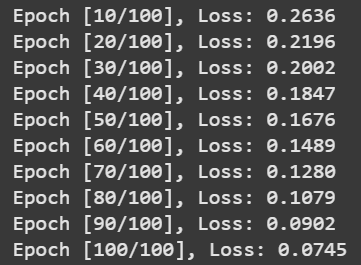
Training
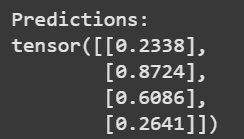
Step 6: Testing the Model
Finally, we need to evaluate the model’s performance on new data to assess its generalization capability.
Python `
model.eval() with torch.no_grad(): test_data = torch.tensor([[0.0, 0.0], [0.0, 1.0], [1.0, 0.0], [1.0, 1.0]]) predictions = model(test_data) print(f'Predictions:\n{predictions}')
`
**Output:
Prediction
Optimizing Model Training with PyTorch Datasets
1. **Efficient Data Handling with Datasets and DataLoaders
Dataset and DataLoader facilitates batch processing and shuffling, ensuring smooth data iteration during training.
Python `
import torch from torch.utils.data import Dataset, DataLoader
class MyDataset(Dataset): def init(self): self.data = torch.tensor([[1.0, 2.0], [3.0, 4.0], [5.0, 6.0]]) self.labels = torch.tensor([0, 1, 0])
def __len__(self):
    return len(self.data)

def __getitem__(self, idx):
    return self.data[idx], self.labels[idx]
dataset = MyDataset() dataloader = DataLoader(dataset, batch_size=2, shuffle=True)
for batch in dataloader:
print("Batch Data:", batch[0])
print("Batch Labels:", batch[1])
`
**2. Enhancing Data Diversity through Augmentation
Torchvision provides simple tools for applying random transformations such as rotations, flips and scaling hence enhancing the model's ability to generalize on unseen data.
Python `
import torchvision.transforms as transforms from PIL import Image
image = Image.open('example.jpg') # Replace 'example.jpg' with your image file
transform = transforms.Compose([ transforms.RandomHorizontalFlip(), transforms.ToTensor() ])
augmented_image = transform(image) print("Augmented Image Shape:", augmented_image.shape)
`
**3. Batch Processing for Efficient Training
Batch processing improves computational efficiency and accelerates training, especially on hardware accelerators.
Python `
for epoch in range(2):
for inputs, labels in dataloader:
    outputs = inputs + 1
    print(f"Epoch {epoch + 1}, Inputs: {inputs}, Labels: {labels}, Outputs: {outputs}")
`
Advanced Deep Learning Models
1. Convolutional Neural Networks (CNNs)
- PyTorch simplifies the implementation of CNNs using modules like torch.nn.Conv2d and pooling layers.
- Integrating batch normalization with torch.nn.BatchNorm2d helps stabilize learning and accelerate training by normalizing the output of convolutional layers.
2. Recurrent Neural Networks (RNNs)
- Implementing RNNs in PyTorch is straightforward with torch.nn.LSTM and torch.nn.GRU modules.
- RNNs, including LSTMs and GRUs are perfect for sequential data tasks.
3. Generative Models
PyTorch makes it easy to construct Generative Models, including: