Docker Compose For Java Applications: Simplifying Deployment (original) (raw)
Last Updated : 6 Aug, 2025
Docker is an open-source platform for developers and sysadmins to build, ship, and run distributed applications. If we want to define and run more than one container then we should go for docker compose. We have to configure multiple container environments in a single file so that it simplifies the deployment process. In Java applications, Docker Compose sequencing the deployment of Java-based services, databases, and other components, ensuring consistency across various environments.
Table of Content
- What is Docker in Java?
- What is Docker Compose?
- Primary Terminologies Related to Docker Compose
- Options of Docker Compose
- Operations of Docker Compose
- Why deploy Java Application on Docker Compose?
- How to Deploy Java Application with Docker Compose? A Step-By-Step Guide
What is Docker in Java?
Docker in java simplifies the deployment of applications by containerizing the Java applications. It facilitates ensuring they run consistently across different environments. It allows the developers to package the application code with all its libraries, runtime, and dependencies into a single container. Through containerizing the application it brings portability, scalability, and efficient resource utilization for the Java applications.
What is Docker Compose?
Docker Compose is a docker-supportive native tool that facilitates defining and running multi-container applications in docker. It allows the users to configure the application services in the YAML file and manages them with simple commands. This docker composes support with simplifying the orchestration and scaling of the complex applications.
Docker Compose YAMLml file named '**docker-compose.yml'. This will be created inside the project root directory. In this, file we need to segregate all the services one after another and make dependency if needed. The following are a few terminologies we need to use in the docker-compose.yml file
- **Service: A service is a containerized application, or a group of containers, defined in the docker-compose.yml file. Each service represents a separate application component and can be configured independently.
- **Container: A lightweight, standalone, and executable package that includes everything needed to run a piece of software, including the code, runtime, libraries, and system tools. Docker Compose manages containers based on the services defined in the docker-compose.yml file.
- **Image: Simply image is static container or executable container. Images are used to create containers. Docker Compose can build images or use existing ones.
- **Build: The way of creating a docker image is called Build. Docker Compose can perform builds based on the configurations specified in the docker-compose.yml file.
- **Volume: A Docker volume is a way to persist data generated by and used by Docker containers. Docker Compose can be used to define volumes, allowing data to persist between container runs.
- volumes:
- todo-mysql-data:/var/lib/mysql - **Network: It creates a default network for all services defined in the docker-compose.yml file. Services within the same Docker Compose file can communicate with each other over this default network.
- **Port Mapping: Docker Compose allows us to map ports between the host machine and the containers.
- ports:
- 127.0.0.1:3000:3000 - **Environment Variables: Docker Compose enables us to set environment variables for services. These variables can be used to customize the behavior of containers at runtime.
environment:
MYSQL_ROOT_PASSWORD: password
MYSQL_DATABASE: test_db
Options of Docker Compose
The following table specifies on the options of docker compose with its functionalities:
| Option/Command | Description |
|---|---|
| docker-compose up | It helps to builds, creates, starts, and attaches to containers for a service |
| docker-compose down | It helps to stops and removes containers, networks, images, and volumes |
| docker-compose build | It helps to builds or rebuilds services |
| docker-compose start | It starts the existing containers for a service |
| docker-compose stop | It stops the running containers without removing them |
| docker-compose restart | It restarts the running containers |
| docker-compose ps | It will lists containers |
| docker-compose logs | It will displays the log output from services |
| docker-compose exec | It executes a command in a running container |
| docker-compose config | It validates and views the Compose file |
| docker-compose pull | It pulls service images |
| docker-compose push | It pushes the service images |
| docker-compose scale | It sets the number of containers for a service |
| docker-compose rm | It removes stopped service containers |
| docker-compose run | It runs a one-time command against a service |
Operations of Docker Compose
The following are the operations of docker compose:
1. Docker Compose Up
The docker-compose up command is used to start the services defined in the docker-compose.yml file. It can also be used with the --build option to build images before starting containers.
docker-compose up --build
2. Docker Compose Down
The docker-compose down command is used to stop and remove the containers, networks, and volumes defined in the docker-compose.yml file. It also removes any resources created during the docker-compose up process.
docker-compose down -v
**Syntax
- The complete sample of docker-compose.yml file code with proper syntax as follows:
services:
app:
image: openjdk:17-jdk-slim
ports:
- 8000:8000
working_dir: /app
volumes:
- ./:/app
environment:
MYSQL_HOST: mysql
MYSQL_USER: root
MYSQL_PASSWORD: password
MYSQL_DB: test_db
mysql:
image: mysql:8.0
volumes:
- gfg-mysql-data:/var/lib/mysql
environment:
MYSQL_ROOT_PASSWORD: password
MYSQL_DATABASE: test_db
volumes:
gfg-mysql-data:
3. Build Docker Compose
The following command is used to build the docker images specified in the docker compose file. It reads the docker compose file and build the images as per specified in the docker compse file.
docker-compose build
4. Run Docker Compose
The following command is used to start the services specified in the docker compose file. It reads the docker compose file and start the containers based on the configurations of the services.
docker-compose run
Why deploy Java Application on Docker Compose?
The following are the some of the main reasons to deploy the java application on the docker compose:
- **Simplified Configuration: Docker Compose allows the users to define and manage the multi-container applications including the databases and other services in a single YAML file making the setup and maintenance easier.
- **Consistency Across Environments: By containerizing your Java application, you ensure it runs the same way in development, testing, and production, eliminating environment-specific issues.
- **Scalability: Docker Compose makes it straightforward to scale services up or down, enabling efficient resource management and better handling of varying loads.
- **Isolation and Security: Each component runs in its own container, isolating the Java application from other processes, enhancing security and stability.
How to Deploy Java Application with Docker Compose? A Step-By-Step Guide
Creating a simple Java application with Docker Compose. In this example, we'll create a simple Spring Boot application. Its having get API, and it provides some sample message like "Geeks For Geeks Docker Compose Example".
**Step1: Create a Spring Boot Application
- Create a new Spring Boot project with a basic REST endpoint. I have used spring initializr for creating spring boot project.
- You can use any tool like Spring Initializr or your favorite IDE. Check the below screenshot for project configuration.

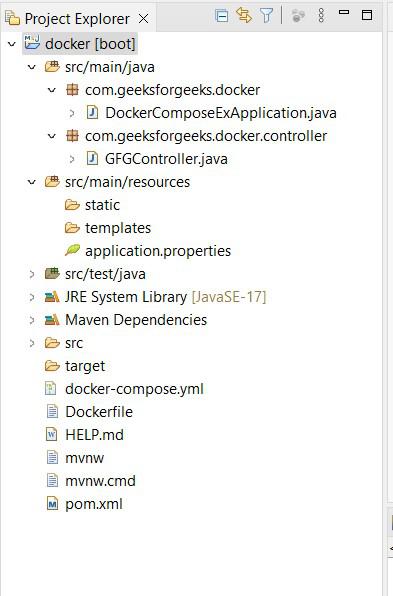
- After downloaded the project, import into your favorite IDE. Then project structure looks like below screenshot.
- Here we need to create new files in root project directory called Dockerfile and docker-compose.yml file.
**Step2: Create GFGController.java
- In this controller, created sample GET API. Which returns a sample string called "Geeks For Geeks Docker Compose Example" Java `
package com.geeksforgeeks.docker.controller;
import org.springframework.web.bind.annotation.GetMapping; import org.springframework.web.bind.annotation.RequestMapping; import org.springframework.web.bind.annotation.RestController;
@RestController @RequestMapping("api") public class GFGController {
@GetMapping("/get-project-name")
public String getProjectName() {
    return "Geeks For Geeks Docker Compose Example";
}
}
`
**Step 3: Change Port (Optional)
- By default spring boot application run's on 8080 port. If already any application runs on 8080 then explicitly you have to add other port.
- You can configure port in application.properties file in application. Here i have configured 8081 as my port in application.properties file.
server.port=8081
**Step 4: Build the Spring Boot Application
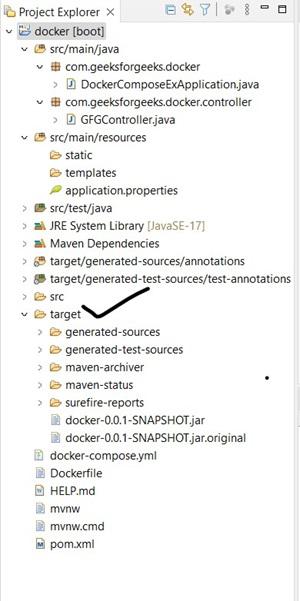
- Build the project using Maven or Gradle. This will generate a JAR file in the target directory. In this example i am using maven.
- Clean the project
Right click on project -> Run as -> maven clean
- Build the project
Right click on project -> Run as -> maven install
- After maven install, jar will create inside the target directory. Check in below screenshot.
**Step 5: Create a Dockerfile
- Open a file named Dockerfile in the root of your project to define the Docker image. Add below image code in it.
FROM openjdk:17-jdk-slim
ARG JAR_FILE=target/*.jar
COPY ${JAR_FILE} app.jar
ENTRYPOINT ["java", "-jar", "/app.jar"]
**Step 6: Create Docker Compose File
- Open a file named docker-compose.yml in the root of your project and add below code in it.
version: '3'
services:
myapp:
build: .
ports:
- "8081:8081"
**Step 7: Build and Run the Docker Container
- Open a terminal and navigate to your project directory. Run the following commands
Build the Docker image
docker-compose build
Run the Docker container
docker-compose up
**Note: If you want to build and run your image with single command then use "docker-compose up --build".

- Now starting the containers in the docker compose file as per configured services.

**Step 8: Access the Application
- Open your web browser and go to "http://localhost:8081/api/get-project-name". You should see the message "Geeks For Geeks Docker Compose Example".
- The following screenshot illustrates successfully deployment and accessment of java application through browser which is deployed through docker compose.

Conclusion
The docker-compose.yml file easy the process of managing and deploying multiple container applications. Instead of using multiple "docker run" commands with various configurations, we can define everything in a single file. This makes it simplify to share and reproduce application stack across different environments.