AWS Elastic Block Store(EBS) (original) (raw)
Last Updated : 11 Jun, 2026
Amazon Elastic Block Store (Amazon EBS) is a high-performance, persistent block storage service designed for use with Amazon Elastic Compute Cloud (EC2). Amazon EBS works like a virtual hard drive for EC2 instances. It is designed for workloads that require low latency, high IOPS, and durable storage.
- Persistent storage that remains available even after an EC2 instance stops or terminates.
- Delivers low latency and high IOPS for transactional workloads.
- Automatically replicates data within the same Availability Zone.
- Supports Elastic Volumes for dynamic resizing and performance tuning.
Key Features
Amazon EBS provides several native features designed to manage enterprise storage requirements efficiently:
| Capability | Details |
|---|---|
| Elastic Volumes | Modify storage type, capacity, and performance dynamically without downtime. |
| Incremental Snapshots | EBS snapshots are incremental backups stored internally in Amazon S3. |
| Fast Snapshot Restore (FSR) | Removes initialization delay and delivers fully provisioned volumes immediately after restoration. |
| EBS Multi-Attach | Attach a single io1 or io2 volume to multiple EC2 instances within the same Availability Zone. |
| High Durability | Provides highly durable storage with durability levels ranging from 99.8% to 99.999% depending on the volume type. |
| Native Encryption | Encrypts data at rest, in transit, snapshots, and attached volumes using AWS Key Management Service (KMS). |
Amazon EBS Volume Types
Amazon EBS volume types are categorized into Solid-State Drive (SSD) backed volumes for transactional workloads and Hard Disk Drive (HDD) backed volumes for throughput-intensive workloads.
Solid-State Drive (SSD) Volumes
Designed for database workloads that require high IOPS and low-latency performance.
- **General Purpose SSD (gp3): The default volume type. Offers single-digit millisecond latency with a baseline of 3,000 IOPS and 125 MB/s throughput included in the price. Performance can scale up to 16,000 IOPS and 1,000 MB/s throughput independently of storage capacity.
- **Provisioned IOPS SSD (io2 Block Express): Engineered for mission-critical, high-performance databases (Oracle, SAP HANA). Delivers up to 256,000 IOPS, 4,000 MB/s throughput per volume, and 99.999% durability.
- **Provisioned IOPS SSD (io1): Legacy high-performance volume. Delivers up to 64,000 IOPS and 1,000 MB/s throughput per volume. Designed to perform within 10% of provisioned IOPS 99.9% of the time.
Hard Disk Drive (HDD) Volumes
Optimized for large, sequential data streaming workloads where throughput is valued over IOPS. HDD-backed volumes (st1 and sc1) cannot be used as boot volumes.
- **Throughput Optimized HDD (st1): Best suited for frequently accessed, throughput-intensive workloads like MapReduce, Kafka, log processing, and data warehousing. Provides burst throughput up to 500 MB/s.
- **Cold HDD (sc1): The lowest-cost block storage option, designed for large, infrequently accessed datasets with burst throughput capacities up to 250 MB/s.
**Note: gp3 is recommended for new deployments because it offers lower cost, independent performance scaling, and better flexibility compared to gp2.
The following table summarizes the major Amazon EBS volume types and their primary use cases.
| Volume Type | Best For | Max Performance |
|---|---|---|
| gp3 | General workloads | 16,000 IOPS |
| io2 Block Express | Mission-critical databases | 256,000 IOPS |
| st1 | Throughput-intensive workloads | 500 MB/s |
| sc1 | Cold storage | 250 MB/s |
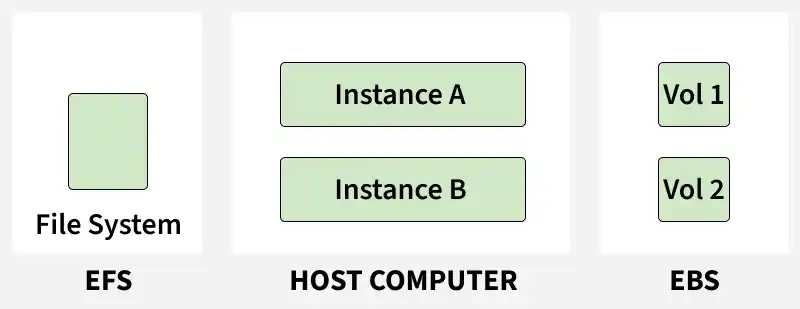
EBS volumes attached independently to their respective host EC2 instances
Standard EBS volumes operate on a single-instance attachment model, whereas Amazon Elastic File System (EFS) allows concurrent mounting across hundreds of servers.
Advanced EBS Capabilities
Understanding specialized features of EBS allows for optimal high-availability and transactional database design:
EBS Multi-Attach
While standard EBS volumes are bound to one EC2 instance, you can enable Multi-Attach on Provisioned IOPS (io1 and io2) volumes. This allows a volume to be attached concurrently to up to 16 Nitro-based EC2 instances within the same Availability Zone. This feature requires clustered file systems (like GFS2 or OCFS2) to safely coordinate concurrent write actions.
EBS in Database and Managed Applications
EBS operates as a vital persistent data store across AWS-native database services and infrastructure layouts:
- **Self-Managed Databases: Serves as highly persistent database storage (MySQL, PostgreSQL) attached to individual EC2 instances.
- **AWS Managed Services: Acts as the underlying persistent storage foundation running behind Amazon RDS and Amazon DocumentDB.
- **Container Storage: Provides persistent, durable volume mounts for containerized stateful workloads managed by Amazon EKS and ECS.
EBS Best Practices
- **Enable Encryption by Default: Configure AWS account settings to automatically encrypt every newly provisioned EBS volume using custom or default AWS KMS keys.
- **Prefer gp3 over gp2: Use gp3 volumes to obtain granular, independent configurations of IOPS and throughput without needing to provision extra volume capacity.
- **Implement EBS CSI Driver for Kubernetes: Deploy the official Amazon EBS CSI Driver in Amazon EKS to automate volume provisioning and lifecycle mounts dynamically.
- **Perform Volume Resizing Safely: While Elastic Volumes support dynamic sizing, always extend the underlying OS-level partition and file system after resizing the volume.
Limitations
- **Bound to Availability Zones: An EBS volume is physically bound to its specific Availability Zone and cannot be directly attached to an EC2 instance in another AZ.
- **Provision-Based Billing: S3 charges only for storage used, but EBS billing is calculated based on the total provisioned size and allocated performance (IOPS/Throughput) regardless of active usage.
- **Write Safety in Multi-Attach: Enabling Multi-Attach without a cluster-aware file system to manage write operations will result in immediate data corruption.
- **No Native Multi-AZ Replication: EBS volumes do not replicate data across multiple Availability Zones natively; cross-AZ recovery must be handled via Snapshot copies.