Jenkins Declarative Pipeline (original) (raw)
Last Updated : 25 Aug, 2025
A **Jenkins Declarative Pipeline is a structured and simplified approach to defining your continuous integration and continuous delivery (CI/CD) pipelines in Jenkins. Unlike Scripted Pipelines, which provide more flexibility but are harder to maintain, Declarative Pipelines offer a clean, human-readable, and standardized way to define pipeline steps.
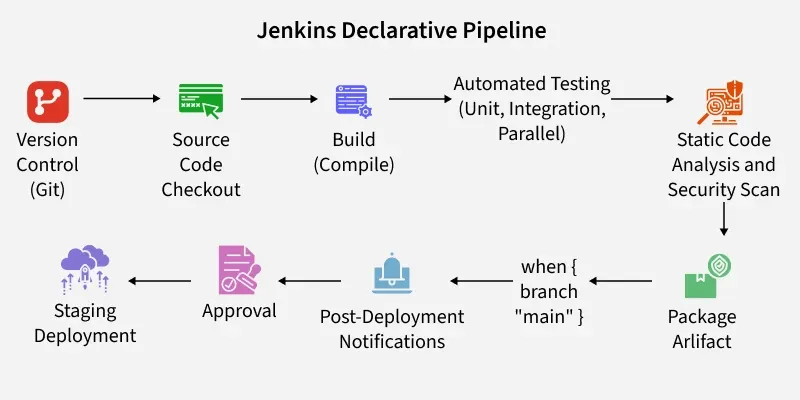
This makes it easier for teams to create and manage automated workflows and ensures smooth integration, testing, and deployment processes.
Syntax Of Jenkins Declarative Pipeline To Build & Push Docker Image
The following Declarative Pipeline can be used to build and docker push the docker image to DockerHub.
pipeline {
agent any
tools {
    // Specify Maven tool with version 3.8.6
    maven "maven 3.8.6"
}

stages {
    stage('Code Checkout') {
        steps {
            // Git checkout step
            git credentialsId: '<Git Credentials>', url: '<GitHub URL>'
        }
    }

    stage('Building the Code') {
        steps {
            // Maven clean and package step
            sh "mvn clean package"
        }
    }

    stage('Build the Image') {
        steps {
            // Docker build step, naming the image using DockerHub repository name and build number
            sh "docker build -t <dockerhubname>/<image name>:${BUILD_NUMBER} ."
        }
    }

    stage('Login and Push the Image') {
        steps {
            // Docker login step
            sh "docker login -u <Username> -p <password>"
            // Docker push step, pushing the image with tagged with build number to DockerHub repository
            sh "docker push <dockerhubname>/<image name>:${BUILD_NUMBER}"
        }
    }
}
}
Explanation Of Jenkins Code
- **agent any: This specifies that the pipeline can run on any available agent. An agent is a worker machine on which Jenkins runs its jobs.
- **tools: This block defines the tools required for the pipeline. Here, Maven is specified with version 3.8.6.
- **stages: This block defines the different stages of the pipeline.
- **Code Checkout: This stage checks out the code from the specified Git repository using the provided credentials.
- **Building the Code: In this stage, the Maven build is performed with mvn clean package.
- **Build the Image: Here, the Docker image is built using the Dockerfile present in the repository. The -t option is used to tag the image with the specified DockerHub repository name, image name, and build number.
- **Login and Push the Image: This stage handles logging into DockerHub using provided credentials and then pushes the built Docker image to the specified DockerHub repository with the tagged build number.
Make sure to replace with your actual values, such as , , , , , and .
Step-By-Step Guide To Write The Jenkins Declarative Pipeline
****Step 1:**Launch Jenkins and select the new project option, as indicated below. Type the project name according to the specifications.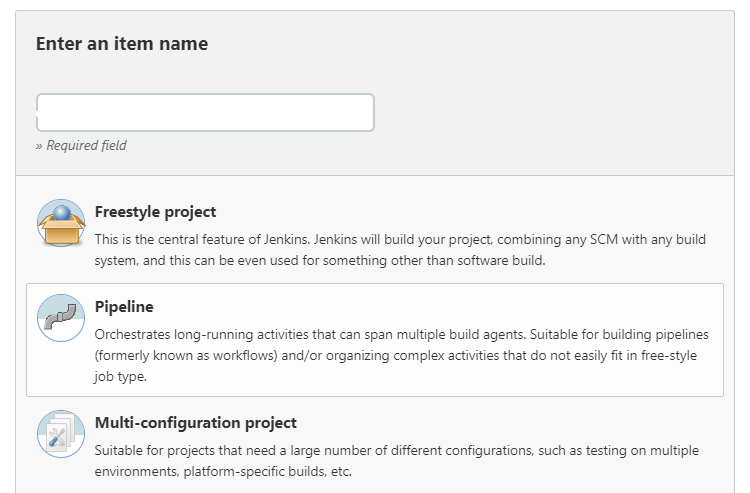
**Step 2: After you scroll down the last bit, you will see a script option where you may enter your desired decleratice pipeline script. Once you have finished writing it, click save and apply..webp)
**Step 3: When you select the Build Know option, your pipeline will start running. If there are any errors, you may view them in the console output option. Click the "Build Know" option once more after reading the error and fixing the problem. -(1).webp)
****Step 4:**After extensive debugging, view the pipeline execution in Console
.webp)
Why Use Jenkins Declarative Pipeline?
Jenkins Declarative Pipeline is a powerful tool used by DevOps teams to automate the software development lifecycle. Here are the key reasons why teams prefer Declarative Pipelines over Scripted Pipelines:
- **Simplified Syntax: Declarative Pipeline uses a cleaner, more readable syntax, which reduces the complexity of pipeline code and makes it easier for new users to get started.
- **Built-in Error Handling: Error handling is simplified with Declarative Pipelines. The pipeline stops execution automatically when an error occurs, making it easier to debug issues.
- **Improved Maintainability: Due to its structured approach, Jenkins Declarative Pipeline is easier to maintain, especially for large, complex projects.
- **Consistency: Declarative Pipelines enforce consistency across different pipeline jobs, ensuring that all pipelines follow the same structure.