Port Scanning Techniques By Using Nmap (original) (raw)
Last Updated : 23 Jul, 2025
Nmap is a security auditing tool used in the security field to actively enumerate a target system/network. It is one of the most extensively used tools by network administrators and conversely attackers for reconnaissance (enumeration), the first step in the 5 phases of hacking. Nmap is used to actively probe the target network for active hosts(host discovery), port scanning, OS detection, version details, and active services running on the hosts that are up. For this, Nmap uses the technique of sending packets and analyzing the responses. To learn more about please refer to the article Nmap.
Port Scanning is one of the features of Nmap wherein the tool detects the status of the ports on active hosts in a network. The status of the ports can be open, filtered, or closed. Type Nmap in the command line to run Nmap. Add necessary switches according to the scanning type to initiate a specific scan technique.
Example: nmap -sS 192.168.0.1-192.168.0.52
This command runs Nmap in TCP SYN scan type (-sS) and scans the given IP address range for active hosts and services.
Please refer to the article Port Scanning to learn more about it.
Types of Port Status:
- Open: The open status means that the given port is open and is actively running a service.
- Filtered: The filtered status means that the respective port might be hidden behind a firewall and its status remains unknown.
- Closed: The closed state represents a given port is closed on the host machine.
Different Port Scanning Techniques in Nmap:
The following are the extensively used scanning techniques in Nmap:
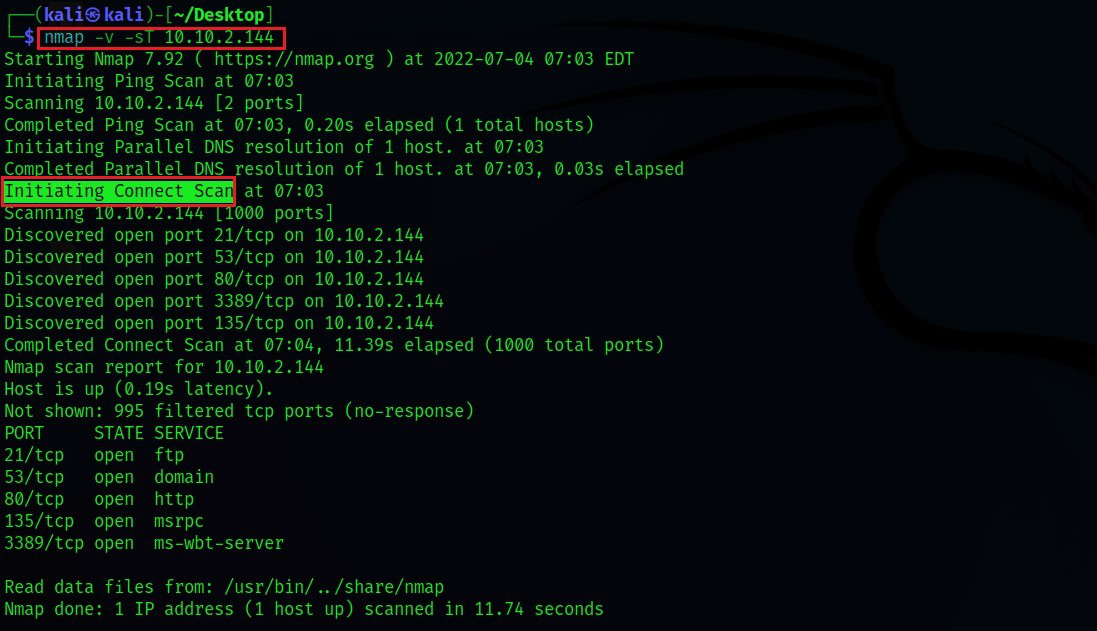
1. TCP Connect Scan (-sT): TCP Connect scan uses the concept of a full three-way handshake to discover whether a given port is open, filtered, or closed according to the response it receives. Nmap sends a TCP request packet to each and every port specified and determines the status of the port by the response it receives. RFC 793 says,
If the connection does not exist (CLOSED) then a reset is sent in response to any incoming segment except another reset. In particular, SYNs addressed to a non-existent connection are rejected by this means.
- What it essentially means is that if Nmap sends a TCP request to a closed port with its SYN flag set, then it receives a TCP packet with its RESET FLAG set from the target server. This tells Nmap that the specified port is "closed".
- Otherwise, if the port is actually "open", then Nmap receives a response with SYN/ACK flags set responding to the packet sent by Nmap with its SYN flag set.
- The third possibility is that if a port is filtered, most of the server's firewalls are configured to just drop incoming packets. Nmap doesn't receive any response back. This essentially means that the given port is running behind a firewall (i.e "filtered").
2. TCP SYN Scan (-sS): SYN scans are often called "Half-open" or "Stealth" scans. SYN scan works the same way as TCP Connect scan with closed and filtered ports i.e receives a RST packet for closed port and no response for filtered ports. The only difference is in the way they handle the open ports. SYN scan sends a response packet to the server with its RESET FLAG set(but not ACK which is usually the default in the actual three-way handshake) after receiving SYN/ACK from the target server. This is to avoid the server from continuously making requests to establish a connection and thereby reduce the scan time.
This scan type is referred to as a stealth scan due to the following advantages:
- Faster because it doesn't have to complete the full three-way handshake.
- Some applications often log only those connections that are fully established. So applications listening on open ports do not log these connections which makes SYN scan "stealthy".

3. UDP Scan (-sU): UDP unlike TCP, doesn't perform a handshake to establish a connection before sending data packets to the target port but rather sends the packets hoping that the packets would be received by the target port. That is why UDP connections are often called "stateless". This type of connection is more efficient when speed dwarfs quality, like in video sharing. As there will be no acknowledgment from the target port whether it has received the packet, UDP scans become more difficult and very much slower.
- When there's no response from the target port after sending a UDP packet, it often times means that the port is either "open" or is running behind a firewall i.e "filtered" in which case the server would just drop the packet with no response.
- UDP scan can effectively identify closed ports as the target UDP port responds with an ICMP packet with a message that the port is unreachable.

The below scan techniques are very less likely to be used in real-time but it's worth learning the principle behind them. They are said to be even stealthier than the "SYN stealth" scan.
For the below scan types, when a packet is sent to an "open" port, there won't be any response from the target port which is very similar to the UDP scan. When the below scan types don't get a response, they would mark the port as being open/filtered. As per RFC 793, for malformed packets, the closed ports on the server are mandated to respond with an RST TCP packet and no response at all for open ports.
- TCP NULL Scan (-sN): NULL scan, as the name implies, sends a TCP packet with no flags set. If the port is closed, the host responds with an RST.
- TCP FIN Scan (-sF): FIN scan, rather than sending completely empty packets, it sends a packet with its FIN flag set. If the port is closed, the host responds with an RST.
- TCP XMAS Scan (-sX): XMAS scan, sends a packet with URG,PSH,FIN flags set. This scan got its name from the appearance it gives of a Christmas tree when viewed as a packet capture in Wireshark. If the port is closed, the host responds with an RST.