Port Scan in Ethical Hacking (original) (raw)
Last Updated : 16 May, 2026
Port scanning is a technique used to identify open ports and services running on a target system in a network. It is commonly used in cybersecurity for vulnerability assessment, system auditing and troubleshooting, while attackers may use it for reconnaissance to discover potential entry points before exploitation. The process works by sending TCP or UDP packets to a host and analyzing the responses to determine the state of ports.
- Port scanning mainly uses TCP and UDP, not ICMP.
- It identifies whether ports are open, closed or filtered based on response behavior.
- It relies on response analysis and timing differences to infer network exposure.
- ICMP (Type 8 echo request and Type 0 echo reply) is used only for host reachability checks, not for scanning ports.
Ports & Services
Ports are virtual communication endpoints on a computer that allow different services to exchange data over a network. Each port is assigned a unique number known as a port number. There are 65,535 available ports, but only some are commonly used and important for standard networking services.
**All ports are classified into three categories:
- **Well-known ports (0–1023): Used by standard system services and protocols.
- **Registered ports (1024–49151): Used by software applications and vendor-specific services.
- **Dynamic/private ports (49152–65535): Temporarily assigned to applications for short-term communication.
**Common Port Numbers and Their Services
| Port Number | Service | Purpose |
|---|---|---|
| 20, 21 | FTP (File Transfer Protocol) | Used for transferring files between systems |
| 22 | SSH (Secure Shell) | Secure login to remote computers |
| 23 | Telnet | Remote login (insecure, outdated) |
| 25 | SMTP (Simple Mail Transfer Protocol) | Sending emails |
| 53 | DNS (Domain Name System) | Translates domain names to IP addresses |
| 80 | HTTP (HyperText Transfer Protocol) | Loading websites |
| 110 | POP3 (Post Office Protocol 3) | Receiving emails |
| 143 | IMAP (Internet Message Access Protocol) | Managing and reading emails |
| 443 | HTTPS (HTTP Secure) | Secure version of HTTP |
| 3306 | MySQL | Used by MySQL databases |
| 3389 | RDP (Remote Desktop Protocol) | Remote desktop access on Windows |
These ports help hackers understand what services are running on a target system. Open ports can be entry points, which is why scanning and securing them is so important in ethical hacking.
Objectives of Port Scanning
Port scanning is one of the first steps in ethical hacking after reconnaissance. It helps ethical hackers understand how a system is set up. Here are the main reasons port scanning is done:
1. Discover Open Ports
Port scanning helps identify which ports on a system are open and actively accepting connections. Each open port usually indicates a running service that can communicate over the network. This helps in understanding what parts of a system are exposed.
- Detects open, closed and filtered ports
- Identifies services listening on the system
- Reveals exposed entry points to networks or internet
2. Identify Running Services
After finding open ports, the next step is to determine which services are running behind them. Different ports are associated with different services such as web servers, SSH or databases. This helps assess whether services are necessary and secure.
- Maps ports to their corresponding services
- Helps detect outdated or vulnerable software
- Supports security auditing of active services
3. Map the Attack Surface
The attack surface refers to all possible entry points an attacker can use to access a system. Port scanning helps map this surface by listing all accessible services and ports. This makes it easier to identify weak areas in the system.
- Identifies all potential entry points
- Helps reduce unnecessary exposed services
- Assists in strengthening system defenses
Types of Port Scans
To protect your network from port scans, it is essential to understand the different types of port scans used by hackers.
- **Vanilla Scan: This scan tries to connect to every single one of the 65,535 ports on a system to check which ones are open.
- **Sweep Scan: Instead of scanning many ports on one device, this method checks the same port on multiple computers to find out which ones are active.
- **FTP Bounce Scan: In this method, the scanner uses an FTP server to send scan requests and hide the real source of the scan.
- **Stealth Scan: This type of scan avoids being recorded in the target system’s logs. It’s done in a way that the scanned computer doesn’t easily notice that it’s being scanned.
Types of Ports Found During Scan
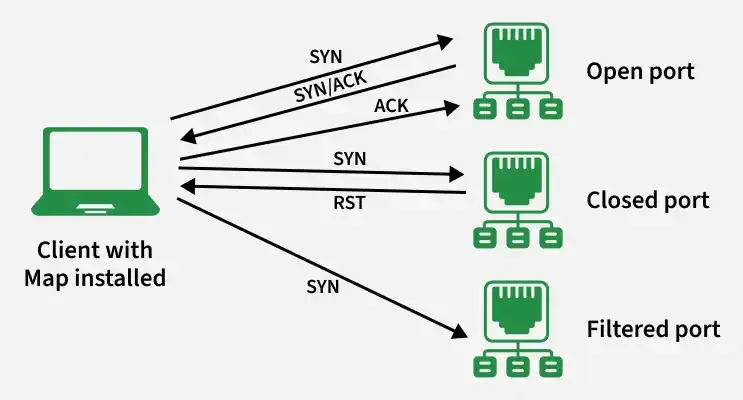
Not all ports respond to scanning, there could be different reasons for this such as the port not being open or there could be a firewall preventing a data packet to reach to the port. There are usually the following types of ports found during a scan:
- **Open: The host replies and announces that it is listening and open for queries. An undesired open port means that it is an attack path for the network.
- **Closed: The host responds but notices that no application is listening. Hackers will scan again if it is opened.
- **Filtered: The host does not respond to a request. This could mean that the packet was dropped due to congestion or a firewall.
Several tools are commonly used in ethical hacking to perform port scanning. These tools help identify open ports, running services and potential vulnerabilities in a network. Below are some of the most popular and effective ones:
- **Nmap: Nmap is one of the most popular tools for network discovery and security auditing. It can scan thousands of ports quickly and provides detailed information about services.
- **Angry IP Scanner: A lightweight and fast scanner that checks IP addresses and ports. It's easy to use and good for beginners for basic network scanning tasks.
- **Netcat: It is used for port scanning, banner grabbing and creating raw TCP/UDP connections.
- **Zenmap: A GUI for Nmap. It makes Nmap easier to use.
- **Advanced Port Scanner: A fast tool for scanning open ports on network devices. It also shows information about connected devices and available network services.
- **MASSCAN: Known for its high speed, MASSCAN can scan the entire internet in minutes. It’s ideal for scanning large networks quickly.
Limitations
- **Firewalls and security systems may hide ports: Some security tools block or filter scan requests, which can prevent the scanner from detecting certain open ports.
- **Port scans are not always accurate: Sometimes a scan may incorrectly report a port as open when it is actually closed or miss a port that is open.
- **Network conditions can affect results: If the network is slow, unstable or experiencing heavy traffic, the scanning results may become unreliable.
- **Scanning large networks takes time: When scanning many devices or a large range of ports, the process can be slow, especially if the scan is configured to avoid detection.