Spring Boot Spring Data JPA (original) (raw)
Last Updated : 9 May, 2026
Spring Data JPA simplifies database access in Spring Boot applications by providing an abstraction layer over the Hibernate ORM implementation of the Java Persistence API. It allows developers to interact with relational databases using Java objects instead of writing complex SQL queries.
- Converts Java objects into relational database tables using ORM (Object Relational Mapping).
- Reduces boilerplate code by providing repository interfaces for common database operations.
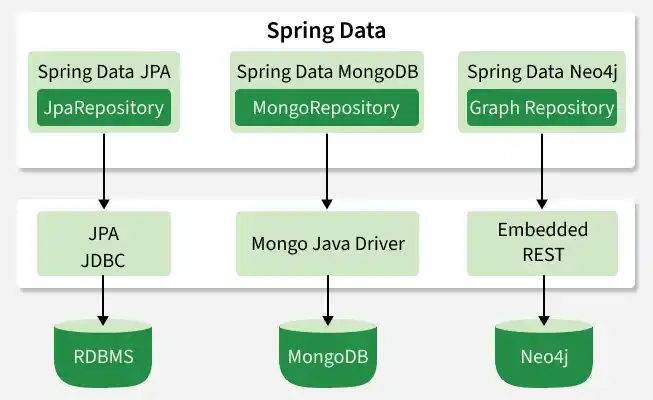
Spring Data Jpa
Prerequisites:
Before starting the implementation, ensure you have the following installed:
- Java 8 or higher
- Mysql Database
- Any IDE such as IntelliJ IDEA, Eclipse IDE
Step-by-Step Implementation of Configure Spring Data JPA
Step 1: Create a Spring Boot Project
Create a new Spring Boot project using Spring Initializr.
Project Configuration
- **Project: Maven
- **Language: Java
- **Spring Boot Version: Latest stable version
- **Group: com.example
- **Artifact: springBoot-JPA-Example
- **Packaging: Jar
- **Java Version: 11 or higher
**Add Dependencies:
Select the following dependencies:
- Spring Web
- Spring Data JPA
- MySQL Driver
After generating the project, open it in your IDE.
Step 2: Project Structure
After creating the project, the structure will look similar to this:
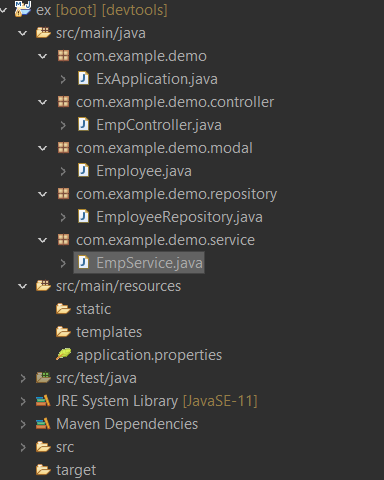
Since this is a Maven project, dependencies are managed using pom.xml.
**pom.xml:
XML `
4.0.0 org.springframework.boot spring-boot-starter-parent 2.6.1 com.example ex 0.0.1-SNAPSHOT ex Demo project for Spring Boot <java.version>11</java.version> org.springframework.boot spring-boot-starter-data-jpa org.springframework.boot spring-boot-starter-web
    <dependency>
        <groupId>org.springframework.boot</groupId>
        <artifactId>spring-boot-devtools</artifactId>
        <scope>runtime</scope>
        <optional>true</optional>
    </dependency>
    <dependency>
        <groupId>mysql</groupId>
        <artifactId>mysql-connector-java</artifactId>
        <scope>runtime</scope>
    </dependency>
    <dependency>
        <groupId>org.springframework.boot</groupId>
        <artifactId>spring-boot-starter-test</artifactId>
        <scope>test</scope>
    </dependency>
</dependencies>

<build>
    <plugins>
        <plugin>
            <groupId>org.springframework.boot</groupId>
            <artifactId>spring-boot-maven-plugin</artifactId>
        </plugin>
    </plugins>
</build>
`
Step 3: Configure Database Connection
Open application.properties and configure the MySQL database connection.
**application.properties:
Java `
spring.datasource.url=jdbc:mysql://localhost:3306/emp spring.datasource.username=root spring.datasource.password=root spring.datasource.driver-class-name=com.mysql.cj.jdbc.Driver
spring.jpa.database-platform=org.hibernate.dialect.MySQL5Dialect spring.jpa.hibernate.ddl-auto=update spring.jpa.generate-ddl=true
`
This configuration connects the Spring Boot application to the MySQL database.
Step 4: Create the Entity Class
Create an Employee class inside the model package with some JPA annotation.
- ****@Entity**: This annotation defines that a class can be mapped to a table
- ****@Id:** This annotation specifies the primary key of the entity.
- ****@GeneratedValue:** This annotation is used to specify the primary key generation strategy to use. i.e. Instructs database to generate a value for this field automatically. If the strategy is not specified by default AUTO will be used.
**Employee.java:
Java `
package com.example.demo.model;
import javax.persistence.*;
@Entity public class Employee {
@Id
@GeneratedValue(strategy = GenerationType.AUTO)
private long id;

private String name;
private String city;

public Employee() {}

public Employee(String name, String city) {
    this.name = name;
    this.city = city;
}

public long getId() {
    return id;
}

public String getName() {
    return name;
}

public String getCity() {
    return city;
}

public void setName(String name) {
    this.name = name;
}

public void setCity(String city) {
    this.city = city;
}
}
`
Step 5: Create Repository Layer
Create EmployeeRepository.java inside the repository package.
- ****@Repository:** The @Repository annotation is a marker for any class that fulfills the role or stereotype of a repository (also known as Data Access Object or DAO).
- **JpaRepository<Employee, Long>: JpaRepository is a JPA-specific extension of the Repository. It contains the full API of CrudRepository and PagingAndSortingRepository. So it contains API for basic CRUD operations and also API for pagination and sorting. Here we enable database operations for Employees. Java `
package com.example.demo.repository;
import org.springframework.data.jpa.repository.JpaRepository; import org.springframework.stereotype.Repository;
import com.example.demo.modal.Employee;
// @Repository is a Spring annotation that // indicates that the decorated class is a repository. @Repository public interface EmployeeRepository extends JpaRepository<Employee, Long>{ ArrayList findAllEmployee(); }
`
Step 6: Create Service Layer
Create a service interface.
@Service is a stereotype annotation in Spring Framework used to mark a class as a service layer component that contains business logic in a Spring Boot application.
**EmpService.java
Java `
package com.example.demo.service; import java.util.ArrayList; import com.example.demo.modal.Employee; public interface EmpService { ArrayList findAllEmployee(); Employee findAllEmployeeByID(long id); void addEmployee(); void deleteAllData(); }
`
Service Implementation
**EmpServiceImpl.java:
Java `
package com.example.demo.service; import java.util.ArrayList; import java.util.Iterator; import java.util.Optional; import org.springframework.beans.factory.annotation.Autowired; import org.springframework.stereotype.Service; import com.example.demo.modal.Employee; import com.example.demo.repository.EmployeeRepository;
// @Service marks a Java class that performs some service, // such as executing business logic, performing // calculations, and calling external APIs. @Service public class EmpServiceImpl implements EmpService { @Autowired EmployeeRepository employeeRepository;
@Override
public ArrayList<Employee> findAllEmployee() {
    return (ArrayList<Employee>) employeeRepository.findAll();
}

@Override
public Employee findAllEmployeeByID(long id) {
    Optional<Employee> opt = employeeRepository.findById(id);
    if (opt.isPresent())
        return opt.get();
    else
        return null;
}

@Override
public void addEmployee() {
    ArrayList<Employee> emp = new ArrayList<Employee>();
    emp.add(new Employee("Lucknow", "Shubham"));
    emp.add(new Employee("Delhi", "Puneet"));
    emp.add(new Employee("Pune", "Abhay"));
    emp.add(new Employee("Noida", "Anurag"));
    for (Employee employee : emp) {
        employeeRepository.save(employee);
    }
}

@Override
public void deleteAllData() {
    employeeRepository.deleteAll();
}
}
`
Step 7: Create Controller Layer
Create EmpController.java inside the controller package.
- ****@RestController:** This is a Spring annotation that is used to build REST API in a declarative way. RestController annotation is applied to a class to mark it as a request handler, and Spring will do the building and provide the RESTful web service at runtime.
- ****@Autowired:** This annotation can be used to autowire bean on the setter method just like @Required annotation, constructor, a property, or methods with arbitrary names and/or multiple arguments.
- ****@PostMapping:** This annotation maps HTTP POST requests onto specific handler methods. It is a composed annotation that acts as a shortcut for @RequestMapping(method = RequestMethod. POST)
- ****@GetMapping:** This annotation is a specialized version of @RequestMapping annotation that acts as a shortcut for @RequestMapping(method = RequestMethod. GET). The @GetMapping annotated methods in the @Controller annotated classes handle the HTTP GET requests matched with the given URI expression.
- ****@DeleteMapping:** This annotation maps HTTP DELETE requests onto specific handler methods. It is a composed annotation that acts as a shortcut for @RequestMapping(method = RequestMethod. DELETE)
**EmpController.java
Java `
package com.example.demo.controller; import java.util.ArrayList; import org.springframework.beans.factory.annotation.Autowired; import org.springframework.web.bind.annotation.DeleteMapping; import org.springframework.web.bind.annotation.GetMapping; import org.springframework.web.bind.annotation.PathVariable; import org.springframework.web.bind.annotation.PostMapping; import org.springframework.web.bind.annotation.RestController; import com.example.demo.modal.Employee; import com.example.demo.service.EmpServiceImpl;
@RestController public class EmpController {
@Autowired
EmpServiceImpl empServiceImpl;

@PostMapping("/")
public void add() {
    empServiceImpl.addEmployee();
}

@GetMapping("/findall")
public ArrayList<Employee> getAllEmployee() {
    return empServiceImpl.findAllEmployee();
}

@GetMapping("/findbyid/{id}")
public Employee getEmployeeUsingId(@PathVariable long id) {
    return empServiceImpl.findAllEmployeeByID(id);
}

@DeleteMapping("/delete")
public void delete() {
    empServiceImpl.deleteAllData();
}
}
`
Step 8: Build the Maven Project
Run the following command:
mvn clean install
Step 9: Run the Application
Run the Spring Boot application:
mvn spring-boot:run
The application will start on:
Step 10: Test the APIs
We can test the APIs using Postman or a web browser.
**Add Employees:

**Get All Employees:


**Get Employee By ID:

getEmployeeRequest

**Delete All Employees:
