Date and Time Commands in Linux (original) (raw)
Last Updated : 7 Jan, 2026
Date and time commands in Linux are used to display the current date, system time, calendar information, and system uptime. These commands help users track system activity, schedule tasks accurately, and monitor how long the system has been running.
Date and time commands are mainly used to:
- Display the current date and time
- View monthly or yearly calendars
- Check system running time and load
- Assist in scheduling and system monitoring
Below are the commonly used Date and Time Commands in Linux
1. cal
The cal command is used to display a calendar in the terminal.
- Shows the current month by default
- Can display specific months or years
- Useful for date reference
**Syntax:
cal [month] [year]
**Example:
cal
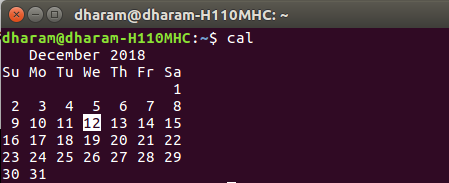
- This displays the calendar of the current month.
2. date
The date command displays or sets the system date and time.
- Shows current date and time
- Supports custom output formats
- Used in scripts and logs
**Syntax:
date
**Example:
date

- This displays the current system date and time.
3. uptime
The uptime command shows how long the system has been running.
- Displays system running time
- Shows number of logged-in users
- Displays system load average
**Syntax:
uptime
**Example:
uptime

- This displays the system uptime and load averages.
Why Date and Time Commands Are Important?
- Help verify the current system date and time
- Useful for system monitoring and troubleshooting
- Required for scheduling tasks and log analysis
- Ensure accurate timestamps in system logs
Use Cases:
Given below are some use cases that help us understand why we use these commands.
Checking System Time Before Running Scheduled Jobs
- Ensures the system date and time are correct before executing cron jobs or automated tasks
- Helps prevent job failures caused by incorrect timestamps
Monitoring System Availability and Stability
- Allows administrators to check how long the system has been running without reboot
- Helps identify unexpected restarts or downtime
- Assists in debugging issues related to incorrect timestamps in logs
- Helps verify time synchronization problems in distributed systems
Viewing Calendars and System Runtime
- Provides quick access to monthly or yearly calendars for date reference
- Helps users understand system runtime and workload duration
Comparison: date vs uptime
The date command displays the current system date and time, while the uptime command shows how long the system has been running along with its load information.
date Command
- Used to display or set the current system date and time
- Shows detailed time information including date, time, and timezone
- Commonly used for logging, scheduling, and timestamp generation
- Helps verify correct system time before running scheduled tasks
uptime Command
- Used to display how long the system has been running since the last boot
- Shows system load averages and number of logged-in users
- Helpful for monitoring system availability and stability
- Commonly used for performance and health checks