Faster RCNN | ML (original) (raw)
Faster R-CNN | ML
Last Updated : 25 Aug, 2025
Faster R-CNN is a popular deep learning model used for object detection which involves identifying and localizing objects within an image. Building on earlier models like R-CNN and Fast R-CNN, Faster R-CNN introduced a significant improvement by incorporating a Region Proposal Network (RPN) that generates object proposals directly within the model. This integration makes it faster and more accurate allowing it to detect multiple objects in real time with high precision.
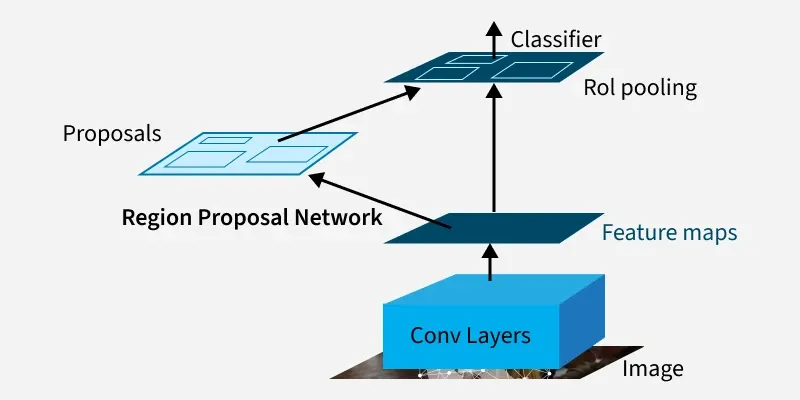
Faster R-CNN
Evolution of R-CNN Models
Lets see the evolution of R-CNN models for over years,
R-CNN (2013)
- Used CNN to classify around 2,000 region proposals generated by Selective Search.
- Processed each region separately, causing slow inference.
- Used SVM for classification.
Fast R-CNN (2015)
- Ran CNN once over the full image to produce shared feature maps.
- Used ROI(Region of Interest) Pooling to extract fixed-size features from proposed regions.
- Replaced SVM with neural network classifier.
- Still depended on slow Selective Search for proposals.
Faster R-CNN (2015)
- Introduced Region Proposal Network (RPN) integrated with CNN for fast proposal generation.
- Enabled end-to-end training of both region proposal and detection.
- Greatly improved speed and accuracy.
Post Faster R-CNN Improvements (2017 - present)
- Added Mask R-CNN for segmentation.
- Improved with powerful backbones like ResNet and Vision Transformers.
- Adopted attention mechanisms and advanced detection methods.
Architecture
Let's see the architecture of Faster R-CNN,
1. Backbone Network
- The backbone is usually a deep CNN like VGG16, ResNet or ResNeXt.
- It extracts feature maps from the input image.
- These feature maps are shared by both the RPN and the detection network.
2. Region Proposal Network (RPN)
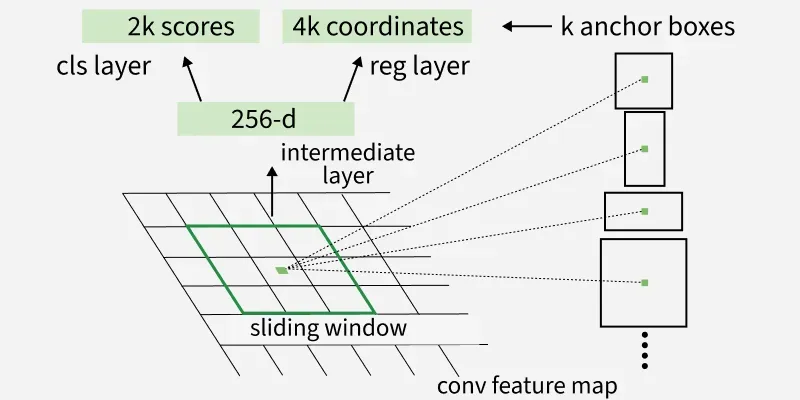
Region Proposal Network(RPN)
1. RPN is a small network sliding over the feature map.
2. It predicts:
- **Objectness score: Probability that a region contains an object.
- **Bounding box coordinates: Refinement of proposed regions.
3. Uses anchors (predefined boxes of different scales and aspect ratios) to propose regions efficiently.
4. End-to-end training allows RPN and the detection network to share features.
3. Region of Interest(RoI) Pooling
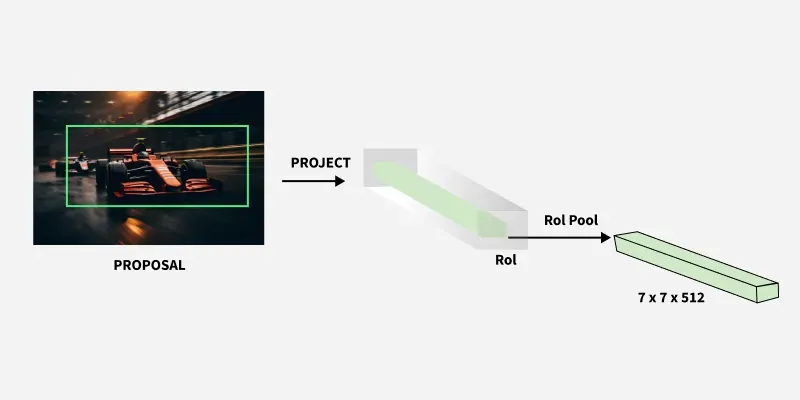
Region of Interest Pooling
- Converts the proposed regions of varying sizes into a fixed-size feature map for the detection network.
- Ensures uniform input size for fully connected layers.
4. Detection Network
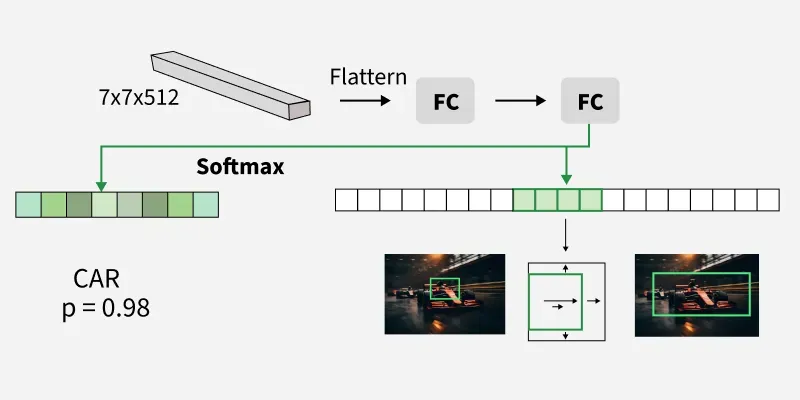
Detection Network
- Classifies each proposed region into object categories.
- Refines bounding boxes for precise localization.
- Uses softmax for classification and smooth L1 loss for bounding box regression.
Working of Faster R-CNN
Let's see the working using a sample example,
Step 1: Install the Dependencies
Python `
!pip install torch torchvision matplotlib
`
Step 2: Import Libraries
We will import the required libraries,
- **torch: Core PyTorch library for tensor operations and model inference.
- **fasterrcnn_resnet50_fpn: Pretrained Faster R-CNN model with ResNet-50 backbone and Feature Pyramid Network (FPN) for detection.
- **functional (F): Provides image transformation utilities like converting PIL images to tensors.
- **PIL.Image: For loading and manipulating images.
- **matplotlib.pyplot: For plotting images and detection results.
- **matplotlib.patches: To draw rectangles (bounding boxes) over images. Python `
import torch from torchvision.models.detection import fasterrcnn_resnet50_fpn from torchvision.transforms import functional as F from PIL import Image import matplotlib.pyplot as plt import matplotlib.patches as patches
`
Step 3: Load and Preprocess Image
We will load the sample image,
- **Image.open: Loads the image from the file.
- **convert("RGB"): Ensures image uses the RGB color format.
- **F.to_tensor: Converts the PIL image to a PyTorch tensor with pixel values normalized between 0 and 1, the model’s expected input.
Used sample can be downloaded from here.

Python `
image_path = "path_to_sample_image" image = Image.open(image_path).convert("RGB") image_tensor = F.to_tensor(image)
`
Step 4: Load Pretrained Faster R-CNN Model
- **fasterrcnn_resnet50_fpn(pretrained=True): Loads Faster R-CNN pretrained on the COCO dataset for object detection.
- **model.eval(): Sets the model to evaluation mode, disabling training-specific layers like dropout. Python `
model = fasterrcnn_resnet50_fpn(pretrained=True) model.eval()
`
Step 5: Model Inference and Extracting Detection Results
- **torch.no_grad(): Disables gradient calculation to save memory and computations during inference.
- **model([image_tensor]): Feeds the image tensor batch (list of one image) to the model and returns predictions.
- **outputs: Contains results for the first (and only) image.
- ****'boxes':** Predicted bounding box coordinates for detected objects.
- ****'labels':** Predicted classes (object categories) for each bounding box.
- ****'scores':** Confidence scores for each detection. Python `
with torch.no_grad(): outputs = model([image_tensor])
boxes = outputs[0]['boxes'] labels = outputs[0]['labels'] scores = outputs[0]['scores']
`
Step 6: Visualize Results
We visualize the results,
- **plt.subplots: Creates a matplotlib figure and axis for plotting.
- **ax.imshow: Displays the original image.
- **patches.Rectangle: Draws red rectangles around objects with confidence > 0.8.
- **ax.add_patch: Adds these boxes to the plot.
- **plt.show(): Renders the visualization. Python `
fig, ax = plt.subplots(1, figsize=(12, 8)) ax.imshow(image)
for box, score in zip(boxes, scores): if score > 0.8: x1, y1, x2, y2 = box rect = patches.Rectangle((x1, y1), x2 - x1, y2 - y1, linewidth=2, edgecolor='r', facecolor='none') ax.add_patch(rect)
plt.show()
`
**Output:
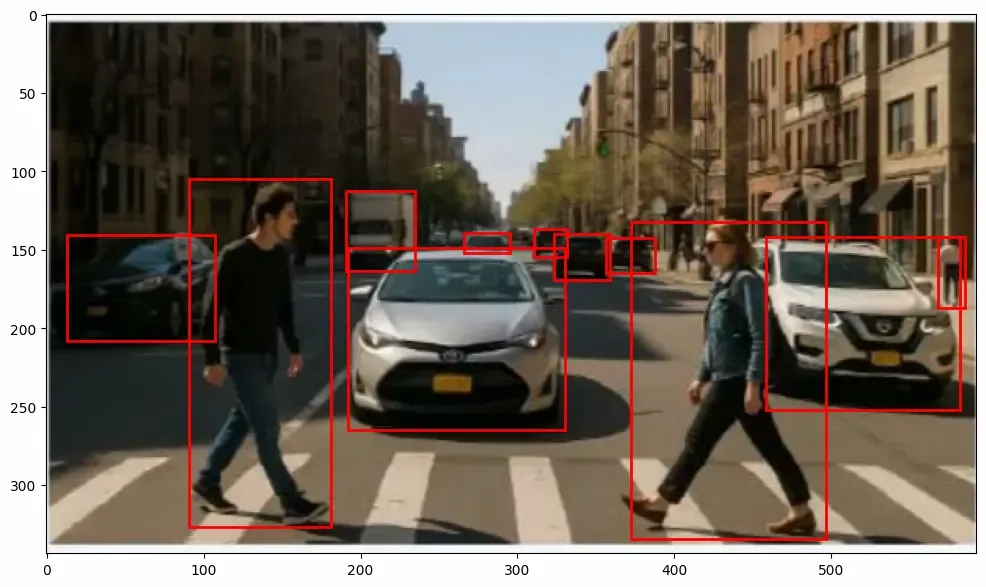
Faster R-CNN Result
Applications
- **Object Detection in Images and Videos: Faster R-CNN is widely used for detecting multiple objects in static images and real time video streams making it important for surveillance, image tagging and content moderation.
- **Autonomous Vehicles: In self driving cars, Faster R-CNN helps detect pedestrians, vehicles, traffic signs and obstacles to ensure safe navigation.
- **Medical Imaging: It is applied in tasks like tumor detection organ localization and anomaly spotting in X-rays, MRIs and CT scans, aiding diagnostic accuracy.
- **Retail and Inventory Management: Faster R-CNN can detect products on shelves or monitor stock levels in warehouses through automated visual systems.
Advantages of Faster R-CNN
- **High accuracy: Maintains state-of-the-art detection performance.
- **End-to-end training: Joint optimization of RPN and detection network.
- **Faster than predecessors: Eliminates external region proposal methods.
- **Flexible backbone: Can use different CNN architectures for feature extraction.
Limitations
- Slower than single-stage detectors like YOLO or SSD for real-time applications.
- High computational cost for very large images.
- Performance depends on the quality of anchors and backbone network.