Image Classification using CNN (original) (raw)
Last Updated : 13 May, 2026
Image classification is a machine learning task where a model assigns labels to images based on their content. CNNs are designed to effectively analyze visual data by learning patterns from images.
- Extracts features like edges, shapes, and textures from images.
- Learns hierarchical patterns through multiple layers.
- Used for tasks like object, scene, and animal classification.
Key Components of CNNs
- **Convolutional Layers****:** Filters or kernels that detect features such as edges or textures.
- **ReLU Activation****:** Adds non-linearity, helping the model learn complex patterns.
- **Pooling Layers****:** Reduce the dimensions of the image making the network more efficient while preserving important features.
- **Fully Connected Layers****:** After feature extraction, these layers make the final prediction based on the detected patterns.
- **Softmax Output****:** Converts the network’s output into probabilities, showing the likelihood of each class.
CNNs Workflow
- **Image preprocessing: Images are resized, normalized, and sometimes augmented to improve model performance and reduce overfitting.
- **Feature extraction: CNNs automatically learn hierarchical features, starting from simple edges to complex objects in deeper layers.
- **Classification: Fully connected layers use extracted features to assign the image to a predefined class.
Implementation
Let's see the implementation of Image Classification step-by-step:
Step 1: Importing Libraries
Importing Tensorflow and Matplotlib libraries for building, training and visualizing accuracy of the model.
Python `
import tensorflow as tf from tensorflow.keras import layers, models, datasets import matplotlib.pyplot as plt
`
Step 2: Downloading and Preparing the Dataset
Loading and preprocessing the CIFAR-10 dataset, which contains 60,000 32×32 color images across 10 categories.
- **Scaling: Pixel values are normalized from [0, 255] to [0, 1] by dividing by 255.
- **One-hot encoding: Converts class labels into binary vectors (e.g., label 2 → [0, 0, 1, 0, 0, 0, 0, 0, 0, 0]). Python `
(x_train, y_train), (x_test, y_test) = datasets.cifar10.load_data()
x_train, x_test = x_train / 255.0, x_test / 255.0
num_classes = 10 y_train = tf.keras.utils.to_categorical(y_train, num_classes) y_test = tf.keras.utils.to_categorical(y_test , num_classes)
`
**Output:

Downloading the Dataset
Step 3: Building the CNN Model
Defining the CNN architecture starting with convolutional and max-pooling layers, followed by flattening and fully connected layers for classification.
- **Flatten layer: Converts 2D feature maps into a 1D vector for dense layers.
- **Dense layers: Perform final decision making, with softmax used in the output layer to generate class probabilities. Python `
model = models.Sequential([
layers.Conv2D(32, (3,3), activation='relu', padding='same', input_shape=(32,32,3)),
layers.MaxPooling2D(2,2),

layers.Conv2D(64, (3,3), activation='relu', padding='same'),
layers.MaxPooling2D(2,2),

layers.Conv2D(64, (3,3), activation='relu', padding='same'),
layers.Flatten(),

layers.Dense(64, activation='relu'),
layers.Dense(num_classes, activation='softmax')
])
model.summary()
`
**Output:
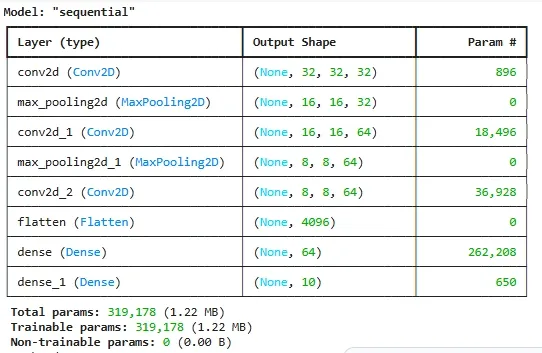
Building the CNN Model
Step 4: Compiling and Training the Model
We compile the model with an optimizer, loss function, and metric, then train it. Adam optimizer is used for adaptive learning rate optimization.
Python `
model.compile(optimizer='adam', loss='categorical_crossentropy', metrics=['accuracy'])
history = model.fit(x_train, y_train, epochs=15, batch_size=64, validation_split=0.2, verbose=2)
`
**Output:
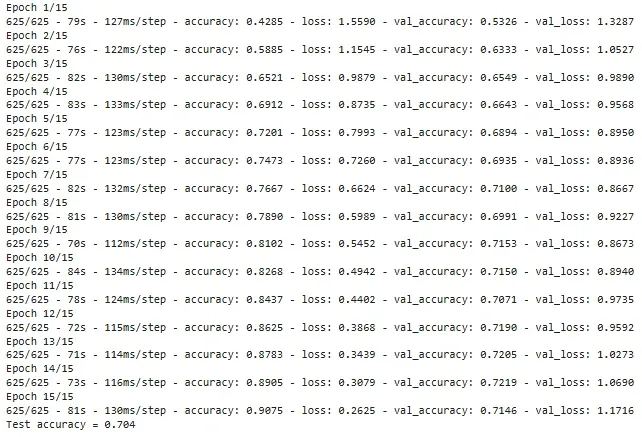
Training the Model
Step 5: Evaluating the Model
We evaluate the trained model on the test dataset to measure its performance on unseen data.
Python `
test_loss, test_acc = model.evaluate(x_test, y_test, verbose=0)
print(f"Test accuracy = {test_acc:.3f}")
`
Step 6: Making Predictions
We use the trained model to predict the class of unseen test images and compare predicted labels with actual labels.
Python `
predictions = model.predict(x_test)
import numpy as np
Example: predicting first test image
print("Predicted class:", np.argmax(predictions[0])) print("Actual class:", np.argmax(y_test[0]))
`
**Output:
313/313 ━━━━━━━━━━━━━━━━━━━━ 5s 16ms/step
Predicted class: 3
Actual class: 3
Step7 : Plotting of Accuracy Curves
Using matplotlib to plot and visualize training and validation accuracy during model training.
Python `
plt.plot(history.history['accuracy'], label='train') plt.plot(history.history['val_accuracy'], label='val') plt.legend() plt.title('Accuracy') plt.show()
`
**Output:
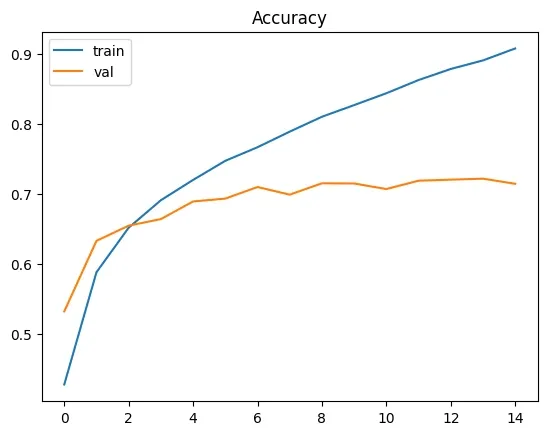
Plotting of Accuracy
Advantages
- Automatically learn features from images which reduces manual effort.
- Recognize objects regardless of position or orientation.
- Reduce computation using pooling layer while retaining key features.
- Work well with large datasets and improve with more data.
Challenges
- CNNs can overfit on small or complex datasets without proper regularization.
- They require high computational power, often needing GPUs or cloud resources.
- Performance depends heavily on high-quality, well-labeled data.
- Training deep CNNs can be time-consuming with large datasets.