Implementation of XGBoost (eXtreme Gradient Boosting) (original) (raw)
Last Updated : 5 Sep, 2025
In machine learning we often combine different algorithms to get better and optimize results known as ensemble method and one of its famous algorithms is XGBoost (Extreme boosting) which works by building an ensemble of decision trees sequentially where each new tree corrects the errors made by the previous one. It uses advanced optimization techniques and regularization methods that reduce overfitting and improve model performance.
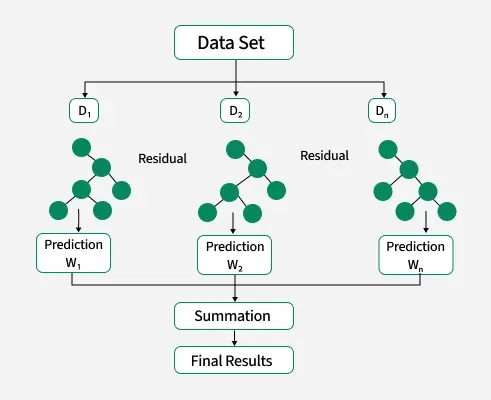
Implementation of XGBoost
Parameters in XGBoost
Before jumping to the implementation of XG Boost we need to understand its parameters for model optimization.
- ****Learning Rate (**\eta ): An important variable that modifies how much each tree contributes to the final prediction. While more trees are needed smaller values frequently result in more accurate models.
- **Max Depth: This parameter controls the depth of every tree, avoiding overfitting and being essential to controlling the model's complexity.
- **Gamma: Based on the decrease in loss it determines when a node in the tree will split. The algorithm becomes more conservative with a higher gamma value hence avoiding splits that don't decreases the loss. It helps in managing tree complexity.
- **Subsample: Manages the percentage of data that is sampled at random to grow each tree hence lowering variance and enhancing generalization. Setting it too low could result in underfitting.
- **Colsample Bytree: Establishes the percentage of features that will be sampled at random for growing each tree.
- **n_estimators: Specifies the number of boosting rounds.
- **alpha (L1 regularization term) and **lambda (L2 regularization term): Control the strength of L1 and L2 regularization respectively. A higher value results in stronger regularization.
- **min_child_weight: Influences the tree structure by controlling the minimum amount of data required to create a new node.
- **scale_pos_weight: Useful in imbalanced class scenarios to control the balance of positive and negative weights.
Let's build and train a model for classification task using XGboost.
Step 1: Importing necessary libraries
We will import numpy, matplotlib, pandas, scikit learn and XGBoost.
Python `
from sklearn.metrics import accuracy_score import xgboost as xgb from sklearn.model_selection import train_test_split import numpy as np import matplotlib.pyplot as plt import pandas as pd
`
Step 2: Loading and splitting the dataset
We will be making a model for customer churn and its dataset can be downloaded from here.
Python `
dataset = pd.read_csv('Churn_Modelling.csv') X = dataset.iloc[:, 3:13] y = dataset.iloc[:, 13].values
`
Step 3: Converting categorical Columns
Since XGBoost can internally handle categorical features. The code converts the specified columns to the categorical data type. While internally representing categories with integers and categorical type retains the semantic meaning of the categories.
Python `
X['Geography'] = X['Geography'].astype('category') X['Gender'] = X['Gender'].astype('category')
`
Step 4: Splitting the dataset into training and testing
We will split our dataset into training and testing for the model training and testing.
- **test_size=0.25: Means 25% test data and 75% train data used.
- **random_state=0: Ensures reproducibility
- **X_train, X_test: Feature sets
- **y_train, y_test: Target labels Python `
X_train, X_test, y_train, y_test = train_test_split(X,y, test_size=0.25, random_state=0)
`
Step 5: Converting Dataset into DMatrix
We will convert our dataset into DMatrix structure. DMatrix is a special data structure in XGBoost for faster training and less memory use.
- To convert our data to DMatrix format , we will use XGBoost's API. It takes both features and labels.
- Use **enable_categorical = True to handle Pandas categorical columns automatically. Python `
xgb_train = xgb.DMatrix(X_train, y_train, enable_categorical=True) xgb_test = xgb.DMatrix(X_test, y_test, enable_categorical=True)
`
Step 6: Creating XGboost Model
We will initialize XGBoost model with hyperparameters like a binary logistic objective, maximum tree depth and learning rate. It then trains the model using the `****xgb_train**` dataset for 50 boosting rounds.
- **objective: 'binary:logistic' for binary classification
- **max_depth: 3 limits tree depth
- **learning_rate: 0.1 controls step size
- **xgb.train(...) trains the XGBoost model using specified params and training data
The specified hyperparameters define the model's structure and training behavior, impacting its accuracy and generalization on the given dataset. Adjusting these hyperparameters are necessary for optimal performance in different scenarios.
Python `
params = { 'objective': 'binary:logistic', 'max_depth': 3, 'learning_rate': 0.1, } n=50 model = xgb.train(params=params,dtrain=xgb_train,num_boost_round=n)
`
Step 7: Making Predictions and Evaluating the Model
We will predict labels and then converts the predicted probabilities (preds) to integer labels allowing for a straightforward accuracy comparison with the true labels.
Python `
preds = model.predict(xgb_test) preds = np.round(preds) accuracy= accuracy_score(y_test,preds) print('Accuracy of the model is:', accuracy*100)
`
**Output:
Accuracy of the model is: 86.6
We can see that we achieved a accuracy of 86.6% which is very good meaning our model is working fine with real world dataset.