What is LangGraph (original) (raw)
Last Updated : 14 Apr, 2026
LangGraph is an open-source framework from LangChain designed to build and manage AI agent workflows using graph-based structures. It allows developers to define workflows as nodes and edges, making complex agent interactions more structured, scalable and easier to control.
- Organises AI agent workflows using graph-based architectures
- Supports both simple use cases (chatbots) and complex multi-agent systems
- Integrates LLMs with external tools, APIs and memory
- Enables modular and customizable workflow design
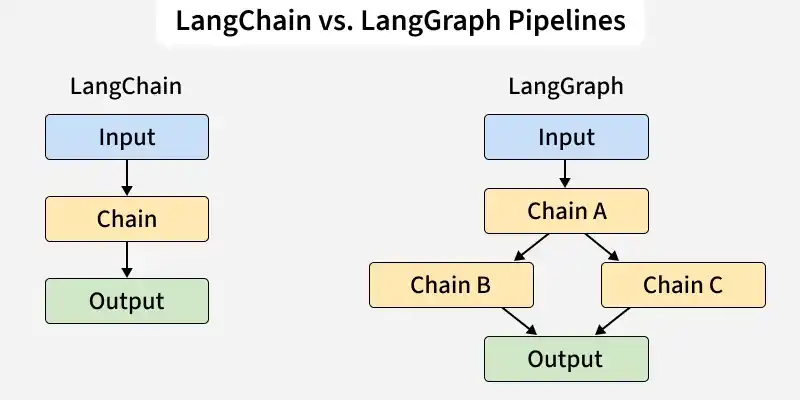
Workflow Pipelines
LangChain uses a straightforward step-by-step pipeline where each task follows a fixed sequence from input to output while LangGraph allows flexible workflows with branching and parallel steps, making it better suited for complex, decision-based applications.
Workflow of LangGraph
The diagram below shows how LangGraph structures its agent-based workflow using distinct tools and stages.
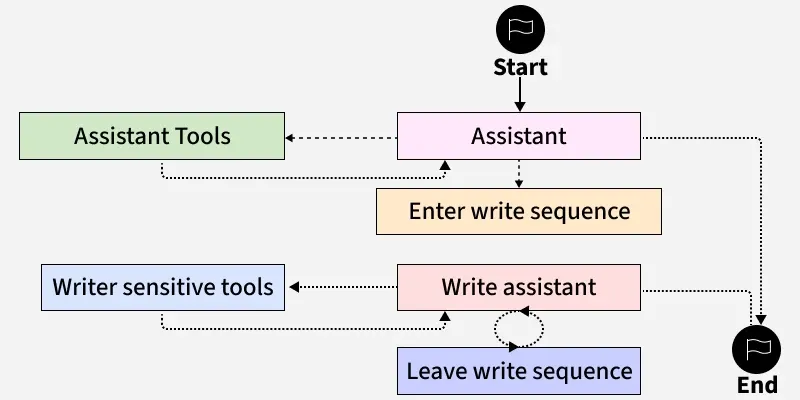
Workflow of LangGraph
Here's a step by step interpretation of the flow:
- **Start: The process begins with the agent (Assistant) initiating an interaction or task.
- **Assistant: This is the central node managing the overall workflow. It controls the movement between tools and sequences based on the current state.
- **Enter Write Sequence: If the task requires writing assistance like generating content, the workflow enters a dedicated writing sequence.
- **Write Assistant: This specialized module focuses on the writing process. It may loop with tools for refining or editing before completing the sequence.
- **Leave Write Sequence: Once the writing task is complete the system exits the write mode.
- **Writer Sensitive Tools and Assistant Tools: These nodes provide specialized capabilities. Depending on the state the Assistant routes tasks to tools that enhance writing or perform sensitive operations.
- **End: The process concludes once the desired outcome is achieved and all necessary tools have been executed.
Components
These core components work together smoothly to help developers build, customize and manage complex AI driven workflows.
- **Monitoring mechanism: Human-in-the-loop (HITL) ensures humans remain part of the decision making process. It improves machine learning accuracy by using critical data points instead of relying on random sampling.
- **Stateful graphs: Each node represents a step in computation and carries forward information from previous steps. This enables continuous, contextual processing of data throughout the workflow.
- **Cyclical graphs: Graphs that contain loops is used for workflows where certain steps may repeat. It becomes important for complex agent run-times.
- **Nodes: The individual components or agents within a workflow is called node. They act like “actors” performing tasks or calling tools (e.g., a ToolNode for tool integration).
- **Edges: Edges determine which node should run next. They can follow fixed paths or branching conditions based on the system state.
- **RAG (Retrieval-Augmented Generation): RAG enhances LLMs by adding relevant external documents as context, improving the accuracy and richness of outputs.
- **Workflows: Sequences of interactions between nodes. By designing workflows, users combine multiple nodes into powerful, dynamic AI processes.
- **APIs: A set of tools to programmatically add nodes, modify workflows or extract data. Offers developers flexibility and seamless integration with other systems.
- **LangSmith: LangSmith is a platform for monitoring, debugging and evaluating LLM applications, helping developers track execution flows and improve performance.
How LangGraph Scales
- **Graph based architecture: Ensures AI workflows grow without slowing down or losing efficiency.
- **Enhanced decision making: Models relationships between nodes, enabling AI agents to learn from past actions and feedback.
- **Increased flexibility: Open-source design lets developers add new components or adapt existing workflows with ease.
- **Multiagent workflows: Supports networks of specialized LangChain agents. Tasks can be routed to the right agent, enabling parallel execution and efficient handling of complex, diverse workloads.
- **Decentralized coordination: This multiagent setup creates a scalable system where automation doesn’t rely on a single agent but is distributed across a coordinated network.
Building a Simple Chatbot with LangGraph
LangGraph makes it easy to build structured, stateful applications like chatbots. In this example we’ll learn how to create a basic chatbot that can classify user input as either a greet, search query and respond accordingly.
Step 1: Install the Dependencies
Installs the required dependencies,
- **langgraph: Framework for building graph-based AI workflows.
- **langchain: Popular toolkit for LLM-powered AI applications.
- **google-generativeai: Google’s API for Generative AI (Gemini models). Python `
!pip install langgraph langchain google-generativeai
`
Step 2: Setup Gemini API
- Imports the Google Generative AI Python SDK.
- Configures the API with our private key for authentication.
- Initializes the Gemini 1.5 Flash model for fast, multimodal LLM responses.
- Defines an ask_gemini function that takes a prompt (user question) and generates a response from Gemini and handles errors gracefully by returning an apologetic message if the API fails.
To know how to access Gemini API refer to : How to Access and Use Google Gemini API Key (with Examples)
Python `
import google.generativeai as genai
genai.configure(api_key="YOUR_API_KEY")
model = genai.GenerativeModel("gemini-1.5-flash")
def ask_gemini(prompt: str) -> str: try: response = model.generate_content(prompt) return response.text except Exception as e: return "Sorry, something went wrong with the Gemini API."
`
Step 3: Define Chatbot State
We will import Optional and TypedDict for strict type checking and creates a GraphState type:
- Holds the current question, its classification (greeting/search) and the final response.
- Ensures clarity and structure in state handling during workflow execution. Python `
from typing import Optional from typing_extensions import TypedDict
class GraphState(TypedDict): question: Optional[str] classification: Optional[str] response: Optional[str]
`
Step 4: Classify Input
We define classify, which takes the workflow state and analyzes the user's question.
- Checks if the question is a greeting. For example keywords like hi, hello, etc.
- Tags the question as either "greeting" or "search" for branching logic later.
- Returns the updated state with the new classification. Python `
def classify(state: GraphState) -> GraphState: question = state.get("question", "").lower() if any(word in question for word in ["hello", "hi", "hey", "good morning", "good evening"]): classification = "greeting" else: classification = "search"
return {
    **state,
    "classification": classification
}
`
Step 5: Respond Using Gemini (or Greeting)
This define respond which generates appropriate output based on classification.
- For greetings, returns a friendly welcome message.
- For search questions, calls Gemini via ask_gemini and fetches an AI-generated answer.
- Handles unknown classifications with a safety fallback response.
- Updates and returns the state with the generated reply. Python `
def respond(state: GraphState) -> GraphState: classification = state.get("classification") question = state.get("question")
if classification == "greeting":
    response = "Hello! How can I help you today?"
elif classification == "search":
    response = ask_gemini(question)
else:
    response = "I'm not sure how to respond to that."

return {
    **state,
    "response": response
}
`
Step 6: Build LangGraph Workflow
- Import tools for network graph creation and visualization.
- Build the workflow graph using LangGraph, adding nodes for classification and response, connecting them with edges and compiling the app.
- Include a function to visually display the workflow using networkx and matplotlib, aiding understanding and troubleshooting. Python `
import networkx as nx import matplotlib.pyplot as plt from langgraph.graph import StateGraph
builder = StateGraph(GraphState) builder.add_node("classify", classify) builder.add_node("respond", respond) builder.set_entry_point("classify") builder.add_edge("classify", "respond") builder.set_finish_point("respond") app = builder.compile()
def visualize_workflow(builder): G = nx.DiGraph()
for node in builder.nodes:
    G.add_node(node)
for edge in builder.edges:
    G.add_edge(edge[0], edge[1])

pos = nx.spring_layout(G)
nx.draw(G, pos, with_labels=True, node_size=3000,
        node_color="skyblue", font_size=12, font_weight="bold", arrows=True)

plt.title("Langchain Workflow Visualization")
plt.show()
visualize_workflow(builder)
`
**Output:
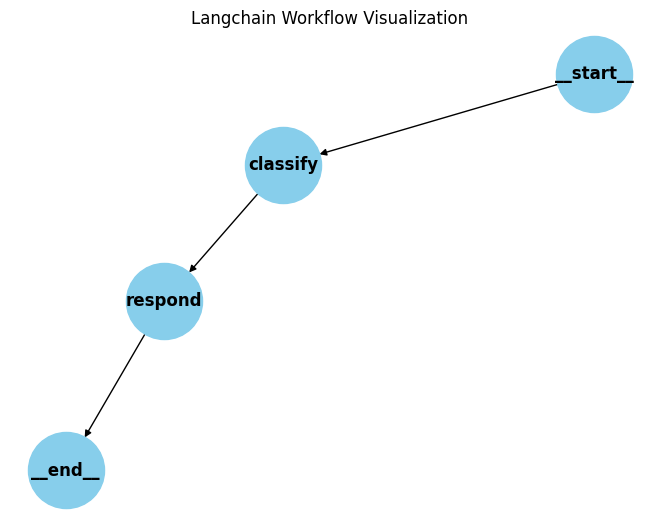
Workflow of chatbot
Step 7: Interactive Chat Interface
- Create a command-line chatbot that processes user inputs until “exit” or “quit” is typed.
- Send each input through the workflow graph and returns the bot’s response, either a greeting or an AI-powered answer. Python `
print("=== Gemini-Powered Chatbot ===") print("Type your question below. Type 'exit' to quit.\n")
while True: user_input = input("You: ") if user_input.strip().lower() in ['exit', 'quit']: print("Bot: Goodbye!") break
state = {"question": user_input}
result = app.invoke(state)
print("Bot:", result["response"])
`
**Output:
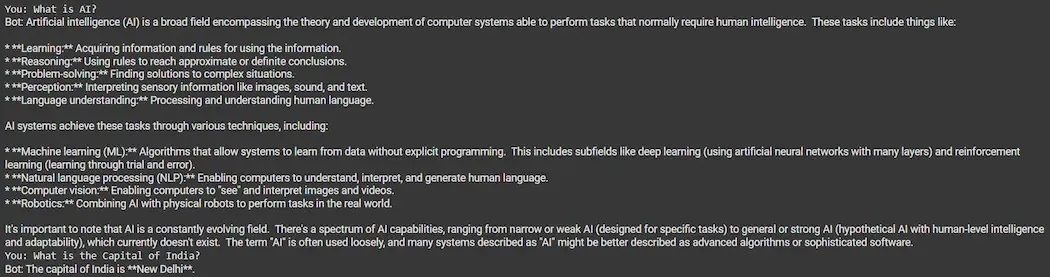
Output
We can see that our chatbot is working fine giving accurate results.
LangGraph vs LangChain Agents
Here a quick difference between LangGraph and LangChain Agents as they are quite similar and confusing:
| Features | LangGraph | LangChain |
|---|---|---|
| Architecture | Graph-based (nodes and edges with memory and branching). | Sequential decision-act loop. |
| Workflow Control | Fully customizable paths, loops and conditions. | Limited control, follows predefined tool-usage cycle. |
| State Management | Built-in persistent state across the entire graph. | Implicit or external memory required. |
| Support for Loops | Yes, supports cyclical flows and iteration. | Not designed for loops or retries. |
| Human-in-the-Loop | Built-in support for pausing and resuming with human input. | Requires custom implementation. |
| Debugging and Observability | High observability with tools like LangSmith. | Limited transparency, harder to debug. |
Applications
- **Conversational AI Systems: For building chatbots that can remember user preferences and handle complex, multi-turn conversations.
- **Research and Analysis Agents: Agents that search, filter and summarize data from multiple sources, with the ability to revise their output based on feedback.
- **Code Generation and Debugging: AI tools that can write code, test it, identify bugs and make improvements automatically.
- **Business Process Automation: Automating workflows that involve multiple decision points, data sources and human approvals.
- **Customer Support: AI copilots that handle initial queries, collect information and pass full context to a human agent if needed.
- **Iterative Reasoning Tasks: Any task where the AI needs to attempt, reflect and retry such as writing, planning or problem-solving.