HumanintheLoop (HITL) (original) (raw)
Human-in-the-Loop (HITL)
Last Updated : 1 Nov, 2025
Human-in-the-Loop (HITL) systems combine AI automation with human oversight. Here, humans actively monitor, validate or refine AI outputs during training, testing or decision-making. Even deep learning models can face bias or ambiguity in unseen scenarios. HITL helps tackle these issues by creating a feedback loop where humans continuously evaluate and improve AI decisions.
Goal is to merge AI speed and scale with human judgment and ethics for more accurate, transparent and responsible outcomes.
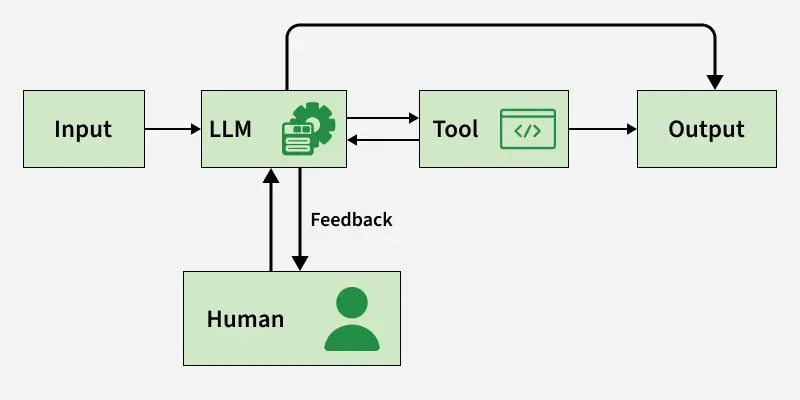
Human-in-the-loop Feedback Loop
How Does HITL Work?
HITL systems bring together AI’s predictive power and human insight in a continuous feedback loop. Human involvement whether before, during or after model training helps the system learn better, make smarter decisions and stay reliable.
Workflow
- **Training Phase: Humans label or annotate raw data to teach the model (e.g., “spam” vs. “not spam”). This forms the ground truth dataset.
- **Inference Phase: The trained AI model predicts outcomes for new data.
- **Feedback Phase: Humans review and correct AI outputs, providing feedback that is used to retrain or fine-tune the model forming a continuous improvement loop.
**Common HITL workflows:
- **Supervised Learning: Humans step in to label examples like marking emails as “spam” or “not spam” or images as “car” or “bus.” These labeled datasets teach the model how to recognize patterns, helping it become more accurate and dependable over time.
- **Reinforcement Learning from Human Feedback (RLHF): Here AI systems learn by combining reinforcement learning with real human judgments. Instead of relying solely on predefined rewards, the model uses human feedback to align its decisions with human values and preferences powering generative AI systems to produce more accurate and human-like responses.
- **Active Learning****:** Here, the AI asks for human help only when it’s unsure. By flagging ambiguous cases, it gets precise feedback without wasting effort making the learning process smarter and more efficient.
Human-Guided Training
AI model prediction be
\hat{y} = f_\theta(x)
where
- f_\theta denotes the model.
- \theta represent the parameters of the model
Human feedback h(x) adjusts or corrects the prediction.
The updated prediction can be represented as:
y' = \alpha \cdot \hat{y} + (1 - \alpha) \cdot h(x)
where \alpha \in [0, 1] determines the weights
In Reinforcement Learning from Human Feedback (RLHF), the model receives a reward signal r_t based on human preference:
\theta_{t+1} = \theta_t + \eta \nabla_\theta r_t
where \eta is learning rate.
This allows the AI to align behavior with human-approved outcomes over time.
Why Human-in-the-Loop Matters
- **Accuracy and Reliability: Humans play a key role in catching model mistakes and spotting unusual patterns, keeping AI systems reliable even in rare or unpredictable situations. Continuous human feedback helps the model learn from its errors and adapt more effectively over time.
- **Ethical Decision-Making and Accountability: When AI faces morally complex situations like healthcare or justice humans bring ethical reasoning that machines lack. HITL systems also maintain clear audit trails, ensuring transparency and accountability.
- **Transparency and Explainability: By keeping humans involved in validation and decision making HITL makes AI’s inner workings easier to understand. When people can see how and why an AI reached a conclusion, it builds trust especially in sensitive fields like finance or medicine.
Human-in-the-Loop (HITL) Annotation
- Combines automated labeling with human review, ensuring both efficiency and accuracy in creating high-quality datasets.
- Humans identify and fix incorrect or ambiguous labels generated by automated systems, reducing noise in training data.
- Models flag uncertain samples, which are then sent to human annotators for clarification improving learning efficiency.
- Human experts provide context-sensitive labels (e.g., medical, legal or financial data) that automation alone might misinterpret.
- Each round of human correction helps the model learn from its mistakes, enhancing performance over time.
- Human oversight ensures balanced, unbiased annotations, creating datasets that better represent real-world diversity.
Step-By-Step Implementation
Here we automated sentiment analysis on text data with a Human-in-the-Loop (HITL) workflow automatically classifying texts as Positive or Negative and asking for human feedback when model confidence is low.
Step 1: Import Required Libraries
- pandas is used to handle and process CSV data.
- langgraph manages workflow creation and state transitions.
- langchain_google_genai allows access to Google’s Gemini model via LangChain.
- os is used for setting environment variables. Python `
import pandas as pd from langgraph.graph import StateGraph, END from langchain_core.prompts import ChatPromptTemplate from langchain_google_genai import ChatGoogleGenerativeAI import os
`
Step 2: Configure Google API Key
- The API key is stored as an environment variable.
- This key authorizes your code to access Google’s Gemini model through LangChain. Python `
os.environ["GOOGLE_API_KEY"] = "API KEY"
`
Step 3: Initialize the Gemini Model
- ChatGoogleGenerativeAI is initialized with the model name and temperature.
- temperature = 0.2 ensures more deterministic and stable responses. Python `
llm = ChatGoogleGenerativeAI( model="gemini-2.5-flash", temperature=0.2 )
`
Step 4: Sentiment Analysis Prompt Template
- The model is instructed to classify text as Positive or Negative.
- It must also return a confidence score (between 0 and 1).
- This structured prompt ensures consistent output format. Python `
prompt = ChatPromptTemplate.from_template(""" You are a sentiment analysis model. Given the text: "{text}", classify it as Positive, Negative. Also give your confidence score (a value between 0 and 1). Example output: Sentiment: Positive Confidence: 0.92 """)
`
Step 5: Sentiment Analysis Node
- This node sends the text to Gemini for prediction.
- Parses the response to extract Sentiment and Confidence.
- Updates the workflow state dictionary. Python `
def llm_sentiment_node(state): text = state["text"] print(f"\nAnalyzing: '{text[:60]}...'") response = llm.invoke(prompt.format(text=text)) result = response.content.strip() sentiment, confidence = "Unknown", 0.0 for line in result.split("\n"): if "sentiment" in line.lower(): sentiment = line.split(":")[-1].strip() elif "confidence" in line.lower(): try: confidence = float(line.split(":")[-1].strip()) except ValueError: confidence = 0.0
state["sentiment"] = sentiment
state["confidence"] = confidence
return state
`
Step 6: Storage Node
- Stores the final result (text, sentiment and confidence) in a list.
- Prints the stored data for confirmation. Python `
def store_result_node(state): results.append({ "Text": state["text"], "Final Sentiment": state["sentiment"], "Confidence": state["confidence"] }) print(f"Stored → Sentiment: {state['sentiment']} (Confidence: {state['confidence']:.2f})") return state
`
Step 7: Human Feedback Node
- Triggered when the model’s confidence is below 0.95.
- Asks the human to manually provide the correct sentiment.
- Updates confidence to 1.0 after review. Python `
def human_feedback_node(state): print(f"\nHuman review triggered!") print(f"Low confidence ({state['confidence']:.2f}) for text:\n {state['text']}") user_input = input("Enter correct sentiment (Positive / Negative): ").strip() state["sentiment"] = user_input if user_input else "ReviewNeeded" state["confidence"] = 1.0 print(f"Human feedback recorded: {state['sentiment']}") return state
`
Step 8: Workflow Graph
- Nodes represent different workflow steps.
- Here we decides whether human feedback is needed. Python `
workflow = StateGraph(dict)
workflow.add_node("llm_sentiment", llm_sentiment_node) workflow.add_node("human_feedback", human_feedback_node) workflow.add_node("store_result", store_result_node)
workflow.set_entry_point("llm_sentiment")
def decision_router(state): if state["confidence"] < 0.95: return "human_feedback" else: return "store_result"
workflow.add_conditional_edges("llm_sentiment", decision_router) workflow.add_edge("human_feedback", "store_result") workflow.add_edge("store_result", END)
app = workflow.compile()
`
Step 9: Load Input CSV and Run Workflow
- Reads input texts from a CSV file.
- Each row is processed sequentially through the workflow.
- The results are stored in a global list. Python `
df = pd.read_csv('sentiment_test.csv') texts_to_process = df.iloc[:, 0].dropna().tolist()
print("\nStarting Sentiment Analysis Workflow using Gemini + LangGraph\n")
results = [] for text in texts_to_process: app.invoke({"text": text})
`
**Output:
You can download the complete code file from here.
Applications
- **Healthcare Diagnostics: Intelligent systems analyze scans and patient data to suggest possible diagnoses. Doctors then review and confirm results improving speed and accuracy while ensuring patient safety.
- **Cybersecurity: Smart algorithms monitor network activity for unusual patterns. When a potential threat is detected, human analysts step in to verify and respond, adding precision and contextual understanding.
- **Fraud Detection: In finance, predictive models flag suspicious transactions. Human experts review these alerts to prevent false positives and maintain fairness in decision-making.
- **Customer Support: Virtual assistants handle routine questions, while human agents take over complex or emotionally sensitive issues delivering both quick responses and genuine empathy.
Challenges
- **Scalability and Cost: Human annotation and oversight can be slow and expensive, especially with massive datasets or specialized domains like radiology or law.
- **Human Error and Inconsistency: Humans introduce their own biases, fatigue and subjectivity, which may reduce labeling consistency.
- **Privacy and Security Risks: Exposing sensitive data to human reviewers may increase the potential for data leaks or misuse.