MongoDB getIndexes() Method (original) (raw)
Last Updated : 5 May, 2026
The getIndexes() method in MongoDB retrieves detailed information about all indexes on a collection. It helps developers review index keys and options to manage and optimize query performance effectively.
- Returns an array of documents describing each index on the collection.
- Provides details such as index keys and creation options.
- Does not require any parameters.
- Includes information about hidden indexes (supported from MongoDB 4.4).
- Useful for analyzing and maintaining an effective indexing strategy.
Syntax
db.collection_name.getIndexes()
- **collection_name: The name of the collection whose index information you want to retrieve.
Return Value
The getIndexes() method returns an array of documents, where each document represents an index and contains details such as:
- The index keys.
- Options used to create the index (e.g., unique, sparse, etc.).
- Information about hidden indexes, if applicable (available from MongoDB 4.4).
Examples of $getIndexes in MongoDB
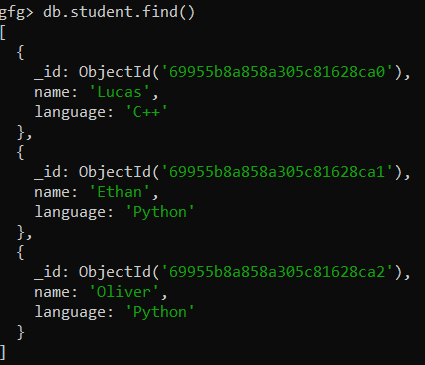
In these examples, we will work with the gfg databases and the student collection, which contains documents with the fields name and language.
- **Database: gfg
- **Collection: student
- **Documents: Three documents contains name and the language in which the students are interested.
Example 1: Retrieve Index Information for a Collection
To view the existing indexes in the student collection, use the getIndexes() method:
db.student.getIndexes()
**Output:

- This output shows the default _id index that is automatically created by MongoDB for every collection.
- The index type is _id_, and it’s an ascending index on the _id field.
- The v field represents the version of the index.
Example 2: Create an Index Using createIndex() and View with getIndexes()
Create an index on the name and language fields of the student collection.
db.student.createIndex({name:1, language:-1})
**Output:

- Creates a compound index with name in ascending order (1) and language in descending order (-1).
- Uses getIndexes() to verify and view the index details on the student collection.
**Query:
db.student.getIndexes()
**Output:

- The first index is the default _id index.
- The second index is the new compound index on name and language, named name_language_index.
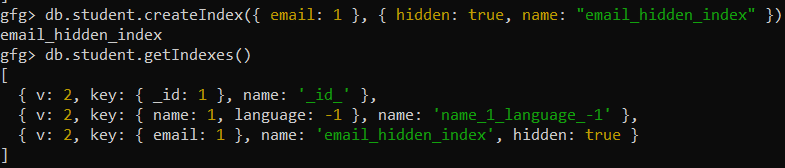
Example 3: Viewing Hidden Indexes
In MongoDB 4.4+, hidden indexes can be viewed with getIndexes() and are ignored by the query planner unless explicitly used, and they can be created by setting hidden: true during index creation.
db.student.createIndex({ email: 1 }, { hidden: true, name: "email_hidden_index" })
Now, to view the hidden index, use the getIndexes() method:
db.student.getIndexes()
**Output: