Delete Duplicate Rows in MySQL (original) (raw)
Last Updated : 24 Mar, 2026
Duplicate rows in MySQL can lead to inaccurate results and make data analysis more difficult. Removing duplicates is essential to maintain data consistency and integrity in your database.
- Eliminating duplicate rows ensures reliable query results and prevents incorrect analysis.
- Cleaner data makes it easier to manage tables and improves overall database performance.
**Note: Some features are only supported in MySQL 8.0 and later versions. If you are using an older version of MySQL, these features may result in errors.
There are multiple strategies for handling and removing duplicate rows in MySQL. First, let’s create a demo table with duplicate entries to demonstrate these methods:
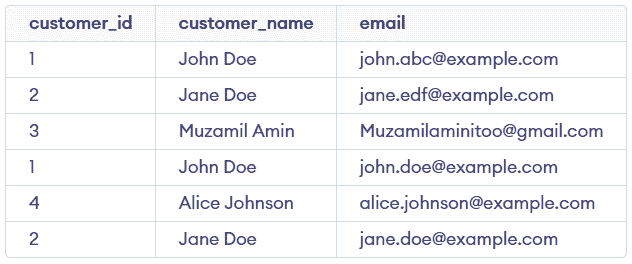
customers Table
1. Using the DELETE Statement
The DELETE statement removes duplicate rows while keeping one occurrence of each customer_id. It uses ROW_NUMBER() to identify and remove duplicate rows.
**Query:
WITH CTE AS ( SELECT customer_id, customer_name, email, ROW_NUMBER() OVER ( PARTITION BY customer_id ORDER BY customer_id ) AS row_num FROM customers ) DELETE FROM customers WHERE (customer_id, customer_name, email) IN ( SELECT customer_id, customer_name, email FROM CTE WHERE row_num > 1 );
**Output:

- **CTE (Common Table Expression): ROW_NUMBER() assigns a sequence within each customer_id group, where row_num = 1 is the first occurrence and row_num > 1 marks duplicates.
- **DELETE Statement: Deletes rows matching records with row_num > 1, ensuring only duplicate entries are removed while keeping one occurrence.
- **IN Operator: The IN operator is used to match rows from the main table with the duplicate records identified in the CTE.
**Note: This method works correctly when duplicate rows are not completely identical. If all column values are exactly the same and no unique identifier exists, MySQL may delete all matching rows.
2. Using the DISTINCT Keyword
The DISTINCT keyword is used to retrieve unique values from a table by filtering out duplicates. It is useful when you want to view clean, non-repeated data without modifying the table.
**Query:
SELECT DISTINCT customer_id FROM customers;
**Output:

- Returns only unique customer_id values from the table.
- Ensures each value appears once, regardless of duplicates.
3. Using the GROUP BY Clause
The GROUP BY clause groups rows based on a specific column to identify unique values. It is commonly used to organize data and perform aggregations.
**Query:
SELECT customer_id FROM customers GROUP BY customer_id;
**Output:

- Groups rows by customer_id, returning one row per value and helping identify unique entries in the result.
- Helps identify unique customer_id values, though it does not delete duplicates from the table.
4. Using the HAVING Clause
The HAVING clause filters grouped results based on conditions applied to aggregated data. It is mainly used to identify duplicate entries by checking group counts.
**Query:
SELECT customer_id FROM customers GROUP BY customer_id HAVING COUNT(*) > 1;
**Output:

- Filters grouped results to return only customer_id values that appear more than once.
- Helps identify duplicate entries, but does not remove them from the table.