PostgreSQL Cheat Sheet : Basic to Advanced (original) (raw)
Last Updated : 23 Jul, 2025
PostgreSQL is a powerful, open-source **object-relational database management system (ORDBMS). It is designed to help developers build robust applications and allow administrators to maintain **data integrity while creating fault-tolerant environments. Like other enterprise databases such as **Microsoft SQL Server and **Oracle, PostgreSQL supports advanced features like **data types, **indexing techniques, and **performance optimizations.
In this **PostgreSQL Cheat Sheet, we've compiled the most essential **commands, **tips, and **tricks for navigating **PostgreSQL efficiently. From **basic queries to **advanced configurations, this article will be our go-to resource for effectively managing databases. Let's dive in and simplify our **PostgreSQL experience.
What is PostgreSQL
PostgreSQL is an advanced, open-source relational database management system ****(RDBMS)**. It uses SQL (Structured Query Language) to interact with and manage data. It supports a wide variety of **data types, **complexqueries, **transactions, **foreign keys, and **triggers, making it an ideal choice for large-scale applications.
**Key Features of PostgreSQL:
- **Open Source DBMS: Free and highly customizable.
- **Supports ACID properties: Atomicity, Consistency, Isolation, and Durability for reliable transactions.
- **Advanced indexing techniques: B-tree, Hash, GIN, GiST, SP-GiST.
- **Replication: Both log-based and trigger-based replication.
- **JSON support: Native support for **JSON and **JSONB data types.
- **Geospatial Data: Support for **geographic objects using **PostGIS.
- **Object-Oriented: Support for custom types and inheritance.
**PostgreSQL Data Types
PostgreSQL supports a wide range of data types. Here's a table of the most commonly used types:
| **Category | **Data Types |
|---|---|
| **Numeric | smallint, integer, bigint, decimal, numeric, serial |
| **Character | varchar(n), text, char(n) |
| **Date/Time | timestamp, date, time, interval |
| **Monetary | money |
| **Binary | bytea |
| **Boolean | boolean |
| **Geometric | point, line, box, path, polygon, circle, lseg |
| **JSON | json, jsonb |
| **UUID | uuid |
| **Network Address | cidr, inet, macaddr |
| **BitString | bit(n), bit varying(n) |
| **Range | int4range, int8range, numrange, tsrange (timestamp range) |
**Operators in PostgreSQL:
An operator manipulates individual data items and returns a result. These are the reserved words used in WHERE clause to perform operations.
| **Operators | |
|---|---|
| Arithmetic Operators | +, -, *, /, %, ^, ! |
| Comparison Operators | =, !=, <>, >, <, >=, <= |
| Logical Operators | AND, NOT, OR |
| Bitwise Operators | &, | |
PostgreSQL Installation
- To install PostgreSQL, run the following command:
sudo apt install postgresql
- To add some additional utilities and functionalities.
sudo apt install postgresql postgresql-contrib
- Once installed, switch to the **Postgres user and access the PostgreSQL prompt:
sudo -i -u postgres
- Now, we can access the Postgres prompt using _**psql_command.
Working With Databases in PostgreSQL
Creating a Database
The**CREATE DATABASE command is used to create the database.
**syntax:
CREATE DATABASE database_name;
**Example:
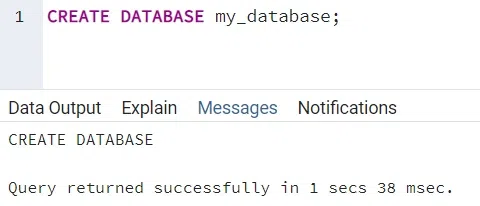
create database
**Explanation:
This command creates a database named my_database where we can store our data. Once the database is created, we can switch to it using the**\c** command in **psql to start working with tables and other objects.
Creating a Table
Now, to store the data, we need the table. The **CREATE TABLEstatement is used to create the table.
**Syntax:
CREATE TABLE table_name
(column_1 data_type,
column_2 data_type,
...
column_n data_type);
**Example:
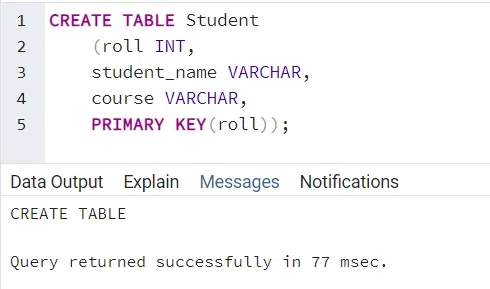
create table
**Explanation:
This command creates an Student table with three columns: **roll, *student_name and course . The roll column is a serial primary key, meaning it will auto-increment with each new row added.TheINSERT*command is used to insert the new record (row) into the table.
Inserting Data into a Table
To insert a new record (row) into a table, use the INSERT INTO command.
**Syntax:
INSERT INTO table_name (column_1, column_2 ,...)
VALUES(value_1, value_2, ...);
**Example:
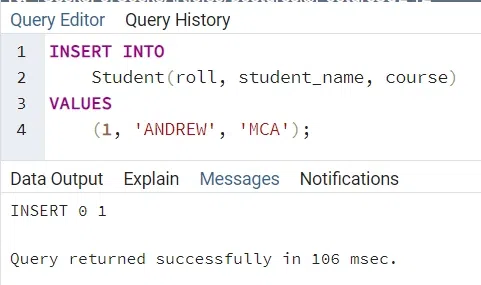
insert into table
**Explanation:
This query inserts a new row into the **Student table with the student name **ANDREW, roll number **1, and course **MCA.
Selecting Data from a Table
The **SELECTstatement is used to fetch the data from a **database table, which returns the data in the form of a result table.
**Syntax:
SELECT
column_1, column_2, .. column_n
FROM
table_name;
**Example:
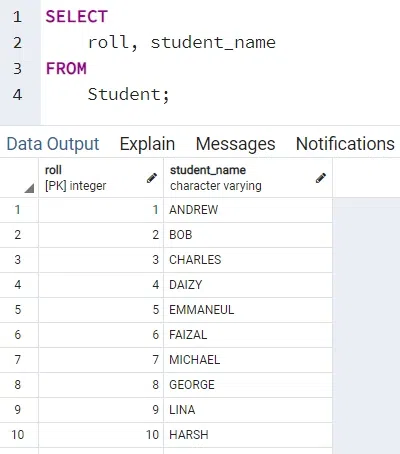
Select command
**Explanation:
This query retrieves the **roll number and student name columns from the Student table. If we want to select all columns, we can use an **asterisk *.
Filtering Data with the WHERE Clause
The**WHEREclause is used to filter results returned by the **SELECT statement.
**Syntax:
SELECT column_name
FROM
table_name
WHERE condition;
**Example:
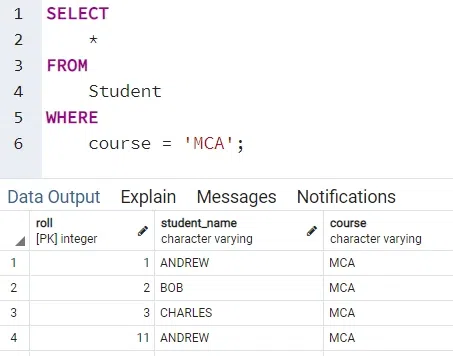
Where clause
**Explanation:
This query selects all the records from the student table where course name is **MCA.
Using the LIMIT Clause
The**LIMITclause is used to get a **subset of rows generated by a query. This clause is **optional and helps control the number of rows retrieved. **OFFSETnskips 'n' rows before beginning to return rows.
**Syntax:
SELECT *
FROM table_name
LIMIT n;
**Example:
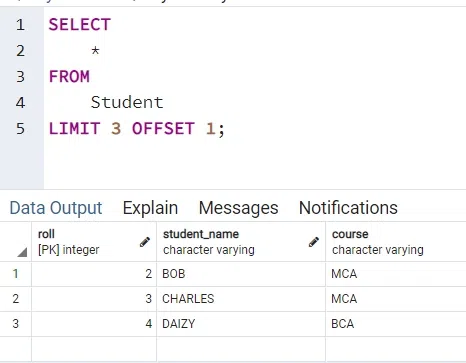
Limit & Offset
**Explanation:
LIMIT n: Specifies the maximum number of rows to return.OFFSET m: Skips the firstmrows and starts returning rows from the next one.
This query returns 3 rows from the Student table, but skips the first 1 row.
Modifying Table Structure with ALTER TABLE
The structure of an existing table can be modified using the **ALTER TABLE statement. PostgreSQL supports the various actions to perform with ALTER TABLE as listed below:
- Add a column to an existing table
ALTER TABLE table_name ADD COLUMN new_column_name TYPE;
- Drop a column from an existing table
ALTER TABLE table_name DROP COLUMN column_name;
- Rename a column from an existing table
ALTER TABLE table_name RENAME COLUMN column_name TO new_column_name;
- Rename a column from an existing table
ALTER TABLE table_name ALTER COLUMN column_name [SET DEFAULT value | DROP DEFAULT];
- Change NOT NULL constraint
ALTER TABLE table_name ALTER COLUMN column_name [SET NOT NULL| DROP NOT NULL];
- Add CHECK constraints to a column
ALTER TABLE table_name ADD CHECK expression;
- Add a constraint
ALTER TABLE table_name ADD CONSTRAINT constraint_name constraint_definition;
- Rename an existing table
ALTER TABLE table_name RENAME TO new_table_name;
Updating Data in PostgreSQL
The UPDATE statement is used to modify existing data in a table. We can **update one or **multiple columns by specifying the column values and a condition for the rows we want to update.
**Syntax:
UPDATE table_name
SET column_1 = value_1,
column_2 = value_2, ...
WHERE
condition_1 AND condition_2;
**Example:
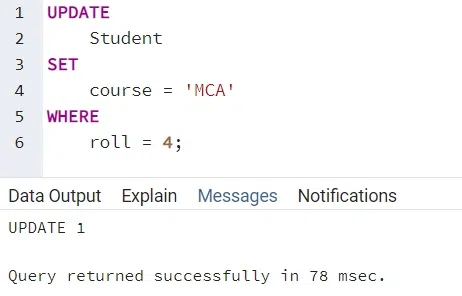
Update
**Explanation:
This query updates the **course of the Student to **MCA where **roll number is 4.
Deleting Data in PostgreSQL
The DELETE statement is used to remove rows from a table. We can delete all rows or specific rows based on a condition.
**Syntax:
DELETE FROM table_name
WHERE condition;
**Example:
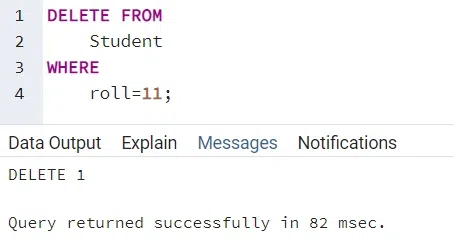
Delete
**Explanation:
This query deletes all student whose roll number is **3.
**Conclusion
PostgreSQL is a highly flexible and powerful database system that offers robust features for managing databases effectively. By using this **PostgreSQL Cheat Sheet, we will be able to navigate through basic to advanced PostgreSQL tasks with ease. From **creating databases to **optimizing queries, this guide ensures you have the right tools and commands at our fingertips.