PostgreSQL Create Database (original) (raw)
Last Updated : 12 Jul, 2025
Creating a database in **PostgreSQL is an important task for **developers and **database administrators to manage data effectively. **PostgreSQL provides multiple ways to create a **database, catering to different user preferences, whether through the **command-line interface or using a **graphical interface like **pgAdmin
In this article, we will explain **various methods of creating a database in **PostgreSQL, including using the **psql shell and **pgAdmin. This article will also cover important points about **database settings, **encoding, **collation, and **connection limits.
How to Create a Database in PostgreSQL
Creating a database in PostgreSQL can be done using the CREATE DATABASE SQL statement in the **psql shell or via the **createdb command-line utility. Additionally, for users who prefer a graphical interface, **pgAdmin offers a convenient way to manage databases. Let's explore step-by-step how to create a PostgreSQL database in detail.
**Creating a Database Using psql Shell
The PSQL provides a **command-line interface to create a database using the **CREATE DATABASE SQL command. This method allows us to define specific parameters such as **owner, **template, and **tablespace to customize your database.
**Syntax:
CREATE DATABASE db_name
OWNER = role_name
TEMPLATE = template
ENCODING = encoding
LC_COLLATE = collate
LC_CTYPE = ctype
TABLESPACE = tablespace_name
CONNECTION LIMIT = max_concurrent_connection
**key terms
- **db_name: It is the name of the new database that we want to create. It must always be a unique name.
- **role_name: It is the role name of the user who will own the new database.
- **template: It is the name of the database template from which the new database gets created.
- **encoding: It specifies the character set encoding for the new database. By default, it is the encoding of the template database.
- **collate: It specifies a collation for the new database.
- **ctype: It specifies the character classification for the new database like digit, lower and upper.
- **tablespace_name: It specifies the tablespace name for the new database.
- **max_concurrent_connection: It specifies the maximum concurrent connections to the new database.
Examples of PostgreSQL Create Database
Let's understand the **PostgreSQL CREATE DATABASE command with some basic examples to showcase how to create databases with **default settings and **specific parameters. These examples will help us to understand the process of configuring a database's **owner, **encoding, **connection limits, and more.
**Example 1: Creating a Database with Default Settings
In this example, we will create a simple test database using the **default settings provided by **PostgreSQL. By removing optional parameters like encoding and connection limits, **PostgreSQL automatically applies the defaults such as **UTF8 encoding, default tablespace, and **unlimited connections.
**Query:
CREATE DATABASE my_test_db1;
**Output
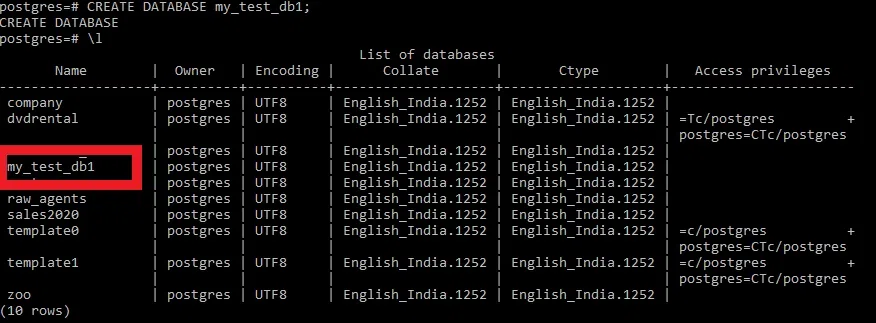
PostgreSQL Create Database Example
**Explanation:
A new database named **my_test_db1**is created with default settings.
**Example 2: Creating a Database with Specific Parameters
In this example, we will create a database with specific settings, including **encoding, **owner, and a limit on **concurrent connections. Now we will create a test database with the following parameters:
- **Encoding: utf-8.
- **Owner: GeeksForGeeks with postgres as the user.
- **Maximum concurrent connections: 30.
**Query:
CREATE DATABASE my_test_db2
WITH ENCODING='UTF8'
OWNER=GeeksForGeeks
CONNECTION LIMIT=30;
**Output
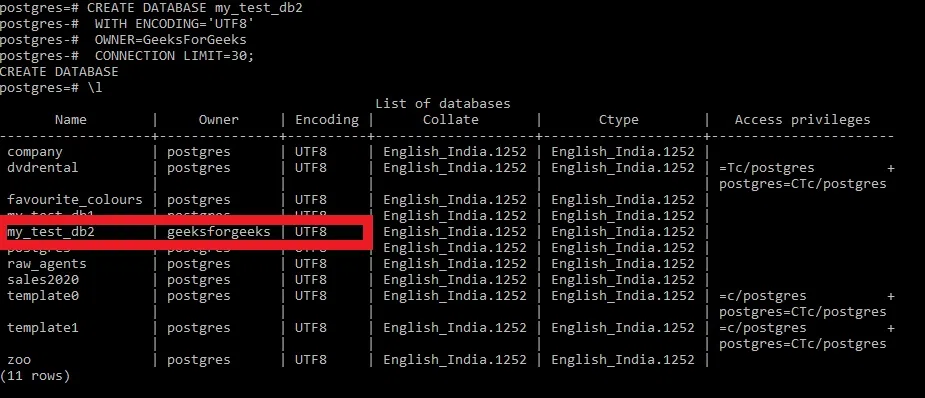
PostgreSQL Create Database Example2
**Explanation:
The database **my_test_db2**is created with **UTF-8 encoding, owned by GeeksForGeeks, and limited to **30 concurrent connections.
Creating a Database Using pgAdmin
**pgAdmin is a popular graphical interface for **PostgreSQL that simplifies **database management. Follow these steps to create a new database using **pgAdmin
Steps to Create a Database Using pgAdmin:
**Step 1: Log in to PostgreSQL via pgAdmin.
Open pgAdmin and connect to our PostgreSQL server.
**Step 2: Navigate to the Databases Menu
Right click on the Databases menu and then click on New Database... sub-menu item as depicted below:
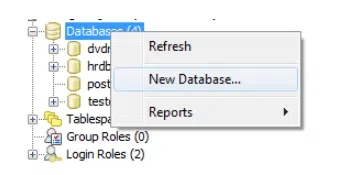
Navigate to the Databases Menu
Step 3: Enter Database Details
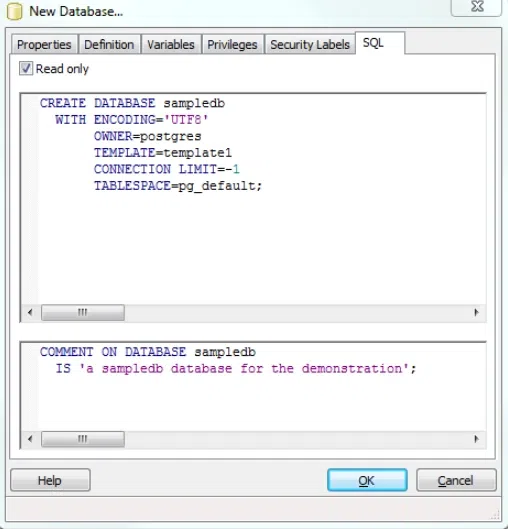
In the New Database dialog, enter the **new database name, **owner, and **configure other parameters. Click the **OK button to create the database.
Connection Limit
- **Positive Integer: Restricts the maximum number of concurrent connections to the database.
- **-1: No limit on the number of connections.

Enter Database Details
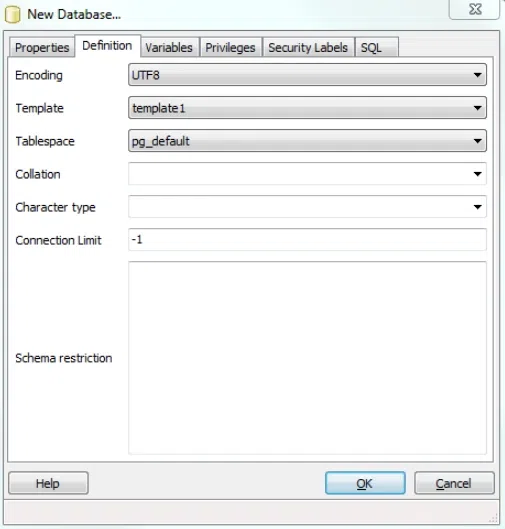
Connection limit -1
Output
Important Points About PostgreSQL Create Database
- **Unique Database Name: Ensure that the database name is unique within the PostgreSQL cluster.
- **User Permissions: Verify that the user has the necessary privileges (
CREATEDBprivilege or superuser status) to create a database. - **Template Database: By default, the new database is created by copying the
template1database. You can specify a different template if needed. - **Encoding and Collation: Properly configure the encoding, collation, and character type settings to match the requirements of your application.
- **Connection Limits: Set appropriate connection limits to manage the database load and ensure optimal performance.
- **pgAdmin Usage: For users who prefer a graphical interface, pgAdmin provides a user-friendly way to manage PostgreSQL databases
Conclusion
Creating a database in **PostgreSQL is straightforward and can be done through the CREATE DATABASE SQL statement in the psql shell or using the **createdb command-line utility. For users who prefer a graphical interface, **pgAdmin simplifies the process of creating **databases with customizable parameters like **encoding, **tablespaces, and **connection limits.
This article has covered essential points and **examples to help us efficiently **create and **manage databases in **PostgreSQL. Make sure to configure our database settings correctly, especially regarding **encoding, **collation, and **template databases, to ensure optimal performance.